How to Switch AI Models
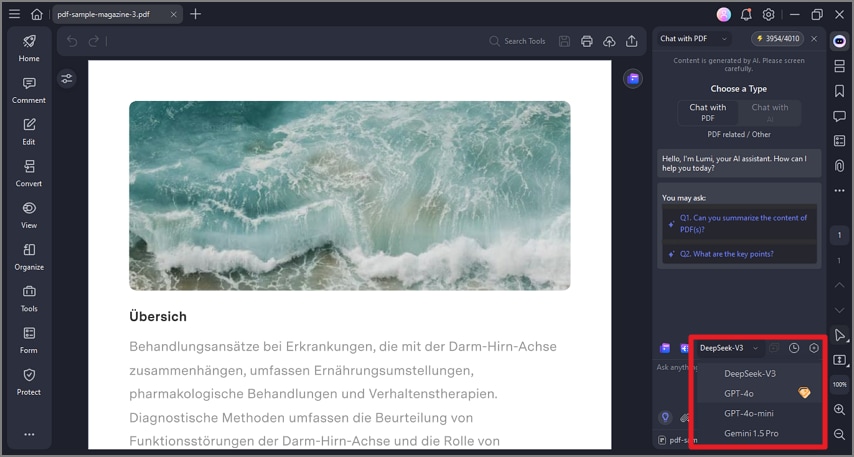
PDFelement's Switch AI Models feature enables users to chat with PDF documents using different large language models (LLMs) to optimize their interaction experience. This allows switching between AI models to find the best fit for the type of queries or document content being handled. With this feature, users can get accurate and faster responses. Read the steps mentioned below to learn how to switch between different AI models on PDFelement:
Step 1
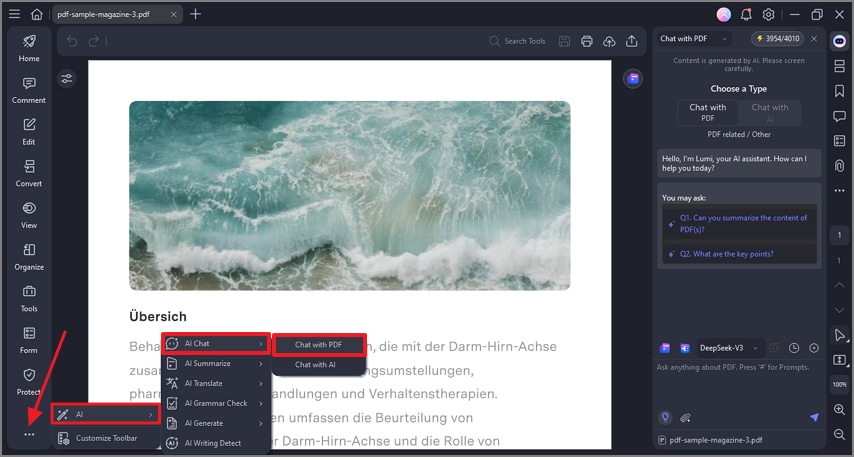
Once you have accessed the document in the tool, click on the “AI” option from the sidebar on the left. In the expanded menu, choose the “AI Chat” option. Now, select the “Chat With PDF” option.
Step 2
When the chat with PDF section is enabled on the right, change the appropriate “AI Model” from the options located above the text prompt field. Input your query and hit the “Send” button to chat within your PDF using AI.