Smart Redact Document
Smart Redact in PDFelement uses AI technology to automatically identify and mask sensitive information in documents, such as names, ID numbers, bank card numbers, and more. This feature allows batch redaction, significantly speeding up the process of safeguarding confidential data. It supports custom rules and complies with privacy standards like GDPR and HIPAA. Read the steps mentioned below to learn how to use this coherent feature of PDFelement:
Step 1
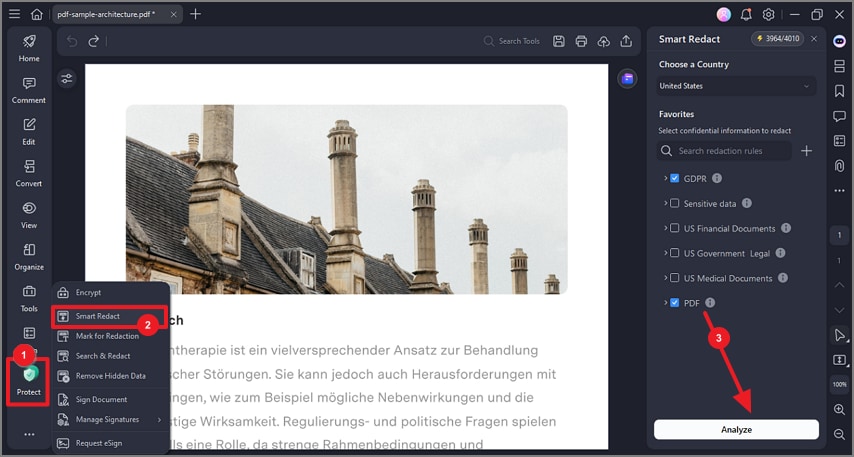
After you have opened your PDF successfully within PDFelement, head to the sidebar on the left and press the “Protect” option. Locate the “Smart Redact” option from the list and click on it. After selecting a country from the “Choose a Country” section, select a privacy standard and hit the “Analyze” button at the bottom.
Step 2
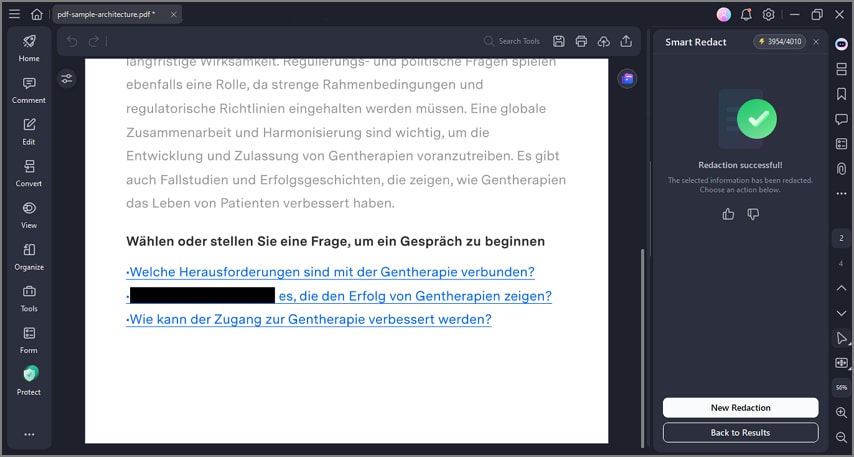
The document will be automatically redacted with a success message appearing on the right.