How to Switch AI Models on Mac
On Mac, PDFelement allows users to switch between different AI models to enhance their interaction with PDF documents. By choosing from multiple large language models (LLMs), you can find the one that best suits your queries or the type of content you're working with. This flexibility ensures more accurate and faster responses during document chats. Learn how to use this utility by following the steps mentioned next:
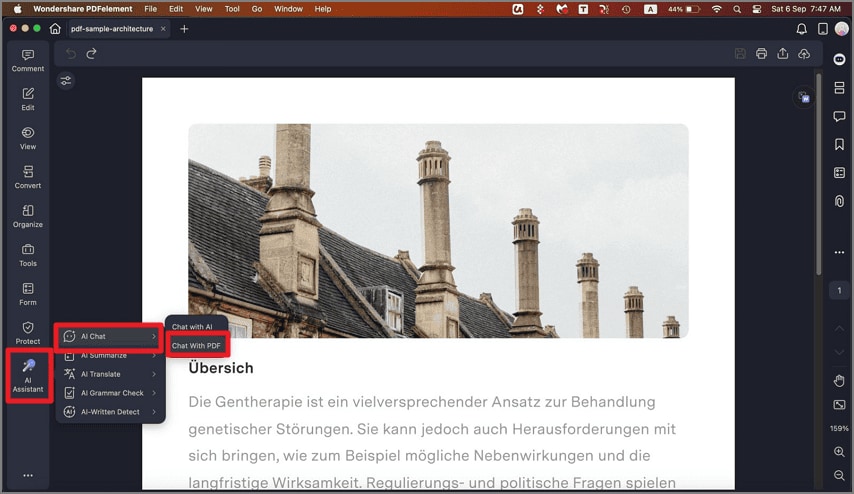
Step 1. Access the sidebar on the left after opening the document within the tool's interface and press the "AI Assistant" option. From the expanded menu, select "AI Chat," then choose the "Chat With PDF" option.
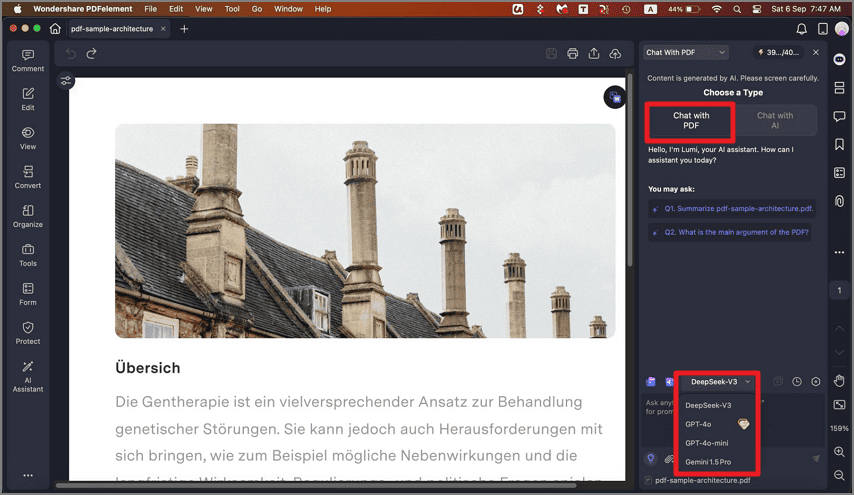
Step 2. When the "Chat With PDF" section appears on the right, open the "AI Model" menu located above the text input field. Select the model of your choice from the options provided and ask your question within the chat interface.