There can be several reasons why you would want to compress a PDF and convert it into a JPG of smaller file size. Often, when PDFs are being sent across as email attachments, there might be a limitation on the file size that you can send.
This post shows 5 ways to convert PDF to JPG in 100kb:
- PDFelement: Compress PDF and convert to JPG. Preseve original image quality.
- PDFelement Online PDF Compressor: Allows you to define a specific file size before compression.
- PDF2Go: Compress and convert PDF to JPG in one place.
- Online2PDF: Advanced compression settings for quality and size.
- Convert-My-Image: Convert images and change image quality to reduce file size.
In this article
Part 1: Desktop PDF to JPG Converter 100 kb
One of the reliable software solutions for converting or editing PDFs is Wondershare PDFelement - PDF Editor Wondershare PDFelement Wondershare PDFelement. This software solution is one of the several products of the Wondershare brand. This software comes with several features. One of the useful functions is the compression feature. Often, people find PDFs too large in size for sending as attachments. Hence, there is a need to reduce the size of the PDFs. If you wish to compress a PDF without losing its quality, PDFelement helps you do just that.


 G2 Rating: 4.5/5 |
 100% Secure
How to Convert PDF to JPG 100 kb with Wondershare PDFelement - PDF Editor Wondershare PDFelement Wondershare PDFelement
If you wish to convert PDFs by compressing them and reducing their size to 100 kb, PDFelement can help you achieve that easily:
Step 1 Install PDF to JPG converter
Start by downloading the software on your desktop. Once it is downloaded, install it. Launch the application and click on the option called 'Open Files'.
Step 2 Compress PDF to 100kb
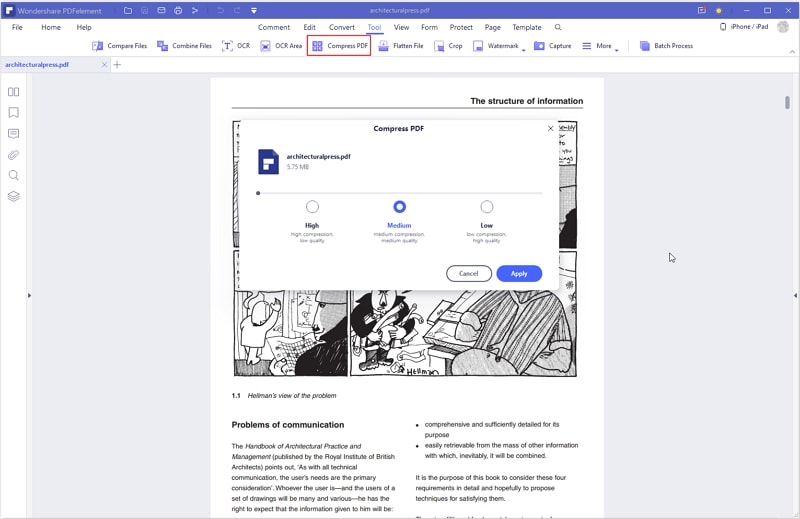
This allows you to find the PDF file from your local folder or drive. You can also use the drag-drop feature. Click on the "Compress PDF" option under Tools. Here you get to choose three quality options for compressing PDFs. You can choose the option most appropriate for you. Once you choose size and quality, click on Apply. This will lead to compressing the PDF to below 100kb.
Step 3 Convert PDF to JPG 100kb
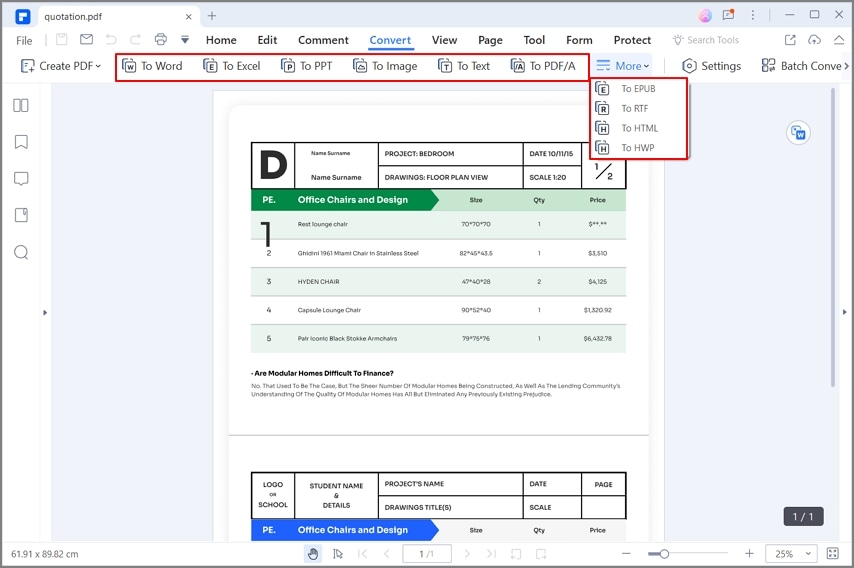
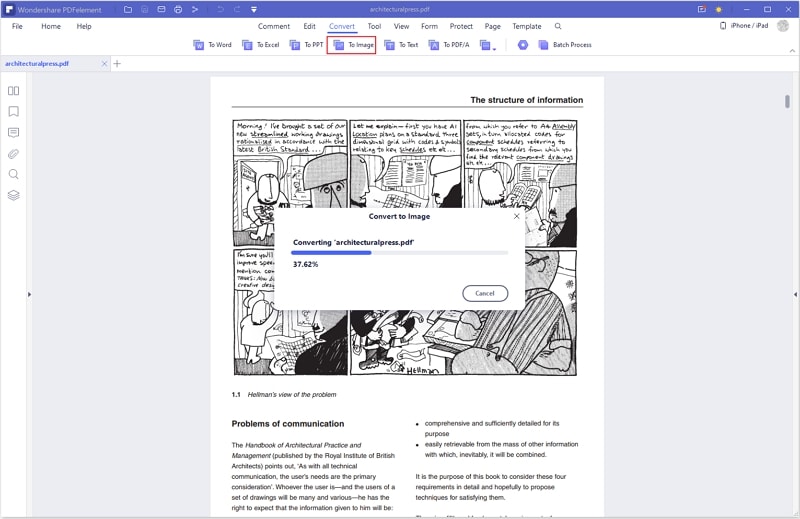
After compressing the PDF to 100KB, you can click Convert > to Image to convert the PDF to JPG.
There are other ways to reduce PDF files in size, on PDFelement. For instance, the edit PDF feature helps you remove unwanted objects. This function allows you to remove backgrounds, pages, comments, forms, images, texts, and watermarks.
The other way to reduce the file size of PDF documents is to use the Crop feature. You can open the PDF file, click on Page, and then Page Box. Here you can set margins in CropBox. It also allows you to customize page sizes.
G2 Rating: 4.5/5 |100% Secure
Part 2: PDFelement Online PDF to JPG Converter 100KB
If you would rather use an online solution to compress and convert PDF files to JPG, the PDFelement Online offers an easy solution. Features of this tool are several. These include fast conversions for PDFs to JPGs. It also provides an online PDF compressor that allows you to compress PDF files to a specific file size, such as 100KB. Once the files are compressed, they are ready to be converted to JPG.
With this online tool, you can use any web browser to convert PDFs to JPGs. The tool is user-friendly and no advanced know-how is required. You can easily access the converter tool from any computer, as long as it has a steady internet connection.
In order to use this compression tool to convert PDFs to compressed JPGs, take the steps below:
Step 1 Go to PDF to JPG converter 100kb
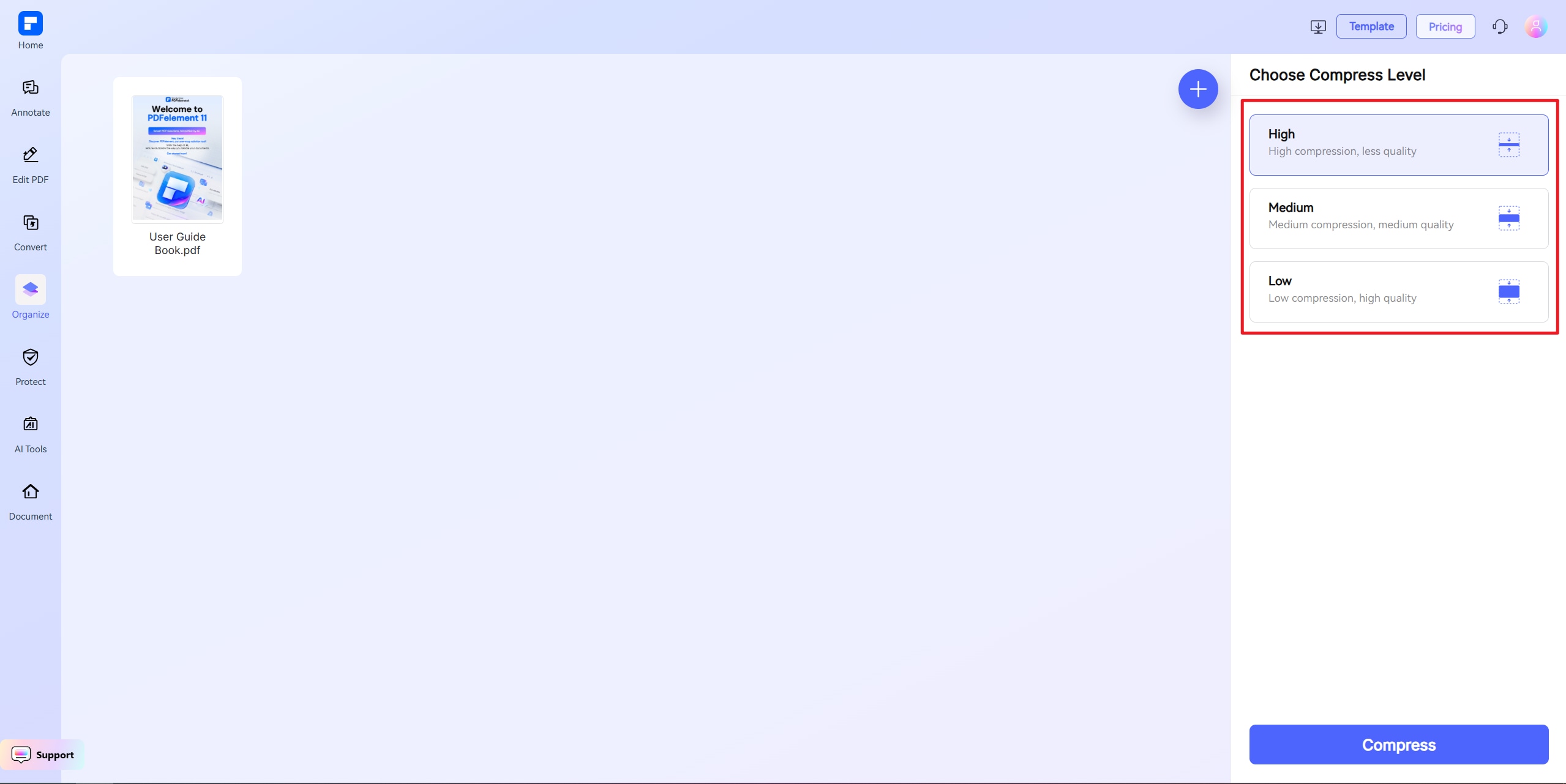
Go to Online PDF Compressor. Here you will find the easy upload feature for adding PDF files to the compressor. After uploading, choose Custom Size and enter 100kb to resize the PDF to 100kb.
Step 2 Convert PDF to JPG within 100kb
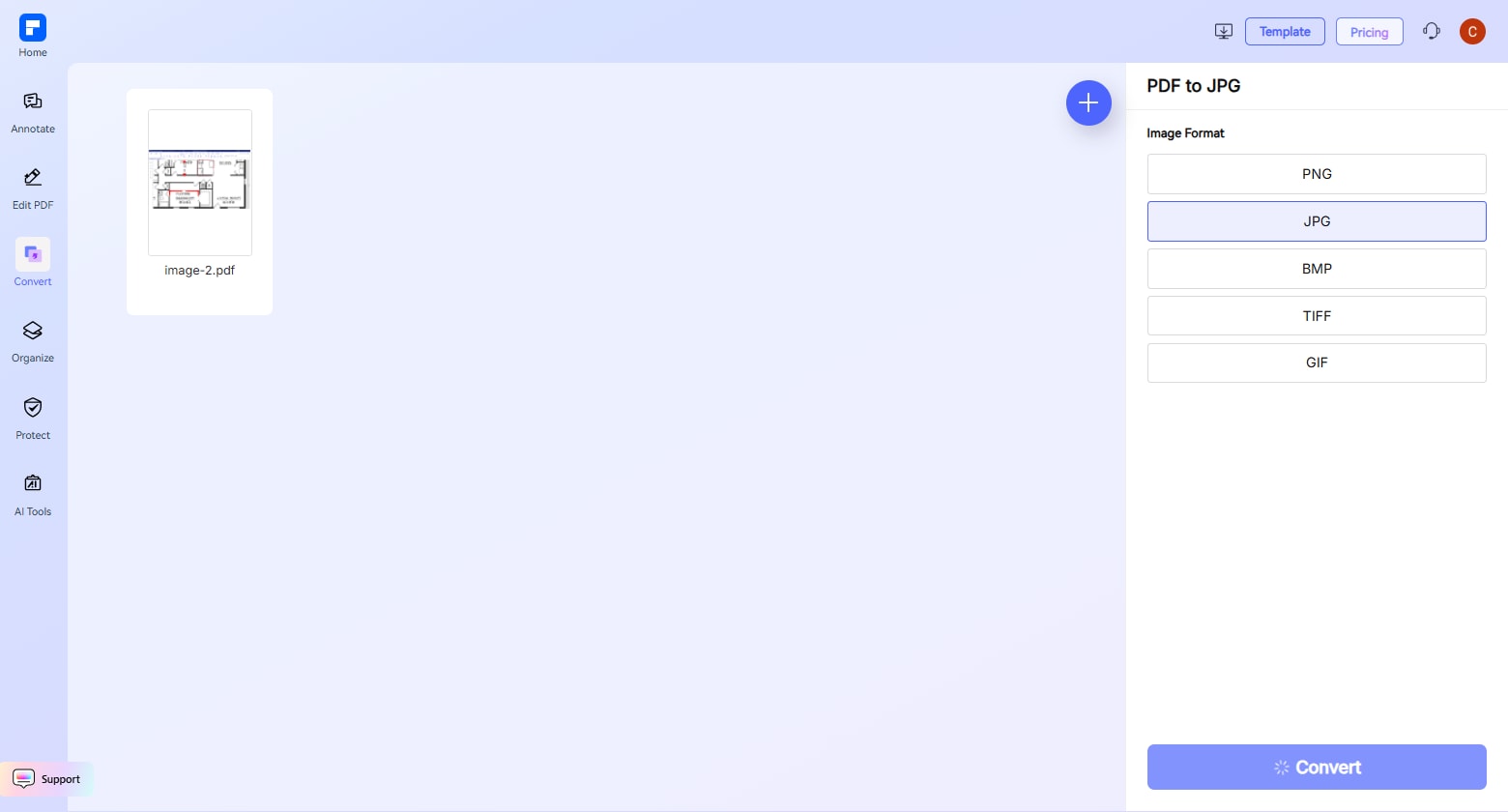
Once you get the PDF file in 100kb, go to PDF to JPG converter on PDFelement , add the compressed PDF, and choose JPG as the output format.
Part 3: PDF2Go Online PDF to JPG Converter 100 kb
Another handy tool to convert and compress PDF files to JPG of about 100 kb is PDF2Go. This is another online conversion platform that helps you convert and compress PDFs to JPGs easily. You can get different versions of a PDF file in JPG format with this tool. The converter helps users log in easily to their free accounts via their Google accounts. Hence, a free account is created by default on this platform. With a free membership, you can access all tools. However, there is a limit on the file sizes you can convert as well as the number of files you can convert.
Those who wish to access all features can take up a monthly subscription plan of $6.50 or at an annual fee of $78. Tools that this platform offers are many. These include editing features for PDFs. With it, you can create, protect, unlock, merge or compress PDFs. Conversion tools are also several here. These include converting PDFs to JPG, Word, Powerpoint, Excel, text, and vice versa.
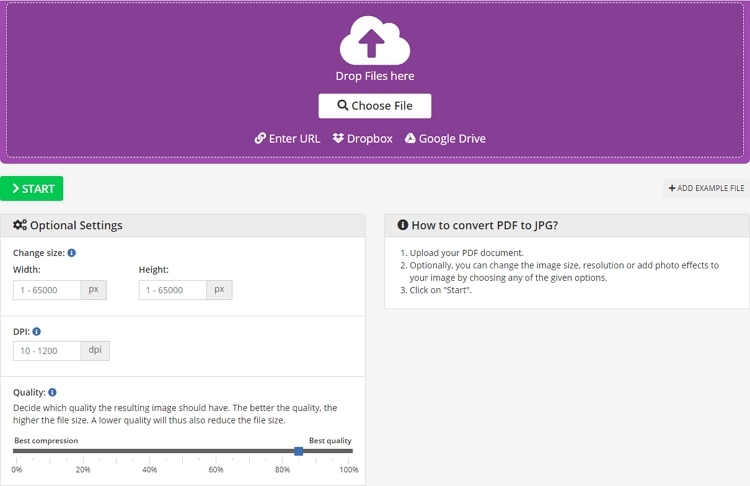
Steps to use this online conversion tool are as follows:
Step 1 Open PDF to JPG converter 100kb
Go to PDF2Go Online PDF to JPG Converter. Here you will find an easy-to-use interface. Simply choose a file and drop it on the platform.
Step 2 Change PDF to JPG 100kb
There are different settings options to choose from. These include size, width, height, DPI, and quality parameters. The above settings can help you set the desired output JPG file to 100 kb.
Other optional settings include color filters that you can apply to the final image. Once the options are set, click on the 'Start' button. After the conversion is complete, you can download the file and save it in a folder of your choice.
Part 4: Online2PDF PDF to JPG Converter 100 kb
If you are looking at different online solutions for converting and compressing PDFs into JPGs, one more option is online2pdf.com. This online tool can help users easily convert documents into JPGs that are 100 kb or more. It helps users get PDFs into smaller sizes by decreasing image quality.
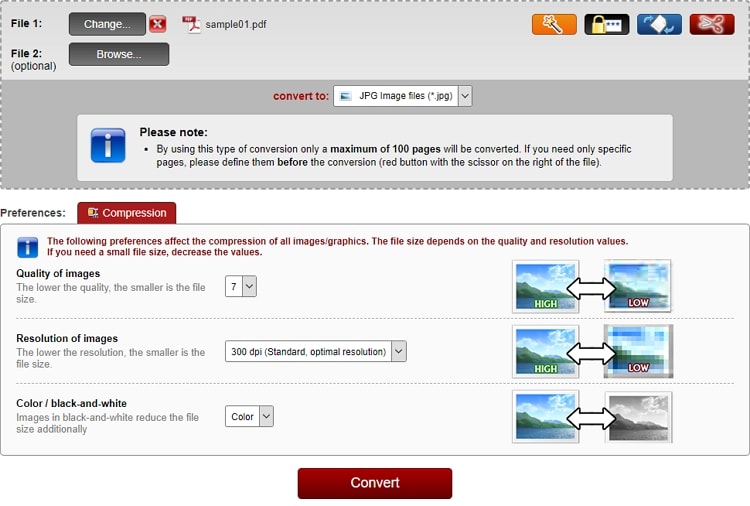
Steps to use this online converter tool are as follows:
Step 1 Open PDF to JPG converter 100kb
Step 1. Go to Online2PDF PDF to JPG Converter. Here you can upload the file that you wish to convert, unlock, edit or merge.
Step 2 Compress PDF to JPG in 100kb
If the PDF needs to be converted into a JPG of 100 kb, you can find the settings accordingly. Once the quality or size parameters are set, simply click on Convert.
The file will convert and be presented for download. This online conversion tool offers several features. For instance, the maximum size of a file that you can upload is 100 MB. Also, you can convert up to 20 files together. This free converter also guarantees privacy and security of data for the users. They remove all client data from their servers after conversions are complete.
Part 5: Convert-My-Image PDF to JPG Converter 100 kb
Another reliable website where you can get PDFs converted into images with ease is convert-my-image.com. This online converter allows easy conversion as well as extraction of images from PDFs as well. Features of this online converter platform are several. For instance, it can help you convert PDFs to different formats such as JPG, TIFF, BMP, PNG, GIF, and others. You have options by which you can change picture quality. With this online converter, it is easy to get PDFs into JPGs of different file sizes, as small as 100 KB.
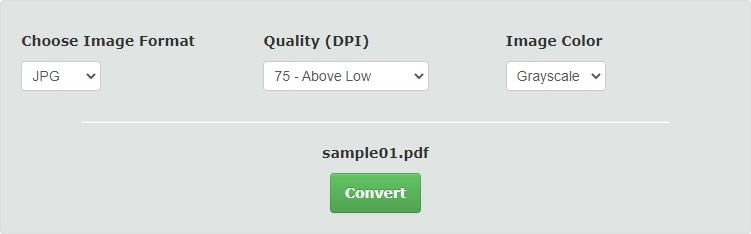
Steps to convert PDFs on this platform are as follows:
Step 1 Open PDF to JPG converter 100kb
Start by visiting Convert-My-Image. Here you will find the option to upload PDFs for converting to image files.
Step 2 Convert PDF to JPG 100kb
After choosing a file for upload, there are several settings to choose from. You can set image format, quality of dpi as well as image colors as per your preference. Once the settings are chosen, you can then click on the 'Convert' option.
Step 3 Download JPG below 100kb
You can get an uploaded PDF as a set of images as well.
This free converter tool helps you get JPGs in the quality you desire. Hence, if you wish to compress a PDF and get a JPG of 100 kb from it, this tool can help you achieve the same. It helps you achieve quick results and with minimal effort. It can easily work with large size PDF files as well. The platform offers a convenient solution for conversions. All images are made available in zip format after they are downloaded.
Conclusion
Of course, not all PDF converters will allow specifications on the size or quality you want it as a JPG file. Hence, only the above tools will come in handy when you wish to reduce PDFs to a JPG, of 100 kb or less or more. PDF element is available for offline use; if you subscribe to the full version, it will offer unlimited conversions and several editing features. On the other hand, if you do not want to download software, the websites mentioned above are reliable choices as well.