

Your signature is part of your identity. If you often sign international documents or prefer writing your name in English, choosing the right English signature matters. Many users look for a capital letter signature (or a signature in capital letters) because it's simple and clear, while others want handwritten styles that look more personal. In this guide, you'll find the top English signature styles, practical tips, and how to apply your signature digitally when needed.
If you're new to signatures, you may also want to read what a signature is and how it's used on documents.
Quick Checklist: What Makes a Good English Signature?
- Consistency: easy to repeat the same way every time
- Readability: at least partly legible (especially for formal documents)
- Professional look: balanced size, clean strokes, not overly complicated
- Works on paper and digital: looks good when scanned or used as an e-signature
Top 3 English Signature Styles
1. Capital letter signature: using capital initials
A signature in capital letters is one of the most common and practical English signature styles. Instead of writing your full name in a stylized way, you can sign using capital initials from your name (for example, first name + last name initials, or all initials if you have multiple names). This approach is popular because it is simple, easy to remember, and clear for readers.
When should you use a signature in capital letters?
- When you want a clean, formal look for work or school documents
- When your name is long and a full handwritten signature becomes messy
- When you need a signature that remains readable after scanning
Capital letter signature examples (simple patterns)
- 2 initials: first name + last name (e.g., “J C”)
- 3 initials: first + middle + last (e.g., “F J M”)
- Initials + underline: add a subtle underline for emphasis (avoid heavy decoration)
If you want a broader set of options beyond initials (such as matching the style to your full name), see signature style ideas for your name .
2. Handwritten English signature: connecting letters
A handwritten English signature uses the letters of your name connected together with smooth strokes and curves. This style is ideal if you want a more personal look than initials, and it often works best for shorter names. If you are searching for handwritten signature ideas for my name, this is usually the best starting point.
How to make a handwritten English signature look professional
- Start strong: begin with a clear capital letter
- Keep the flow: connect letters smoothly (avoid breaks)
- Limit flourishes: one simple stroke is enough; avoid excessive loops
- Practice consistency: repeat 10–20 times until it becomes natural
3. Pure design signature: a unique mark
A pure design signature is more like a unique mark than a readable name. You can use a combination of strokes, lines, dots, or a minimal symbol. This style can look very stylish, but it requires practice and consistency to ensure it remains recognizable as your signature.
Who should choose a pure design signature?
- Creative professionals who want a distinctive visual identity
- People whose names are difficult to write quickly
- Users who mainly sign digitally and want a clean, reusable mark
Which English Signature Style Should You Choose?
If you're unsure, use this simple decision guide:
- Choose capital letters / initials if your priority is clarity, speed, and formal documents.
- Choose handwritten connected letters if you want a personal look and your name is not too long.
- Choose pure design if you want a unique mark and can keep it consistent over time.
How to Use an English Signature Online
No matter which style you choose, online signing often requires an electronic signature tool. If you frequently sign PDFs, you can create and apply your signature digitally using tool like PDFelement.
PDFelement: Create and Use an English Signature Easily
PDFelement helps you create, save, and reuse signatures across devices. It works for common English signature styles, including capital letter signatures and handwritten signatures, and supports signing workflows for business and personal documents.
- Signature Creator: Create signatures by typing, drawing, or uploading images.
- PDF Converter: Convert and manage PDFs with flexible format options.
- Fillable Form Creation: Build interactive fillable PDF forms with one click.
- Data Extraction: Extract structured data to speed up document work.
- Multi-Platform: Available on Windows, Mac, iOS, and Android.
- Multiple Languages: Supports major languages for global workflows.


 G2 Rating: 4.5/5 |
 100% Secure
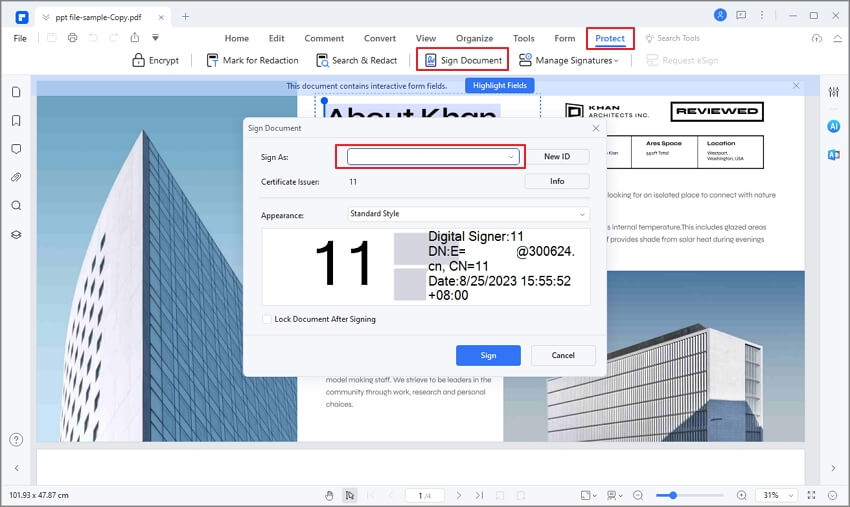
If you want to create a signature quickly before signing, you can also try a dedicated signature maker .
Step-by-step: Sign a PDF with your English signature using PDFelement
After choosing your preferred English signature style, the next step is applying it to a document. With PDFelement, you can easily sign PDFs using a capital letter signature, handwritten signature, or custom design.
Step 1
Open your PDF document. Launch PDFelement and click Open File to upload the PDF you want to sign. This works for contracts, forms, and other official documents.
Step 2
Create your English signature. Go to the Comment or Sign section and choose to create a signature. You can:
- Type your name in English and adjust the font
- Draw your handwritten English signature
- Upload an image of your signature (including capital letter signatures)
G2 Rating: 4.5/5 |100% Secure
Step 3
Apply the signature to the PDF. Select your saved signature and click anywhere on the document to place it. You can resize or reposition it to fit the signing area.
Step 4
Save or share the signed document. Once signed, save the PDF or share it digitally. Your English signature can be reused for future documents, saving time and ensuring consistency.
If you want a more detailed walkthrough, you can also check this guide on how to sign a PDF.
Frequently Asked Questions
-
Is a signature in capital letters acceptable?
Yes. A signature in capital letters is widely acceptable as long as it is consistent and clearly represents the signer's intent. It is often preferred when clarity is important on official or scanned documents.
-
What is the best English signature style?
The best English signature style depends on your name length and preference. Capital letter signatures are simple and readable, while handwritten connected-letter signatures look more personal. The most important factor is choosing a style you can repeat consistently.
-
How can I create an English signature online?
You can create an English signature by typing, drawing, or uploading an image of your signature in a PDF editor or e-signature tool. For example, you can create and reuse signatures with PDFelement or use an online signature workflow with PDFelement Sign.




