

Table of Contents
A signature is more than a stylish version of your name. On a document, it usually shows that you identify yourself as the signer and agree to, approve, acknowledge, or certify something in the document. That simple act—writing a name, drawing a mark, clicking an e-sign button, or applying a digital certificate—can carry real personal, business, and legal consequences.
The exact signature meaning depends on the situation. Signing a birthday card is not the same as signing a loan agreement. A signature on a delivery receipt may only confirm that a package was received, while a signature on a contract may show consent to specific obligations. That is why understanding what a signature is, and what it does, matters before you sign anything important.



 G2 Rating: 4.5/5 |
 100% Secure
What Is a Signature?
A signature is a person’s handwritten name, mark, symbol, electronic action, or digital credential used to identify the signer and show intent. In the simplest signature definition, it is a sign that connects a person to a document, message, transaction, or decision.
Traditionally, a signature meant a handwritten version of someone’s name. It might be neat, messy, full of loops, reduced to initials, or almost unreadable. The key point was not beauty. The point was that the mark was made by, or authorized by, the person whose signature it represented.
The modern definition is broader. A signature can now appear in several forms, including a typed name at the end of an email, a drawn signature on a tablet, a checked consent box, an electronic signature in a PDF, or a cryptographic digital signature attached to a file. The form changes, but the purpose stays similar: the signature links a person to an action or statement.
Signature meaning in English
The phrase “signature meaning in English” usually refers to the basic meaning of the word. As a noun, a signature is a person’s name or mark written or applied to show authorship, approval, consent, or identity. As an adjective, “signature” can also mean distinctive or characteristic, as in “a chef’s signature dish” or “a brand’s signature style.”
This article focuses on the document-related meaning. In that context, a signature commonly answers three questions:
Who signed?
What did they sign?
Did they intend to sign it?
Those questions are simple, but they are the foundation of most signature disputes and verification processes.
What does signature mean on a document?
On a document, a signature generally means the signer is taking responsibility for a specific action. That action may be agreement, approval, acknowledgment, authorization, certification, or receipt.
For example, if you sign an employment agreement, your signature usually means you accept the terms listed in the agreement. If you sign a school permission form, it may mean you authorize a child’s participation in an activity. If you sign a package delivery confirmation, it may simply mean the package arrived at your address or was accepted by someone there.
The document itself matters. A signature does not have one universal effect in every setting. The surrounding language, the placement of the signature line, the law that applies, and the signer’s authority can all affect what the signature means.
Signature Meaning in Documents and Everyday Use
A signature is often treated as proof, but it is better to think of it as evidence. It can help prove identity, intent, and acceptance, but it may not prove everything by itself. A court, company, bank, or public office may look at the full context: the document, the signer’s authority, the signing method, the date, witnesses, authentication records, and any related communications.
That is why signatures are used so widely. They create a clear point in time when a person appears to have reviewed or accepted something.
Identity
One major function of a signature is identification. A handwritten signature is associated with a particular person. An electronic signature may be tied to an email address, account login, IP address, audit trail, or device. A digital signature may be linked to a digital certificate issued to a person or organization.
Identity does not always mean the signature is impossible to forge. A handwritten signature can be copied. An email account can be misused. A weak signing process can be challenged. Still, signatures help create a record of who appears to have taken an action.
Intent
Intent is just as important as identity. A person’s name appearing on a document does not always mean they intended to sign it. For instance, a typed name in a draft contract may not carry the same weight as clicking “I agree” in a completed signing workflow.
A valid signature usually needs some indication that the signer meant to sign. That indication may come from the wording near the signature line, the signing process, the signer’s conduct, or the system record. In many electronic signature systems, the audit trail is used to help show intent.
Approval, consent, and acknowledgment
People often use “approval,” “consent,” and “acknowledgment” as if they mean the same thing, but they can be different.
Approval means you accept or authorize something. Consent means you agree to allow something. Acknowledgment means you confirm that you received, read, or understood something, even if you are not necessarily approving every detail.
This distinction matters. Signing a workplace policy acknowledgment may not mean you personally agree with every policy. It may only confirm that the policy was provided to you. Signing a sales contract, on the other hand, usually means you agree to the terms.
Common places where signatures appear
Signatures appear in ordinary life more often than people notice. You may see them on contracts, tax forms, medical intake documents, bank forms, school forms, delivery receipts, rental agreements, invoices, permission slips, nondisclosure agreements, employment documents, and government applications.
They also appear in emails and digital communications. A typed email signature block is usually not the same as signing a legal document, but in some contexts, a typed name or email approval may still show intent. The details matter, especially in business transactions.
For a general legal overview of electronic signatures in the United States, the Federal Trade Commission’s explanation of the E-SIGN Act is a useful reference.
Signature Line Definition: What It Means on a Form or Contract
A signature line is the designated place where a person signs a document. The signature line definition is simple: it is a line, field, or space that tells the signer where to place their signature and often what role they are signing in.
A signature line may include a label such as “Signature,” “Authorized Signature,” “Applicant Signature,” “Customer Signature,” or “Parent/Guardian Signature.” It may also appear with fields for printed name, date, title, company, initials, or witness signature.
The wording around the line can affect the meaning of the signature. A line that says “Accepted and agreed” is different from one that says “Received by.” One suggests agreement to terms; the other may only confirm receipt.
Signature line vs. printed name
A printed name identifies the signer in readable text. A signature shows the signer’s act of signing. Many forms require both because signatures can be hard to read.
For example:
Signature: the signer writes or applies their signature.
Printed Name: the signer types or clearly writes their full legal name.
Date: the signer records when the document was signed.
If a document asks for both a signature and printed name, provide both unless there is a clear reason not to. Leaving out the printed name can create confusion later, especially when signatures are stylized or illegible.
Signature vs. initials
Initials are shortened marks, usually made from the first letters of a person’s name. They are often used to confirm smaller approvals within a document, such as approving a correction, acknowledging a specific clause, or marking each page of a contract.
Initials are not always a substitute for a full signature. If a contract has a main signature block, initialing every page may not complete the signing requirement unless the document or process says so. Initials can support evidence of review, but the final signature is usually the main act of agreement.
Signature line vs. witness line
A witness line is for another person who observes the signing. The witness is not usually agreeing to the contract terms. Instead, the witness confirms that the signer signed the document.
Some documents may require a witness, notary, or both. Examples include certain affidavits, powers of attorney, deeds, and estate planning documents, depending on the jurisdiction. If a document requires witnessing or notarization, a normal signature alone may not be enough.
What to check before signing a signature line
Before signing, read the language immediately above and below the signature line. This is where documents often state exactly what your signature means. You should also check whether you are signing personally or on behalf of a company.
For business documents, your title may matter. Signing “Jane Lee” alone could be interpreted differently from signing “Jane Lee, Operations Manager, ABC Ltd.” If you are signing for an organization, confirm that you have authority and that the signature block clearly shows your representative role.
Types of Signatures: Handwritten, Electronic, and Digital
Not all signatures work the same way. The three most common categories are handwritten signatures, electronic signatures, and digital signatures. They overlap in everyday conversation, but they are not identical.
Handwritten signatures
A handwritten signature, sometimes called a wet signature, is made by physically writing on paper with ink. It is the traditional form most people picture first.
Wet signatures are still common for documents that require original paper records, notarization, physical filing, or local compliance rules. Some organizations continue to prefer them for high-value or sensitive transactions, even when electronic options are available.
Their main advantage is familiarity. Almost everyone understands what it means to sign a paper document. The downside is inconvenience. Paper documents must be printed, mailed, scanned, stored, or physically delivered. They can also be lost, damaged, or altered if not handled carefully.
Electronic signatures
An electronic signature is a signature made or captured electronically. It can be a typed name, a drawn signature on a screen, a scanned image of a handwritten signature, a click on an “I agree” button, or another electronic action that shows signing intent.
Electronic signatures are widely used for business forms, HR documents, sales contracts, consent forms, internal approvals, and PDF workflows. They are popular because they reduce printing and mailing. They also make it easier to sign documents remotely.
However, not every electronic signature process provides the same level of evidence. A basic typed name in a document may be easy to create but harder to verify. A signing platform that records the signer’s email, time, IP address, document history, and consent steps creates a stronger record.
In the U.S., electronic signatures are generally recognized under the E-SIGN Act and state laws such as UETA, though exceptions and industry-specific rules may apply. Other countries have their own electronic signature laws, so always check the requirements for the document and location involved.
Digital signatures
A digital signature is a specific kind of electronic signature that uses cryptographic technology. It is not just an image of a signature. It is a secure method for confirming that a document was signed with a digital certificate and that the document has not been changed after signing.
Digital signatures often rely on a digital ID or certificate issued by a trusted certificate authority. When the signer applies a digital signature, the system creates a unique encrypted link between the signer and the document. If the document is changed later, many PDF readers and verification systems can show that the signature is no longer valid.
This makes digital signatures useful for contracts, compliance documents, official records, and workflows where document integrity matters. They are often stronger than simple electronic signatures because they can help prove both signer identity and file integrity.
Electronic signature vs. digital signature
People often use these terms interchangeably, but the difference is worth knowing.
An electronic signature is the broad category. It includes many ways to sign electronically, from typing your name to clicking a consent button. A digital signature is a more technical form of electronic signature that uses encryption and certificates.
A simple way to remember it: all digital signatures are electronic signatures, but not all electronic signatures are digital signatures.
Scanned signatures
A scanned signature is an image of a handwritten signature inserted into a digital file. It is convenient, but it has limitations. Anyone with access to the image may be able to copy and paste it into another document.
That does not mean scanned signatures are never accepted. Many organizations use them for routine paperwork. But for sensitive agreements, a secure e-signature or digital signature workflow is usually safer because it can include authentication, timestamps, and audit records.
How to Create and Use a Signature Properly
A good signature does not need to be elaborate. It should be consistent enough that you can reproduce it and distinctive enough that it is recognizably yours. For personal style, legibility is optional. For document clarity, the printed name field can handle readability.
If you are looking for signature suggestions, start with your normal written name rather than trying to design something overly complex. A signature you cannot repeat reliably can become annoying on bank forms, IDs, delivery slips, and legal documents. Small personal features—a distinctive initial, underline, spacing pattern, or ending stroke—are often enough.
Practical signature suggestions
For handwritten signatures, choose a form you can write naturally under mild pressure. A signature made slowly and carefully at your desk may look different when you sign a receipt at a counter. Consistency matters more than decoration.
For professional documents, avoid using a joke name, nickname, or unclear mark unless that is truly how you sign and it is accepted in the context. If the document asks for your legal name, your printed name should match the identity being used. The signature itself may be stylized, but the document record should be clear.
For electronic signatures, pay attention to the account or email address used to sign. If you sign a business contract from a personal email account, it may create unnecessary confusion later. Use the correct identity for the transaction.
G2 Rating: 4.5/5 |100% Secure
Signing PDFs with PDFelement
Many signature tasks happen in PDF form: contracts, consent forms, invoices, onboarding documents, application packets, and internal approvals. Wondershare PDFelement is useful here because it lets you prepare, review, fill, and sign PDF documents without printing them first.
A practical workflow looks like this: open the PDF in PDFelement, check the document text, fill in required form fields, add comments if you need clarification, and place your signature in the correct signature field or signature line. If the PDF is scanned, OCR can help make the content searchable before review. If you need to send the file back, you can save, compress, or organize pages before sharing.
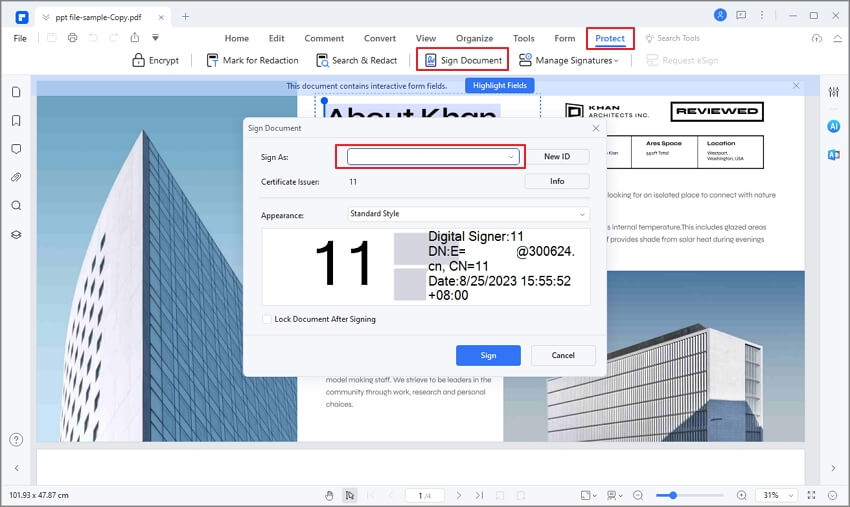
This is especially helpful when a document arrives as a flat PDF rather than a fillable form. Instead of printing, signing by hand, scanning, and emailing, you can complete the document digitally. For teams, it also reduces version confusion: the signed file can stay in a clean PDF format, with pages in order and annotations preserved.
PDFelement is not a substitute for legal advice or a guarantee that every signature type will meet every legal requirement. But for everyday PDF signing and document preparation, it removes a lot of manual work.
Naming and storing signed documents
After signing a document, save it with a clear file name. A name like Lease_Agreement_Signed_2026-03-15.pdf is much more useful than scan001.pdf. If several people need to sign, avoid overwriting earlier versions unless your workflow clearly tracks changes.
For important documents, keep both the final signed copy and any completion certificate, audit trail, or confirmation email if one is provided. These records can be useful if someone later asks when or how the document was signed.
Common Signature Mistakes to Avoid
The most common signature mistake is signing too quickly. People often jump to the signature line because the document looks routine. That is risky, especially with contracts, waivers, financial forms, and employment documents.
Another mistake is signing in the wrong capacity. If you are signing as a company representative, the document should usually show the company name, your name, and your title. If you sign only your personal name, you may create ambiguity about whether you acted personally or for the organization.
Avoid inserting a signature image into documents you do not control. A scanned signature can be copied. If you must use one, store it carefully and avoid sending editable files with the signature image exposed.
Do not ignore blank spaces. Blank amounts, blank dates, missing pages, or incomplete terms can create problems after signing. If a document has blanks that should not be filled in later, ask for a completed version before signing or mark unused spaces appropriately if that is accepted in the context.
Finally, be careful with “for” signatures. Sometimes a person signs on behalf of someone else, using wording such as “for,” “on behalf of,” or “per procurationem.” The exact meaning depends on authority and local practice. Do not sign for another person unless you are clearly authorized to do so.
People Also Ask
-
What is a signature in simple words?
A signature is a person’s name, mark, or electronic action used to show identity and intent. On a document, it usually means the person has approved, accepted, acknowledged, or authorized something. -
What does signature mean legally?
Legally, a signature can serve as evidence that a person agreed to or acknowledged a document. Its effect depends on the document, the law that applies, the signer’s authority, and the signing method. Some documents also require witnesses, notarization, or specific formalities. -
What is the difference between a signature and a printed name?
A signature is the act or mark used to sign. A printed name is the readable version of the signer’s name. Many forms ask for both because signatures are often stylized or difficult to read. -
What is a signature line?
A signature line is the place on a document where the signer is expected to sign. It may include related fields such as printed name, date, title, company name, witness name, or notary information. -
Can a typed name count as a signature?
Yes, in many situations a typed name can count as an electronic signature if it is used with intent to sign. The strength of the signature may depend on the surrounding evidence, such as consent language, email records, authentication, and audit trails. -
Is an electronic signature the same as a digital signature?
No. An electronic signature is any electronic method used to show signing intent, such as typing a name or drawing a signature on a screen. A digital signature is a more secure type of electronic signature that uses encryption and a digital certificate. -
Is a scanned signature safe to use?
A scanned signature is convenient but less secure than a controlled e-signature or digital signature workflow. Because it is an image, it can be copied and reused if mishandled. For sensitive documents, use a signing method that records identity, time, and document integrity. -
Do I need to use my full legal name in my signature?
Not always. Many people use stylized or shortened signatures. However, if a document asks for your legal name, make sure the printed name or identity fields are accurate. For official, financial, or legal documents, consistency with your ID and records is usually best. -
What should I do before signing a PDF?
Read the full document, check the signature line wording, fill in required fields, confirm dates and names, and make sure no important blanks remain. If the PDF is difficult to review, use a PDF editor such as PDFelement to search text, fill fields, add comments, organize pages, and sign in the correct place. -
Can someone else sign for me?
Only if they have proper authority, such as a valid power of attorney, company authorization, or another recognized permission. Signing for someone else without authority can create serious legal problems.




