The best AI contract generator in 2026 depends on what you need after the first draft. Some tools focus on creating agreements from prompts or templates, while modern legal AI platforms can also review clauses, suggest redlines, apply negotiation playbooks, route approvals, and help teams manage contracts after signing. For PDF-heavy workflows, PDFelement adds another layer by combining AI assistance with OCR, editing, redaction, translation, and e-signing in the same document environment.
That difference matters. A tool that can draft a basic NDA is not automatically the best choice for reviewing a supplier agreement, negotiating a liability clause, working with a scanned contract, or preparing a cross-border PDF for signature. This guide compares six current options and explains where each one fits.
Quick answer
- Best for a PDF-based contract workflow: PDFelement for drafting support, PDF editing, OCR, AI-assisted review, redaction, translation, and e-signing.
- Best for jurisdiction-aware AI drafting: GenieAI for generating and reviewing legal documents with jurisdiction and playbook context.
- Best for lawyers working in Word or Google Docs: Spellbook for drafting, review, redlining, and playbook-based contract work inside familiar document editors.
- Best for contract intelligence and cited analysis: Robin AI for document search, cited answers, precedent-based review, and legal intelligence workflows.
- Best for AI-native contract lifecycle workflows: Juro for drafting, playbook-based review, approval, signing, and post-signature contract intelligence.
- Best for enterprise CLM and playbook-driven redlining: Ironclad for standardized review, approval routing, contract workflows, and AI-assisted negotiation at scale.


 G2 Rating: 4.5/5 |
 100% Secure
In this article
- Best AI Contract Generators at a Glance
- How We Evaluated These Tools
- 6 Best AI Contract Generators in 2026
- AI Contract Generator vs AI Contract Review
- A Complete PDF Contract Workflow with PDFelement
- Which Tool Fits Your Contract Scenario?
- How to Use AI Contract Generators Safely
- Conclusion
- FAQs About AI Contract Generators
Part 1.Best AI Contract Generators at a Glance
Choose an AI contract tool by workflow, not by the length of its feature list. Drafting, reviewing, redlining, working from a legal playbook, editing PDFs, and managing a contract lifecycle are different jobs. The table below focuses on those differences.
| Tool | Best For | Draft | Review | Redline / Playbook | PDF Workflow | CLM / Signing |
|---|---|---|---|---|---|---|
| PDFelement | PDF-based contract creation and post-draft document work | Yes, with templates and AI assistance | AI-assisted document review | Not a dedicated legal playbook platform | Strong: edit, OCR, redact, translate, sign | eSign and document tracking |
| GenieAI | Jurisdiction-aware drafting and legal review | Strong | Strong | Playbooks and AI redlines | Document-focused legal workflow | Broader legal workflow rather than PDF editing |
| Spellbook | Legal teams working in Word or Google Docs | Yes | Strong | Playbooks and tracked-change redlines | Editor-centric, not PDF-centric | Not a full CLM |
| Robin AI | Contract intelligence, precedents, and cited analysis | Yes | Strong | Precedent- and playbook-based review | Document analysis focus | Legal intelligence platform |
| Juro | End-to-end contract workflow for business and legal teams | Yes | Strong | AI Review against playbooks | Word/PDF workflow support | Strong: approval, signing, repository |
| Ironclad | Enterprise CLM and standardized contract review | Yes | Strong | Strong: AI Playbooks and Jurist | Contract workflow focus | Strong: enterprise CLM |
Legal note: AI-generated contracts and AI review results should be treated as drafting and review assistance, not as a substitute for legal advice. Governing law, enforceability, mandatory clauses, negotiation positions, and business risk vary by jurisdiction and transaction. Have a qualified legal professional review high-value, regulated, unusual, or legally sensitive agreements before signing.
Part 2.How We Evaluated the Best AI Contract Generators
This comparison is based on current documented capabilities and workflow fit, not on a synthetic accuracy score. We reviewed the current product and help documentation available in 2026 and compared each tool across six practical criteria. We did not invent a “best accuracy” ranking where equivalent independent benchmark data was not available.
- Drafting: Can the tool generate a complete agreement or structured clauses from a brief, prompt, or template?
- Review: Can it identify unusual terms, missing language, risk areas, or deviations from preferred positions?
- Redlining: Can it propose actual tracked revisions rather than only summarize a problem?
- Legal context: Can it use jurisdictions, precedents, playbooks, or company standards to shape the output?
- Document workflow: Does it work where the document already lives, such as PDF, Word, Google Docs, or a CLM?
- Post-draft workflow: Can users edit, approve, redact, translate, sign, store, or analyze the agreement after it is generated?
This framework matters because a lightweight free AI contract generator can be useful for a first draft, but it does not solve the same problem as an enterprise contract review or CLM platform.
Part 3.6 Best AI Contract Generators in 2026
1. PDFelement: Best for PDF-Based Contract Drafting and Review Workflows
PDFelement is the strongest fit on this list when the contract itself needs to remain a working PDF after AI-assisted drafting. It is not a specialist legal CLM platform, but it combines contract templates and AI assistance with practical PDF tools such as editing, OCR, redaction, translation, signatures, and document sharing.
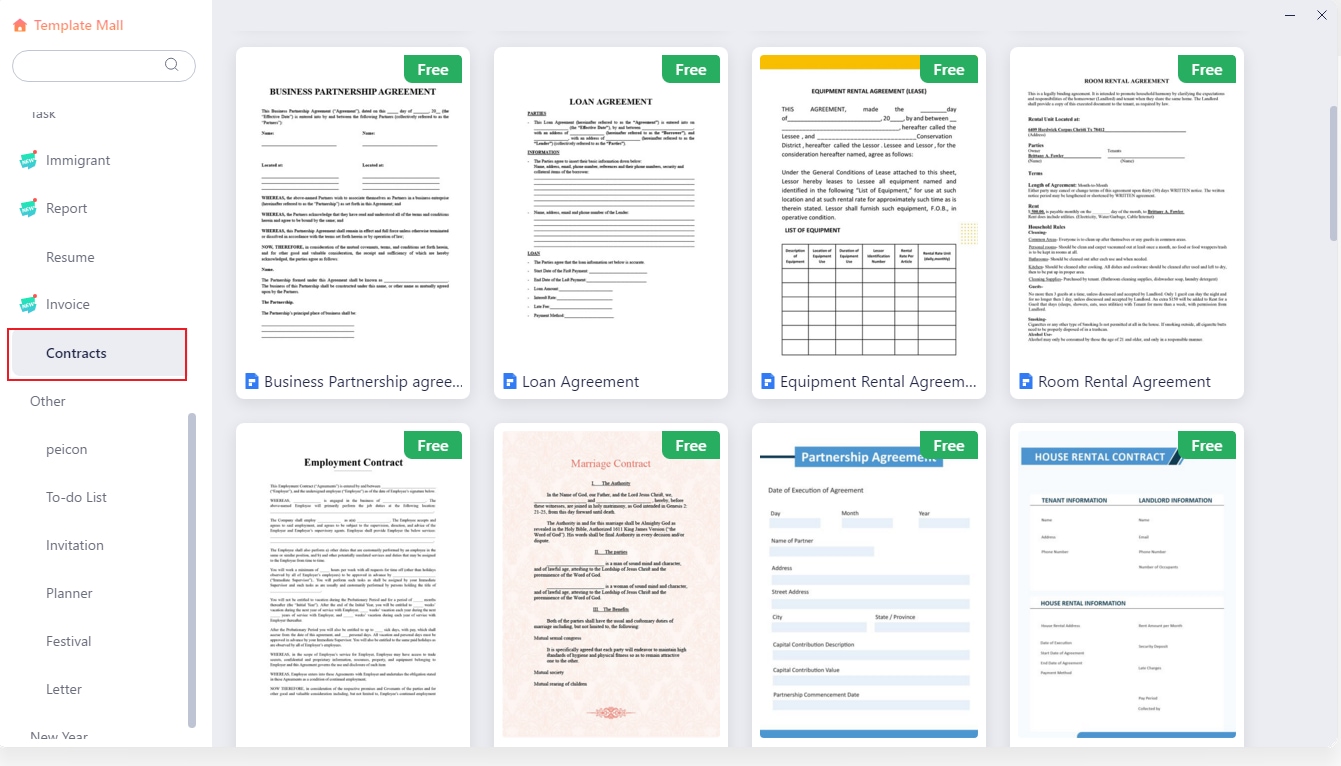
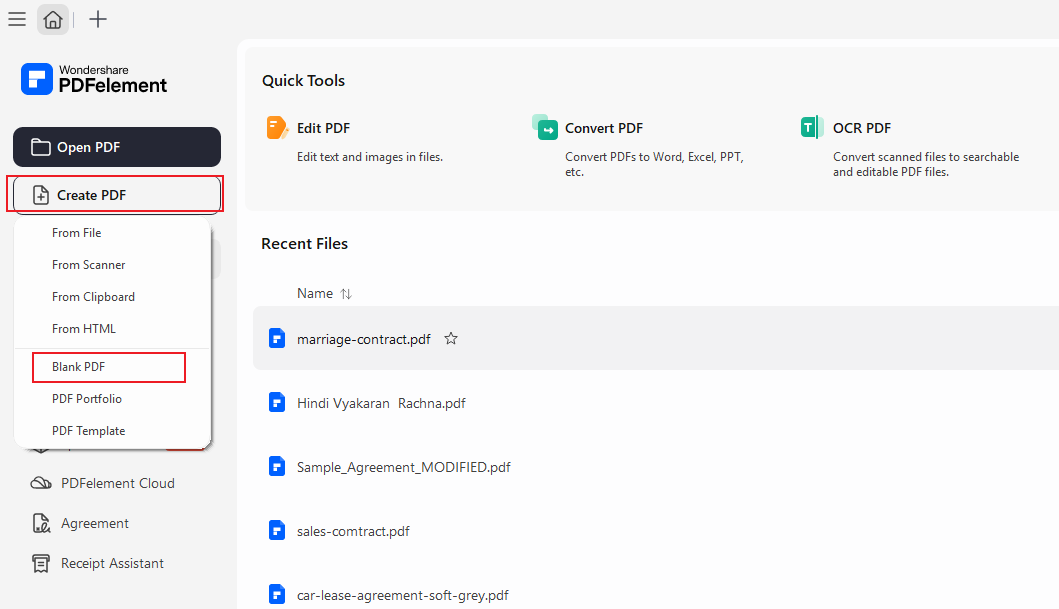
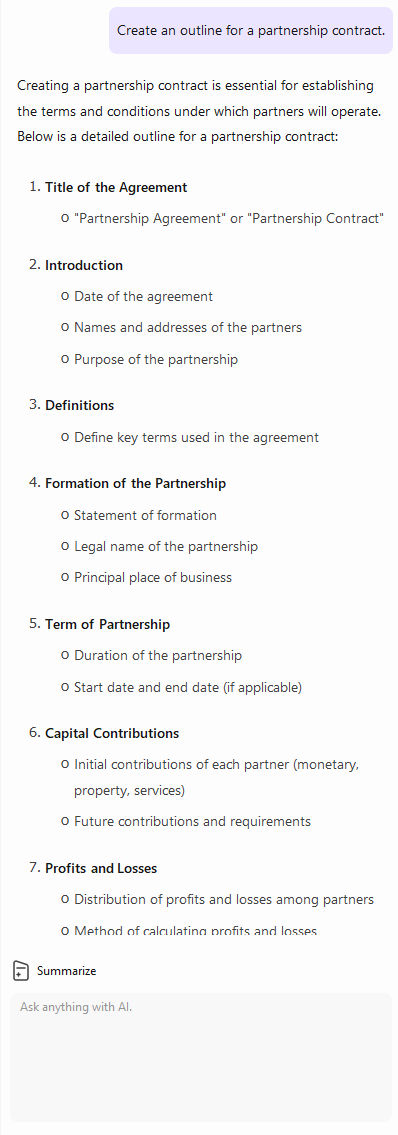
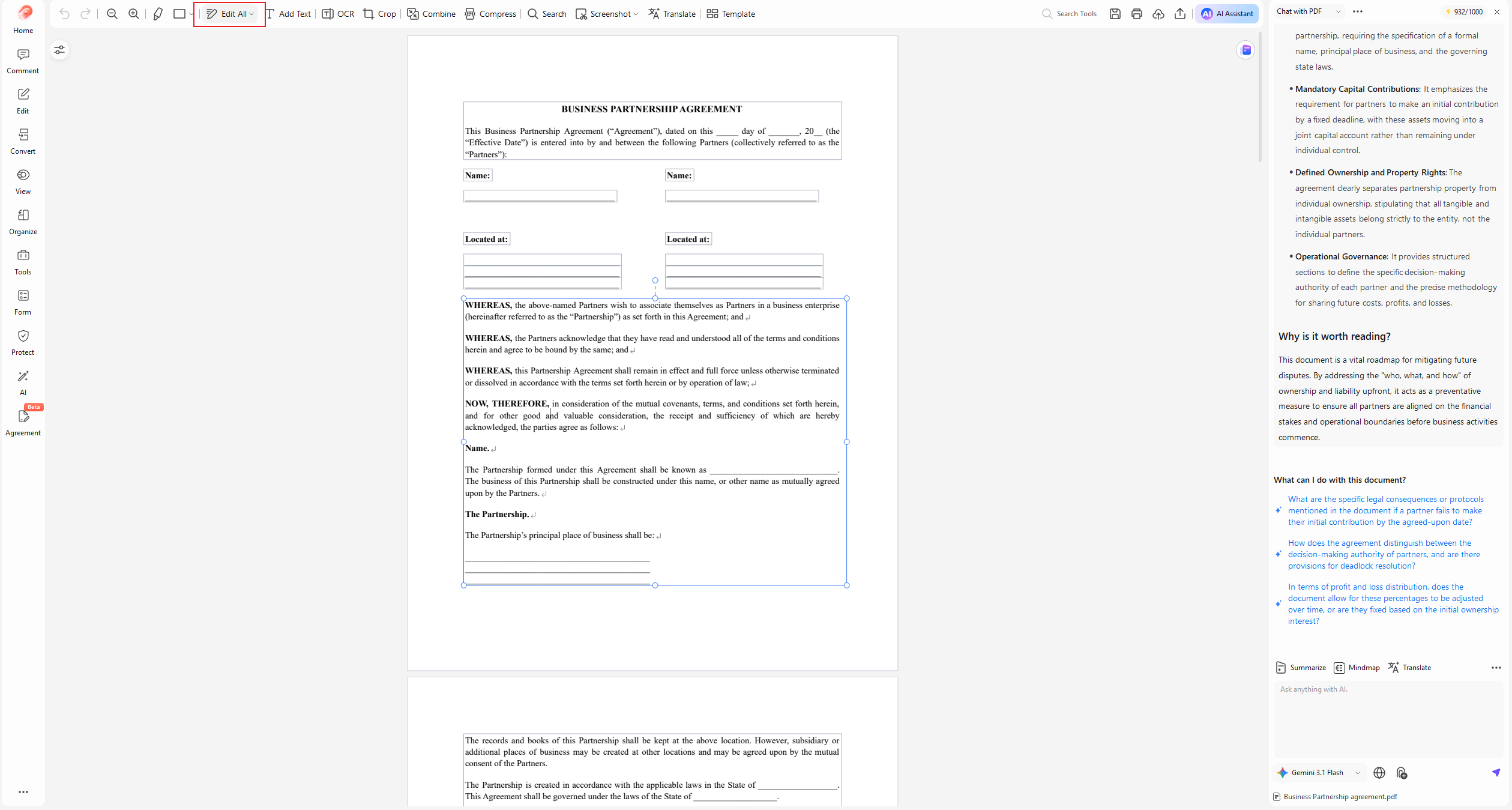
For a new agreement, you can start from a blank PDF or use a contract template, then ask the AI assistant to create an outline, explain clauses, draft language, or summarize obligations. If the incoming contract is a scan, PDFelement OCR can turn image-based text into searchable and editable content before review.
PDFelement's newer Review & Protect workflow also extends beyond drafting. Current AI usage documentation lists AI Risk Review and Smart Redact as dedicated review/protection functions. Its Smart Redact feature can identify sensitive information across more than 70 field types, while its AI PDF Translator supports more than 50 languages for multilingual document workflows.

Best for: freelancers, operations teams, small businesses, and professionals who receive or create contracts as PDFs and need to edit, review, OCR, redact, translate, sign, or share the same file afterward.
Watch for: PDFelement is a document workflow tool, not a replacement for a jurisdiction-specific legal drafting platform or legal counsel. Its own AI terms state that AI-generated content cannot be guaranteed to be 100% accurate.
How to Create an AI-Assisted Contract Draft in PDFelement
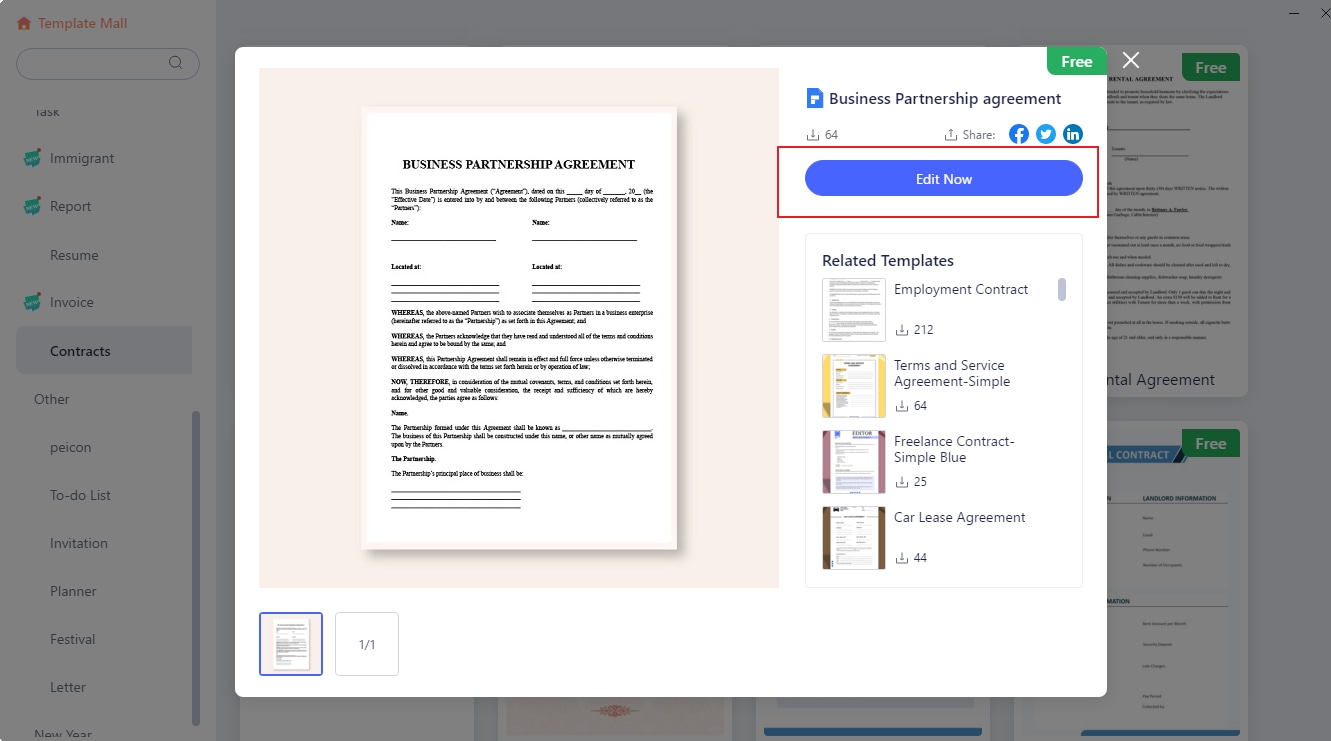
- Start from a template or blank PDF. Open PDFelement and choose Create PDF > PDF Template for a ready-made agreement, or create a blank PDF.
- Give the AI context. Specify the contract type, parties, purpose, governing law if known, payment terms, dates, and any business terms that matter.
- Generate an outline before full clauses. Ask for the sections the agreement should contain, then review the structure before expanding each clause.
- Edit inside the PDF. Add, replace, or revise the text in the document rather than maintaining a separate AI answer and a separate final file.
- Run a review step before signing. Ask questions about obligations, missing concepts, unclear wording, renewal, liability, termination, confidentiality, or other deal terms. Treat the output as issues to verify, not a final legal conclusion.
G2 Rating: 4.5/5 |100% Secure
2. GenieAI: Best for Jurisdiction-Aware AI Contract Drafting
GenieAI is a legal-focused option for users who need more jurisdiction and legal-workflow context than a general document assistant provides. Its current Create Contracts workflow generates agreements from plain-English briefs and combines drafting with risk review, reusable templates, and review/negotiation tools.
GenieAI currently states that its drafting workflow supports 150+ jurisdictions. Its broader platform also includes contract review, redlining, document Q&A, playbooks, and a Microsoft Word add-in. That makes it a stronger fit for legal teams that want the AI to reason against defined negotiation positions rather than simply generate plausible contract text.

Best for: teams that need jurisdiction-aware drafting, playbook-based review, and legal-specific workflows.
Watch for: legal coverage is valuable only when the selected jurisdiction and deal context are correct. Users should still verify governing law, execution requirements, and negotiated business terms.
Official product information: GenieAI Create Contracts.
3. Spellbook: Best for AI Contract Drafting and Review in Word or Google Docs
Spellbook is best suited to lawyers and contract professionals who want AI inside the document editor they already use. Its current workflow goes far beyond the old idea of a simple Microsoft Word plugin: Spellbook now supports Reviews, Playbooks, redline-aware review, negotiation assistance, and Google Docs as well as Word.
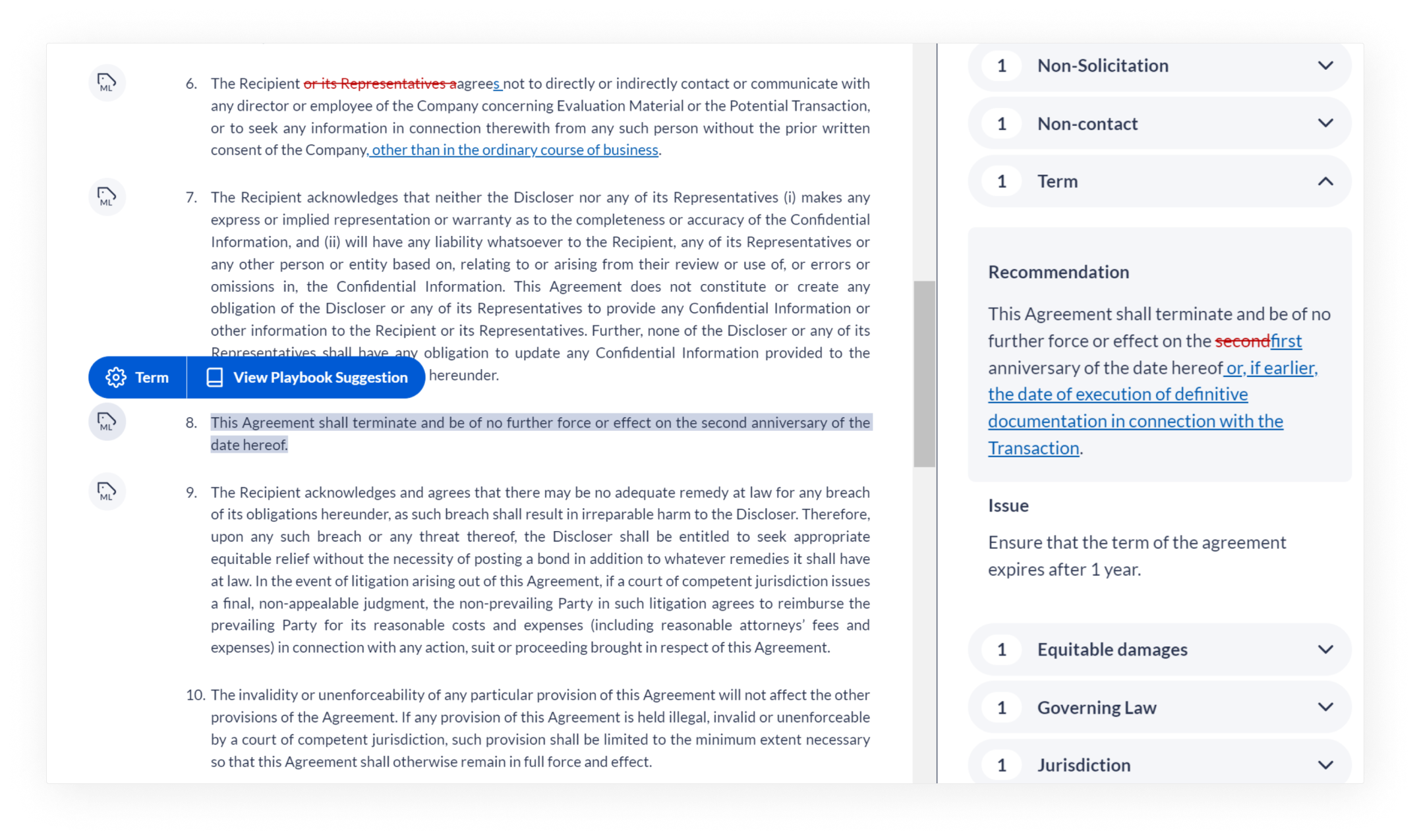
Its Comprehensive Review can focus on general risks, proofreading, represented party, jurisdiction, and markup preferences. Playbooks add more control by checking the contract against specific rules, required language, and negotiation positions. For documents that already contain tracked changes, Spellbook can also run a playbook specifically against the redlines and recommend whether to accept, reject, or revise them.
Best for: transactional lawyers, law firms, and in-house teams that negotiate heavily in Word or Google Docs.
Watch for: it is optimized for legal drafting and review in document editors rather than PDF production, OCR, or broader PDF post-processing.
Official product guidance: Spellbook review and playbook workflow.
4. Robin AI: Best for Contract Intelligence, Precedents, and Cited Answers
Robin AI is a strong fit when the task is not just creating a contract but understanding a contract portfolio and reusing legal knowledge. Its current Legal Intelligence Platform emphasizes deep search, cited answers, contract review, precedent use, and obligation management.
Robin's product positioning is especially relevant to legal teams that want to ask questions across legal documents and then verify the answer against the underlying source. Its platform also supports live contract editing and precedent-informed review, which can make previously negotiated language easier to reuse.
Best for: legal departments that need contract intelligence, document search, cited analysis, precedent discovery, and review.
Watch for: teams looking only for a fast one-off contract draft may find a broader legal intelligence platform more than they need.
Official product information: Robin AI Legal Intelligence Platform.
5. Juro: Best for AI-Native Contract Lifecycle Workflows
Juro is a better fit when drafting is only one stage in a larger contract workflow. Its 2026 product combines AI-assisted drafting with playbook-based review, redlining, approvals, signing, a contract repository, and post-signature intelligence.
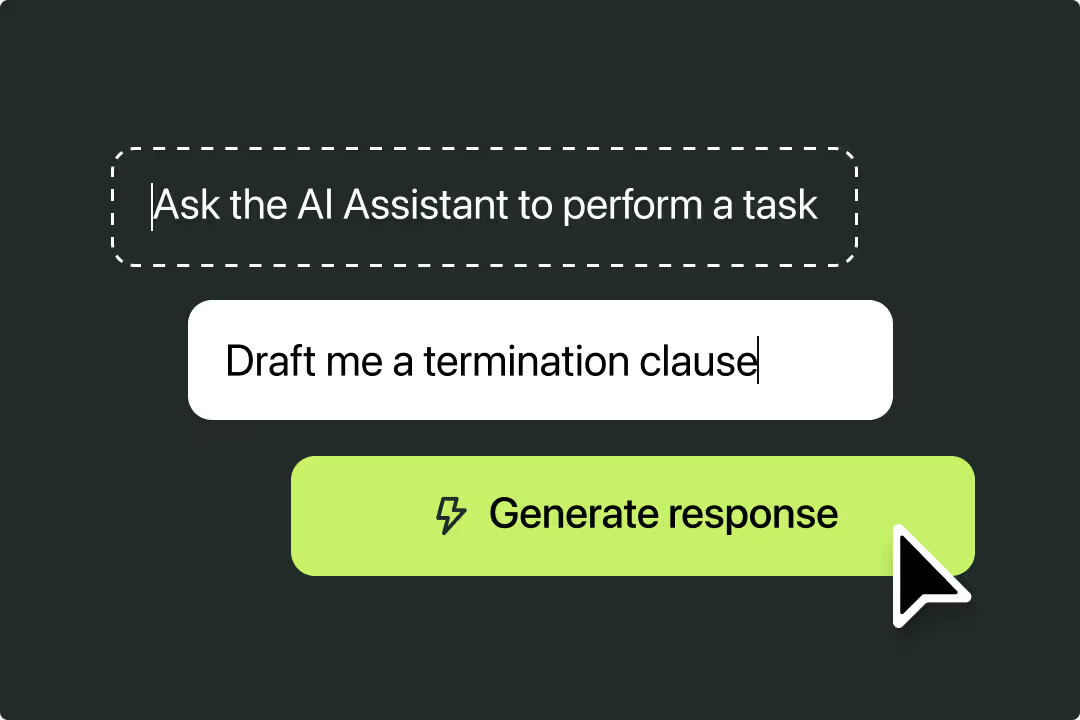
Juro's AI Review can analyze third-party contracts against user-defined playbooks and propose redlines. The review workflow is available in Microsoft Word, while the wider platform can route contracts through approvals and signing. Juro also introduced Operator, a contract intelligence layer that can answer questions across contract data and link users back to source material.
Best for: in-house legal, sales, HR, finance, and procurement teams that need an AI contract generator connected to approvals, negotiation, signing, and stored contract data.
Watch for: Juro states that AI contract review is currently English-only even though some other AI features support multiple languages.
Official product information: Juro AI contract review.
6. Ironclad: Best for Enterprise CLM and Playbook-Driven Redlining
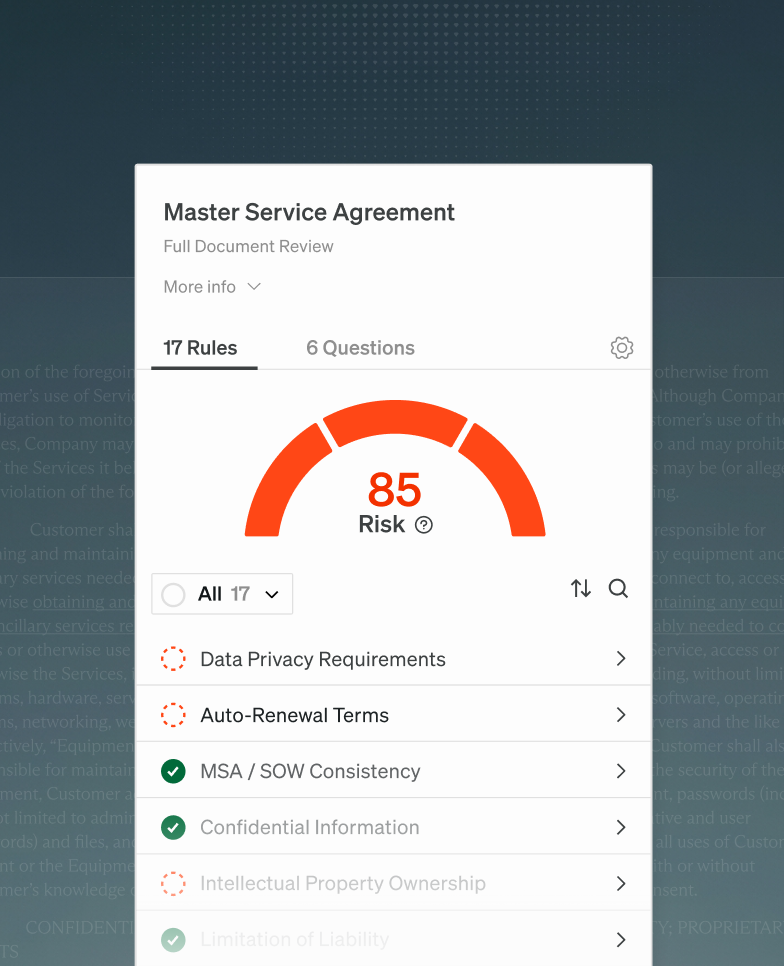
Ironclad is strongest for organizations that need standardized contract review inside a full enterprise contract lifecycle system. Its current review workflow combines AI Playbooks with Jurist, its AI contract partner, to identify risk, generate redlines, route approvals, and keep the negotiation inside a controlled workflow.
Ironclad states that its platform includes more than 190 pre-built AI clauses and properties for contract analysis. For larger legal teams, the important differentiator is not simply drafting language: it is the ability to connect the review to preferred language, approvers, tracked changes, version control, and the underlying CLM record.
Best for: enterprise legal operations teams that need playbook-driven review, structured negotiation, approval routing, and contract lifecycle management.
Watch for: it is an enterprise workflow platform rather than a lightweight free contract generator.
Official product information: Ironclad contract review.
Part 4.AI Contract Generator vs AI Contract Review: What Is the Difference?
An AI contract generator creates a new agreement; an AI contract review tool analyzes an agreement that already exists. In 2026, many legal AI products combine both functions, but users should still understand which job they are asking the AI to perform.
| Task | AI Contract Generator | AI Contract Review |
|---|---|---|
| Create a new NDA from a brief | Primary use | Not the main use |
| Draft a missing clause | Yes | Often |
| Find missing or unusual terms | Limited unless prompted | Primary use |
| Compare terms with a playbook | Usually limited | Common in legal AI platforms |
| Suggest redlines | Sometimes | Common in advanced tools |
| Review counterparty paper | Not the main use | Primary use |
This distinction is also useful for long-tail searches. Someone looking for an AI NDA generator has a different task from someone looking for an AI contract review tool, AI contract redlining software, or an AI contract playbook.
Part 5.How PDFelement Fits a Complete AI Contract Workflow
PDFelement is most useful when the contract has to move through several PDF-stage tasks after drafting. Instead of treating AI contract generation as the finish line, the workflow can continue through review, OCR, editing, privacy protection, translation, and signature.
1. Generate or Import the Contract
Start with a contract template, a blank PDF, an existing Word file converted to PDF, or a contract received from another party. If the document is already drafted, skip generation and move directly to review.
2. Turn Scanned Contracts into Searchable Text
Legacy agreements, signed scans, and photographed contracts may contain image-only text. Use OCR PDF to make that text searchable and editable before asking AI questions or making changes.
3. Review Clauses and Ask Contract Questions
Use AI Chat or AI-assisted review to identify obligations, renewal language, dates, termination conditions, confidentiality terms, payment terms, or wording that deserves manual attention. A good prompt is specific: instead of asking “Is this contract safe?”, ask “List every termination right, notice period, liability cap, indemnity obligation, and governing-law clause, with the page where it appears.”
4. Edit the Contract in the Same PDF
Once a clause has been approved for revision, edit the PDF directly. This reduces the risk of losing the final wording between an AI chat window and the actual agreement.
5. Redact Sensitive Information Before Sharing
Contracts often contain names, addresses, account numbers, pricing, signatures, IDs, and other confidential information. Smart Redact can help locate and remove sensitive fields before the document is shared externally.
6. Translate Cross-Border Contracts When Needed
For supplier, employment, licensing, or partnership agreements involving multiple languages, AI PDF Translator can translate the document while preserving its PDF structure. Legal meaning should still be reviewed by someone qualified in the relevant language and jurisdiction.
7. Finalize, Send, and Sign
When the final wording is approved, use the contract e-sign workflow to add signer fields, send the agreement, and track completion.
Where the newer PDFelement workflow adds value
The value is not that AI writes one more paragraph of contract text. It is that a PDF can move from scan or draft → AI-assisted review → edit → redact → translate → sign without rebuilding the document in several disconnected tools. This is most relevant to operations, procurement, freelancers, small businesses, and teams that manage contracts primarily as PDFs rather than inside a specialist CLM.
G2 Rating: 4.5/5 |100% Secure
Part 6.Which AI Contract Generator Should You Use for Different Contract Scenarios?
The right tool changes with the contract type, document format, and level of legal risk. These common scenarios show why a single “best AI contract generator” answer is usually too broad.
For an NDA or Simple Service Agreement
A prompt-based generator or approved template may be enough to create a first draft. The important next step is checking confidentiality scope, duration, permitted disclosures, payment, termination, and governing law before anyone signs.
For an Employment or Contractor Agreement
Use a tool that supports your jurisdiction and makes the source of the terms easy to verify. Employment law varies substantially by location, so a generic AI-generated agreement should not be treated as automatically compliant.
For a Vendor, SaaS, or Procurement Contract
Review and redlining become more important than generation. Look for tools that can evaluate liability, indemnity, data protection, service levels, renewal, termination, and other clauses against your organization’s preferred positions or playbook.
For a Scanned or Signed PDF Contract
A PDF workflow with OCR is more practical than a browser generator. Convert the scan into searchable text, review the agreement, edit only where permitted, redact sensitive information if sharing, and preserve the original signed version separately.
For Cross-Border Agreements
Prioritize jurisdiction, language, and human legal review. A translation can help stakeholders understand the text, but it does not resolve questions about governing law, local execution requirements, tax, employment rules, or enforceability.
For a High-Volume Legal Team
Choose a platform that supports playbooks, redlining, approval routing, version history, structured contract data, and escalation rules. This is where products such as Juro, Ironclad, GenieAI, Spellbook, and Robin AI are materially different from a simple free AI contract generator.
Part 7.How to Use an AI Contract Generator Safely
A safer AI contract workflow separates drafting speed from legal judgment. Use AI to reduce repetitive work, but keep human control over business terms, jurisdiction, legal risk, and the final signed document.
- Define the contract type and deal context. Give the AI the parties, purpose, scope, dates, payment terms, governing law if known, and any non-negotiable business positions.
- Start from an approved template when possible. A company template or verified precedent usually gives the AI better boundaries than a blank prompt.
- Generate the outline before the full draft. Check whether key sections are missing before expanding every clause.
- Verify names, dates, amounts, definitions, and cross-references. These are easy to overlook and can materially change the agreement.
- Review high-risk clauses separately. Liability, indemnity, IP ownership, confidentiality, data protection, termination, payment, dispute resolution, and governing law often deserve focused review.
- Ask the AI to show its basis where the tool supports citations or playbooks. A review is easier to trust when you can see the clause, source page, precedent, or rule behind the recommendation.
- Protect sensitive information. Redact confidential or personal data before sharing a contract with people who should not see it.
- Get qualified legal review when the stakes justify it. AI can accelerate drafting and issue spotting, but it does not know every fact, negotiation objective, law, or regulatory requirement that applies to your deal.
Conclusion
The best AI contract generator is the one that matches the full contract workflow, not just the first drafting prompt. GenieAI is compelling for jurisdiction-aware legal drafting, Spellbook fits Word- and Google Docs-based legal review, Robin AI focuses on contract intelligence and precedents, Juro connects AI review to an end-to-end contract workflow, and Ironclad is built for enterprise CLM and playbook-driven negotiation.
PDFelement fills a different gap. It is a practical choice when the contract must be created or received as a PDF and then reviewed, OCR-processed, edited, redacted, translated, signed, or shared in the same document environment. For lower-risk drafting, that can reduce tool switching; for important agreements, it should sit alongside appropriate legal review rather than replace it.
G2 Rating: 4.5/5 |100% Secure
People Also Ask
-
What is the best AI contract generator in 2026?
The best tool depends on the workflow. PDFelement is useful for PDF-based drafting and document handling, GenieAI for jurisdiction-aware legal drafting, Spellbook for Word or Google Docs review, Robin AI for legal intelligence, Juro for AI-native contract lifecycle workflows, and Ironclad for enterprise CLM and playbook-driven redlining. -
Can AI generate a legally binding contract?
AI can generate a contract draft, but whether an agreement is legally valid or enforceable depends on the parties, consent, governing law, required formalities, mandatory terms, and other facts. Treat AI-generated language as a draft and obtain qualified legal review when the agreement is important or legally sensitive. -
What is the difference between an AI contract generator and an AI contract review tool?
An AI contract generator creates new agreement language from a prompt or template. An AI contract review tool analyzes an existing agreement for risks, unusual terms, missing clauses, playbook deviations, or proposed revisions. Many current legal AI platforms now combine both functions. -
Can an AI contract tool review a scanned PDF?
Only if the text can be recognized first. Image-only or scanned contracts generally need OCR before AI can reliably search, summarize, or analyze the wording. A PDF tool with built-in OCR is useful when old, signed, or photographed agreements are part of the workflow. -
Is a free AI contract generator enough for business contracts?
A free generator may be enough for a low-risk first draft or to explore a simple agreement structure. It is usually not enough when you need jurisdiction-specific terms, playbook-based review, redlining, approval controls, privacy safeguards, contract intelligence, or legal review before signing.