

On macOS 27, Writing Tools can turn selected text into a summary or key points, and Siri AI can explain what is on screen. Both are useful for a first read, yet a contract asks a harder question than what it says. A summary treats every clause as equal and can drop the conditions hidden in words such as "unless," "except," and "provided that."
A summary may shorten a clause too much. AI contract review points out possible risks and explains them in plain language. PDFelement V13 offers it on macOS 27 through Agreement Copilot, so you can review contracts with AI while keeping the final decision.


 G2 Rating: 4.5/5 |
 100% Secure
In this article
Part 1. Reasons to Use AI to Review Contracts on a Mac
Contract reviews can take time, especially when important terms are buried in long pages of legal wording. Set side by side, a manual read and an AI-assisted one differ on four points:
| Reason | Manual Review | With AI Review |
| Review Contracts More Efficiently | Every page gets the same slow, careful read | The first pass points you straight to the clauses worth your time |
| Identify Potential Risks More Easily | Risky terms look like every other paragraph | Risk levels show which flagged clauses to read first |
| Understand Complex Contract Language | Legal phrasing sends you to a dictionary or a lawyer | Each flag comes with an explanation in everyday words |
| Reduce the Chance of Missing Important Clauses | Attention fades on long agreements | The whole document gets scanned, including the final pages |
Part 2. PDFelement V13: An AI Contract Review Tool Worth Trying
PDFelement V13 brings contract review into Agreement Copilot, which was added in the September 3, 2026 release. Six features shape how it reads a contract and what you get back at the end:
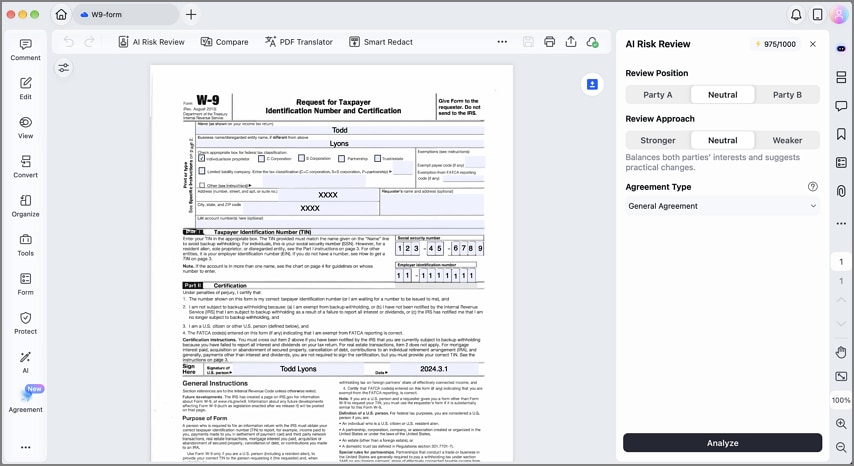
- Review from Your Position: Before analysis, you choose the party you represent. The review reflects the side of the deal you are checking.
- Risk Levels: After analysis, Agreement Copilot sorts potential issues into High, Medium, and Low risk levels. This makes it easier to work through the most serious flags first.
- AI Explanation: A short note under every flag says why the clause matters, in wording a non-lawyer can follow.
- Suggested Revision: Flagged clauses can include suggested replacement wording. If the explanation is not clear enough, the Ask AI option lets you request more detail about the risk or proposed change.
- Support Multiple Contract Types: An agreement-type setting adjusts the review for documents such as NDAs, sales contracts, and employment agreements.
- Export and Keep Your Review Results: Findings can be saved as a review report and shared with colleagues or outside counsel.
Part 3. How to Review a Contract on Mac with PDFelement V13
Running an AI contract review in PDFelement takes three steps, all inside the contract you already have open. To review contracts with AI this way, you need PDFelement V13 on any Mac with macOS 11 or newer, including macOS 27.
Step 1: Open the Contract in PDFelement's Agreement Copilot
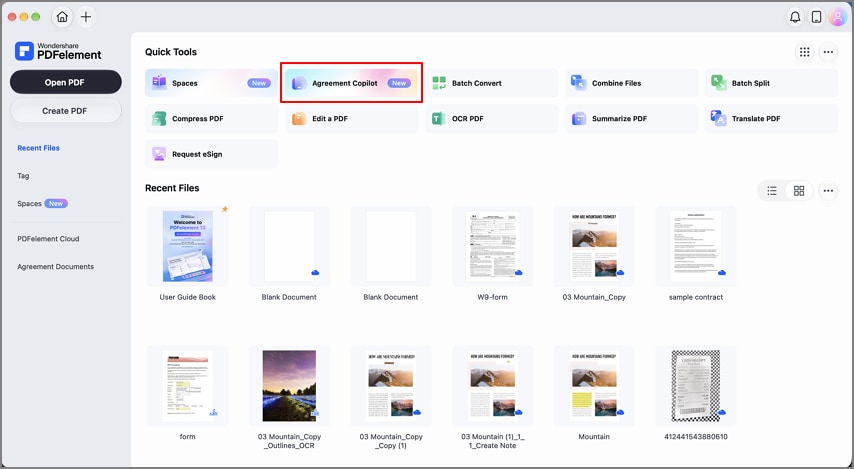
Select Agreement Copilot and open the contract PDF in PDFelement V13. If the agreement arrived as a scan or a photo, run OCR first.
Step 2: Set Up Your Contract Review
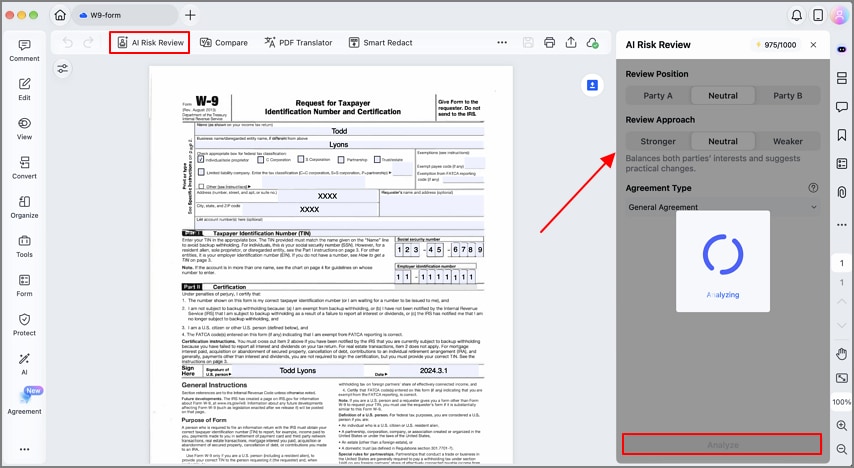
Choose the AI Risk Review option and select the Review Position, Review Approach, and Agreement Type settings. Once set, click Analyze. These choices matter because the same clause can carry a different level of concern depending on your position in the agreement.
Step 3: Review AI-Identified Risks
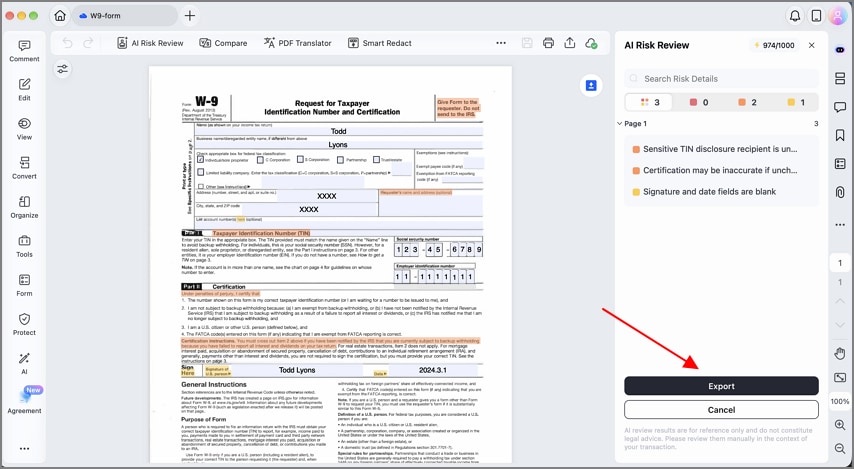
PDFelement organizes detected issues into High, Medium, and Low risk levels. Open each finding to see why the clause was flagged and review the suggested revision beside it. When you finish, click Export and save the review report so your notes stay with the contract for later rounds.

Part 4. What to Keep in Mind When Using AI for Contract Review on Mac
AI speeds up the review, but the decision to sign still rests with you and anyone advising you. Four habits keep AI contract review useful rather than misleading on a real agreement:
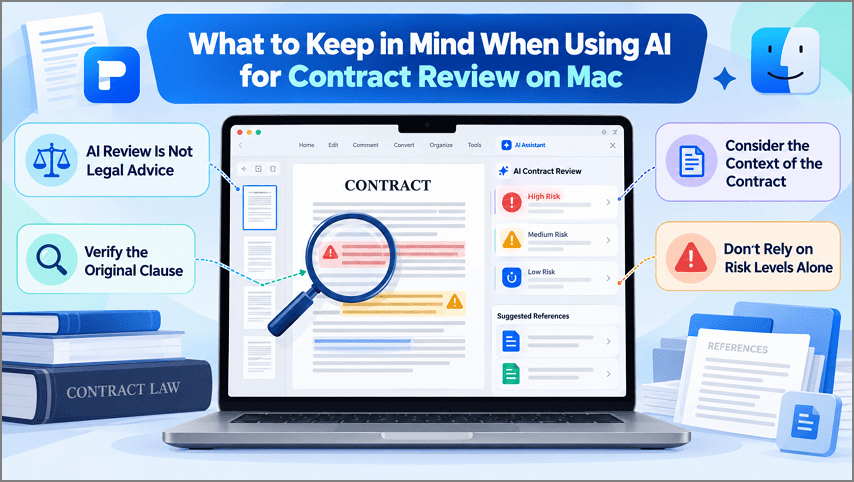
- AI Review Is Not Legal Advice: A flag is a prompt to look closer, not a legal opinion, so high-stakes agreements still deserve a lawyer's read.
- Verify the Original Clause: Read the full clause behind every flag, because a single "unless" or "except" can reverse what an explanation implies.
- Consider the Context of the Contract: Contracts can pull in outside documents by reference, such as online standard terms, which can bind you even though the AI never reads them.
- Don't Rely on Risk Levels Alone: A low rating can hide a real problem for your deal, such as a short notice period when you depend on one supplier.
Frequently Asked Questions
Can I use AI to review contracts on Mac?
Yes, you can review contracts with AI on a Mac through Agreement Copilot in PDFelement V13, which runs on macOS 27. Writing Tools can summarize contract text, but it does not rate clauses by risk.
Can AI identify risks in a contract?
AI can flag commonly risky clauses, such as one-sided indemnities or automatic renewals, and explain why they matter. It cannot judge your business context, so treat each flag as a question rather than a verdict.
What types of contracts can AI review?
Most text-based agreements work, including NDAs, sales and purchase contracts, employment agreements, and service contracts. The agreement-type setting in PDFelement adapts the review to the document, and scanned contracts need OCR first.
Is AI contract review safe for confidential documents?
It depends on your organization's rules, since Wondershare's privacy policy says its AI features use large language models from providers including OpenAI and DeepSeek. Removing personal data with Smart Redact before a review reduces what leaves your Mac.
Final Takeaway
A summary tells you what a contract says, while AI contract review shows which clauses deserve your attention and why. Pairing that review with your own reading of each flagged clause, and a lawyer when the stakes are high, keeps the final call with you.
PDFelement V13 brings that review to macOS 27 through Agreement Copilot, reading each agreement from your side and exporting the findings as a report. After the review, the same app handles edits, version comparison, and signatures without another download.
G2 Rating: 4.5/5 |100% Secure


![What AI Contract Generator Should You Use? [Top 6 Tools]](https://images.wondershare.com/pdfelement/images2026/pdf-like-article-3.png)

