

Reading a document demands your eyes, a screen, and enough quiet time to stay focused. During a busy workday, that uninterrupted time can be hard to find, leaving reports and long PDFs unread. Listening to PDF files makes it easier to use time already spent driving, walking, commuting, or doing routine tasks.
PDF listening is not limited to one format. You can hear the full document, use a shorter spoken summary, or turn key ideas into a podcast-style conversation. Each option suits a different purpose. This guide explains the main formats, suitable documents, and simple ways to begin.


 G2 Rating: 4.5/5 |
 100% Secure
In this article
Part 1. Why Listening Beats Reading for Some Documents
Choosing to listen to PDF files can make certain documents easier to fit into a busy day. The points below show where audio can be more practical than reading on screen:
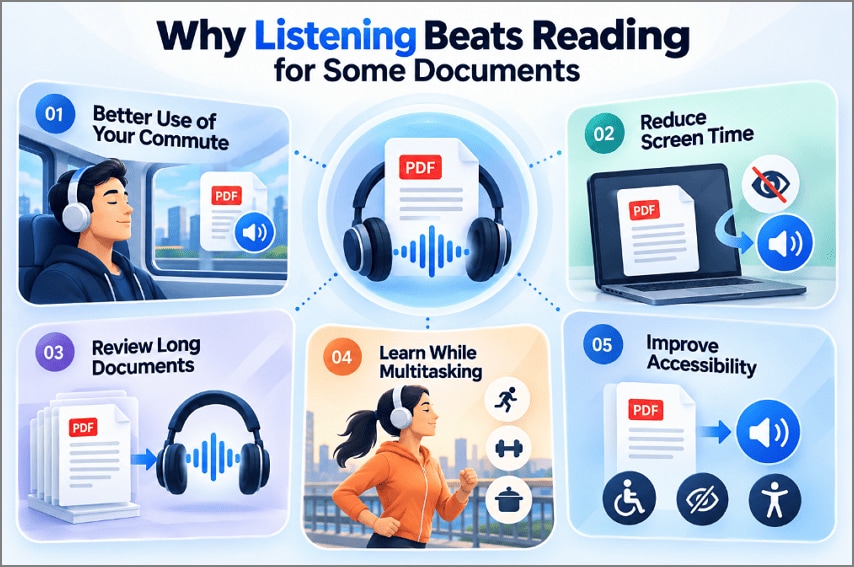
- Make Better Use of Your Commute: Travel time can double as review time when reading is inconvenient or unsafe. Listening lets you work through reports, notes, or study material without adding another reading session later.
- Reduce Screen Time: After hours of reading on a laptop or monitor, another long PDF can feel tiring. Listening lets you move through some of the material without staying fixed on the screen.
- Review Long Documents More Efficiently: A first listen can give you the shape of a long report before you study it in detail. You can then return to the sections, arguments, or findings that matter most.
- Learn While Doing Other Things: Walking, exercising, cooking, or tidying can leave room for listening. Audio lets you review educational or professional material during those periods instead of waiting for dedicated reading time.
- Make Digital Documents More Accessible: Not everyone can comfortably work through pages of text on a screen. For someone with low vision or difficulty reading for long periods, hearing the document can offer another practical way to get through its content.
The W3C WCAG2ICT guidance explains how WCAG accessibility principles apply to non-web documents and software, supporting more accessible digital content for people with disabilities.
Part 2. The Three Forms of PDF Listening
There is more than one way to approach listening to PDF content. The 3 options below differ mainly in how much the original document is transformed before you hear it:
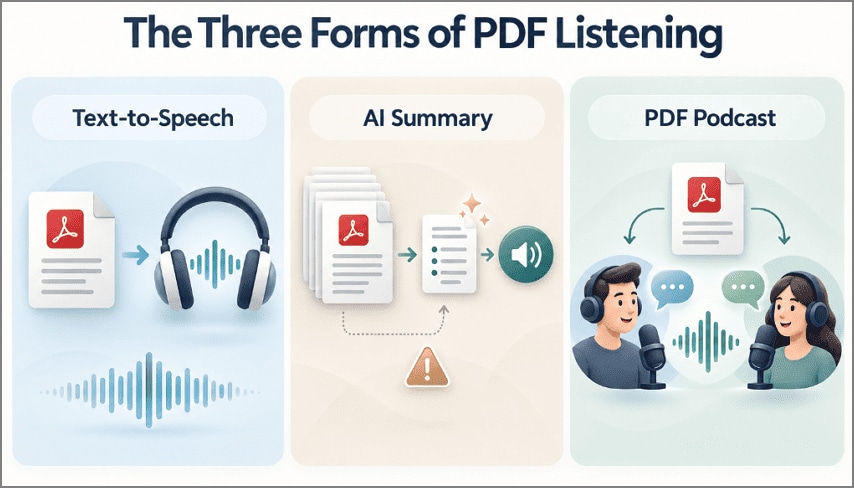
Reading the PDF Aloud with Text-to-Speech
At the simplest level, text-to-speech reads the document text aloud using a synthetic voice. The wording is not intentionally summarized or rewritten, making this option useful when the exact language of the document matters. Playback time depends on the document length and the selected speaking speed.
Listening to an AI-Generated Summary
AI can condense a PDF into a shorter spoken overview focused on its main ideas and findings. This can save time when full narration is unnecessary. However, summaries may omit details or contain errors. A NIST study notes that LLMs can generate factually incorrect or fabricated information, so important details should be verified.
Turning the PDF into a Podcast
A PDF podcast turns source material into conversational audio, often with 2 synthetic speakers discussing key ideas and connections. The format can make dense content easier to follow while multitasking. Since wording may be shortened, reorganized, or omitted, podcast output works best for review rather than replacing the original document.
Part 3. Which PDFs Are Worth Listening To
Whether you should listen to PDF files depends heavily on the document’s purpose and structure. Text-heavy material often works well in audio, while documents that rely on exact wording, tables, formulas, or visual context usually need closer reading.
| Document Type | Listening Works | Why |
| Research Papers | Summary first, then read | Hearing the findings shows whether the full paper earns an hour |
| Business Reports | Good for overview | Conclusions and recommendations survive condensing intact |
| Long Articles and References | Well for text-heavy sections | Length is the obstacle, and audio removes it without cost |
| Contracts and Legal Documents | Best as a second pass | Exact wording carries legal weight and must be read |
Reading and listening do not always lead to the same level of understanding. A 2026 study indexed by ERIC found differences between reading, listening, and using both together. That is one reason contracts and other important documents are safer to listen to as a second check, not as the only review. The distinction matters because listening and reading are not always interchangeable.
Part 4. How to Listen to PDF Files with PDFelement
A long report or scanned PDF is awkward to deal with when you want to listen instead of sitting in front of the screen. To listen to PDF files without moving between several tools, PDFelement keeps the document, OCR, and audio options in one place. That also makes scanned pages easier to handle, since the text can be recognized before playback.
How to Use Read Aloud in PDFelement
PDFelement features a complete Read Aloud feature which helps read the content present within the PDF. After performing the OCR across any document, all editable and readable content will be read by the platform. The 4 steps below take you from opening the file to hearing its contents:
Step 1. Add Your PDF to PDFelement
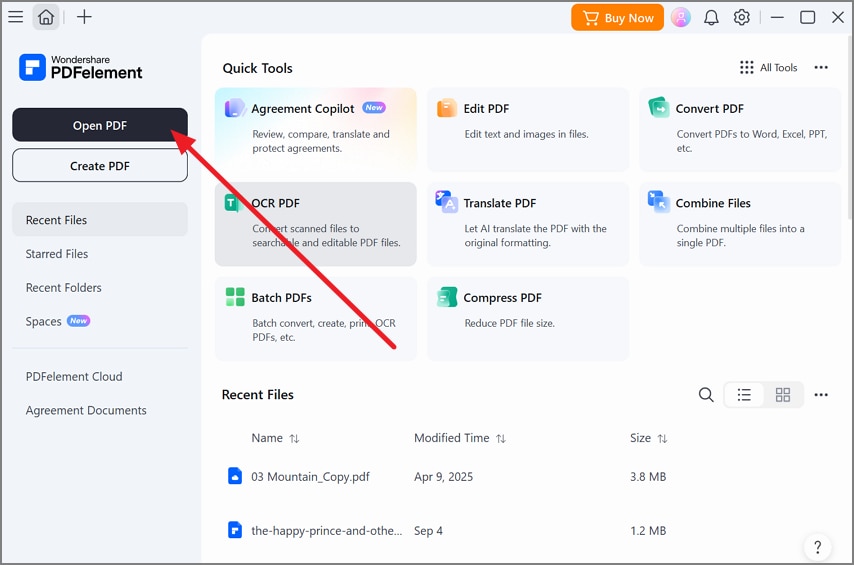
Open PDFelement, choose “Open PDF,” and load the file you want to hear.
Step 2. Recognize Text on Scanned Pages
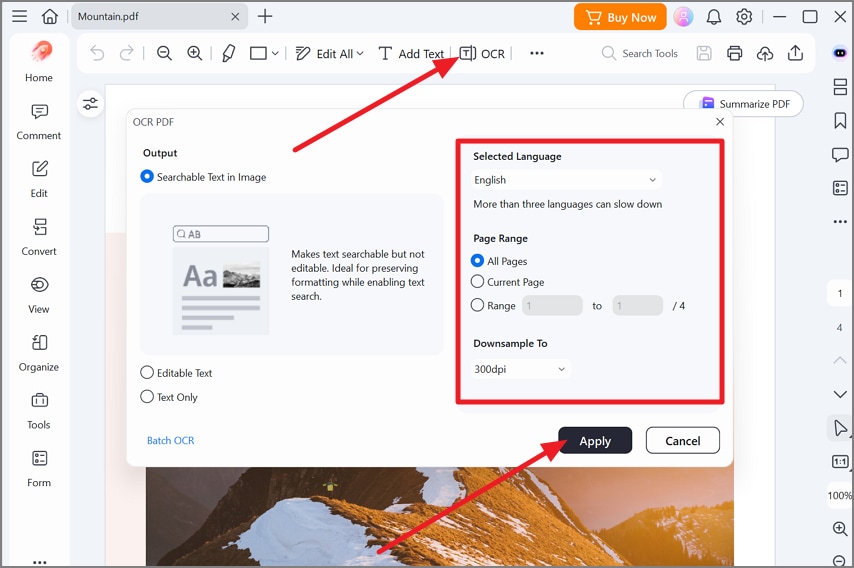
For image-based PDFs, select “OCR” from the top toolbar. Set the language and pages to process, then apply OCR so the text becomes readable.
Step 3. Turn On Read Aloud
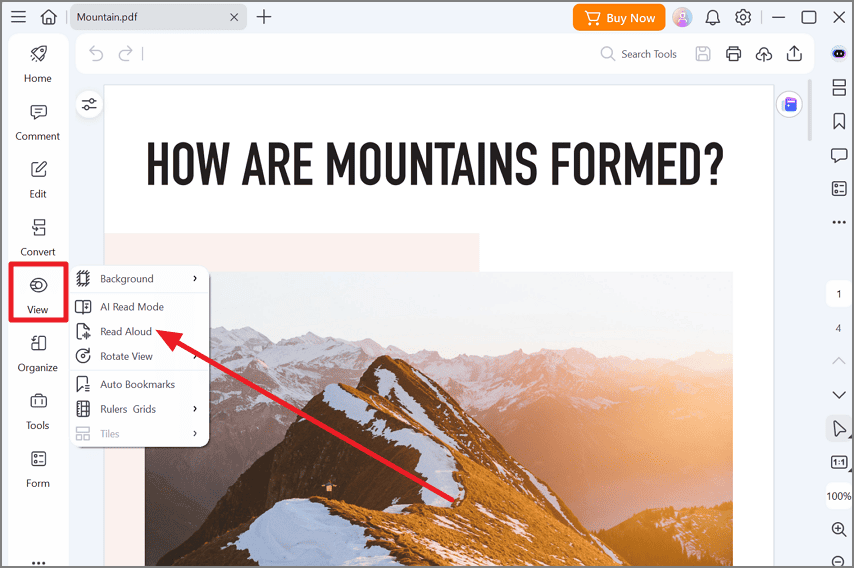
Open “View” from the left-side menu and click “Read Aloud.” The program will start speaking the text from the active page.
Step 4. Adjust How the PDF Is Read
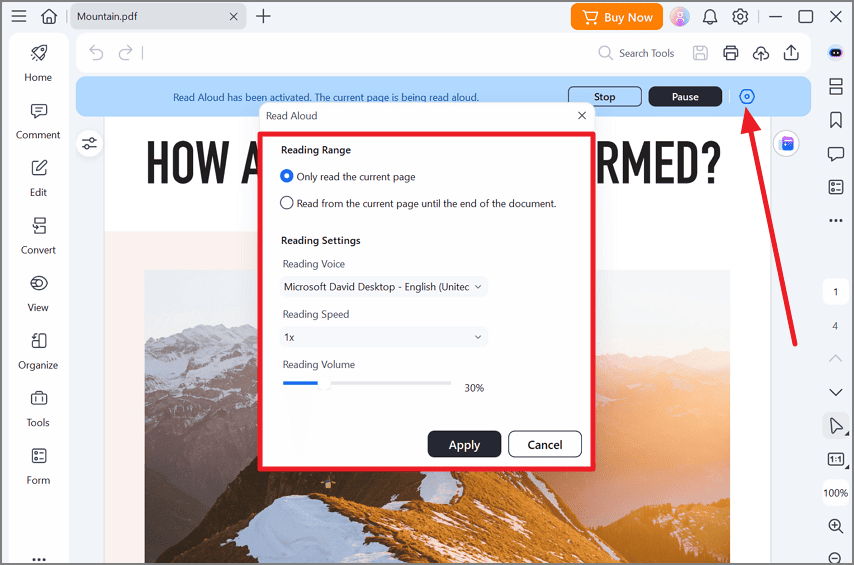
Open the “Read Aloud” controls and set the page range, voice, playback speed, and volume to suit your preference. Press “Apply” to apply the changes before continuing.
How to Turn PDF into Podcast with PDFelement
For listening to PDF content in a more conversational format, PDFelement can turn the source into podcast-style audio built around its main ideas. This can be useful for long reports, study material, or reference documents that are easier to follow by ear. The steps below show how to create one:
Step 1. Set Up a Space
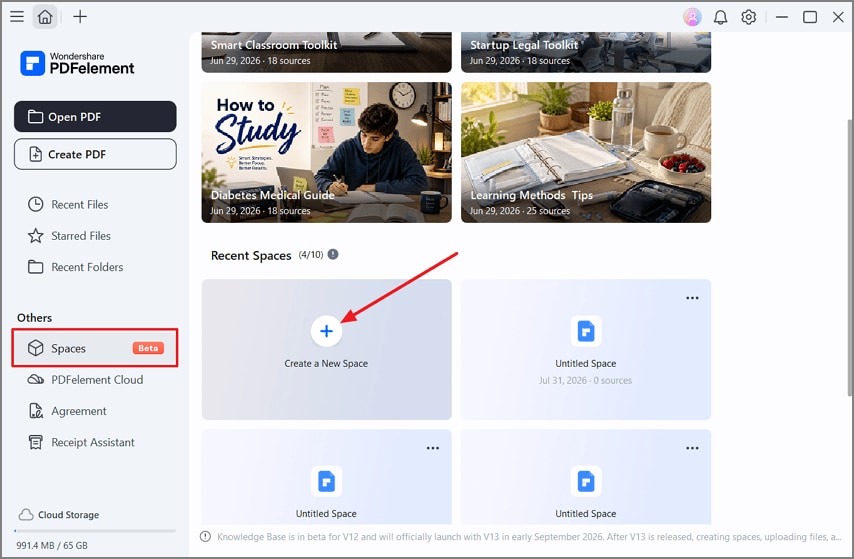
Go to “Spaces” in the left-hand menu and choose “Create a New Space.” This gives you a dedicated area for the PDF and generated podcast.
Step 2. Upload the PDF
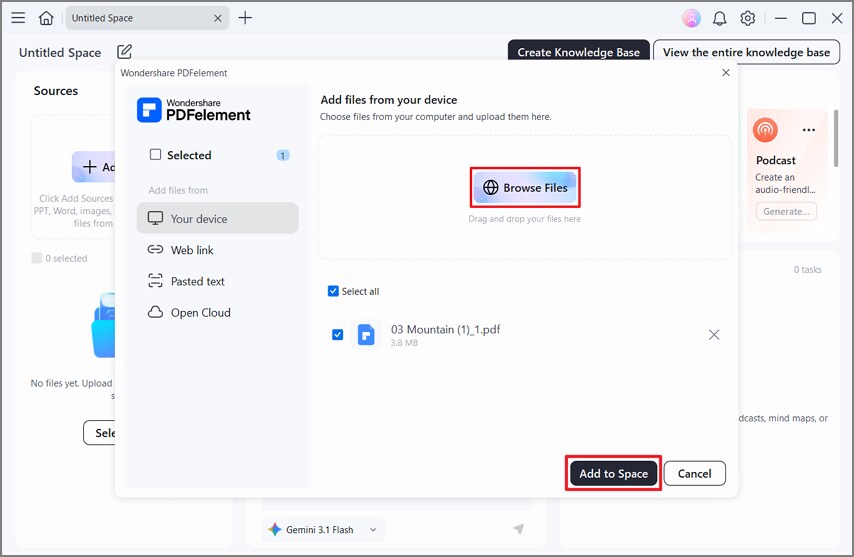
Click “Add Sources,” select “Browse Files,” and locate the PDF on your device. Add the file to the Space so PDFelement can use it as the podcast source.
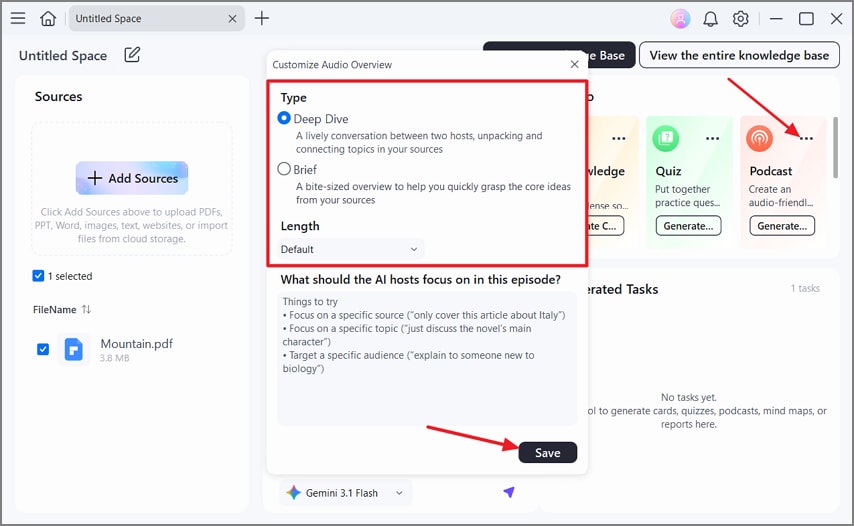
Step 3. Choose the Podcast Settings
Open “Podcast” and set the audio type and preferred length. You can also add instructions about what the AI hosts should focus on. Save the settings to begin generating the audio.
Step 4. Play the Finished Podcast
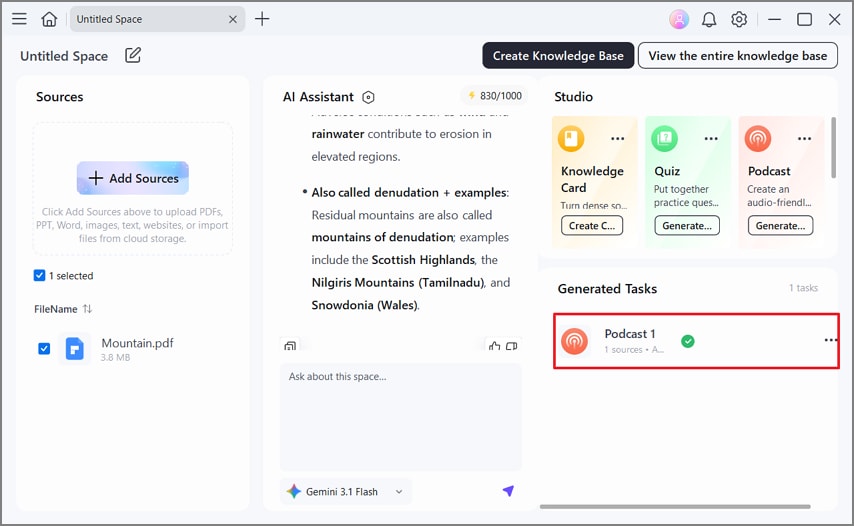
Once generation is complete, open “Generated Tasks.” Select the finished podcast to play it and review the audio created from your PDF.
Why PDFelement Suits This Job
For listening to PDF content, the useful part is not just getting sound from the file. You also need readable text, control over playback, and an easy way to check what the audio came from. PDFelement brings those pieces together in one workflow.
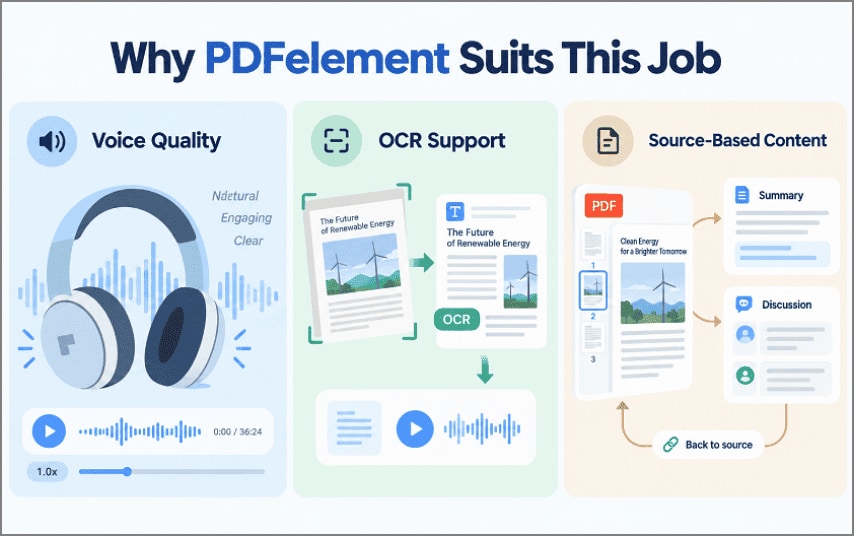
- Voice and Playback Controls: The Read Aloud feature gives you room to change the voice and reading speed, so a long PDF does not have to play at one fixed pace.
- OCR for Scanned PDFs: A scanned report may contain page images rather than selectable text. PDFelement’s OCR can recognize that text first, allowing those pages to be used for reading and other document tasks.
- Source-Linked AI Content: In AI Spaces, summaries, answers, and generated outputs can be based on the files you provide. Source citations also link back to the relevant page or text, making important points easier to check against the PDF.
G2 Rating: 4.5/5 |100% Secure
Frequently Asked Questions
Can I listen to any PDF?
Almost any file works, provided it contains real text or has been through OCR. Password-protected and copy-restricted documents are the usual exceptions, since the text cannot be extracted for a speech engine.
Is PDF listening the same as text-to-speech?
Text-to-speech is one form of it rather than the whole category. Listening also covers narrated summaries and generated discussions, both of which interpret the document before speaking rather than reading it word for word.
Can scanned PDFs be listened to?
Yes, once OCR has converted the page images into a text layer. Recognition quality matters, because mistakes introduced at that stage get spoken aloud as though they were correct.
Final Takeaway
To conclude, choosing when to listen to PDF files depends on the document and what you need from it. Full narration suits exact wording, while summaries and podcast-style audio work better for faster review. For scanned pages or mixed listening needs, PDFelement offers a practical way to handle OCR, reading, and audio from the same document.
G2 Rating: 4.5/5 |100% Secure




