

Struggling with the hassle of printing, signing, and mailing agreements? You're not alone, as traditional contract signing wastes time and resources. Now, electronic signatures eliminate the need for printing, which is authorized by the U.S. ESIGN Act of 2000.
Under this law, major companies are adopting e-signatures to minimize manual errors. This article covers essential information on how to sign an agreement using an advanced digital signing tool.
In this article
- What It Means To "Sign an Agreement" Today
- Where and How Agreements Are Usually Signed
- How To Sign an Agreement Online (Overview)
- Electronic Signature vs. Digital Signature for Agreements
- How To E-Sign an Agreement Using PDFelement (Step-By-Step)
- Signing Agreements Sent by Someone Else
- When To Use Digital Signatures for Agreements
- Online Agreement Signing Vs Desktop Signing Tools
- Common Mistakes When Signing Agreements Online (And How to Avoid Them)
Part 1. What It Means To "Sign an Agreement" Today
Traditionally, signing an agreement meant printing the draft, adding signatures with ink pens, and then scanning it to send it. The foremost con is that this physical process can have errors or get delays, which is unsuitable for remote work environments. This shift from traditional to online signatures primarily occurred during the COVID-19 pandemic, allowing agreement signing from anywhere. Now, let's explore common types of agreements that require signatures:
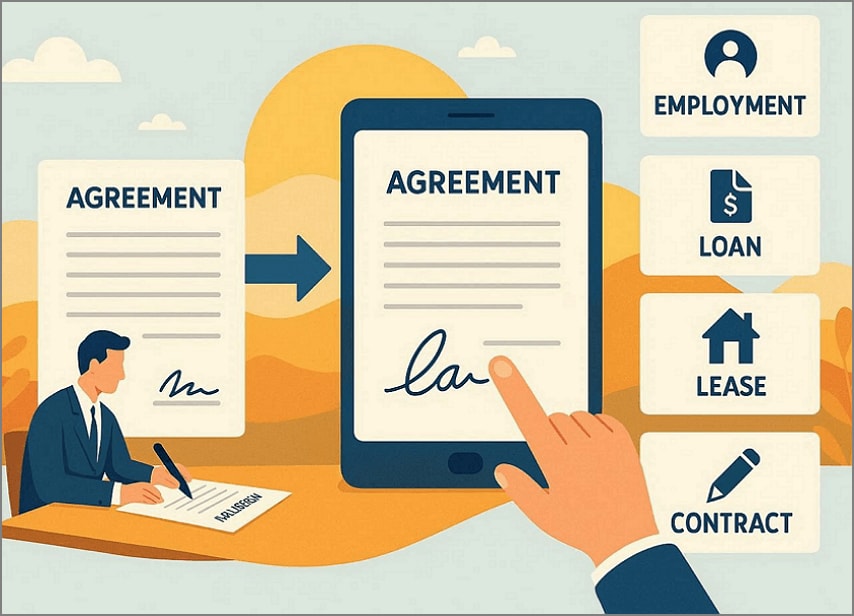
Employment Agreements: This typically includes job title, salary, working hours, and responsibilities to ensure clear expectations.
Service Contracts: Service contracts define project scope for freelancers or vendors and specify timelines for a smoother workflow.
NDA and Business Agreements: These cover confidential information, revenue sharing, and lease terms, enabling secure collaborations.
Part 2. Where and How Agreements Are Usually Signed
An agreement signature page is a dedicated final section that includes party information and a signature area. Signature appears typically at the end of the page, clause stating "IN WITNESS WHEREOF, the parties have executed this Agreement." Most agreements include dedicated fields for both handwritten signatures and e-signatures for your convenience.
Single-Signer vs. Multi-Signer Agreements
While exploring signatures on agreements, let's have a quick breakdown of the types of signer agreements:
| Aspects | Single-Signer Agreements | Multi-Signer Agreements |
| Number of Parties | Single party (Personal waiver) | Multiple parties (Partnerships, Client-vendor deals) |
| Signature Lines | Single line for name, date, title | Various lines, one per party, witness, or notary |
| Complexity | Low; ideal for speed | Higher ensures consensus among stakeholders |
| Use Casses | Individual authorizations, simple receipts | Joint ventures, employment offers, sales contracts |


 G2 Rating: 4.5/5 |
 100% Secure
Part 3. How To Sign an Agreement Online (Overview)
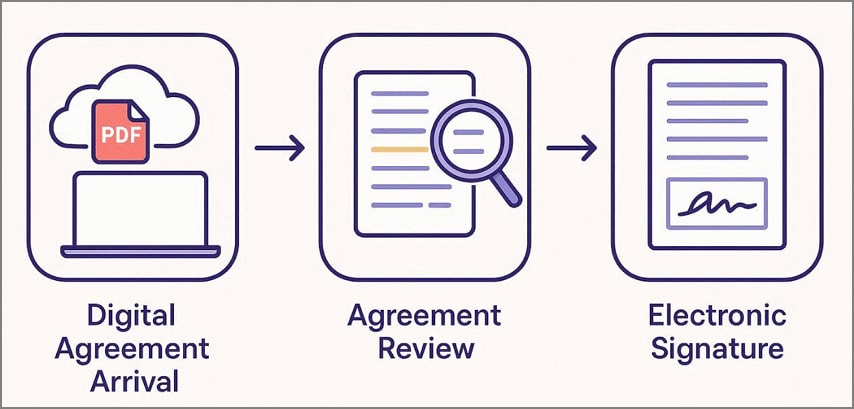
To know how to sign an agreement online, have a look at the following section to explore its detailed workflow:
Step 1
Digitally, agreements arrive via online platforms like email, which can be accessed without printing. So, initiate by opening that agreement PDF in your desired PDF reader to review it further.
Step 2
Upon entering the agreement, zoom in on the page to review its clauses and highlight the essential points if needed.
Step 3
Now, navigate to the signature section, typically located at the end of the agreement. Afterward, expand the signature box and draw your signature with a mouse or add a scanned signature.
Step 4
At the end, save the updated file to the device and share it with the other parties for contract completion.
This online workflow eliminates the hassle of printing files, adding signatures, and then scanning them to re-share. Furthermore, it is considered beneficial for remote or in-office workflows to expedite the agreement process.
Part 4. Electronic Signature vs. Digital Signature for Agreements
While covering the basics, explore the following table to understand which signature types suit your scenario the most:
| Aspects | Electronic Signature (eSign) | Digital Signature |
| Definition | Broad category of digital intent capture (typed name or checkbox) | Cryptographic e-sign subset using PKI certificates for identity and integrity |
| Technology | Simple software: draw/type/upload | PKI encryption, private/public keys, hash verification |
| Security Level | Basic to Moderate | High |
| Legal Validity | Widely accepted (ESIGN/eIDAS SES) | Equivalent to wet-ink; meets strict regs (AES/QES) |
| Setup & Cost | Instant, free/low-cost platforms | Cert purchase from CA, specialized tools; higher cost |
| Speed/Use Cases | Fast for routine deals (service contracts, NDAs | Verification-heavy (financials, regulated employment) |
| Best For | Every day use, low-medium risk; most common choice | High-stakes needing proof/integrity |
Users can opt for eSign Agreements to quickly execute everyday tasks at no cost. Whereas, if you need identity assurance for financial deals, then opt for Digital signatures.
G2 Rating: 4.5/5 |100% Secure
Part 5. How To eSign An Agreement Using PDFelement (Step-By-Step)
Imagine you are a freelancer who is working with an international client. He wants to sign a contract with a tight deadline but doesn't have a printer nearby. Here is where PDFelement steps in, as it lets you add eSignatures instantly. This tool lets you add signatures by uploading an image, drawing the signature, or typing it. Furthermore, users can even choose the desired color for their signatures, making it an ideal choice.
For scanned documents, it provides advanced OCR that makes the file editable, enabling easy e-signature. It also provides a "Sync Signature" option to reuse previously used signatures, improving the overall workflow. One can also convert the e-signed agreement into other file formats if needed, making it a one-stop solution.
Detailed Step-by-Step Workflow to Use PDFelement For Signing Documents
As you are familiar with the efficient key features of PDFelement, you can now proceed with its guide to sign an agreement online:
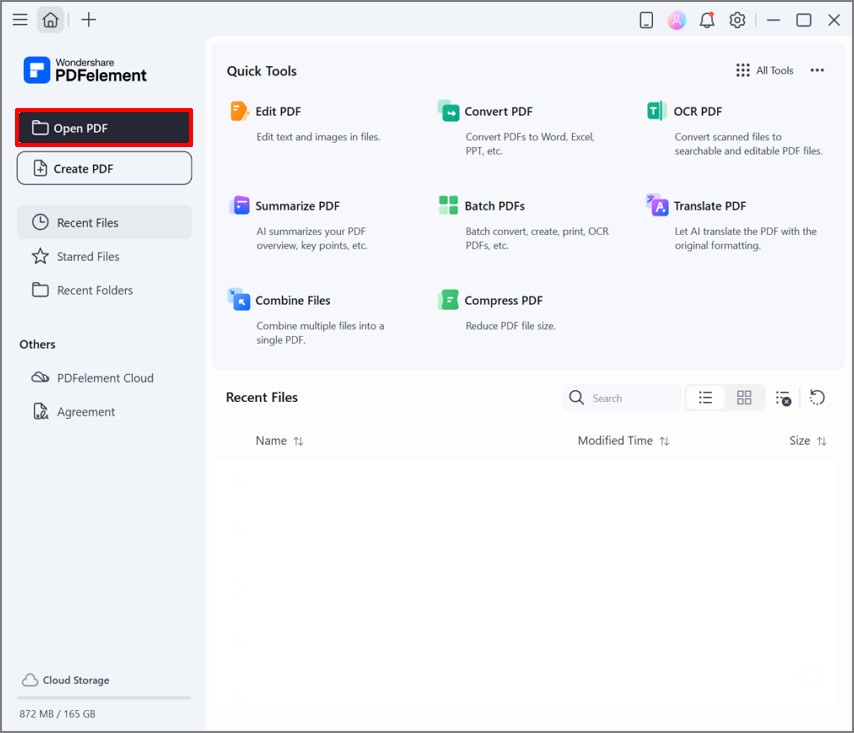
Step 1Choose the Open PDF Button in PDFelement
Begin by clicking the "Open PDF" button on the homepage to insert the desired contract file from your device.
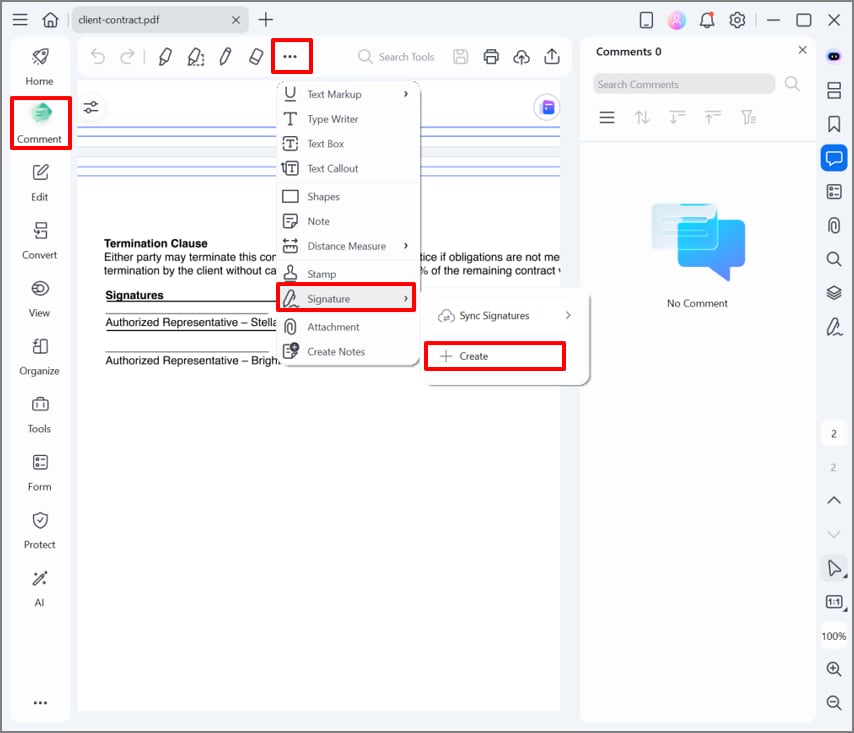
Step 2Select Comment Menu to Add Signature
As you open the file, choose the "Comment" option from the left toolbar and click on the "3 Dots." Next, select the "Signature" option and hit the "+Create" option in the pop-up menu.
G2 Rating: 4.5/5 |100% Secure
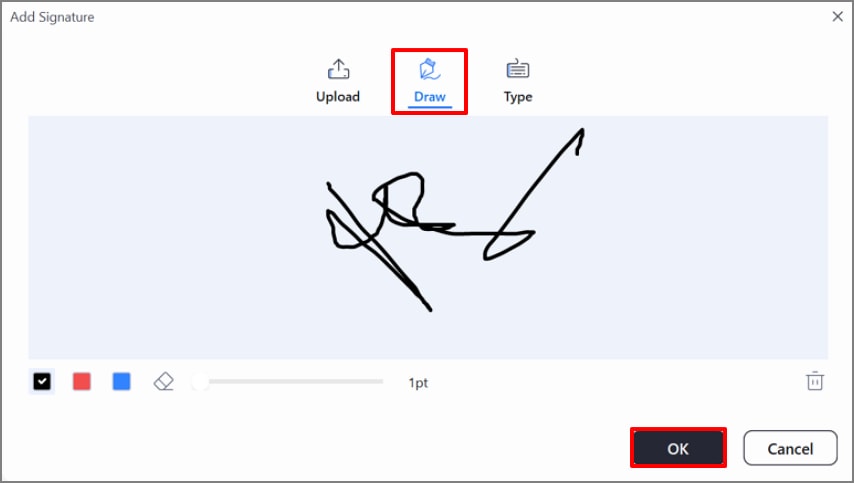
Step 3Click the Draw Option to Create an Electronic Signature
Afterwards, click on the "Draw" option to create the e-signature and hit the "Ok" button. Here, you can also upload the signed image by choosing the "Upload" option or type your name using the "Type" option.
Step 4Place The Signature and Save The PDF file
Lastly, select the e-signature to place it in the appropriate position in the signature field. After verifying its accuracy, click the "Save" icon to save the file and share the signed contract with the client.
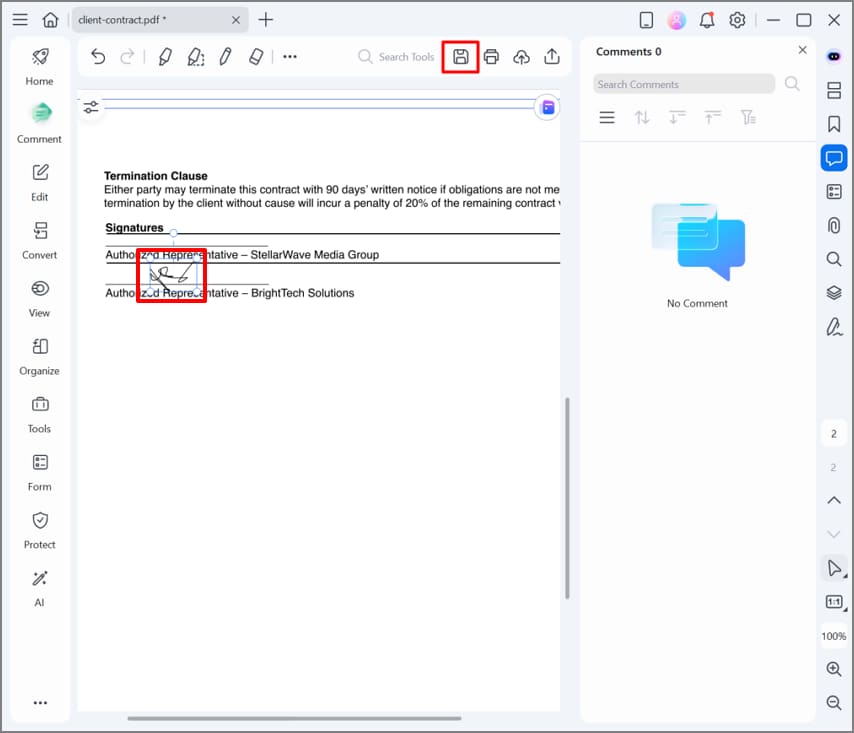
Outcome: Now, your file includes an embedded e-signature that can be shared with the client. Without worrying about printer and internet issues, you can create your E-sign agreement anytime with the PDFelement tool.
Part 6. Signing Agreements Sent by Someone Else
An Ohio-based startup receives an urgent employment contract by email for immediate hiring. When the employer discovers the agreement was created as a Word document, PDFelement becomes a practical solution. It allows users to import third-party files and automatically convert them into an editable PDF.
This efficient tool ensures the file format is not altered during conversion. Users can add e-signatures by accessing the "Signatures" option in the "Comment" section. Overall, PDFelement shines as an ideal option for remote workflows, ensuring accurate formatting preservation and non-destructive overlays.
G2 Rating: 4.5/5 |100% Secure
Part 7. When To Use Digital Signatures for Agreements
Digital signatures are beneficial for agreements that require higher assurance, including financial contracts and legal NDAs. Users prefer these signs over e-signs to verify identity and mitigate fraud risk. This move will protect the signature and stop the other party from making alterations. For this purpose, PDFelement provides support for digital signature on agreement, so go through its detailed steps below:
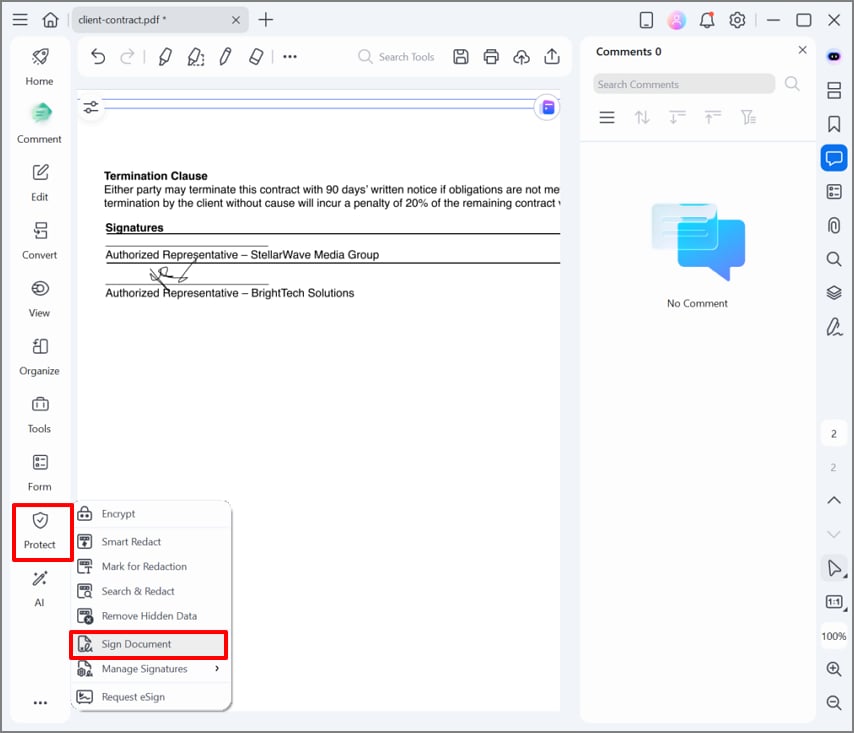
Step 1Access the Protect Menu to Choose Sign Document
After adding the signature to your contract, hit the "Protect" menu to select the "Sign Document" option.
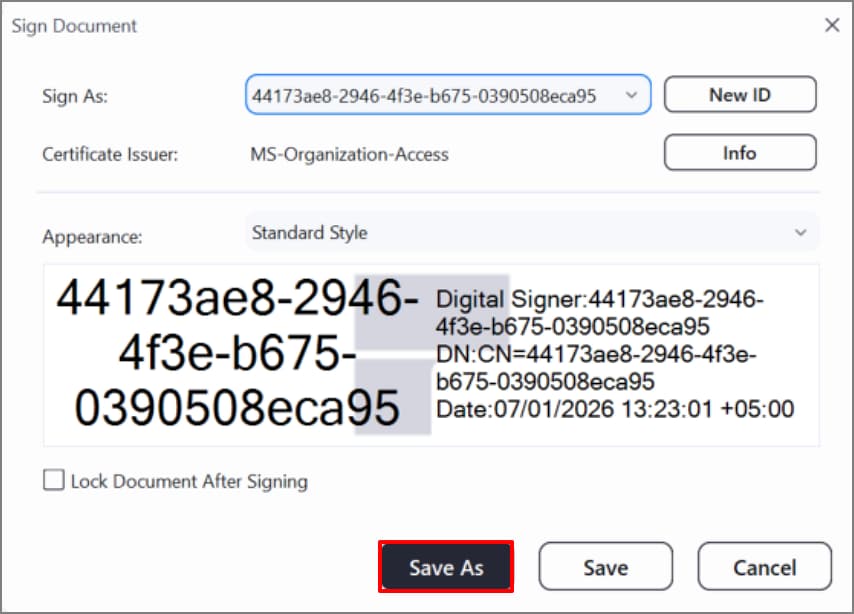
Step 2Save the Embedded Sign ID With PDFelement
Here, review the ID generated for your signature and select the "Save As" button to make the signature secure and un-editable.
G2 Rating: 4.5/5 |100% Secure
Part 8. Online Agreement Signing Vs Desktop Signing Tools
Now, if you are confused about choosing an appropriate tool to sign an agreement, then go through the following:
Online Agreement Signing Platforms
Convenient: Online tools can be accessed from any device, making them a good choice for quick e-signatures on the go.
Require Internet: To process your files, you need a stable internet connection, as online tools entirely rely on it.
Subscription-Based: Most tools offer premium features, including e-signatures, behind a paywall, which can be an issue for startups.
Cloud Storage: Files must be uploaded to the site's cloud storage, which can compromise the privacy of your confidential data.
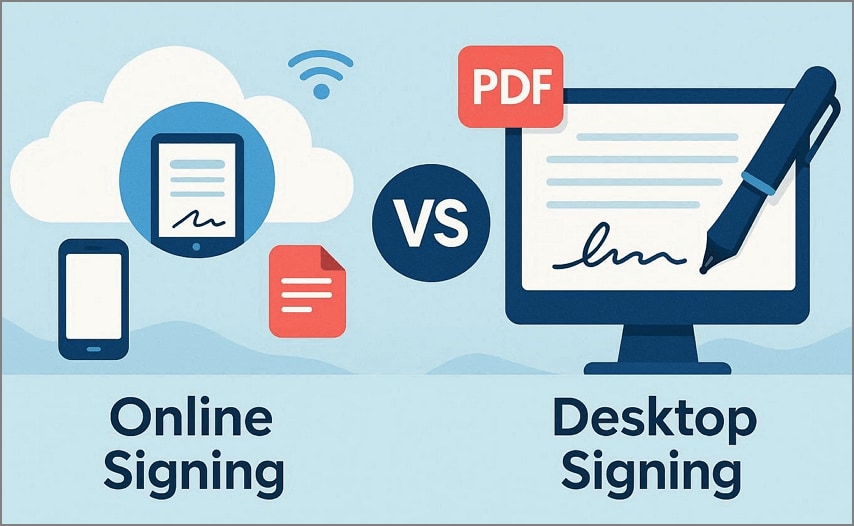
Desktop PDF Signing Tool (PDFelement)
Local File Control: The PDFelement tool processes the file on your system, ensuring that the data privacy remains intact.
Offline Signing: As a desktop tool, it can operate without an internet connection, making it easily accessible to users.
Frequent Agreement Signing: Users can add e-signatures to unlimited agreements without having any cap on file type or size.
Advanced Editing: Besides adding e-signatures, it also provides other features like "Organize", Convert", and "Edit" for generating professional PDFs.
Batch Processing: Unlike other tools ot offers an advanced batch processing system to process multiple files simultaneously to save on extra work.
After comparing these tools, we recommend PDFelement as the practical choice for users whose main focus is privacy. Furthermore, you can access various features in a single platform to cater to all needs for PDF file editing.
Part 9. Common Mistakes When Signing Agreements Online (And How to Avoid Them)
Before wrapping up, you should review the following mistakes to avoid them in an electronic signature agreement:
Wrong Sign Placement: Sometimes users wrongly place the signature at the end of the file rather than on the dedicated signature line. So, one should properly go through the context to find the accurate section for the signatures.
Forget Signature Page: Users overlook the final execution page and sign anywhere in the contract, making it useless. To avoid this issue, always scroll to the end of the PDF file or use navigation tools to confirm all fields.
Wrong Signature Type: People misunderstood and use the e-signature for confidential documents requiring digital signatures. Ensure you verify the agreement type before inserting the accurate signature type.
Not Embedded Signature: If users export the flattened PDF file without signature integration, it will be at risk of removal. For the signature's safety, it is advised to protect the document by using security features.
People Also Ask
-
How do I sign an agreement online without printing?
To sign an agreement, open the contract in a PDF tool like PDFelement, and expand the Comment menu. Next, choose the Signature option to add your desired signatures in its dedicated section. -
Is an electronic signature valid on an agreement?
Yes, e-signatures are legally binding under the ESIGN Act (U.S.) and eIDAS (EU/global) law. Users are opting for e-signatures for most of the contracts in a remote workflow. -
Can I sign an agreement someone else created?
Absolutely, you simply have to open that file in the PDFelement tool to open it as a PDF. Furthermore, this tool also offers an advanced OCR to make the file editable to add signatures. -
What's the difference between eSign and digital signatures for agreements?
E-signs are simple, fast methods for routine use, using an image or typed name. Whereas digital signatures use PKI certificates for tamper-proof integrity in high-risk cases. -
Do both parties need the same software to sign an agreement?
No, it is not necessary for both parties to use the same tools for agreement signing. However, we recommend using PDFelement, which provides various advanced features, including editing and conversion.
Wrap-Up: The Easiest Way to Sign Agreements
Agreement signing has been shifted from physical to digital methods, eliminating the extra hassle. This article covers an efficient PDF tool that simplifies the procedure to know how to sign agreement. Furthermore, we recommend using PDFelement, which lets you add both electronic and digital signatures without scanning or printing.




