

A contract can pass through many hands after it is signed. Accountants, lenders, auditors, or potential partners may all receive a copy. Some clauses might also end up in later templates. Those details can easily follow the contract from one recipient to another. Data masking hides sensitive information without making the remaining agreement difficult to read or use.
This guide explains what contract information needs masking, when it is necessary, and how PDFelement helps permanently remove sensitive content from contracts and attachments.


 G2 Rating: 4.5/5 |
 100% Secure
In this article
Part 1. Data Masking in Contracts Explained
The data masking meaning in a contract context is narrower than the term suggests elsewhere. Databases use masking to build realistic test environments from live records, while contracts use it when sharing documents with people who need most, but not all, of their contents. One technical point matters most: drawing a black rectangle over PDF text usually adds a shape rather than deleting the content.
The original characters can remain and may still be copied. Genuine redaction removes the underlying content, making the distinction important when sensitive contract information must be protected. Regulation adds another distinction worth knowing.
Under EDPB Guidelines 01/2025 on Pseudonymization, pseudonymized data remains personal data when additional information can be used to identify the person. Truly anonymous information is treated differently because the person is no longer identifiable. This means GDPR masking decisions depend on whether information remains identifiable, rather than simply whether it looks hidden.
Part 2. The Contract Data That Needs Masking
Deciding what to hide is harder than performing the operation, because over-masking destroys a document's usefulness as surely as under-masking exposes it. The following 4 categories account for nearly everything worth removing, and each carries a different kind of exposure:
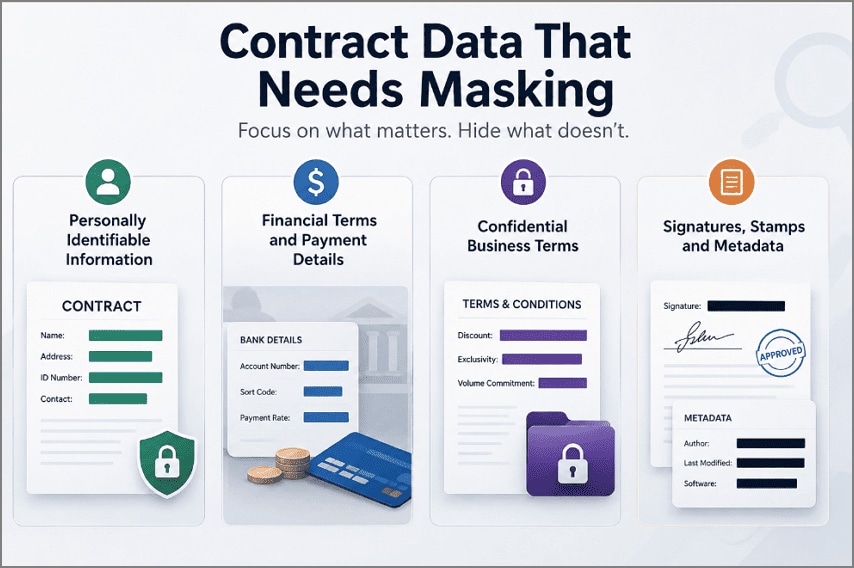
- Personally Identifiable Information: Check for names, home addresses, national ID numbers, and contact details, especially when they belong to people outside the agreement.
- Financial Terms and Payment Details: Bank account numbers, sort codes, and rates can expose more than the main contract does. Attachments such as bank statements deserve the same review.
- Confidential Business Terms: Discounts, exclusivity arrangements, and volume commitments may reveal commercially sensitive information. Data masking for data security helps keep these details protected from readers who do not need access.
- Signatures, Stamps, and Metadata: Signatures and stamps are easy to notice, but metadata is easier to miss. Author names, revision history, and editing software can remain embedded in the file.
Part 3. When Contracts Need Data Masking
Masking rarely happens for its own sake, and knowing the trigger points helps you catch documents before they leave rather than afterward. Here are the 3 situations that account for most of the demand, and masking technology can help handle each while determining what should stay visible:
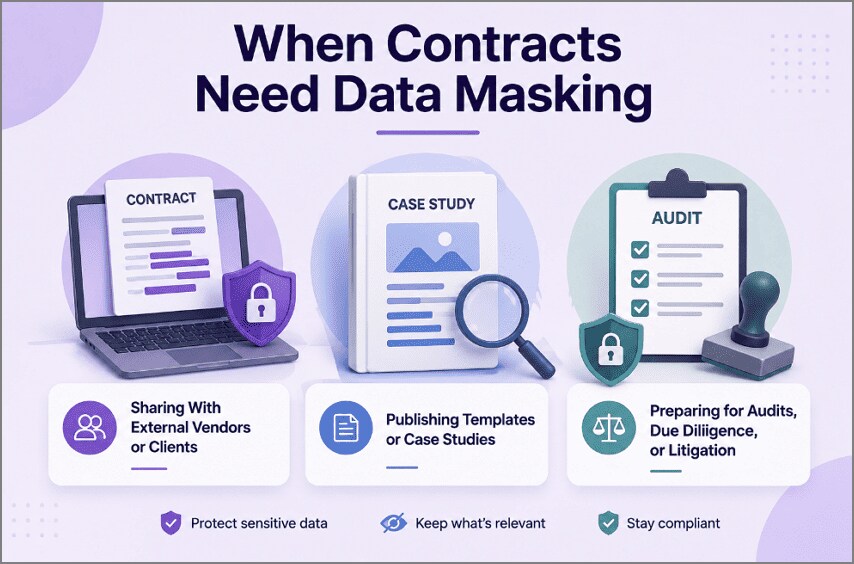
- Sharing With External Vendors or Clients: A subcontractor may need the scope and deadlines, but client pricing and other sensitive terms may not need to be shared. The ICO guidance on data sharing recommends considering what information needs to be shared and the risks involved.
- Publishing Templates or Case Studies: Real agreements often contain names and other identifying details. Remove them before sharing, while leaving the useful contract terms and structure intact.
- Preparing for Audits, Due Diligence, or Litigation: Reviewers may need broad access, but unrelated third-party personal data still requires protection. Here, external requirements often determine what must be masked.
Part 4. Common Data Masking Methods for Contract Security
No single technique fits every field, which is why data masking for data security works better as a toolkit than a rule. An account number, a party name, and a signature date each call for different handling. The following 5 data masking methods cover contract work, and the table below sets them against what they suit:
| Method | How It Works | Example |
| Character Masking | Hides part of a value while keeping enough to identify it | 31001019100 becomes 310****9100 |
| Substitution | Replaces real details with realistic fictional equivalents | A supplier name becomes a placeholder company |
| Generalization | Reduces precision without losing the point | March 12, 2026 becomes Q1 2026 |
| Deletion | Removes the content permanently, leaving nothing behind | A bank account line disappears from the page |
| Randomization | Swaps values for random equivalents of the same type | Salary figures shuffled across an appendix |
Choosing between these data masking techniques depends on whether the reader needs to recognize the field or merely see that it existed. Character masking lets an auditor match a partially hidden account against their own records. Deletion suits anything the reader has no legitimate reason to see at all.
Part 5. AI-Powered Contract Masking with PDFelement
Applying those methods by hand across a 50-page agreement and its attachments is slow and easy to get wrong. One missed account number in an appendix can undo the care taken everywhere else. Long contracts can hide sensitive information in places you might miss, including tables, signatures, and attachments. Checking and masking each detail by hand can also take considerable time.
PDFelement uses masking technology to simplify this process by automatically detecting sensitive information. Its Smart Redact feature identifies names, identification numbers, bank details, and other sensitive fields, then presents them for review before anything is applied. Applied redactions remove the underlying content rather than simply covering it, helping ensure masked information cannot be recovered from the file afterward. Follow the 5 steps below to mask a contract:
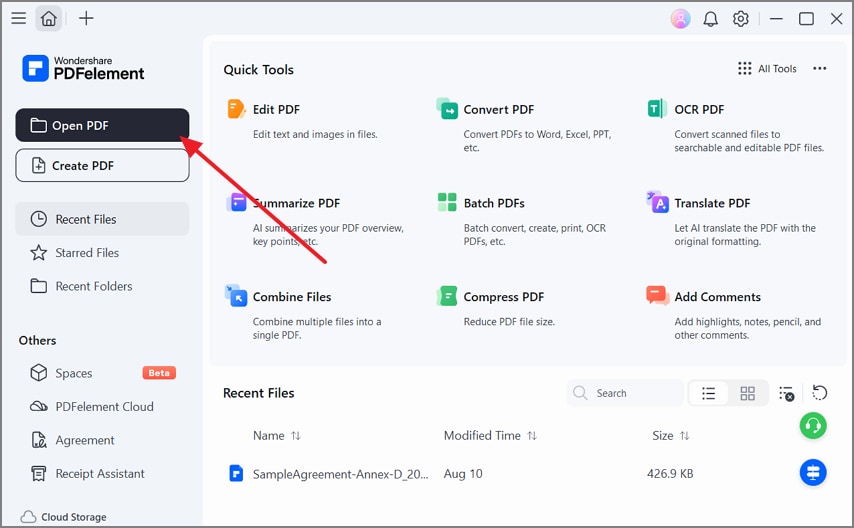
Step 1. Open the PDF in PDFelement
Launch Wondershare PDFelement and click “Open PDF.” Select the PDF containing the sensitive information you want to redact.
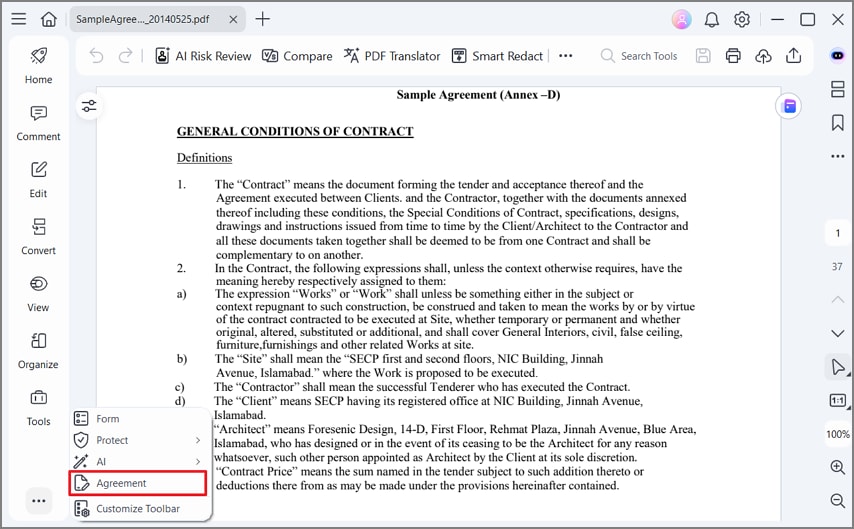
Step 2. Access the Agreement Tool
After the PDF opens, click the “More (...)” option in the left toolbar. Select “Agreement” from the menu to access document-related tools.
Step 3. Run the Smart Redact
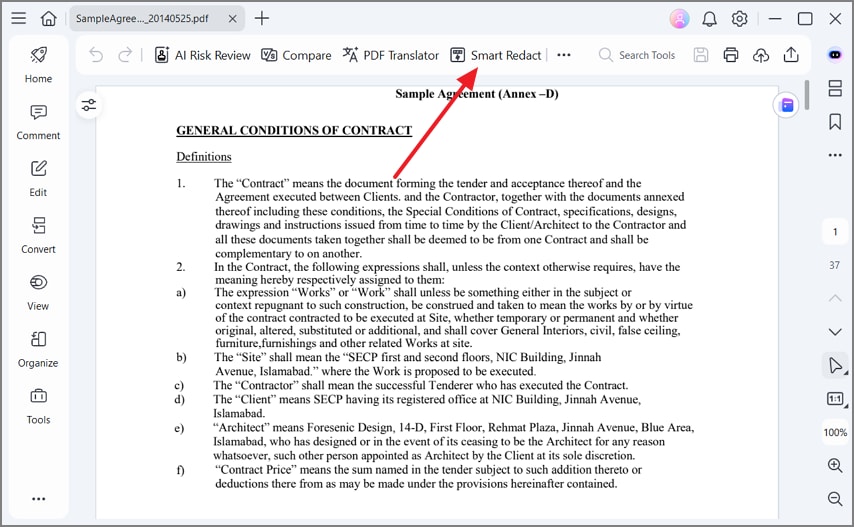
Click “Smart Redact” from the top toolbar, then PDFelement opens the Smart Redact panel on the right side of the document.
Step 4. Choose Redaction Rules
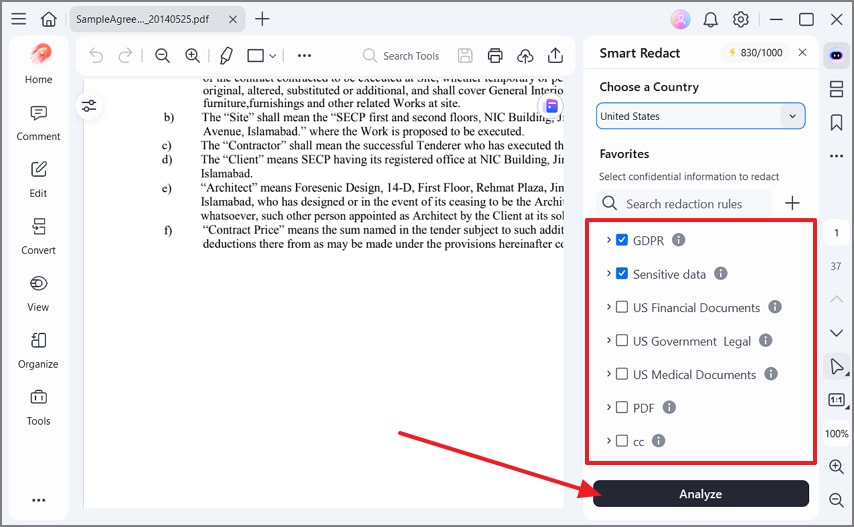
Select your country, then choose the categories you want PDFelement to detect, such as GDPR or Sensitive data. After that, press “Analyze” to scan the document for matching information.
Step 5. Review and Apply the Redaction
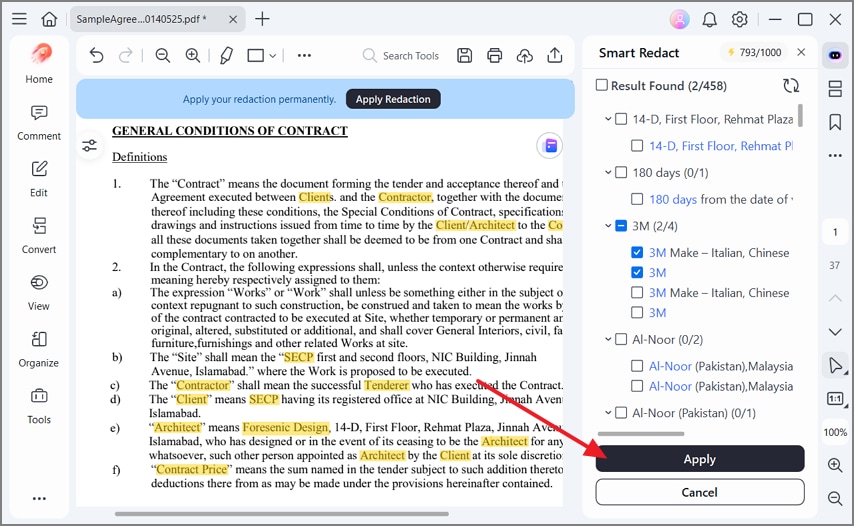
Review the detected results and select the information you want to remove. Click “Apply,” then choose “Apply Redaction” to permanently redact the selected content from the PDF.
G2 Rating: 4.5/5 |100% Secure
Frequently Asked Questions
What is the data masking meaning in a contract?
Hiding or removing specific details in an agreement so it can be shared without exposing personal, financial, or commercially sensitive information. The rest of the document stays intact and readable.
Can I mask data in a contract without changing the legal meaning?
Usually yes, provided you remove identifying details rather than substantive terms. Obligations, deadlines, and liability clauses should stay untouched, and a signed agreement being masked for circulation is worth checking with counsel first.
How do I redact bank statements attached to a contract?
Treat attachments as part of the same job rather than separate files. Account numbers, sort codes, and transaction lines all need removing, and automated detection catches entries that manual review commonly misses.
Can PDFelement help mask contract data in PDFs?
Smart Redact handles detection and permanent removal in one pass, with batch processing across multiple files. Reusable profiles help when the same contract types come through repeatedly.
Final Takeaway
To conclude, contract exposure often happens through overlooked attachments or ineffective masking rather than dramatic breaches. Before sharing an agreement, identify what the recipient genuinely needs and remove anything unnecessary. Effective data masking protects sensitive details without compromising the document’s purpose or readability. For a simpler workflow, PDFelement can help detect sensitive information and permanently remove it before the contract leaves your organization.
G2 Rating: 4.5/5 |100% Secure




