

YouTube is a great place to learn, yet finding useful videos is difficult. Long videos make it hard to know if they are worth your time before watching. Many people now summarize YouTube videos before spending time watching the complete content carefully. Content creators and language learners all use summaries for different purposes.
There are 3 simple methods, and each offers different levels of speed, control, and learning. This guide explains each method, compares them clearly, and shares prompts for better video summaries.


 G2 Rating: 4.5/5 |
 100% Secure
In this article
Part 1. Who Needs a YouTube Summary?
Long videos are not useful when you only need the most important information quickly. Many people summarize YouTube videos because they have different learning and work needs every day. Let's explore who benefits from video summaries and why they use them for different tasks.
- Students: Review online lectures and prepare for exams without watching every lesson from beginning to end.
- Content Creators: Research competitors, follow trending topics, and discover fresh ideas in much less time.
- Professionals: Check webinars, business presentations, and training videos before watching the complete recording carefully.
- Researchers and Academics: Read key points from academic lectures before spending time on complete video sessions.
- Language Learners: Understand important ideas first and follow long videos with better confidence and understanding.

Part 2. YouTube AI Summary vs. Manual Summary
Choosing the right summary method depends on your learning goals and available time before watching videos. A YouTube AI summary saves time by showing important points within just a few seconds. Writing your own summary takes longer but helps you remember information much better afterward. Research from the Learning Scientists shows active recall improves long-term learning retention. To compare both methods more clearly, look at the table below:
| Factor | YouTube AI Summary | Manual Summary |
| Speed | Takes seconds, regardless of video length | Takes as long as the video or even longer |
| Effort Required | Requires a video link or transcript and a prompt | Requires watching, understanding, and writing notes |
| Accuracy | Depends on transcript quality and AI interpretation | Depends on your understanding of the content |
| Long Videos | Handles long videos quickly | Takes more time for longer videos |
| Retention | Helps with a quick overview but lower long-term retention | Improves understanding and long-term memory |
| Best Suited to | Quick reviews and deciding what to watch | Studying, exams, and deep learning |
The table does not mean you must choose only one method. Start with an AI summary to find the key points, then write your own notes to improve understanding and remember the information longer.
Part 3. 3 Common Ways to Summarize YouTube Videos
Different methods create a summary of a YouTube video, but each works in a different way. Below, we have 3 popular methods for summarizing YouTube videos:
Method 1: Browser Extensions With YouTubeDigest
The YouTubeDigest extension creates a summary without leaving the YouTube video page. It installs quickly and adds a summary option directly beside the video player. So, follow the steps below to use the YouTubeDigest extension for video summaries:
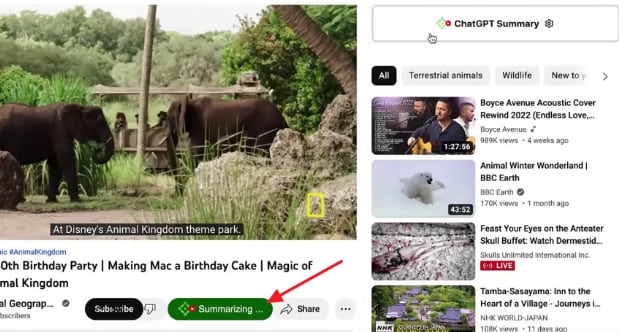
Step 1. Summarize the Video
Once you install YouTubeDigest from the Chrome Web Store, open any YouTube video and let the page finish loading first. Next, press the “Summarize” button under the video.
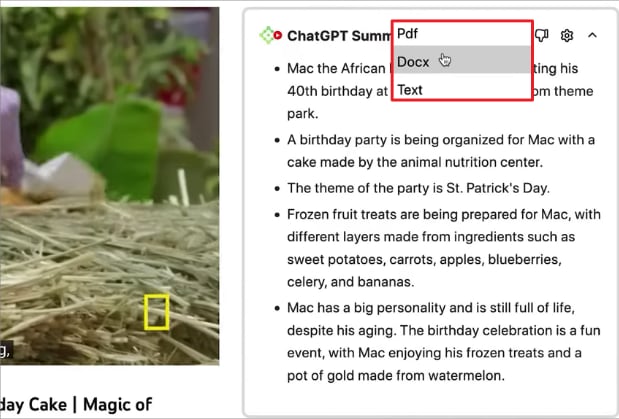
Step 2. Download the Summary
After you get the summary, press “Download” and choose a format to save the summary.
Method 2: Creating a Summary With ChatGPT and Claude
Chat assistants give more control and create summaries based on your instructions and prompts. A YouTube summary with ChatGPT and Claude depends on the transcript and your prompt quality. To create your own summary, see the steps below:
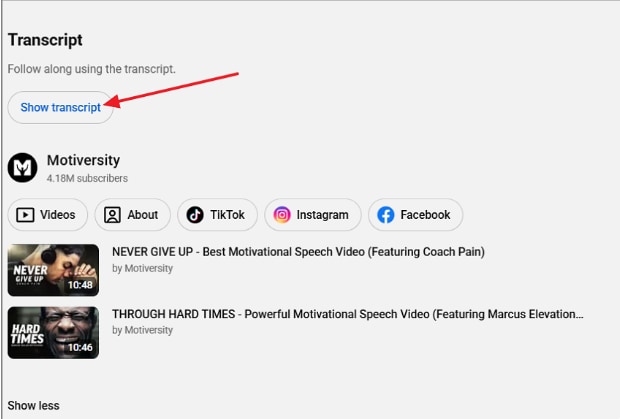
Step 1. Open the YouTube Transcript
Once you plan a YouTube video, scroll down to the video description, click “...more” and select “Show transcript” in the panel that appears.
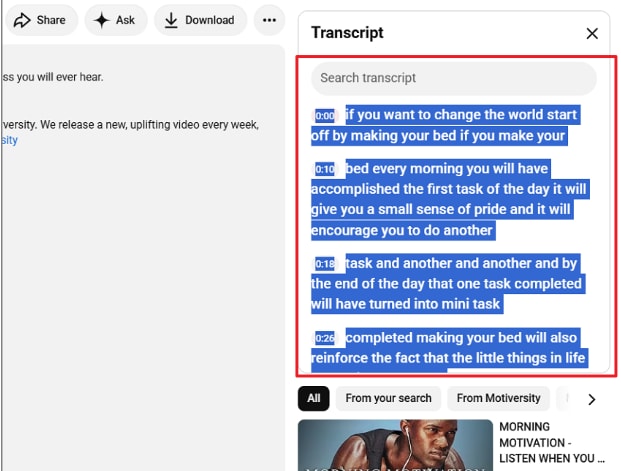
Step 2. Copy the Transcript
Next, copy the transcript from the right side panel.
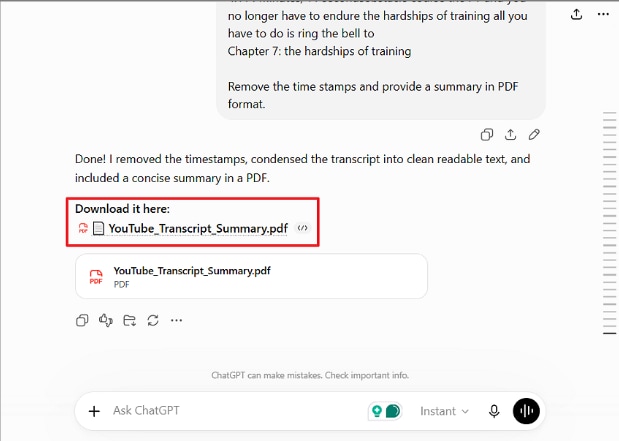
Step 3. Ask an AI Assistant to Summarize It
Give that script to ChatGPT or Claude and ask to remove timestamps, summarize the video, and provide the summary in the specific format.
Method 3: Summarizing With PDFelement
Summarizing long videos becomes easier when you need more than simple notes for learning purposes. PDFelement helps summarize YouTube videos by using only the video link without transcripts. Its AI Space keeps the original video available while answering your follow-up questions accurately afterward.
You can continue asking questions without copying transcripts into another tool or website again. It also creates mind maps, reports, notes, and other helpful study materials from the video. So, follow the steps below to summarize videos and create useful study materials with PDFelement.
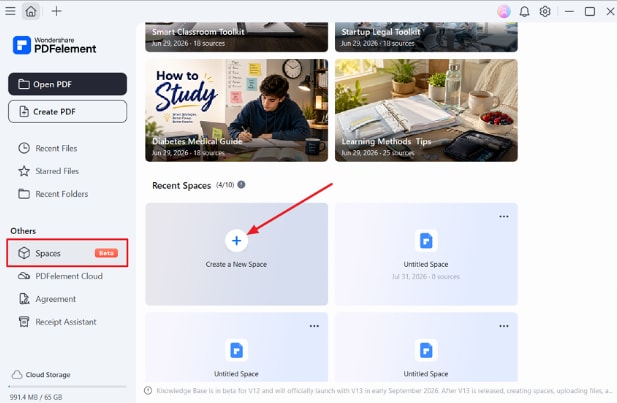
Step 1. Create a New Space in PDFelement
Once you enter PDFelement, press the “Spaces” option in the left side panel and choose “Create a New Space.”
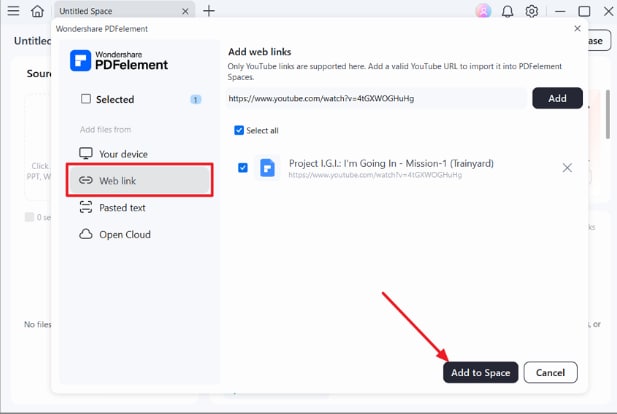
Step 2. Add a New Source
Next, press “Add Sources,” click “Web link” in the left side panel, and paste the YouTube video URL. After that, choose “Add to Space” to add the video in Space.
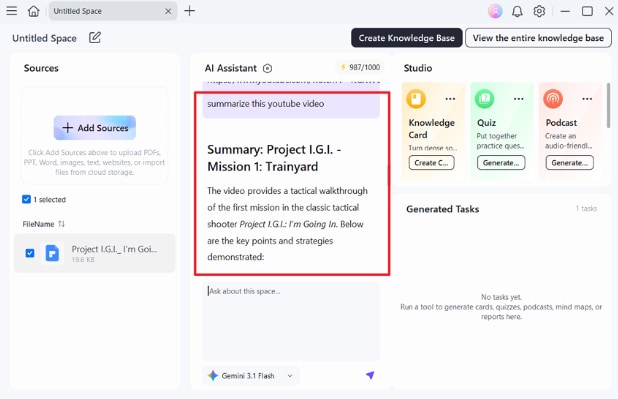
Step 3. Generate the Summary
Once done, ask the AI Assistant to summarize the YouTube video.
Step 4. Create Study Materials if Needed
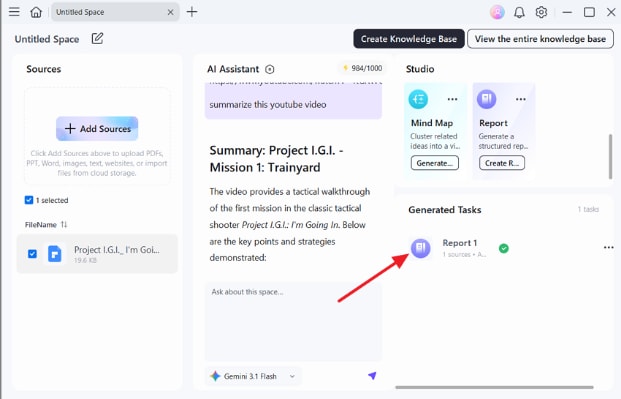
After getting the summary, choose “Report” or “Mind Maps” under the Studio section. Next, select the generated report under the “Generated Tasks” section to view it.
G2 Rating: 4.5/5 |100% Secure
Part 4. Which Method Should I Choose for a YouTube Summary?
Each method creates a useful summary of YouTube video content for different learning needs. Your choice depends on available time, preferred workflow, and personal learning goals before watching. The table below compares all methods and helps you choose the right option:
| Point of Comparison | Browser Extension | ChatGPT or Claude | PDFelement |
| Setup Effort | One-time browser installation | Existing account and transcript | Desktop application installation |
| Control Over Output | Limited summary formats | Fully customizable with prompts | Guided summaries with follow-up questions |
| Beyond the Summary | Summary only | Notes, outlines, or anything you request | Notes, mind maps, reports, and study materials |
| Main Limitation | Depends on transcript quality | Depends on prompt quality | Some AI features require a paid plan |
Part 5. Prompt Examples for a Better Summary
Good prompts help create a better YouTube summary with clear and useful information every time. Simple instructions improve summary quality regardless of the method or tool you choose. Let's explore 5 useful prompts for different summary needs below:
- Basic Summary: Summarize this YouTube video in 10 bullet points covering only the main ideas.
- Detailed Summary: Summarize this YouTube video by topic, including important examples, facts, and numbers.
- Lecture Summary: Summarize this lecture by section and list the key terms with simple definitions.
- Key Takeaways: List the 5 most important takeaways from this YouTube video in order of importance.
- Action Steps: Summarize this YouTube video as a step-by-step action checklist, including any preparation needed.
Frequently Asked Questions
What is a YouTube AI summary?
An AI-generated condensation of what was said in a video, built from the transcript rather than the footage. Format varies by tool, though most return bullet points or prose.
What is the difference between a YouTube summary and a transcript?
A transcript records every spoken word, including repeated phrases and unnecessary details from the original video. According to YouTube, transcripts also let viewers search spoken content and jump directly to specific video sections. In contrast, a summary keeps only the main points, making the content shorter and easier to understand.
Is a YouTube summary enough for learning?
A summary works well when deciding whether a video is worth watching or studying further. However, writing your own notes or testing yourself helps you understand and remember information better.
Are summaries always accurate?
Accuracy depends on transcript quality, audio clarity, and the density of technical vocabulary. Names, figures, and specialist terms are always worth checking against the video.
Final Takeaway
Summarize YouTube videos using the method that best matches your learning needs and goals. Browser extensions save time, while chat assistants provide greater control over summary results and formatting. Writing short personal notes after AI summaries helps improve understanding and remember important information longer. If you need summaries with notes, mind maps, and study materials, we recommend PDFelement.
G2 Rating: 4.5/5 |100% Secure




