The PDF has been sitting in the downloads folder for 3 weeks. A 100 pages, saved with real intent, opened once. The free hours since then went to driving, cooking, and folding laundry. None of those are moments when you can read. That mismatch is the actual barrier. The document wants your eyes and full attention, while the time you have offers neither.
A PDF to podcast conversion moves the material into a format that fits the hours you already have. The sections below explain podcast generation’s appeal, then show how to create an episode in PDFelement.


 G2 Rating: 4.5/5 |
 100% Secure
In this article
Part 1. PDF to Podcast AI Explained
Turning a document into audio sounds solved, given that screen readers have existed for decades. What changed is everything between the file and the sound. The phrase PDF to podcast AI describes tools that do not simply read a document aloud. They rebuild it into something worth hearing, much like Google’s Audio Overviews.
How AI Turns PDFs into Podcasts
The conversion resembles commissioning a script from someone who has already read the source. 4 stages sit between the upload and the finished audio, and each one changes the material:
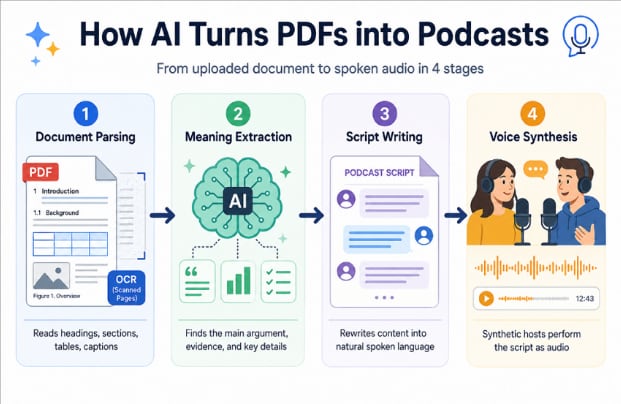
- Document Parsing: The file is read, including headings, sections, tables, and captions. Scanned pages need OCR first.
- Meaning Extraction: The AI identifies the argument, its evidence, and the details a listener can lose.
- Script Writing: Content is rewritten as speech, with the sentence lengths and signposting spoken language requires.
- Voice Synthesis: Synthetic hosts perform the script, usually as a conversation between two speakers rather than one reading.
Podcast vs. Text to Speech
That fourth stage is where the two approaches visibly part company, although the split begins earlier. Text to speech skips the middle, receiving text and producing sound with nothing in between. The table below sets out what that costs a listener:
| Point of Difference | Text to Speech | PDF to Podcast AI |
| Handling of the Text | Reads every word in order | Rewrites the content as a script |
| What Gets Dropped | Nothing, including page numbers and citations | Repetition, references, and layout artifacts |
| Delivery | One flat voice throughout | Two hosts discussing the material |
| Listening Effort | High, since structure must be inferred | Low, because the script signposts it |
Part 2. Why People Convert PDF to Podcast
Understanding the mechanism does not explain the appeal. Reading stays faster than listening when uninterrupted time is available. Podcast learning research points to a different advantage: fitting study into moments when opening a document simply is not possible. Below are the reasons why people turn PDFs into podcasts:
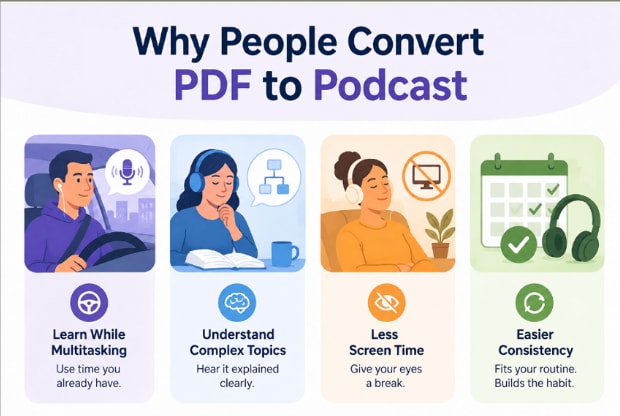
- Learning While Multitasking: Audio occupies attention that driving, cooking, or exercising leaves free. A commute that produced nothing now covers a chapter.
- Faster Understanding of Complex Documents: A dense methodology section explained conversationally often lands sooner than the same passage read twice.
- Less Screen Time: After a day spent on a monitor, material arriving through headphones removes one more reason to keep staring.
- Easier Consistency: Habits attached to existing routines survive. Listening on a regular drive asks for no new time, which is why it holds.
Part 3. PDFelement: An AI Podcast Generator From PDF
The best PDF to podcast experience should fit naturally into the document workflow instead of adding extra steps. PDFelement does exactly that by combining AI-powered reading, editing, and audio generation in one workspace. There is no need to export files or switch between separate applications before listening.
Moreover, PDFelement creates podcast-style audio directly from its AI Sidebar, alongside summarization, translation, and document analysis. The original PDF remains open and editable while the audio is generated, making it easy to verify details or revisit sections without interrupting the listening experience.
From PDF to Podcast Step by Step
The process is short enough to run before leaving the house. Most of the control sits in the second stage, where format and length get decided. Follow the steps below to create a podcast from PDF sources:
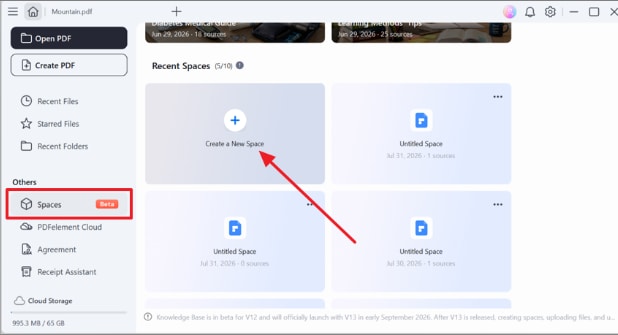
Step 1. Create a New Space
Open “Spaces” from the left panel, then click “Create a New Space” to start a workspace for your PDF and AI-generated content.
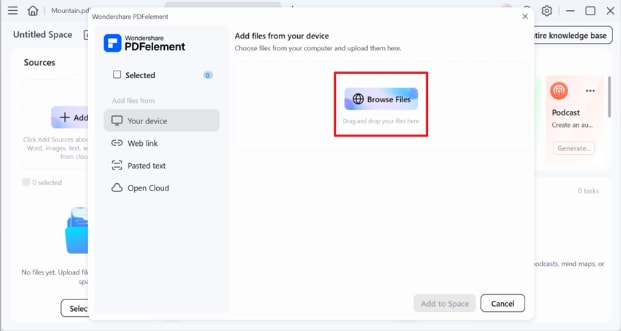
Step 2. Upload Your PDF
Press “Browse Files,” choose the PDF from your device, and prepare it for AI processing and podcast generation.
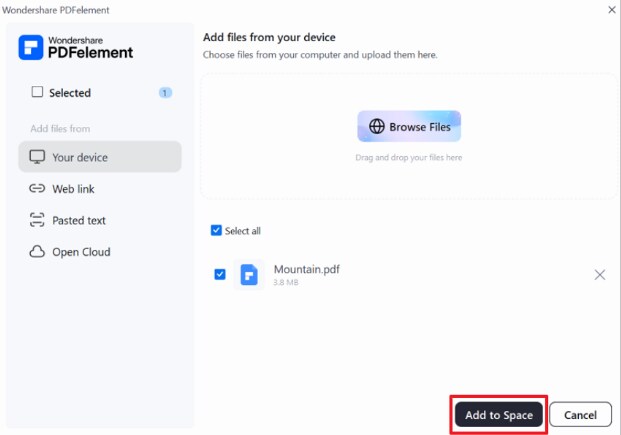
Step 3. Add the File to Your Space
Confirm the selected PDF, then click “Add to Space” to upload it into your new knowledge space.
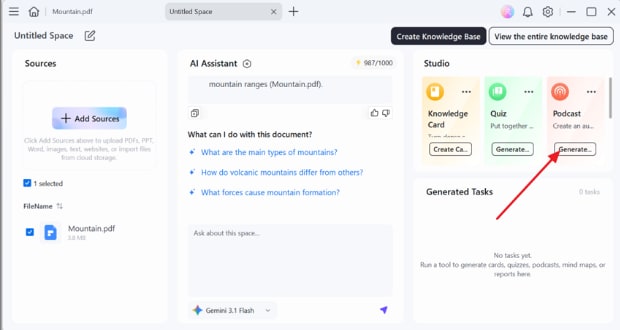
Step 4. Generate a Podcast
After the PDF finishes processing, go to the “Studio” panel and select “Generate” under the Podcast option.
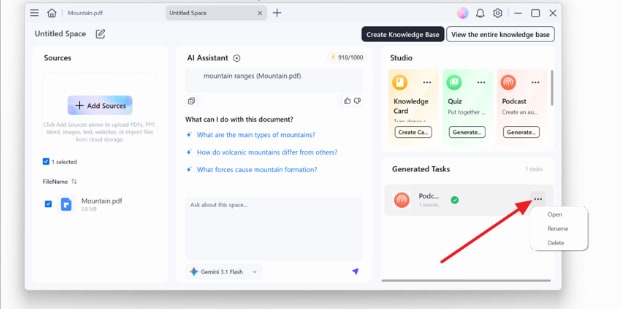
Step 5. Open the Generated Podcast
When generation finishes, open the “Three-dot” menu beside the completed task and select “Open” to view the podcast.
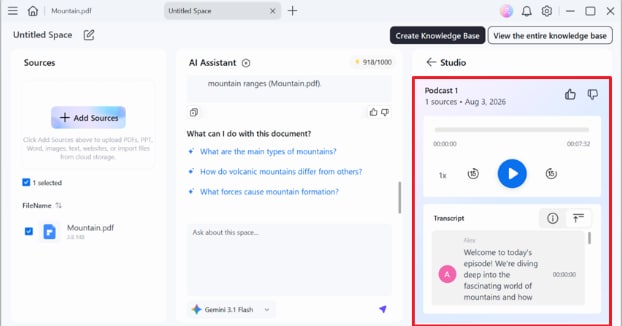
Step 6. Listen and Review the Transcript
Play the podcast directly in PDFelement, adjust playback speed if needed, and follow the synchronized transcript while listening.
What Makes PDFelement Different
Many tools can now turn documents into audio. The real difference between one PDF-to-podcast converter and another lies in the workflow, controls, and document features built around that audio generation.
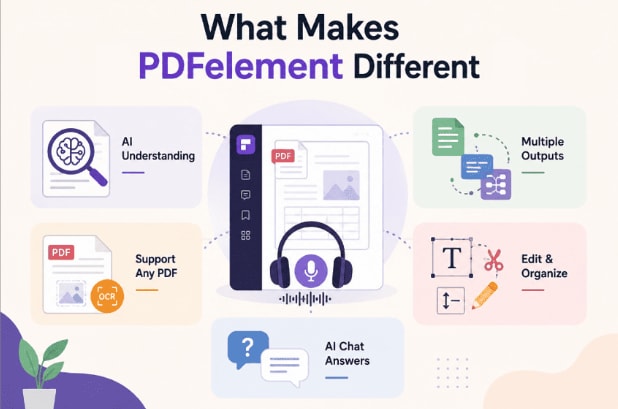
- AI Document Understanding: The script comes from an interpretation of the argument, not surface text.
- Multiple Outputs From One File: The same document also yields summaries, knowledge cards, and mind maps.
- Support for Any PDF: OCR brings scanned and image-based files into range.
- Editing and Organization Together: Trim, reorder, or annotate the source before generating anything.
- AI Chat for Instant Answers: Questions raised by the audio get answered against the document itself.
Who Can Benefit From PDFelement
The format suits anyone whose reading list has outgrown their reading time. What each group gains differs, which is worth knowing before switching:
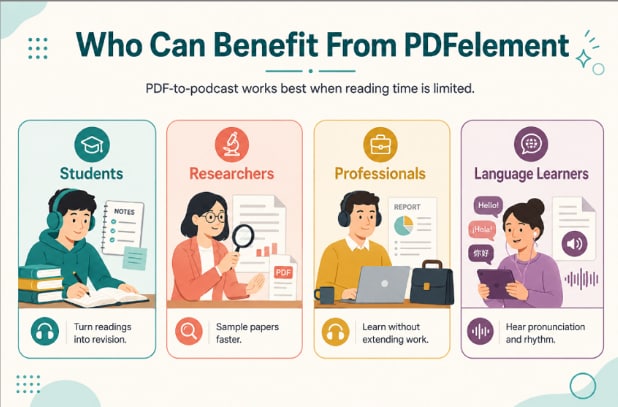
- Students: Lecture readings and textbook chapters become revision that fits around a timetable.
- Researchers and Academics: Papers outside a core specialism can be sampled before committing to a full read.
- Professionals: Reports, policies, and training material get covered without extending the working day.
- Language Learners: Written material in a second language arrives with pronunciation and natural rhythm attached.
G2 Rating: 4.5/5 |100% Secure
Part 4. Tips for Creating Better Podcasts From PDF
A PDF to podcast converter works best with clear source material. These 4 habits help produce an episode listeners are more likely to finish:
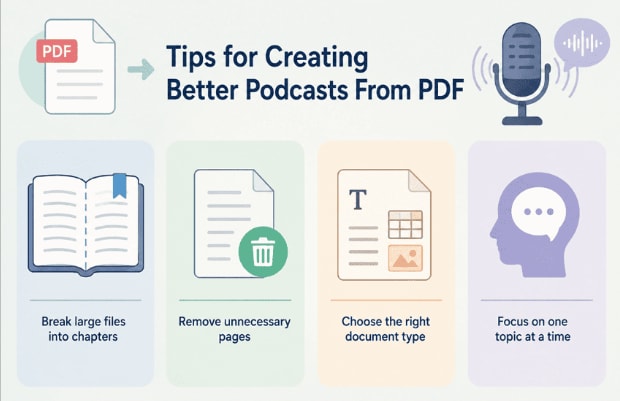
- Break Large Files into Chapters: A hundred pages produces a shapeless episode. One chapter has a beginning and an end.
- Remove Unnecessary Pages: Reference lists, appendices, and copyright notices add nothing to audio and dilute what matters.
- Choose the Right Document Type: Argument-driven material converts well. Tables, formulas, and diagrams rarely survive the move to sound.
- Focus on One Topic at a Time: A file covering three subjects yields an episode committing to none.
Frequently Asked Questions
Can I turn a PDF into a podcast for free?
Free tiers exist across most tools, though they usually cap episode length or monthly conversions. A PDF-to-podcast free option suits occasional use, while regular conversion generally needs a paid plan.
Can AI generate podcasts from research papers?
Yes, and papers convert well because their structure is predictable. Methods and results translate cleanly into spoken explanation, though equations and data tables lose meaning in audio.
How long does it take to convert a PDF to a podcast?
Usually a few minutes for a chapter-length file. Processing time scales with page count and with whether OCR must run first.
Can I create podcasts from scanned PDFs?
Yes, provided OCR converts the page images into text beforehand. Faint scans and handwriting produce recognition errors that get spoken aloud, so check those pages first.
Final Takeaway
The reading backlog rarely shrinks because someone finds extra hours. It shrinks when the material fits into time already spent driving, exercising, or doing routine tasks. Converting a PDF to podcast format makes that possible. PDFelement handles the audio conversion alongside editing, OCR, and AI chat, so the source remains usable. Start with the chapter you have postponed longest and play it during your next drive.
G2 Rating: 4.5/5 |100% Secure