

In this article
- How Do You Cite a PDF Correctly and Quickly?
- How Do You Identify the Source Type Before Citing a PDF?
- What Essential Details Do You Need to Cite a PDF Correctly?
- Mastering APA Style: How to Cite a PDF the Right Way?
- MLA Made Simple: How to Cite a PDF Correctly?
- How Can You Cite a PDF Correctly in Chicago Style?
- What Is the Right Way to Handle Missing Details in PDF Citations?
- What PDF Citation Examples Can You Actually Use?
- Which Common PDF Citation Mistakes Should Be Avoided?
- Which PDF Tools Can Be Used to Simplify Citation Preparation?
- Frequently Asked Questions
- Conclusion
Citing a PDF correctly is a common challenge for students, researchers, and professionals working with digital material. Many people assume there is a special PDF citation format that should be used universally, but that is not how citation styles actually work. To cite a PDF correctly, you need to identify what the file really is, gather the right publication details, and then format the citation according to APA, MLA, or Chicago rules. This guide walks through that process and also shows how PDFelement can help when reviewing PDFs for author names, dates, titles, page numbers, and other citation details.
Part 1. How Do You Cite a PDF Correctly and Quickly?
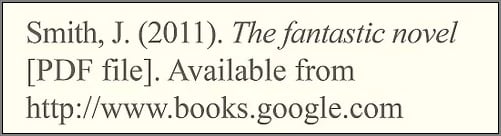
When people ask how to cite a PDF, the most important rule is simple: a PDF is just a file format, not a source type. That means the citation should follow the rules for the actual document inside the PDF rather than treating the file itself as a unique category.
No Separate PDF Format: A PDF is not cited using a special standalone formula. Instead, the correct citation style depends on the underlying source.
Identify the Real Source Type: Determine whether the file is a journal article, report, eBook, brochure, webpage, or another kind of document.
Follow the Required Citation Style: APA, MLA, and Chicago all organize author names, dates, titles, and links differently, so the final citation changes based on the style guide you are using.
Part 2. How Do You Identify the Source Type Before Citing a PDF?
Before formatting the citation, you need to understand what kind of source the PDF actually represents. This removes confusion and helps you apply the correct citation structure from the start.
PDF as a Journal Article
If the PDF is a journal article, cite it as an academic article rather than as a file. Focus on the author, journal title, volume, issue, year, page range, and DOI when available.
PDF as a Report or Government Document
When the PDF is a report, policy paper, or government publication, the organization may serve as the author. The report title, year, and issuing body usually become central citation elements.
PDF as an eBook, Brochure, or Web Document
For eBooks, brochures, and downloadable web documents, cite the material according to its publication format. Typical elements include the title, publisher, year, and the URL or access point.
Part 3. What Essential Details Do You Need to Cite a PDF Correctly?
Before learning how to cite a PDF in APA, MLA, or Chicago style, collect the core details from the file. Doing this first makes the actual citation much easier and more accurate.
| Citation Element | Why It Matters for PDF Citation |
|---|---|
| Author / Organization | Identifies who created the source and is required in most citation styles. |
| Publication Date | Helps readers understand the timeliness and relevance of the source. |
| Title & Subtitle | Ensures the exact source can be identified and referenced correctly. |
| Publisher / Institution | Adds credibility and context to the source. |
| DOI or URL | Allows readers to access or verify the original document. |
Part 4. Mastering APA Style: How to Cite a PDF the Right Way?
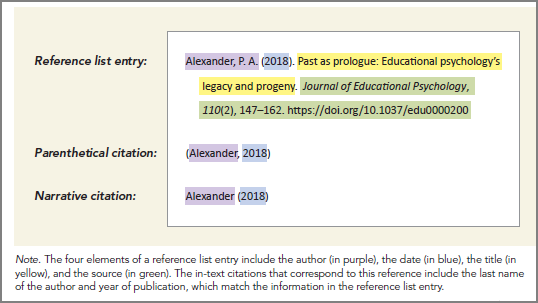
If you are learning how to cite a PDF in APA, the process becomes much simpler once you remember that APA cites the source type rather than the file extension.
APA Rule: Cite the Source, Not the PDF File
In APA format, a PDF is not treated as its own citation category. Instead, the citation depends on whether the source is an article, report, or web document.
APA Example: PDF of a Journal Article
When citing a journal article PDF, include the author, year, article title, journal name, volume, issue, and DOI if available.
Reference List: Smith, J. A. (2022). Digital research methods. Journal of Media Studies, 15(2), 45–60. https://doi.org/xxxxx
In-Text Citation: (Smith, 2022)
Using a DOI is preferred because it provides a stable and reliable link to the source.
APA Example: PDF of a Report or Web Document
For a report or web-hosted PDF, include the organization or author, year, title, and URL if the document is available online.
Reference List: World Health Organization. (2021). Global health report. https://www.example.com/report.pdf
In-Text Citation: (World Health Organization, 2021)
Use a URL when no DOI is available.
Part 5. MLA Made Simple: How to Cite a PDF Correctly?
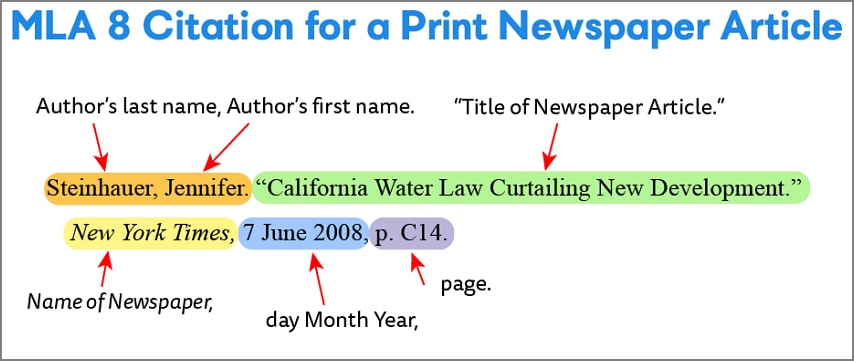
MLA can seem complicated at first, but the logic is the same: ignore the file type and focus on the original source details. Once that is clear, citing a PDF in MLA becomes much more straightforward.
MLA Format Basics for PDFs
MLA citations are built around the work the PDF represents, not the file format itself. Core elements still include the author, title, date, and location details.
MLA Example: PDF of a Journal Article
For a journal article in PDF form, use normal scholarly article formatting.
Works Cited: Smith, John A. “Digital Research Methods.” Journal of Media Studies, vol. 15, no. 2, 2022, pp. 45–60. https://doi.org/xxxxx
In-Text Citation: (Smith 45)
In MLA, page numbers are included in in-text citations when they are available.
MLA Example: PDF of a Report or Web Document
For reports or web-based PDFs, list the organization as the author when no individual writer is provided.
Works Cited: World Health Organization. Global Health Report 2021. 2021, https://www.example.com/report.pdf
In-Text Citation: (World Health Organization)
A URL should be included when the PDF is accessed online and no DOI exists.
Part 6. How Can You Cite a PDF Correctly in Chicago Style?
Chicago style is common in academic writing and uses clear source-document rules rather than treating PDFs as a special format. As with APA and MLA, the key is to identify the underlying source correctly.
Understanding Chicago Citation Basics for PDFs
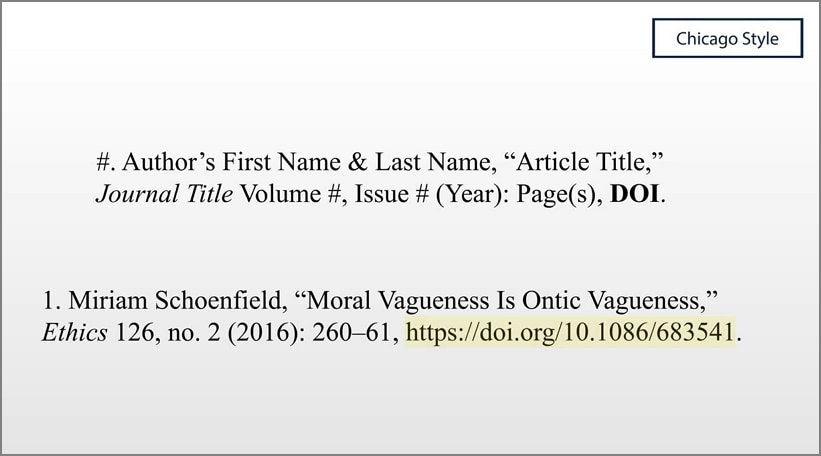
Chicago does not treat PDFs as a separate source type. Instead, you cite the underlying work using either the notes-bibliography system or the author-date system.
Bibliography Example: PDF Journal Article
For a journal article, include the author, article title, journal name, volume, issue, year, page range, and DOI.
Example: Smith, John A. “Digital Research Methods.” Journal of Media Studies 15, no. 2 (2022): 45–60. https://doi.org/xxxxx
This version belongs in the bibliography section.
Notes Example: PDF Source Citation
In the notes-bibliography system, citations appear as footnotes or endnotes with source details.
Example: John A. Smith, “Digital Research Methods,” Journal of Media Studies 15, no. 2 (2022): 47.
This helps readers locate the exact point being referenced.
Part 7. What Is the Right Way to Handle Missing Details in PDF Citations?
Not every PDF includes complete publication details. That can make citations feel messy, but APA, MLA, and Chicago all have ways to handle missing information without breaking the citation format.
No Author in a PDF: If no named author appears, begin with the title. In some cases, the organization can serve as the author if it clearly produced the document.
No Date in a PDF: When the publication date is missing, many styles allow “n.d.” for “no date.” This keeps the citation consistent while signaling that the year is unknown.
No Page Numbers in a PDF: When page numbers are unavailable, refer to headings, paragraph numbers, or omit the page reference depending on the citation style.
Part 8. What PDF Citation Examples Can You Actually Use (By Source Type)?
Practical examples make citation rules much easier to apply. The table below shows the most common PDF source types and how they should be treated in citations.
| PDF Source Type | How It Should Be Cited |
|---|---|
| Journal Article (PDF) | Cite it as a journal article, not a file. |
| Report (PDF) | Treat the organization as the author if needed. |
| eBook / Chapter (PDF) | Cite it like a book or chapter. |
| Web Download PDF | Cite it as a webpage or digital document. |
| Scanned / Incomplete PDF | Use the available details and fill gaps carefully according to the style guide. |
Part 9. Which Common PDF Citation Mistakes Should Be Avoided?
A few recurring mistakes make PDF citations less accurate and less useful for readers. Avoiding them can improve both correctness and consistency.
Treating PDF as the Source Type: Always cite the underlying content type rather than the file format itself.
Citing a Search Result Instead of the Source: Referencing a Google result or aggregator page instead of the original document source leads to weaker citations.
Ignoring the DOI: Leaving out a DOI removes a stable and often preferred access point for scholarly sources.
Using the Wrong or Missing Date/Author: Incorrect publication details can make the citation misleading or harder to verify.
Assuming Page Numbers Exist: Not every PDF has stable pagination, so in-text citations should reflect what the document actually provides.
Part 10. Which PDF Tools Can Be Used to Simplify Citation Preparation?
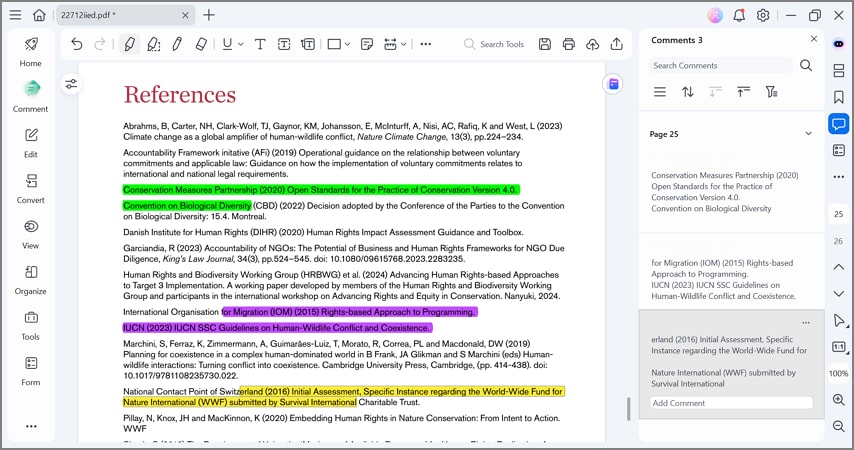
Preparing a citation often means reviewing the file carefully to find author names, publication dates, titles, URLs, and page numbers. A PDF tool can make this process faster by helping users highlight, inspect, and organize important details before they write the final citation.
PDF tools also support annotation, comments, and document organization, which helps streamline the overall citation workflow. Users can mark useful references or separate key sections before building citations in APA, MLA, or Chicago format.
For this kind of review work, PDFelement can help users inspect, annotate, and organize PDF material while preparing citations more efficiently.


 G2 Rating: 4.5/5 |
 100% Secure
Frequently Asked Questions
Do I cite a PDF differently from a website or article?
No. You do not cite a PDF as a separate source type. Instead, cite it according to what it actually is, such as a journal article, report, eBook, or webpage.
How do I cite a PDF in APA if there is no author?
If no author is listed, start the citation with the title of the document. If an organization is clearly responsible for the content, that organization can be used as the author instead.
How do I cite a PDF with no date?
In APA, MLA, and Chicago styles, use “n.d.” when the publication year is missing, following the conventions of the required style guide.
Should I cite the PDF link or the webpage where I found it?
Cite the original source of the document rather than a search or aggregator page. If the PDF is hosted online, include the direct PDF URL or the official source page when appropriate.
How do I cite a PDF that is actually a report?
If the PDF is a report, cite it as a report and use the organization as the author when no individual writer is named. Include the report title, year, publisher, and URL when available.
Can I cite a scanned PDF with incomplete information?
Yes. Use all available details and follow the rules for missing information. Start with the title when there is no author, and use “n.d.” when the date is missing.
G2 Rating: 4.5/5 |100% Secure
Conclusion
Learning how to cite a PDF is really about identifying the source correctly and then applying the rules of APA, MLA, or Chicago with care. Once the underlying source type is clear, the rest of the citation becomes much easier to structure. If you need help reviewing source details inside the file before citing it, PDFelement can support that preparation workflow.




