

Automated Invoice Processing Software: How to Automate Invoice Workflows from Start to Finish
The invoice processing software eliminates manual invoicing in favor of more efficient, error-free computer-mediated invoicing. It scans invoices, retrieves data, and forwards approvals through finance teams without latencies. Nonetheless, the bulk of invoices is increasing and renders the traditional processes expensive, time-consuming, and unscalable.
Thus, automated invoice processing software standardizes the invoice capture, validation, approval, and posting processes. This manual describes automated invoice processes that operate in a manner as discussed in the receipt and final payment. It emphasizes efficiency, visibility, and compliance advantage to finance departments handling invoices on a daily basis.
In this article
- What is Invoice Processing?
- Why Manual Invoice Processing No Longer Scales
- What Automated Invoice Processing Really Means
- Core Stages of An Automated Invoice Processing Workflow
- Benefits of Automated Invoice Processing
- AI Invoice Processing: What It Improves And What It Doesn't
- What To Look For In Automated Invoice Processing Software
- Using PDFelement For Automated Invoice Processing
- Automated Invoice Processing vs Accounting-Only Solutions
- Common Mistakes When Automating Invoice Processing
Part 1. What is Invoice Processing?
Invoice processing is the process businesses use to handle supplier invoices efficiently. When people ask "what is invoice processing?", it means receiving, checking, approving, and recording invoices. The approval procedures of manual invoices involve the use of emails, spreadsheets, and paper documents. Consequently, the invoice procedure becomes time-consuming, difficult to monitor, and liable to mistakes.
Part 2. Why Manual Invoice Processing No Longer Scales
As invoice volumes increase, manual workflows become harder to manage and sustain for several reasons:

- Rising Costs: Manual invoice handling consumes staff time and increases operational expenses. Repetitive data entry and follow-ups add hidden costs over time.
- Processing Delays: Invoices move slowly between inboxes and approval stages. This often leads to late payments and strained supplier relationships.
- Compliance Risks: Manual records are harder to track and verify during audits. Missing documents or approval gaps can create regulatory issues.
- Team Overload: Finance and operations teams spend excessive time fixing errors. This reduces focus on analysis, planning, and higher-value business tasks.
Part 3. What Automated Invoice Processing Really Means
Automated invoice processing is not merely a replacement for paper by software. It transforms the flow of invoices, the decision-making process, and time consumption by finance departments. Rather than manual, slow handling, invoices have a smart, interconnected flow supporting accuracy, speed, and control throughout the process. To get a clear view of this change, it is useful to consider the development of invoice handling step by step.
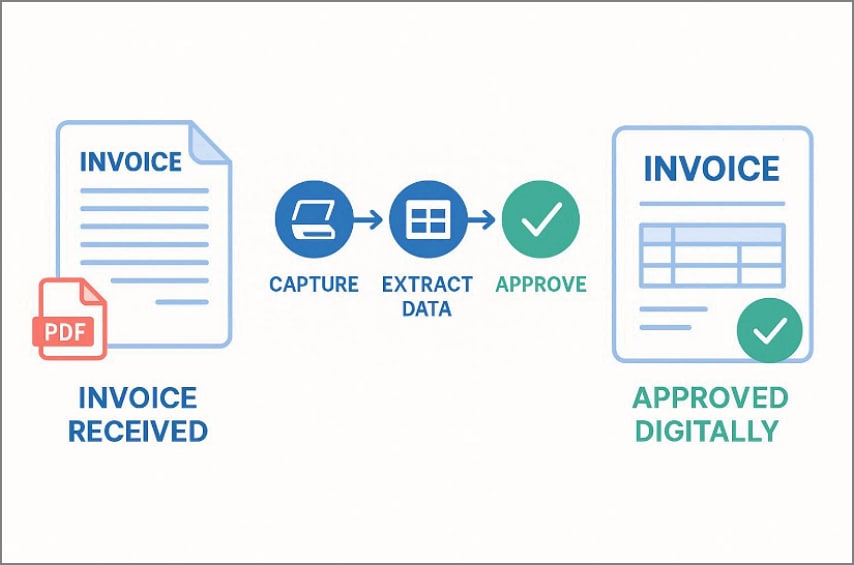
From Paper or PDF Invoices to Digital Workflows
In the old system, invoices would be received in the form of paper or PDF files and would wait to be typed in manually. Automated invoice processing involves digital capture of the invoices once received, extraction of important data, and transfer via automated approval channels. This saves time, enhances visibility, and makes all invoices trackable in real time.
Automation vs. Simple Digitization
To better understand this distinction, the table below highlights how automation goes beyond digitization:
| Aspect | Simple Digitization | Automation |
| Main Purpose | Converts paper invoices into digital files | Manages invoices automatically from start to finish |
| Data Handling | Stores invoice data only | Reads, validates, and processes invoice data |
| Intelligence Level | No decision-making | Uses rules and AI to make decisions |
| Error Handling | Errors must be found manually | Flags errors and exceptions automatically |
| Approval Process | Manual follow-ups required | Approvals triggered automatically |
| Workflow Control | Passive record keeping | Active workflow management |
Role of AI in Modern Invoice Processing
AI can be used to process invoices automatically and read them correctly, learn new formats, and improve with time. It discourages mistakes, finds duplications, and makes adjustments to changing supplier papers. Consequently, automatic invoice processing can be scalable, reliable, and capable of meeting the expanding needs of businesses.
Part 4. Core Stages of An Automated Invoice Processing Workflow
A good invoice processing procedure is a smooth conveyor belt, with one step getting the invoice ready for the next. Rather than requiring manual handoffs, workflow invoice processing ensures all the processes are just moving correctly and on time.
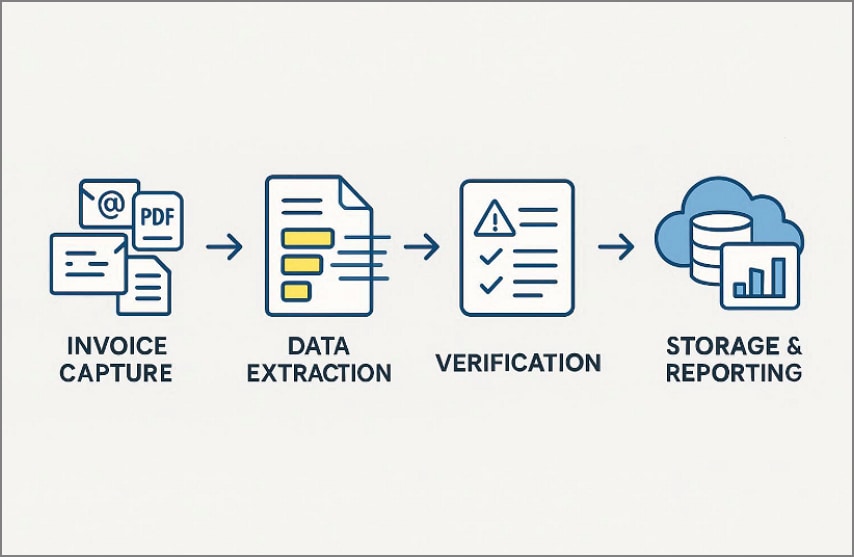
Invoice Capture and Scanning
First, invoices arrive in many forms, like emails, PDFs, scanned paper, or supplier portals. Automated systems capture these invoices instantly and convert them into readable digital formats. This step removes manual sorting and ensures no invoice is missed or delayed.
Invoice Data Extraction
Upon capture, the system will concentrate on the content of the invoice. Key information like invoice numbers, dates, vendor names, and amounts is automatically drawn using AI and OCR. With time, the system will learn various invoice layouts, and as a new document is processed, the data extraction process will be increasingly faster and more precise.
Data Verification and Validation
Afterwards, the extracted data is checked against predefined rules, purchase orders, and contracts. Errors, duplicates, or mismatches are flagged instantly. This stage of the invoice processing workflow reduces payment mistakes and prevents costly disputes.
Storage, Reporting, and Workflow Integration
Lastly, all the invoice steps lead to a single integrated business process. Licensed invoices are safely stored, searchable, and connected to accounting software. The invoice processing through workflow also allows real-time reporting, which provides the finance teams with a clear view and improved control of cash flow and performance.
Part 5. Benefits of Automated Invoice Processing
After automation is applied, businesses quickly notice clear improvements. Below are the key benefits of invoice automation that directly improve speed, accuracy, and control:
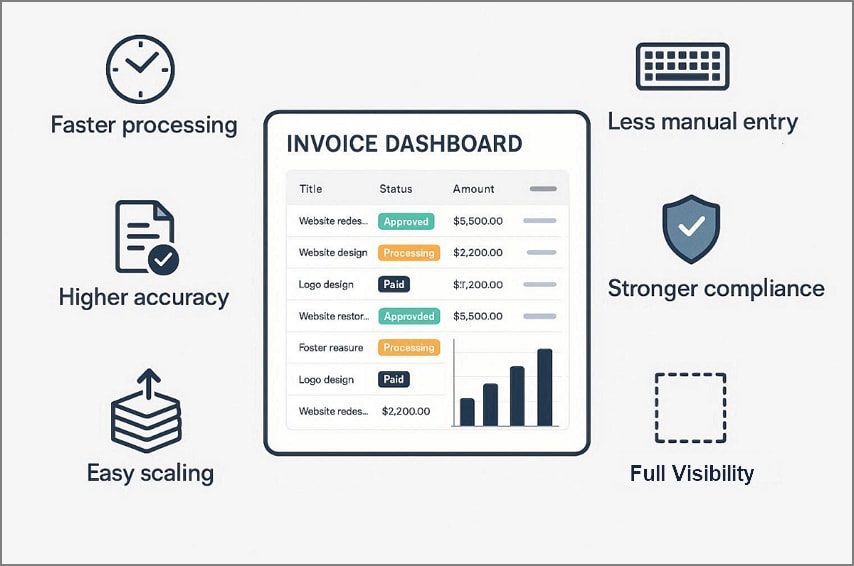
- Faster Processing: Invoices move automatically through approvals, reducing delays and speeding up payments overall. This delivers one of the key benefits of automated invoice processing systems.
- Less Entry: Manual typing is removed as invoice data is captured automatically by systems. These benefits of invoice processing free staff for higher-value work tasks.
- Higher Accuracy: AI checks extracted data against rules, reducing errors and inconsistencies across invoices. Consistent results strengthen trust in financial records and reporting for teams companywide.
- Stronger Compliance: Automated checks enforce policies and keep approval trails complete for audit purposes. This supports audits and regulatory reviews without last-minute stress or confusion.
- Easy Scaling: Systems handle growing invoice volumes without adding staff or costs over time. This is one of the strongest benefits of automated invoice processing today.
- Full Visibility: Dashboards show invoice status, cash flow impact, and processing performance in real-time. Teams gain control and insight across the entire invoice lifecycle process overall.
Part 6. AI Invoice Processing: What It Improves And What It Doesn't
The processing of AI invoices leads to very potent changes in the processing of invoices; however, it does not fully eliminate human judgment. Knowing the areas where AI invoice automation performs best, and where it remains in need of assistance, can enable businesses to make better use of it.
How AI Improves Invoice Data Extraction
AI invoice processing is an automated process for reading invoices that uses OCR and machine learning. It stores invoice numbers, dates, vendor details, and amounts in various formats. The AI invoice automation learns various layouts over time, which makes it faster, more accurate, and less manual data entry as the volumes of invoices grow.
Why Human Verification Still Matters
While AI improves accuracy and speed, human verification remains essential for confident decisions.
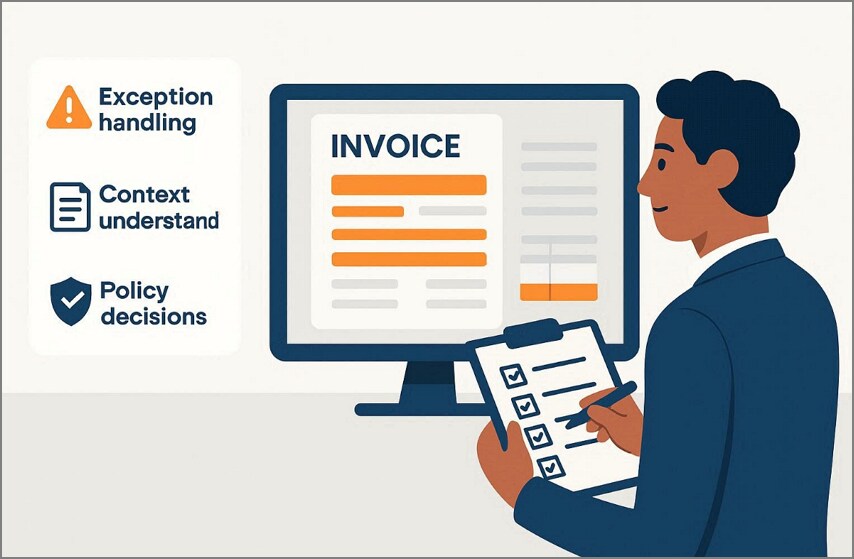
- Exception Handling: Humans review unusual invoices, mismatched amounts, or unclear details that AI cannot confidently resolve.
- Context Understanding: People understand contracts, pricing agreements, and business context beyond extracted invoice data.
- Policy Decisions: Human approval ensures invoices follow company policies and financial controls correctly.
Common Misconceptions About "Fully Automatic" Invoice Systems
This balance between automation and human input often leads to common misunderstandings mentioned below:
- AI invoice automation works without any human involvement at any stage.
- Automated systems can handle all exceptions and disputes independently without review.
- AI invoice processing eliminates the need for approvals or ongoing financial oversight.
Part 7. What To Look For In Automated Invoice Processing Software
The selection of the appropriate solution should be based on its ability to meet the invoice requirements in the world. The most important features to consider with invoice processing software are listed below:

- Data Accuracy: Accurate extraction ensures invoice details are captured correctly from varied formats. This feature reduces errors and improves trust in software for invoice processing.
- Review Tools: Built-in verification tools allow users to review, edit, and approve invoices easily. These tools ensure accuracy and control within invoice processing software systems.
- Cloud Access: Cloud-based platforms store invoices securely and allow access anytime, anywhere. This supports remote teams and simplifies collaboration across finance departments.
- Device Support: Cross-device access allows invoices to be reviewed on desktops, tablets, or mobiles. This flexibility improves response times and keeps workflows moving smoothly.
- Workflow Compatibility: The software should integrate easily with existing accounting and finance systems. Compatibility reduces disruption and improves the adoption of invoice processing software.
Part 8. Using PDFelement For Automated Invoice Processing
With an increase in invoice volumes, teams tend to work with receipts that are far in between, delayed approvals, and manual checks. Invoices can be scanned and stored in email inboxes, and finance personnel have to move between devices and systems to confirm simple information. This creates slowdowns, errors, and gaps in tracking, especially during reimbursements or tax periods.
This is where tools like PDFelement fit naturally into automated invoice processing. Instead of replacing human review, it supports the workflow by speeding up scanning, extracting key invoice fields, and keeping verification simple. The focus is on reducing repetitive work while maintaining accuracy and control across expense, reimbursement, and tax-related invoice tasks.


 G2 Rating: 4.5/5 |
 100% Secure
Guide to Use PDFelement for Automated Invoice Processing
The steps below outline how PDFelement can be used within an automated invoice processing workflow:
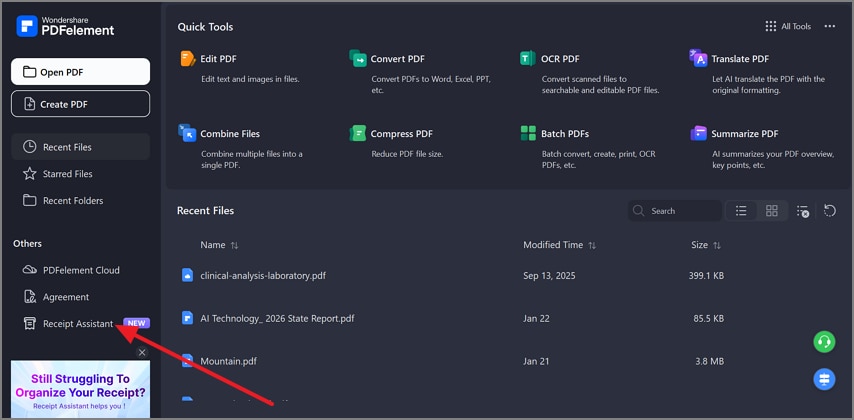
Step 1Access the Receipt Assistant Feature to Continue
Upon launching PDFelement, navigate to 'Receipt Assistant" from the left sidebar.
Step 2Import the Invoice to PDFelement
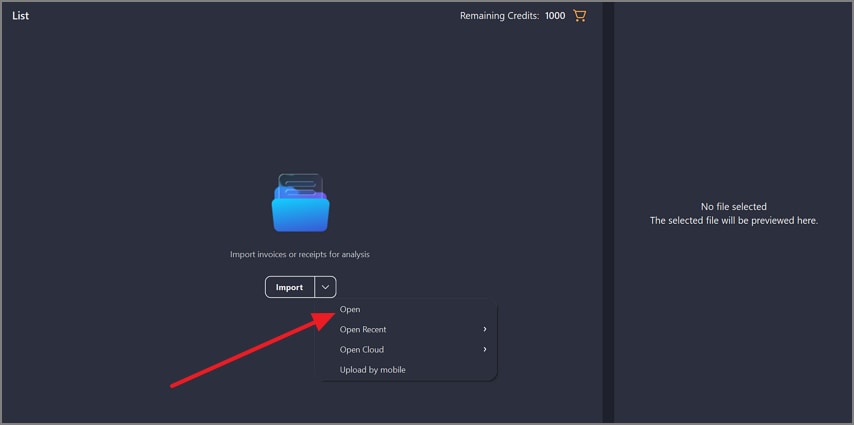
After that, click "Import" inside Receipt Assistant, then choose "Open" to add your receipt from your device. Moreover, you can select a recent invoice, access cloud files, or upload invoices scanned from mobile devices.
Step 3Preview the Invoice to Proceed
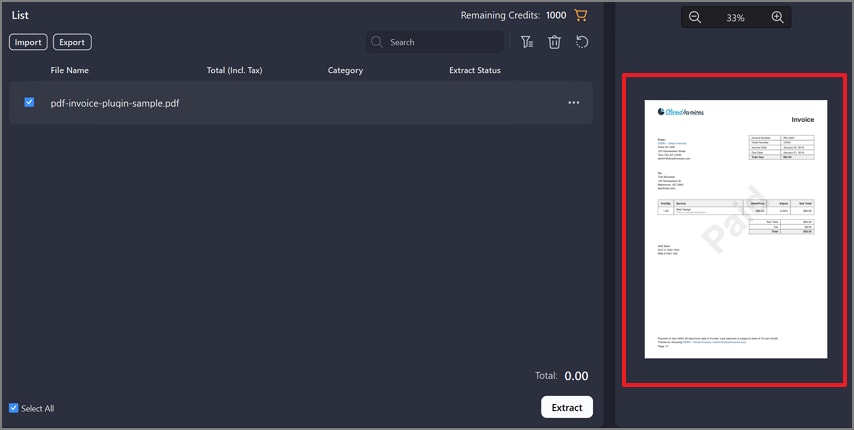
Once imported, the invoice appears in the list with a live preview panel on the right. This preview allows users to visually confirm invoice clarity, layout, and completeness before data extraction begins.
Step 4Start the Data Extraction of the Invoice
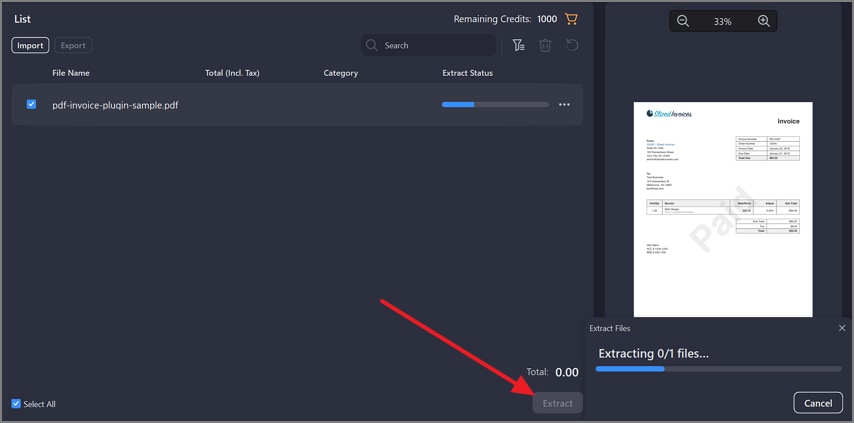
Now, select the invoice and click the "Extract" button to let PDFelement automatically extract key invoice fields.
Step 5Review Extracted Invoice Details
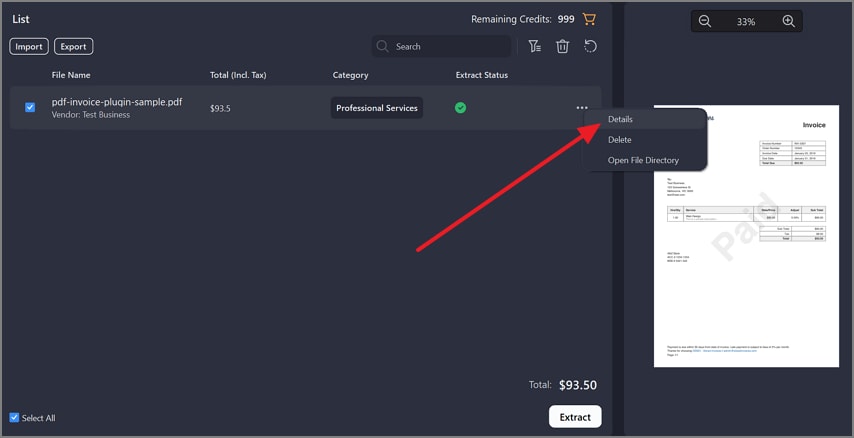
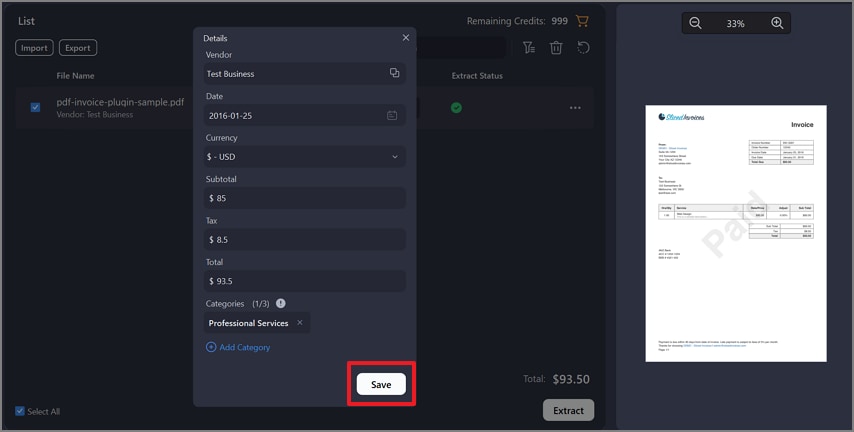
After extraction, click the "Three Dots" to later choose the "Details" option. Here, users can review vendor name, date, currency, subtotal, tax, total amount, and category. Each field is editable, allowing precise human verification.
Step 6Save Verified Invoice Data to Receipt Management
Once the accuracy is met, hit the "Save" button in the details panel to save invoice data to Receipt Management.
Step 7Search and Manage Invoices in Receipt Management
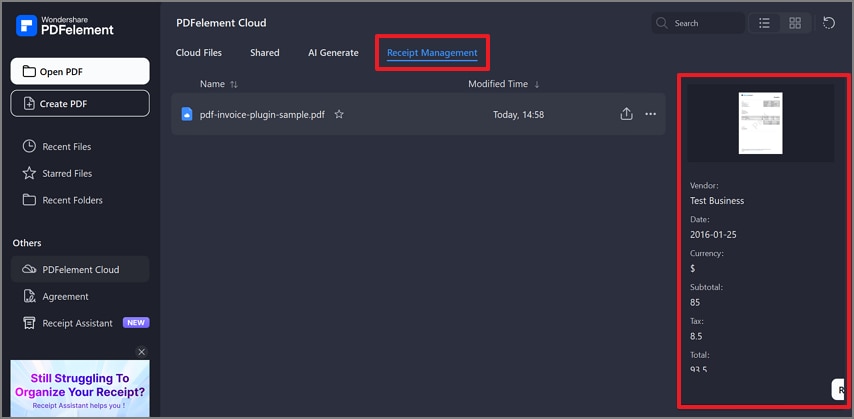
Now, verified invoices are saved to "Receipt Management" (Invoice Cloud Space). Plus, invoices remain searchable, securely archived, and accessible across devices, supporting audits and expense tracking.
Step 8Export Invoice Data When Needed
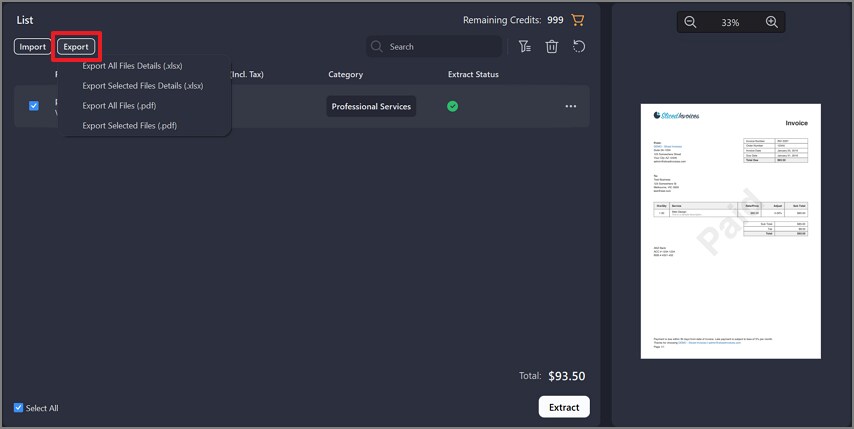
Here, use the "Export" option to download the invoice data. In addition, invoices can be exported as files or structured data for accounting, expense reporting, or recordkeeping purposes.
G2 Rating: 4.5/5 |100% Secure
Part 9. Automated Invoice Processing vs Accounting-Only Solutions
Though the terms invoice automation and accounting tools are often used interchangeably, the purposes of these two terms are very different. Therefore, identifying these differences helps businesses choose an appropriate invoice processing solution rather than forcing invoices into systems that do not fit.
Difference Between Invoice Automation and Payment Automation
| Focus Area | Invoice Automation System | Payment Automation |
| Primary role | Captures, verifies, and routes invoices | Executes supplier payments |
| Workflow stage | Before approval and posting | After approval and posting |
| Data handling | Extracts and validates invoice details | Uses finalized accounting data |
An invoice automation system focuses on managing invoices before payment decisions occur. It handles capture, validation, and approvals. Payment automation only manages fund transfers after invoices are already processed. Thus, confusing the two often leads to gaps in control and visibility.
Why Invoice Processing Should Not Be Limited to Accounting Systems
These limitations highlight why accounting systems alone are not sufficient for invoice processing:
- Design Mismatch: Accounting systems focus on financial records rather than invoice capture and validation.
- Workflow Gaps: Limited approval routing increases manual reviews, delays, and processing errors.
- Visibility Issues: Invoice tracking and retrieval become difficult across teams and audit processes.
- Manual Workarounds: Teams rely on emails or spreadsheets to manage invoice exceptions.
- Scalability Limits: Growing invoice volumes strain systems not designed for automation.
When Standalone Invoice Automation Makes Sense
Certain business conditions make a standalone invoice automation system the better choice.
- High Volume: Large invoice volumes require faster processing without increasing the accounting staff.
- Multiple Sources: Invoices arriving from emails, portals, and scans need centralized capture and control.
- Complex Approvals: Multi-level approval workflows demand clear routing and complete audit trails.
Standalone invoice automation works as a control layer before invoices enter accounting systems. It ensures data is verified, approvals are completed, and records remain accurate. This invoice processing solution scales efficiently while reducing errors as operations grow.
Part 10. Common Mistakes When Automating Invoice Processing
Choosing an invoice automation system requires avoiding the following common mistakes during the implementation process:

- No Validation: Automating processes without validation allows errors to flow unchecked across systems easily. Human review checkpoints are necessary to catch exceptions before approvals occur.
- OCR Reliance: Treating OCR as a complete solution ignores workflow rules and exception handling steps. OCR captures text, but an invoice automation system requires logic and controls too.
- Poor Storage: Ignoring invoice storage causes retrieval delays and weak visibility during audit processes. Centralized storage supports compliance, reporting, and faster issue resolution for finance teams.
- Compliance Gaps: Overlooking compliance requirements risks missing approvals, policies, and audit trails during reviews. An invoice processing solution must support controls, logs, and regulatory documentation consistently.
- Weak Integration: Poor integration planning creates data silos between invoice automation tools and systems. Disconnected systems reduce efficiency and increase manual reconciliation work for finance teams.
- Scaling Issues: Failing to plan scalability limits long-term invoice automation benefits for growth. Higher volumes expose performance issues not addressed during the early setup stages.
People Also Ask
-
What is automated invoice processing software?
Automated invoice processing software manages invoice capture, validation, approvals, and posting without effort. It replaces manual workflows with faster, accurate, and traceable digital invoice processes today. -
How does AI invoice processing work?
AI invoice processing uses OCR and machine learning to extract and classify data. The system learns formats, flags exceptions, and improves accuracy through continuous training processes. -
Can invoice processing be fully automated?
Invoice processing cannot be automated because exceptions, policies, and judgments require human review. Automation works best when combined with human oversight for accuracy and compliance purposes. -
What are the benefits of invoice automation?
Invoice automation delivers faster processing, reduced errors, lower costs, and improved financial visibility. It supports compliance, scalability, and better control across growing invoice volumes for businesses. -
How do I automate invoice processing effectively?
Automate invoice processing by standardizing capture, validation, approvals, and integration with accounting systems. Choose professional tools, define workflows clearly, and maintain human verification checkpoints for accuracy.
Wrap-up: Building a Reliable Invoice Automation System
To conclude, automated invoice processing software works best as a complete, connected workflow rather than a single tool. Reliable automation starts with structured, verified invoice data that supports accuracy and control. Professional solutions go beyond OCR by enabling validation, approvals, compliance, and audit readiness. PDFelement helps automate invoice processing while keeping financial data accurate, traceable, and consistently audit-ready.
G2 Rating: 4.5/5 |100% Secure




