

Contemporary papers are moving at light speed, taking sensitive data through the mail, clouds, and collaborative workspaces every day. With organizations going digital, it is increasingly difficult to safeguard confidential information without reducing productivity or teamwork. The laws, agreements, and privacy laws require accuracy in processing personal or business-sensitive data.
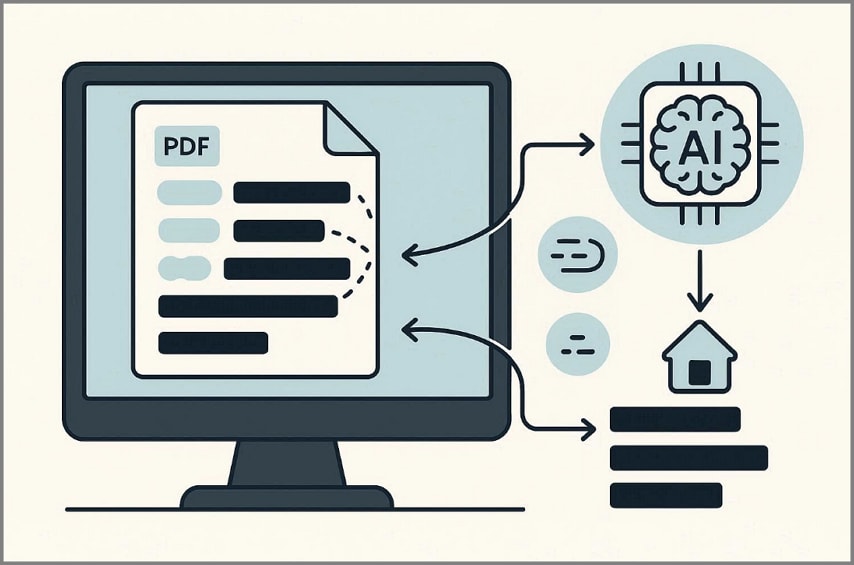
Here, AI redaction automates the detection of sensitive content before sharing documents with an external party. Smart redaction tools, rather than manual guesswork, examine context, patterns, and structure to eliminate errors. In addition, being able to know when automated redaction should be used ensures that documents are not leaked.
In this article
- What is AI Redaction?
- Why Manual Redaction is No Longer Enough
- How AI-Powered Redaction Works in Practice
- What Types of Information Do AI Redaction Tools Detect
- Why Location and Compliance Rules Matter in AI Redaction
- A Real-World AI Redaction Workflow in PDFs
- Auto Redacting PDFs vs Fully Automatic Redaction: What's the Difference?
- AI Redaction vs Traditional Redaction Tools
- Common Use Cases for AI redaction in PDFs
- Things to Check Before Using an AI Redaction Tool
Part 1. What is AI Redaction?
AI redaction is the process of identifying and permanently removing sensitive information from documents using intelligent assistance. Redaction protects personal, legal, and confidential data before sharing files. Unlike manual methods, AI redaction analyzes content patterns automatically, reducing errors and review time. However, it still relies on human oversight to ensure accuracy and document integrity during secure information handling workflows.
How AI Redaction Differs From Manual Redaction
The table below compares traditional and AI redaction methods used in document workflows:
| Aspect | Manual Redaction | AI Redaction |
| Detection Method | Users locate sensitive data manually, reviewing documents line by line. | Scans entire documents automatically using pattern and context recognition. |
| Speed and Effort | Time-consuming and repetitive, especially for long or complex files. | Processes large documents quickly with significantly less human effort. |
| Risk of Errors | Higher risk of missed or inconsistent redactions due to human oversight. | Automated detection reduces missed information and improves consistency. |
| Review Requirement | Requires manual checks throughout the entire redaction process. | Review remains essential to confirm accuracy before finalizing redactions. |
Why "AI Redact" Means Assisted Automation
The phrase AI redact usually describes assisted automation rather than blind information removal. AI systems analyze documents and suggest redaction targets based on patterns and context, but they do not finalize changes independently. Users review, adjust, and approve each suggestion before completion. This approach maintains human control while improving speed, accuracy, and compliance in sensitive document handling.


 G2 Rating: 4.5/5 |
 100% Secure
Part 2. Why Manual Redaction is No Longer Enough
Manual redaction workflows were designed for limited document volumes and predictable content structures. In modern compliance environments, these methods create inefficiencies and increase exposure risks significantly.
Time Cost of Manual Redaction
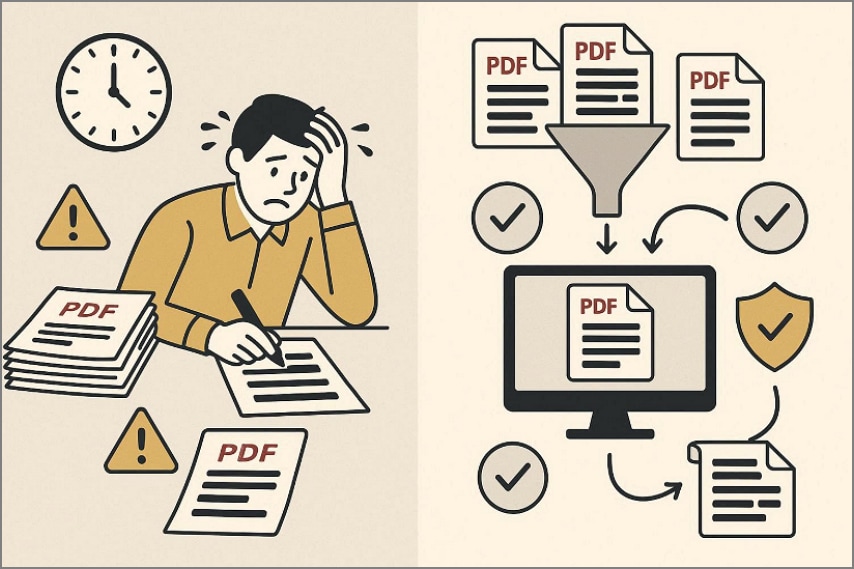
In manual redaction, the reviewer is required to look at the pages one at a time; hence, it is time-consuming. With increased volumes of documents, there would be a reduction in the speed of review, an increase in the cost of operation, and a steady fall in productivity.
High Risk of Missing Sensitive Information
Human reviewers tend to disregard delicate information, concealed in headers, footers, metadata, or in scanned content of documents. A single oversight will reveal sensitive information, initiate regulatory breaches, and cause significant legal repercussions.
Challenges with Large Volumes of PDFs
Manual redaction struggles when organizations manage large volumes of PDFs across departments and ongoing projects. Repetitive reviews cause fatigue, reduce consistency, and significantly increase the likelihood of costly errors occurring.
Why Organizations Look for Auto Redact Solutions
- Auto redact solutions improve document processing efficiency while reducing manual review time significantly.
- Automated detection lowers the risk of missed sensitive information across complex PDF documents.
- Organizations managing large PDF volumes achieve scalable, consistent redaction with stronger compliance control.
Part 3. How AI-Powered Redaction Works in Practice
AI-controlled redaction adheres to an organized, review-first workflow, which is aimed at accuracy, control, and compliance. Instead of being a purely automatic process, a "Smart Redact" tool integrates automated detection with human decision-making.
G2 Rating: 4.5/5 |100% Secure
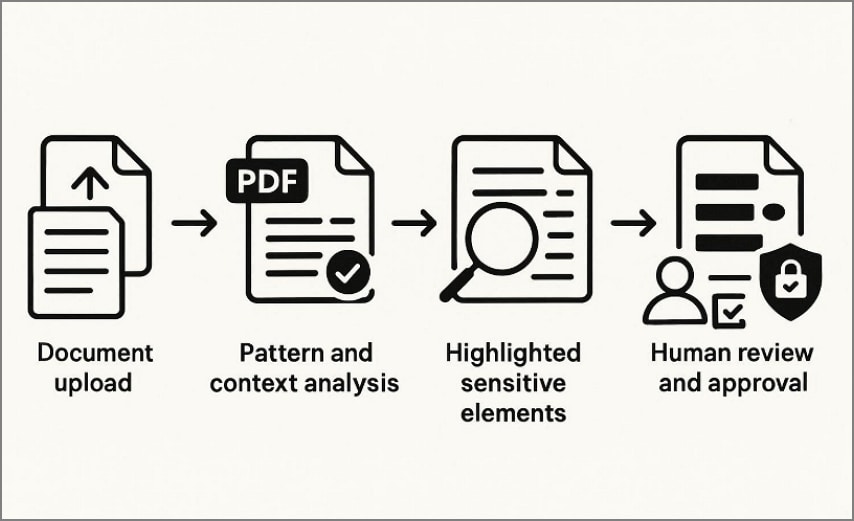
An AI redaction system starts by examining the text, scanned pages, and layouts in the whole document. This scan of the entire document guarantees that nothing, be it a section, page, or embedded information, is missed during the scanning.
Then the system analyzes content using predefined patterns and contextual signals. Common targets include names, identification numbers, financial data, addresses, and regulated information categories.
Instead of deleting content immediately, the tool highlights all detected sensitive elements. These visual markers show users exactly where sensitive information appears across the document.
Further, users review each suggested redaction before applying changes. This step ensures accuracy, prevents over-redaction, and keeps users in full control of final decisions.
Once approved, selected information is permanently removed from the document. Proper smart redact workflows ensure the data cannot be recovered, searched, or visually revealed later.
Key Clarification: Assistance, Not Automation
AI assists with detection speed and coverage, not blind removal. Users retain final control, making every AI redaction tool a balance between efficiency, accuracy, and compliance.
Part 4. What Types of Information Do AI Redaction Tools Detect
AI redaction tools are designed to detect specific categories of sensitive information using structured rules and patterns. This section clarifies what these tools typically identify and how detection accuracy improves.
Common Data Types Detected by AI Redaction Tools
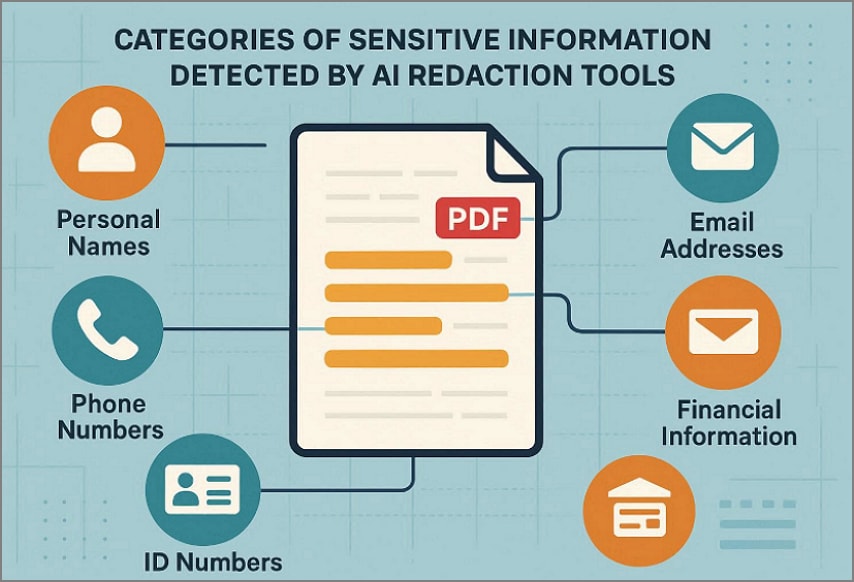
Personal Names: AI redaction tools detect personal names appearing in contracts, reports, correspondence, and legal documents.
Phone Numbers: Standard phone number formats, including country codes and variations, are identified automatically during scanning.
Email Addresses: Email patterns are recognized consistently across headers, body text, attachments, and embedded content.
ID Numbers: Identification numbers such as national IDs, employee numbers, or passport references are flagged for review.
Financial Information: Bank account numbers, credit card details, invoice references, and transaction identifiers are commonly detected.
How Detection Accuracy Works
AI redaction detection is primarily rule-based and pattern-driven, not interpretive or judgmental. Moreover, accuracy improves when contextual filters refine results, reducing false positives and improving relevance.
G2 Rating: 4.5/5 |100% Secure
Part 5. Why Location and Compliance Rules Matter in AI Redaction
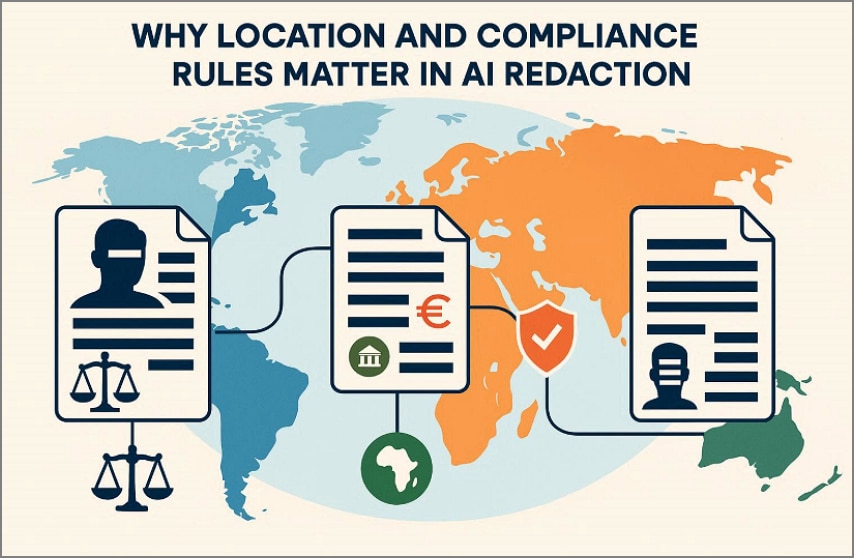
Document security does not operate under universal rules, especially in regulated environments. Legal expectations around data protection change based on geography, industry, and regulatory authority, making localized redaction strategies essential.
Sensitive Data Definitions Differ by Country
Different jurisdictions classify personal, financial, and confidential data using distinct legal standards. Information requiring protection in one country may remain unrestricted in another. Redaction workflows must reflect these differences to avoid compliance gaps or unnecessary data removal.
Compliance Requirements Vary Across Regions
Regulatory obligations depend heavily on regional laws and enforcement practices. Some regions emphasize identity protection, while others prioritize financial or sector-specific data. Effective AI redaction aligns detection rules with regional compliance expectations.
Why One-Size-Fits-All Redaction Creates Risk
- Uniform redaction rules often fail to account for legally required protections across multiple international jurisdictions.
- Over-redaction removes critical context, reducing document usability, clarity, and operational decision-making value.
- Region-based workflows enable AI redaction systems to adapt rules to ensure accuracy and compliance.
Part 6. A Real-World AI Redaction Workflow in PDFs
In cases where AI redaction is transferred out of the concept phase onto actual documents, it tends to take the form of a helper instead of a standalone functionality. In most PDF editors, redaction is already included in document protection, and AI is added on top to minimize the manual process of locating sensitive information. The experience is meant to feel familiar, with automation supporting existing controls instead of replacing them.
To see this in everyday use, consider how AI redaction works inside PDFelement. Instead of creating a new process, AI redaction fits naturally into existing protection tools. Smart Redact extends familiar redaction steps by offering suggestions, while users keep final control. So, review the workflow below to understand how AI redaction operates within real PDF documents:
G2 Rating: 4.5/5 |100% Secure
Step 1Access the Smart Redact Feature
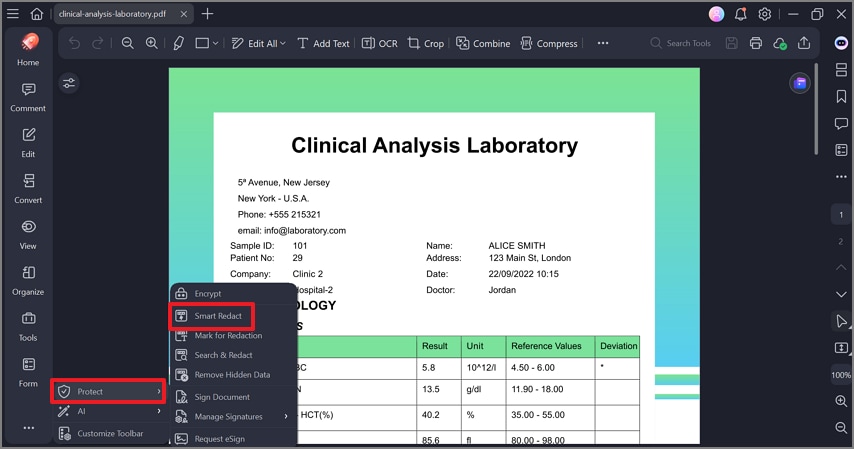
First, open the PDF and go to "Protect" and select the "Smart Redact" feature to continue. This activates AI-assisted redaction mode without changing document content.
Step 2Select Country and Data Categories
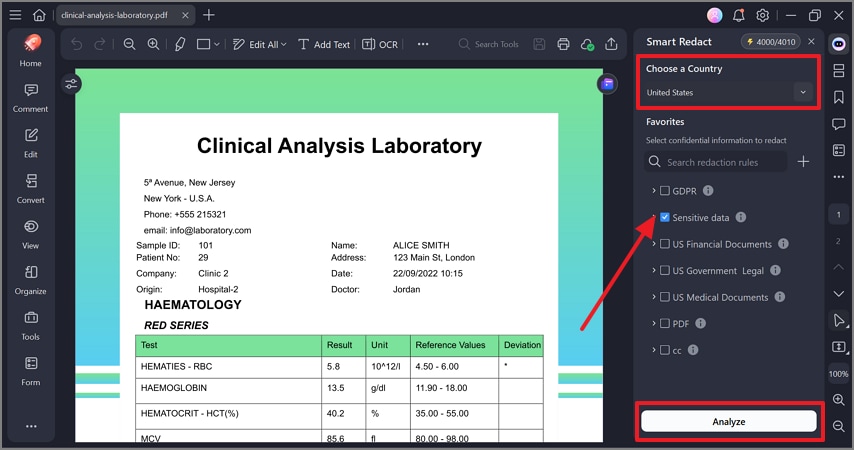
After that, a right-side panel appears, choose the relevant country or region, then select sensitive data categories to target. Click "Analyze" to let Smart Redact scan the document using contextual detection rules.
Step 3Review and Confirm Redaction Results
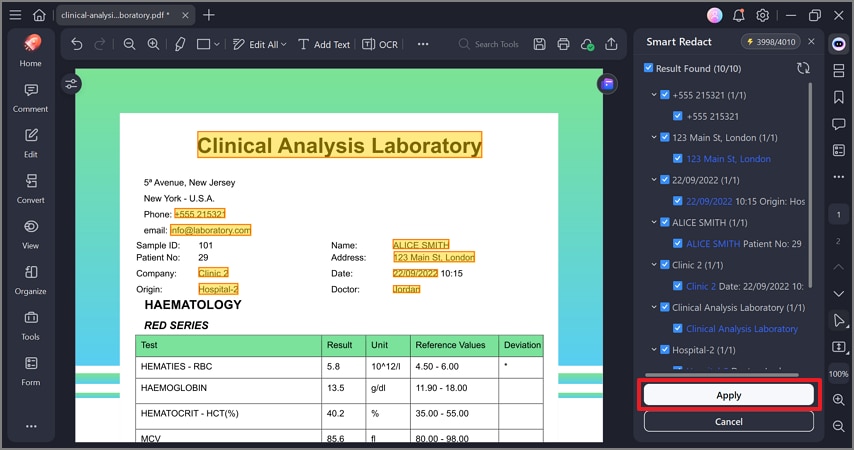
Now, review highlighted items and the results list shown in the side panel. After confirming accuracy, press the "Apply" button to finalize the redacted document.
Part 7. Auto Redacting PDFs vs Fully Automatic Redaction: What's the Difference?
To handle documents safely, it is important to understand the distinction between assisted and fully automatic redaction. Although both of them are based on AI, they are not equally risky or equally suitable in terms of compliance.
G2 Rating: 4.5/5 |100% Secure
Why Fully Automatic Redaction Without Review Is Risky
Fully automatic redaction removes information without human oversight, increasing the risk of critical errors. AI systems may misinterpret context, redact necessary content, or overlook legally protected sensitive information. Since redaction permanently alters documents, these mistakes are difficult to detect, correct, or reverse later.
What "Auto Redact PDF" Usually Means in Real Workflows
The term auto redact PDF typically describes a controlled, two-stage workflow:
- Automated Detection: AI scans the document to identify sensitive information based on selected rules and regions.
- Manual Confirmation: Users review, adjust, and approve suggested redactions before finalizing changes.
Why Hybrid Redaction Is Preferred in Compliance Workflows
Workflows that are compliance-oriented require accuracy, traceability, and accountability in the processing of documents. The hybrid redaction combines the speed of AI with human judgment, minimizing the risk and ensuring the efficiency of the operations. This solution facilitates alignment of regulatory compliance and maintains the meaning of documents, usability, and legal defense.
Part 8. AI Redaction vs Traditional Redaction Tools
To better understand how these redaction approaches differ in real workflows, the comparison below highlights their practical strengths and limitations:
| Redaction Method | Accuracy | Scalability | Auditability |
| Manual Redaction | Accuracy depends on human focus and often leads to overlooked sensitive information. | Manual processing slows significantly when document volume increases. | Audit trails require extra effort and are often incomplete or inconsistent. |
| Keyword-Based Redaction | Matches predefined terms but frequently misses context and semantic variations. | Scales moderately but struggles with complex or unstructured documents. | Logs exist, but rarely explain why specific content was redacted. |
| AI-Assisted Smart Redaction | Uses context and patterns to reduce both missed data and over-redaction. | Processes large document sets efficiently while maintaining consistent results. | Built-in review steps create clearer, more reliable compliance records. |
G2 Rating: 4.5/5 |100% Secure
Part 9. Common Use Cases for AI redaction in PDFs
Now, let's see where AI redaction delivered the most value by looking at common real-world document scenarios:
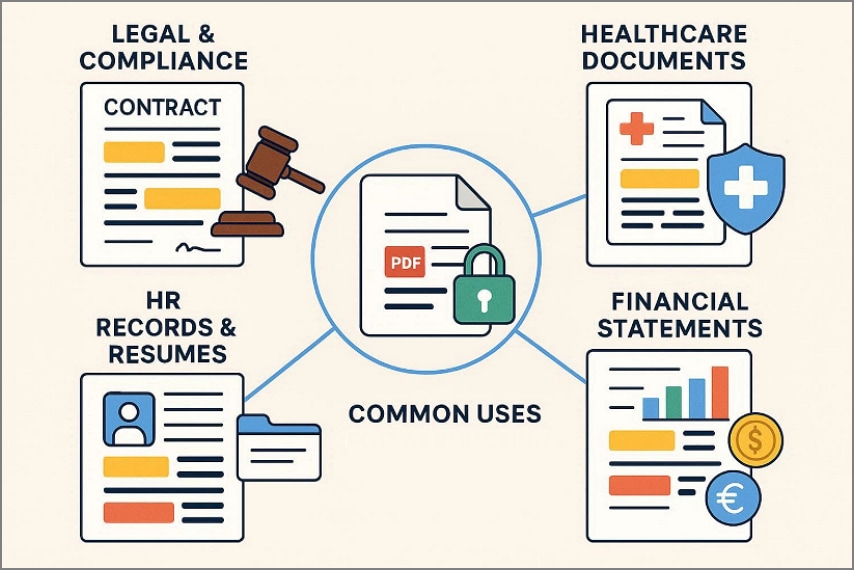
Legal and Compliance Documents
There is also a lot of movement of legal files across various teams, systems, and external parties. Sensitive information is found in the contracts, filings, and disclosures, which should not be disregarded or revealed. Auto-redact PDF workflows assist in exposing confidential information within a short time frame, whereas the review processes enforce compliance with legal motives and regulatory mandates of redactions.
HR Records and Resumes
Human resources teams handle documents built entirely around personal information. Resumes, evaluations, and internal records contain details that must be protected without damaging readability. AI redaction reduces the manual burden of screening these files, while human confirmation preserves fairness, accuracy, and contextual meaning.
Financial Statements and Reports
Financial documents demand precision because even small redaction mistakes can distort interpretation. Statements, audits, and reports often span dozens of pages with repeated sensitive fields. Auto redact PDF processes help locate these fields efficiently, while review prevents critical financial context from being removed.
Healthcare and Regulated Documents
Healthcare documentation carries strict legal obligations and zero tolerance for exposure errors. Medical records and regulated forms require consistent handling of protected data across large volumes. AI redaction supports standardized detection, while controlled review ensures compliance without interrupting operational workflows.
Part 10. Things to Check Before Using an AI Redaction Tool
Before relying on AI redaction, the following few practical checks help reduce risk and build confidence:
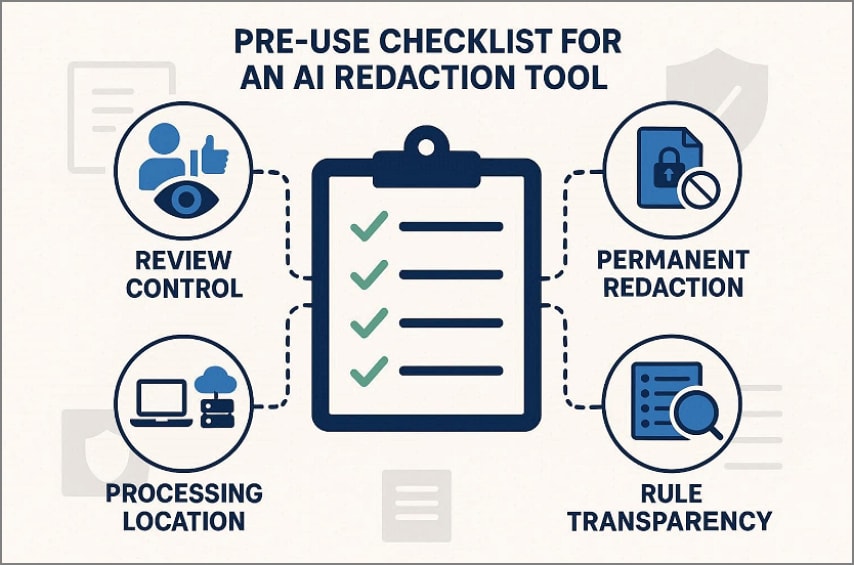
- Review Control: Ensure the tool allows reviewing every detected item before any redaction occurs. This prevents accidental removals and keeps humans accountable for final document decisions.
- Permanent Changes: Confirm whether redaction permanently deletes data or simply hides information visually inside. Permanent actions demand caution because reversed recovery is usually impossible after saving.
- Processing Location: Check if files are processed locally or uploaded to external cloud servers. Local processing reduces exposure risks and supports stricter organizational security policies compliance.
- Rule Transparency: Understand how detection rules work and which data patterns trigger redaction actions. Transparent logic builds trust and helps teams explain decisions during audits clearly.
Frequently Asked Questions
-
What is AI Redaction?
AI redaction uses intelligent systems to identify sensitive information inside documents efficiently and consistently. It assists users by highlighting risk areas while preserving human judgment over final redaction decisions. -
Is AI Redaction Fully Automatic?
AI redaction is not fully automatic and intentionally avoids removing content without human review. It combines automated detection with confirmation steps to prevent irreversible or compliance-related redaction errors. -
How Does Smart Redact Work in PDFs?
Smart redact scans PDF text layers using contextual patterns and region-based privacy rules. It then presents editable suggestions, allowing users to approve, adjust, or reject redactions safely. -
Can AI Redaction Miss Sensitive Information?
AI redaction can occasionally miss sensitive information due to ambiguous language or formatting. Human review remains essential to catch context-specific details that automated systems may overlook. -
Is Auto Redacting PDFs Safe for Compliance?
Auto-redacting PDFs is safe when paired with review controls and audit visibility. This hybrid model aligns automation speed with compliance requirements, accountability, and regulatory confidence.
Wrap-up: when AI redaction makes sense
To conclude, AI redaction improves document security by reducing manual effort while lowering the risk of sensitive data exposure. Smart redact workflows combine automated detection with human review to ensure accuracy and compliance control. Region-based rules further refine results by aligning redaction with legal expectations. In practice, AI redaction tools like PDFelement demonstrate how automation can support secure, reliable PDF workflows without sacrificing oversight.


