

In this article
- Understanding Word Passwords: Open vs. Restrict Editing
- Top 5 Word Password Remover Tools in 2026
- Word Password Removers Comparison Table
- How to Unlock Word Document Without Password (Free Manual Methods)
- Best PDF Password Remover in 2026: PDFelement
- Important Ethical and Legal Considerations
- Frequently Asked Questions (FAQ)
You are confident to leave your computer with your buddies because you know you got a strong password protecting it. After a while, you come back and try retrieving a crucial, password-protected business proposal or personal essay. However, to your complete dismay, you can't recall the right character combinations for your password. You don't know how to unlock a Word document without a password, and panic starts to set in.
Luckily, you have stumbled on this comprehensive, life-saving guide. Getting locked out of your own files is a common problem, but it is highly solvable. By the end of this article, you will understand exactly how Microsoft Word security works, discover the best word password remover software on the market, and learn clever manual tricks to unprotect Word documents seamlessly.


 G2 Rating: 4.5/5 |
 100% Secure
Understanding Word Passwords: Open vs. Restrict Editing
Before attempting to remove a password from a Word document, you must determine what type of password is in your way. Microsoft Word uses two distinct types of protection, and the method you choose to unlock your Word document online or offline depends entirely on this distinction.
1. Document Open Password
If you double-click your Word file and immediately see a pop-up window demanding a password before you can even view the text, you are dealing with a Document Open Password. Microsoft uses advanced AES encryption (usually 128-bit or 256-bit in modern DOCX files) for this. Because the file is encrypted, there is no simple "hack" or "backdoor" to bypass it. You must use a dedicated office password remover tool that utilizes Brute Force, Dictionary, or Mask attacks to recover the exact password.
2. Restrict Editing Password
If you can open and read the document, but the ribbon menu is greyed out and you cannot make any changes, you are facing a Restrict Editing password. This does not encrypt the file; it merely places a lock on the XML code dictating formatting and editing privileges. Fortunately, learning how to unlock a Word document without a password in this scenario is quite easy, as several manual workarounds (like the ZIP method) can strip this protection for free.
Top 5 Word Password Remover Tools in 2026
There are several office password remover utilities available on the internet supporting both online and desktop environments. However, they are not equal in strength, speed, or functionality. After evaluating the current market, we have highlighted the following 5 best Word password remover tools for recovering Document Open passwords.
1. PassFab for Word
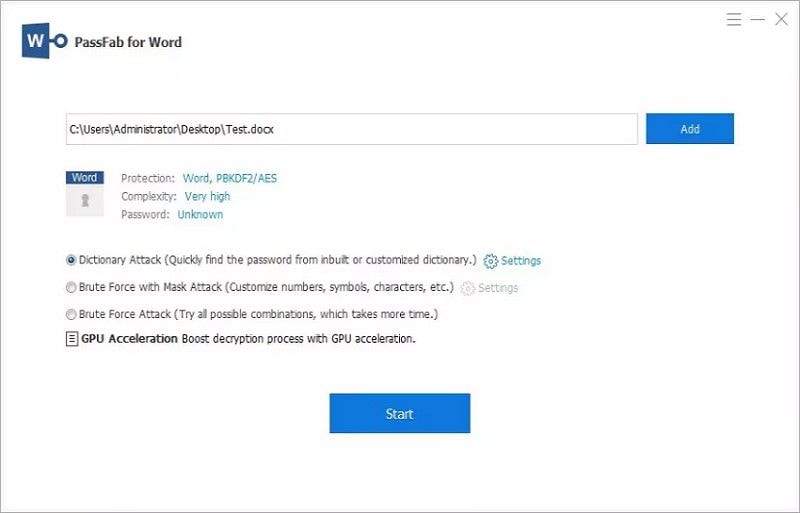
PassFab for Word is a robust suite that helps you to recover or remove passwords from Word documents using advanced decryption techniques. It offers three primary attack types: Brute Force Attack (trying every possible combination), Dictionary Attack (using a built-in or custom list of common passwords), and Brute Force with Mask Attack (where you input known parameters like password length or specific characters).
Those different kinds of password attack options combined with an intuitive interface, an easy recovery process, and slick design make it a nearly perfect docx password remover utility.
2. Passper for Word
Passper for Word (developed by iMyFone) is another highly efficacious tool that puts immense attention on recovery speed and success rates. It combines a perfect blend of design and deep-level functionalities to unprotect Word documents.
Instead of just offering recovery, Passper also includes an instant "Remove Restrictions" feature. If you only have a Restrict Editing password, Passper can strip it in two seconds with a 100% success rate. For Open Passwords, it utilizes multi-core CPU and GPU acceleration to speed up the dictionary and brute-force attacks.
3. iSunshare Word Password Genius
If you are looking for a highly technical, no-nonsense docx password remover, iSunshare Word Password Genius is a staple in the IT community. It boasts incredibly high recovery speeds, especially if you utilize it on a machine with a powerful NVIDIA or AMD graphics card.
It supports all versions of Microsoft Word, from the legacy Word 97 to the latest Word 365. Furthermore, iSunshare offers a "Pro" version that allows you to utilize a Local Area Network (LAN) to distribute the password-cracking workload across multiple computers, drastically reducing the time it takes to unlock a Word document.
4. LostMyPass (Online)
For users wondering how to unlock Word document online without downloading software, LostMyPass is a premier cloud-based solution. It is one of the most popular online office password removers available today.
LostMyPass works by allowing you to upload your locked DOCX file to their secure servers. They then use a massive, continuously updated database of millions of common passwords to attempt a rapid decryption. Their "Weak Password Recovery" is completely free and works in minutes. If your password is more complex, you can opt for their paid "Strong Password Recovery."
5. Password-Find
Password-Find is another excellent cloud-based docx password remover. What sets Password-Find apart is its ability to instantly remove passwords from Word documents rather than just recovering them. They have specialized algorithms that can instantly unlock documents protected by older Word formats, and they offer robust cloud-computing power for modern AES-encrypted files.
They also offer a 100% money-back guarantee if their cloud servers fail to find or remove your document's password.
Word Password Removers Comparison Table
To help you make an informed decision, here is a quick comparison of the top tools:
| Tool | Format | Best Feature | Attack Types | Best For |
|---|---|---|---|---|
| PassFab for Word | Desktop | GPU Acceleration | Brute Force, Dictionary, Mask | Fast offline recovery. |
| Passper for Word | Desktop | Dual unlocking modes | Brute Force, Dictionary, Mask | Removing editing restrictions instantly. |
| iSunshare | Desktop | LAN Computing | Brute Force, Dictionary, Mask | IT pros needing networked cracking power. |
| LostMyPass | Online | Free weak password tier | Cloud-based Database | Users who want to unlock Word document online quickly. |
| Password-Find | Online | Instant older file decryption | Cloud-based Database | People who prefer not to install any desktop software. |
G2 Rating: 4.5/5 |100% Secure
How to Unlock Word Document Without Password (Free Manual Methods)
If your document only has a Restrict Editing password (meaning you can open the document but can't change the text), you do not need to buy an expensive password cracker. There are several free, clever workarounds to bypass this protection.
Method 1: The ZIP Extension Rename Hack
This is one of the most effective ways to unprotect Word documents. Because modern .docx files are essentially ZIP archives containing XML data, you can manually go in and delete the specific file that enforces the password protection.
Step 1
First, ensure file extensions are visible in your operating system. Open the locked Word document, then click "File" and scroll to select "Save As" to resave a copy of the file to your desktop. Working on a copy ensures you don't corrupt the original file.
Step 2
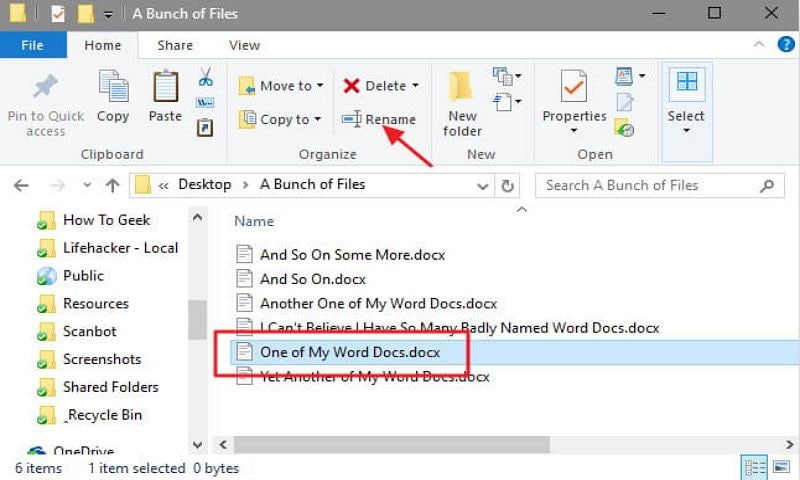
Right-click the copied file and choose "Rename." Change the file name extension from .docx to .zip. A warning prompt will appear; click "Yes" to confirm changes.
Step 3
Open the newly created "ZIP" file using Windows Explorer, WinRAR, or 7-Zip.
Step 4
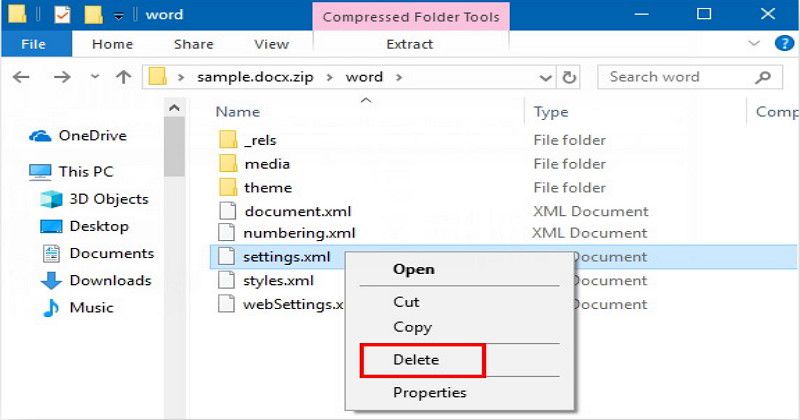
Navigate into the word folder. Look for a file named settings.xml. This file contains the editing restriction instructions. Simply delete settings.xml from the archive.
Step 5
Close the ZIP file, rename the extension back from .zip to .docx, and open the file. The editing restrictions will be completely removed, and the Word file should now be fully editable.
Method 2: The Google Drive Workaround
If you are uncomfortable changing file extensions, you can use Google Drive as a free docx password remover for editing restrictions. Google Docs does not support Microsoft Word's specific editing restriction locks.
- Go to Google Drive and upload your restricted Word document.
- Double-click the uploaded file and select "Open with Google Docs."
- Google Docs will open the file, completely ignoring the editing restrictions.
- Go to File > Download > Microsoft Word (.docx).
- The downloaded file will be a fresh, unlocked Word document.
Method 3: Using VBA Code (For Older .doc files)
If you are dealing with a legacy .doc file (Word 97-2003), you can use a simple Visual Basic for Applications (VBA) script to crack the password.
- Open the restricted
.docfile. - Press
ALT + F11to open the Microsoft Visual Basic for Applications window. - Click
Insert > Module. - Paste the standard Word password breaker VBA script (widely available on tech forums) into the module.
- Press
F5to run the script. It will generate a usable bypass code, effectively unlocking the document.
Best PDF Password Remover in 2026: PDFelement
Often, business professionals dealing with locked Word documents also encounter locked PDF files. If you need to remove passwords from PDFs, you will need a dedicated PDF editor, as Word password removers cannot handle PDF encryption.
G2 Rating: 4.5/5 |100% Secure
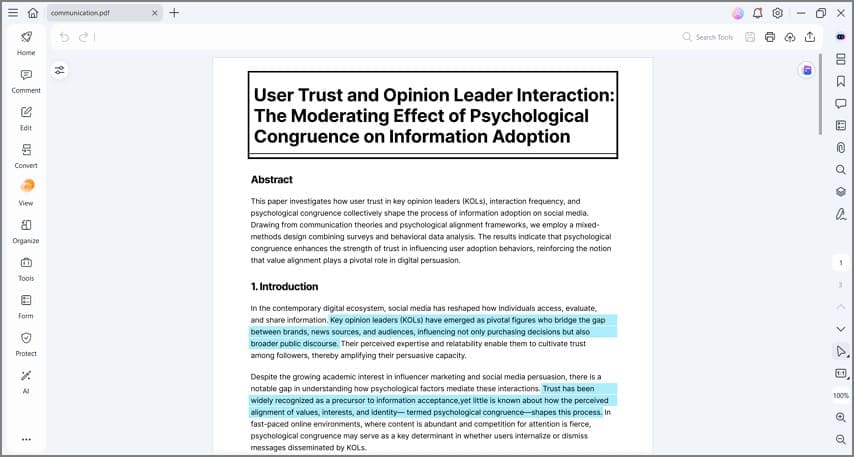
PDFelement is an outstanding, all-in-one PDF program that has been widely regarded as an industry standard. It can seamlessly remove Open Passwords (if the password is known) and instantly strip Permission Passwords (which restrict printing and copying) from PDF documents.
Key Features of PDFelement:
- Password Removal: Instantly removes permissions and restrictions from PDF files, allowing you to copy, edit, and print freely.
- Robust Editing: Unlocked PDFs can be edited just like a Word document. You can alter text, swap out images, and change formatting easily.
- OCR Technology: Integrated with advanced Optical Character Recognition (OCR), making it possible to extract and edit text from scanned PDF files.
- User-Friendly Interface: Has a simple design providing an intuitive experience for both novices and pros.
- Conversion Tools: Easily convert your unlocked PDFs back into Word, Excel, or PowerPoint formats.
PDFelement has a huge number of users around the globe, and its free trial comes with sufficient basic PDF editing solutions. The paid version is highly affordable compared to competitors like Adobe Acrobat, making it the editor with the best value for money.
Important Ethical and Legal Considerations
There is quite a good number of considerations you should keep in mind when deciding to use a docx password remover. Proceeding carelessly might drag you into unprecedented legal trouble or cause data loss.
Permission and Ownership: The key consideration is that you should only crack documents you have legal privileges over. Removing passwords from another person's or an organization's Word documents without their explicit permission is a severe infringement of privacy rights and can be prosecuted under cybercrime laws. These tools are designed to help you recover your own lost data.
Data Privacy with Online Tools: If you choose to unlock Word document online using cloud-based services, be highly cautious about the content of your document. Uploading files containing sensitive personal information, trade secrets, or financial data to a third-party server always carries an inherent security risk. Read the privacy policies of online unlockers to ensure your files are automatically deleted from their servers after the process is complete.

Frequently Asked Questions (FAQ)
-
How to open password protected word file if I completely forgot the password?
If it is a Document Open Password, you cannot open it without the password. You must use a third-party desktop tool like PassFab for Word or an online service like LostMyPass to run a brute-force or dictionary attack to recover the forgotten password. -
Can I remove password from word document without downloading software?
Yes, if the document only has an editing restriction, you can use the Google Drive workaround mentioned above. If it is encrypted with an open password, you can use cloud-based services like Password-Find to unlock Word document online without installing any software. -
Is the ZIP rename method safe to unprotect Word document?
Yes, it is completely safe, provided you work on a copy of your original document. This ensures that if you accidentally delete the wrong XML file, your original data remains intact. -
Why is my office password remover taking so long to crack the document?
Modern DOCX files use advanced AES encryption. If your password is long (e.g., more than 8 characters) and uses a complex mix of symbols, numbers, and uppercase letters, a brute force attack has to calculate billions of combinations. This can take hours or even days, which is why utilizing tools with GPU acceleration is highly recommended. -
Does PDFelement work as a docx password remover?
No. PDFelement is explicitly designed to handle PDF files. While it can easily remove permissions and passwords from PDFs and convert them to Word files, it cannot decrypt a natively encrypted Microsoft Word (.docx) file. You will need one of the specific Word tools listed in this article for that task.



