Managing your tax receipts is key to saving money on taxes. It's like keeping a diary of what you spend for work or your business. This helps you not pay more tax than needed. Before, people kept paper receipts in files, which was hard and took time.
Now, technology makes it easier. Some apps help you keep track of your receipts just by using your phone. These tax apps for receipts are smart. They sort and save your receipts in a way that's easy to find later. This means less stress during tax time. This way, you can show them as proof of tax deductions. It's a simple way to make managing taxes easier.
6 Tax App for Receipts: Streamline Your Tax Filing
Finding the right tax app for your receipts can make tax time less scary. These apps help you keep track of spending for work or your business. This way, you can get the most money back on your taxes. Let's look at six great apps to make this easier.
In this article
1. PDFelement: Best Receipt App for Taxes
PDFelement is a great app for handling your tax receipts. It lets you scan and save your receipts easily. You just use your phone camera to take a picture of your receipt. The app then turns this picture into a PDF file. This is good because it keeps the quality of the receipt clear and readable. You can also search for words in your receipts. This makes finding a specific receipt quick and easy.



PDFelement has different prices. There is a free version that lets you do basic things. You must pay for more features, like editing PDFs or adding signatures. The cost depends on what plan you choose. They offer yearly subscriptions starting at $79.99. This means you can pick what's best for your budget.
People who use this app like it a lot. On the iOS App Store, it has a rating of 4.6 out of 5. On the Google Play Store, it's rated 4.3 out of 5. These ratings show that many users find the app helpful and easy to use.
How To Use PDFelement for Tax Receipts
PDFelement is a handy tool for managing your tax receipts. It turns your phone into a powerful organizer for all your tax-related documents. Here’s how to use its features for your tax receipts:
Scanning Tax Receipts
Step 1
Start the app on your phone.

Step 2
Choose to scan a new document.

Step 3
Take a photo of your tax receipt.

Step 4
Crop or adjust the clarity if needed.
Step 5
The app converts it into a PDF. Save it in your desired folder.

Extract Data from Tax Receipts
Step 1
Open the scanned receipt you want to extract data from.
Step 2
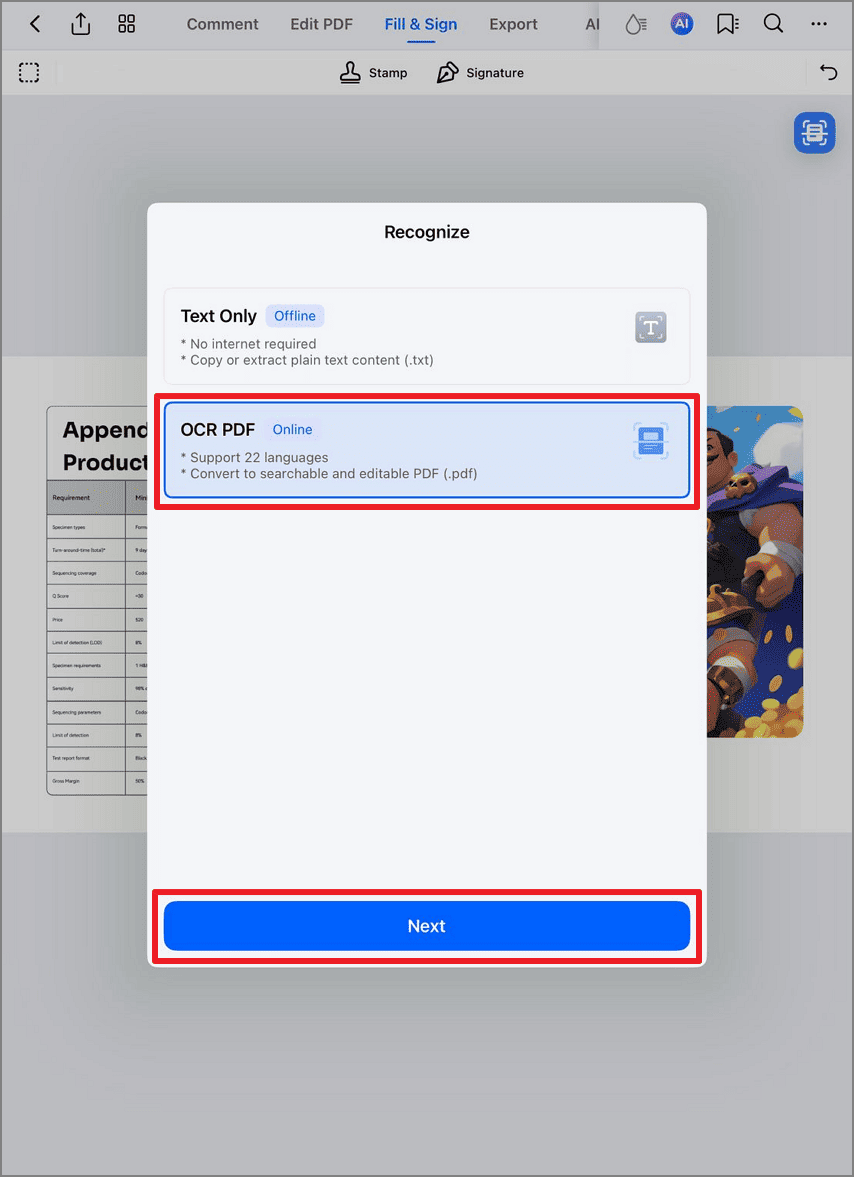
Tap the blue scanning icon to open OCR PDF, which will turn the scanned receipt into an editable version. You can then copy and save data such as merchant name, date, and total amount from the receipt.
Extract Data on Computer
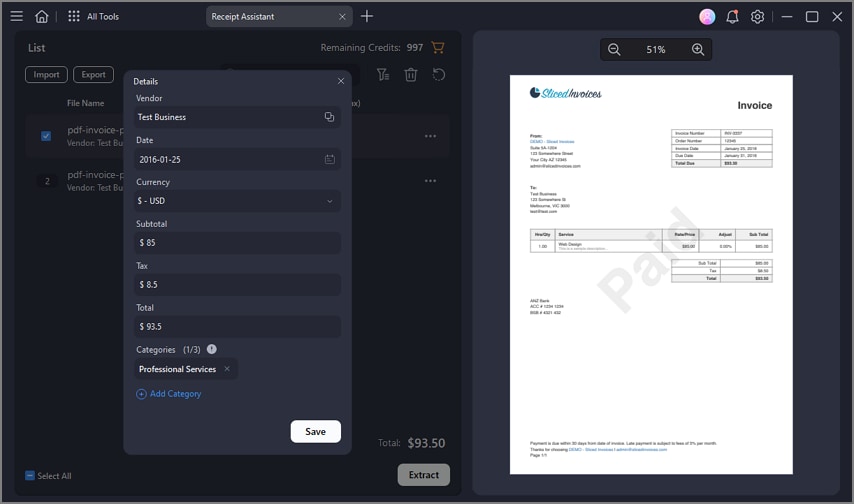
PDFelement can work across Windows, Mac, and mobile devices. The Receipt Assistant on the desktop can easily extract details such as, merchant, date, tax, and total amount from a receipt.
Step 1
Launch PDFelement on the desktop and open Receipt Assistant.
Step 2
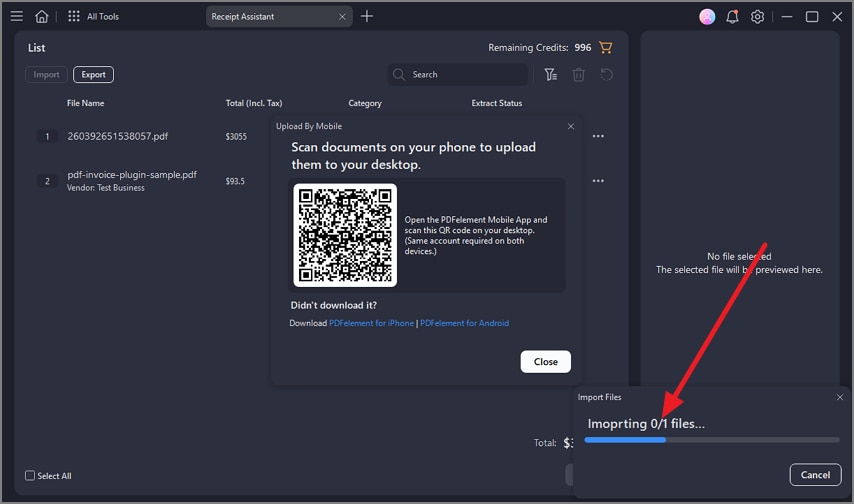
Click Open > Upload from mobile and import the receipts from your phone to the computer by scanning QR code.
Step 3
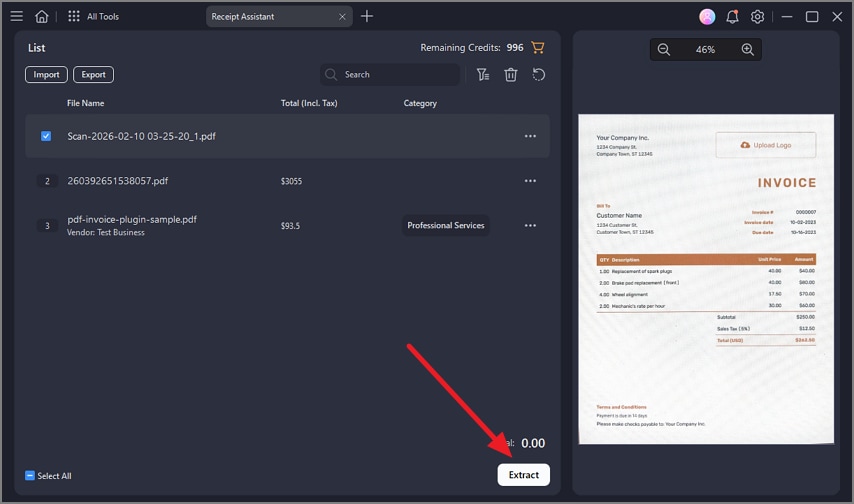
After importing the receipt, click Extract and PDFelement will extract data and save the data.
Step 4
Review the extracted detail and export it to an Excel file.
Combining Multiple Receipts into a PDF
Step 1
Go to the main menu.
Step 2
Select the ‘Merge PDFs’ feature.

Step 3
Select all the receipts you want to combine.

Step 4
The app merges them into one PDF.

Step 5
Name your combined file and save it.

Password Protecting Receipts
Step 1
Choose the PDF you want to protect.
Step 2
Tap on the ‘Protect’ option.

Step 3
Enter a strong password.

Step 4
Now, your receipt PDF is secured.

Uploading Receipts to PDFelement Cloud
Step 1
Open the PDF you want to upload.
Step 2
Find the cloud option.
Step 3
Select PDFelement Cloud to upload.

Step 4
Your receipt is now saved online for easy access.
Following these steps, you can efficiently manage your tax receipts with PDFelement, keeping them organized, safe, and easily accessible.
2. QuickBooks

QuickBooks makes handling tax receipts easy for business owners. It lets you snap photos of your receipts and automatically adds the info to your expenses. This means less typing for you. You can also link your bank account to match receipts with bank transactions. This keeps everything tidy and ready for tax time.
QuickBooks starts at $18.00 per month. This basic plan covers most needs for managing receipts and expenses. There are higher plans with more features for growing businesses.
On the Google Play Store, QuickBooks has a solid rating of 4.4 out of 5. Many users find it useful and reliable for managing their finances and tax receipts.
3. Receipt Scanner

Receipt Scanner is an app that makes saving your tax receipts a breeze. It lets you use your phone to take pictures of your receipts. Then, it turns these pictures into digital files. This app is smart. It can read the details on your receipts, like the date and amount spent. This helps you keep track of your expenses easily. You can also sort your receipts into categories.
Receipt Scanner is completely free. This makes it a great choice for anyone looking to manage their receipts without spending extra money.
With a rating of 4.7 out of 5 on Google Play, Receipt Scanner is highly praised by its users. They love its ease of use and convenience for managing tax receipts.
4. 1tap Receipts

1tap Receipts is designed to help freelancers and small business owners manage their receipts. You can snap a photo of any receipt, and the app automatically extracts important details like date, amount, and vendor. It's great for tracking expenses and preparing for tax season. The app also estimates your tax returns based on your receipts.
1tap Receipts start at $19.00 per month. This plan includes all the basic features for managing receipts and efficiently tracking expenses.
The app has a rating of 4.1 out of 5 in Google Play, showing that users find it useful and effective for keeping their tax receipts in order.
5. Expensify

Expensify is all about making expense reports easy. You can photograph your receipt, and the app automatically reads the details. This includes the amount, date, and what you bought. It's perfect for keeping track of business expenses or travel costs. Expensify also lets you submit expense reports right from your phone.
Expensify starts at $5.00 monthly, a great deal for freelancers or small businesses. They offer different plans based on your needs, so you can choose what works best.
With a 4.3 out of 5 rating in Google Play, Expensify is a popular choice. Users like its receipt scanning and expense management features, making it a go-to app for many.
6. eTax Mobile App

eTax Mobile App aims to simplify tax time by scanning your receipts. You can take pictures of receipts; the app stores them when you file taxes. It tries to make organizing tax documents easy so you're ready for tax season without the hassle.
Lower Rating: Not as highly rated by users compared to other apps.
eTax Mobile App has a free version for basic use. For more features, prices start at $79. This can be steep compared to other apps that offer more for less.
With a 2.4 out of 5 rating in Google Play, the eTax Mobile App has room for improvement. Users seem to want more from the app, whether it's better functionality or more features in the free version.
Conclusion
Managing tax receipts is easier with the right app. Among the six we explored, PDFelement stands out for its ease of use, clear scans, and helpful features. It's a great choice to keep your receipts organized and ready for tax time. With PDFelement, you can make tax season less stressful and save money on your taxes. Give it a try to see the difference it makes.