

Users often become frustrated when trying to redact sensitive information from a signed PDF. They find that the digital signature flags the entire document and blocks further edits. It typically occurs when signatures use cryptographic hashes to verify document integrity and render changes invalid.
Fortunately, there are numerous solutions available to redact a signature efficiently. This article covers all the necessary information on sign redaction using an efficient tool. If you are also exploring how to redact a signed PDF, go through this article to the end.
In this article
- Can You Redact a Signed PDF?
- What Happens to A Digital Signature When You Redact a PDF
- Why People Still Need to Redact Signed PDFs
- Safe Ways to Handle Redaction in Signed PDFs
- Redacting A Signed PDF Using PDFelement (Safe, Copy-Based Approach)
- Digital Signatures Vs Electronic Signatures When Redacting PDFs
- Common Mistakes When Redacting Signed PDFs
Part 1. Can You Redact a Signed PDF?
Absolutely, you can redact a PDF, but doing so in the standard way can render the signed document invalid. The main reason is that crypto checks can easily detect any alteration to the Docs. Users often ask this question in fields where post-signature redaction is essential. However, in these citations, they normally encounter issues like software restrictions about losing legibility in tools like Adobe Acrobat Sign or DocuSign.
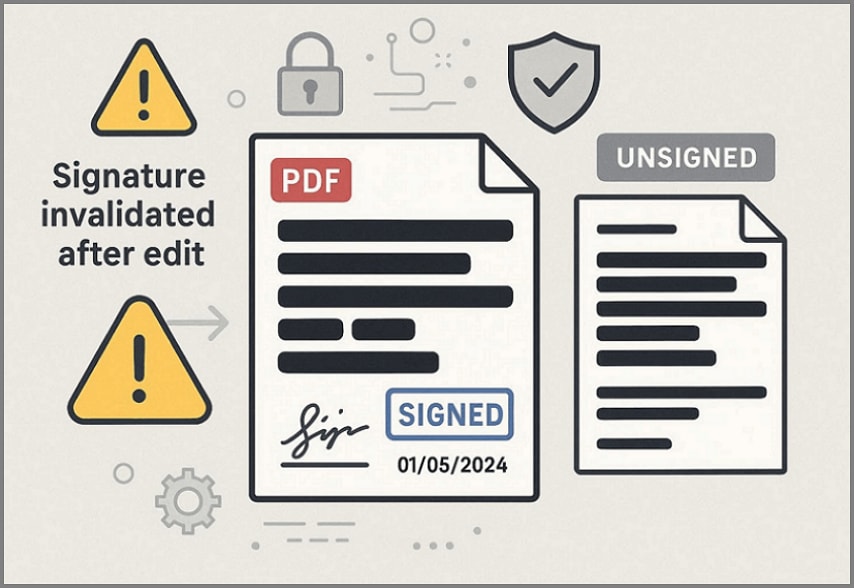
What Does "Redacting a Signed PDF" Mean?
It typically refers to using specialized tools to mark confidential information via Search and manual selection. This will apply blackouts or overlays to mark confidential information areas, preventing copying and printing. While knowing can you redact a signed PDF, always remember to create an extra copy beforehand. This process will create an unsigned file for sharing, allowing you to sign it again later.


 G2 Rating: 4.5/5 |
 100% Secure
Part 2. What Happens to A Digital Signature When You Redact a PDF
In this digital world, digital signatures protect document integrity by using a unique cryptographic hash. It helps verifiers confirm that the file is accurate and that editing tools introduced no alterations. This verification procedure also covers redaction, which permanently overwrites sensitive text, rendering the signatures invalid or flagged.
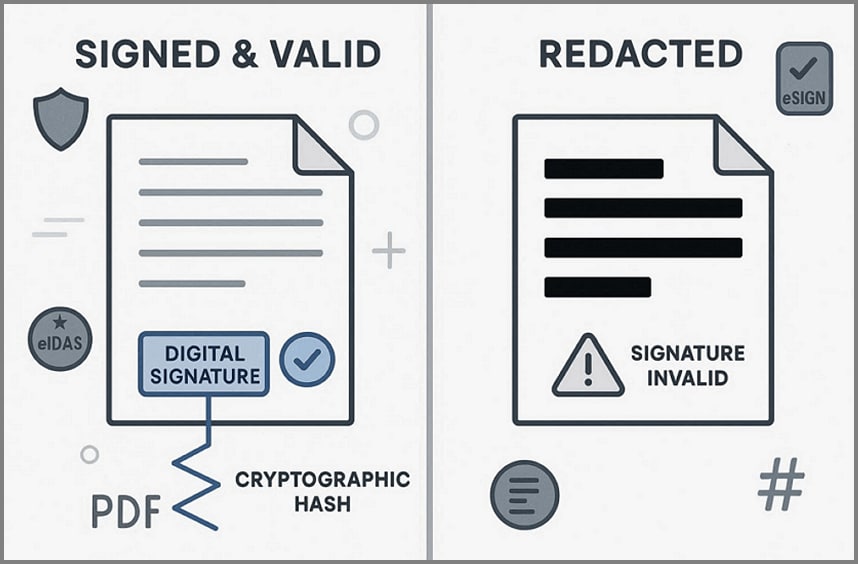
Invalid Signatures Refers To?
The "Invalid Signature" term typically indicates that the document is not authenticated. It usually refers to not following the legal requirements for unaltered content under sections like "eIDAS" or the "ESIGN" Act. Users face issues like "Document has been altered or corrupted since it was signed," blocking further actions. Thus, creating an extra copy before you redact a signed PDF is required to set realistic expectations before proceeding.
Part 3. Why People Still Need to Redact Signed PDFs
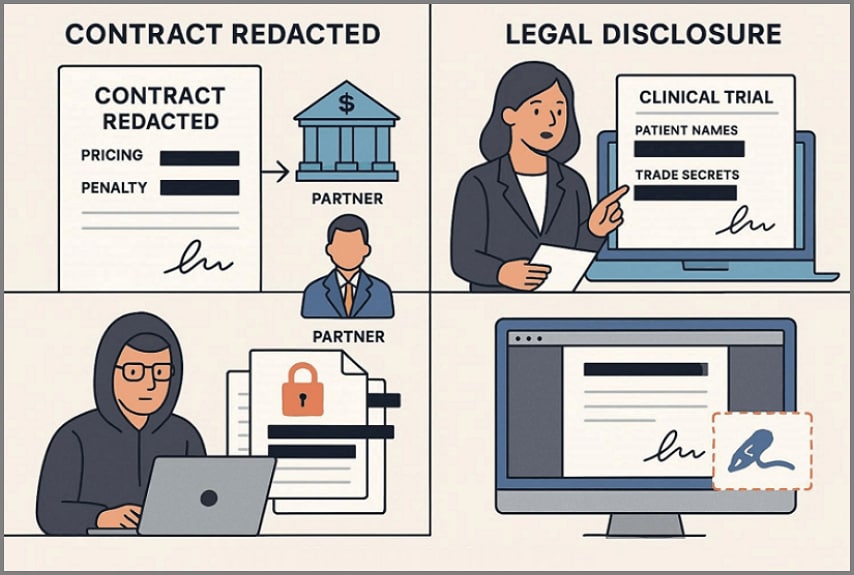
Nowadays, people still need to redact signed PDFs to safely share documents while preserving their accuracy. So, we have listed some of the most common workflow scenarios that require the redacting procedure:
G2 Rating: 4.5/5 |100% Secure
Scenario 1. Signed Contracts Externally
A software company has signed a master services agreement (MSA) with a large bank. That agreement includes all essential details like pricing and special penalty clauses. When the bank reshares the document with other partners, it can share the redacted version. It will help to only show the required points and may hide the negotiated points that the partner has no right to see.
Scenario 2. Legal Disclosures
Consider a pharmaceutical company involved in a regulatory investigation that must submit a signed clinical trial. Before submitting the document, the company can redact confidential information like the patient's name and trade secrets. This will only display the required research data and ensure the confidentiality of sensitive data.
Scenario 3. Confidential Info Distribution
Suppose a company's human resources department has signed an employee agreement including the employee's personal information. While sharing those documents with their finance department or an external auditor, they create a redacted document. With this move, they can hide the employee's confidential information and share only the clauses and amounts the reviewer needs to see.
Scenario 4. Original Records Retained
In a construction firm, they normally sign multiple sub-contacts with other firms. Normally, what they do is store the actual document in the document management for their audits. Whereas, they redact a signed PDF separately to cater to different departments. For instance, one file for a client that hides subcontractor's rates and another for a public tender that hides personal data.
Part 4. Safe Ways to Handle Redaction in Signed PDFs
Before knowing how to redact a signed PDF, first understand the safest and most compliant ways to redact sensitive information:
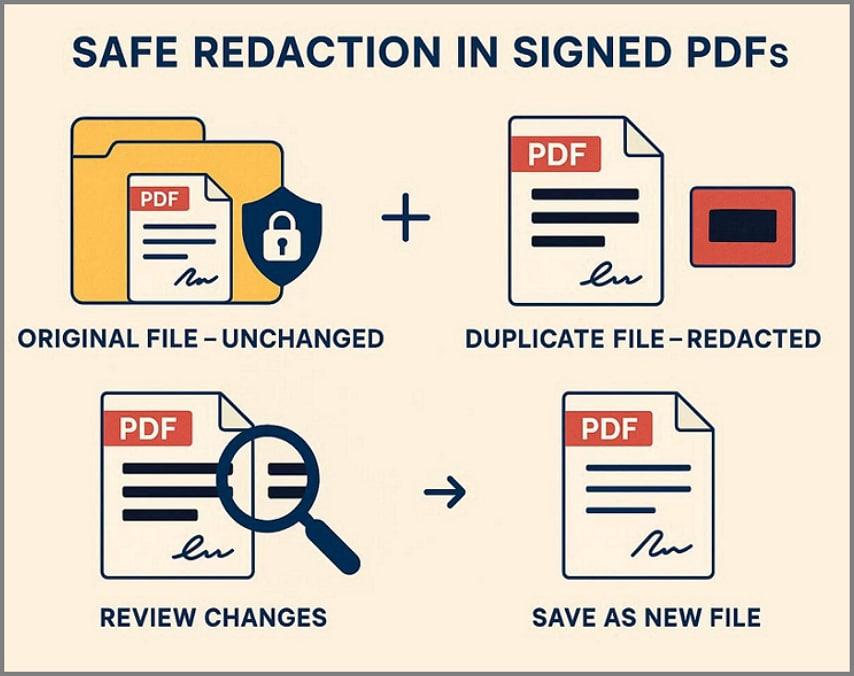
Original File Unchanged: Ensure you always preserve one untouched, signed document in your secured storage folder. This should never be edited or partially redacted, so it remains valid evidence for audits, disputes, or regulatory reviews.
Separate Redacted Version: Before redacting the PDF, ensure you make an extra copy and do all redaction on that file. Use proper redacting tools to properly hide the confidential data for further sharing with non-privileged recipients.
Different Distinguished Files: Always save both the original files and the redacted file with clear file names. Use separate name tags like "Signed Originals" and "Redacted Copies" so you don't accidentally share the wrong files.
Documented Redaction Workflow: Establish a straightforward workflow by specifying who can access the original and copied files. It will reduce mistakes and make it easier to show it to regulators and auditors.
Re-Sign When Necessary: Sometimes, a redacted version also requires signing the file for legality purposes. By signing that file separately, you saved the confidential origami file while making it usable for sharing.
Before you redact signed PDFs, these points make it clear what will happen with the file. So, users have an accurate understanding of the workflow instead of assuming that the signature will remain intact.
Part 5. Redacting A Signed PDF Using PDFelement (Safe, Copy-Based Approach)
Suppose a legal team has just finalized and signed a complex service agreement with a major client. Now, he needs to share the required part with the external auditor while hiding confidential details. To redact a signed PDF, you can opt for PDF editing tools like PDFelement and others. These editing tools let you check the document's signature and apply redaction tools to that file.
It provides various redaction options to let you choose according to your PDF needs. You can also use OCR to make scanned files editable and apply redactions. After performing redaction, the file can also be converted into various file formats for easier file sharing.
Detailed Workflow for Redacting PDF Files Effortlessly With PDFelement
Here, we have provided a detailed workflow to redact a signed PDF with a beginner-friendly guide:
G2 Rating: 4.5/5 |100% Secure
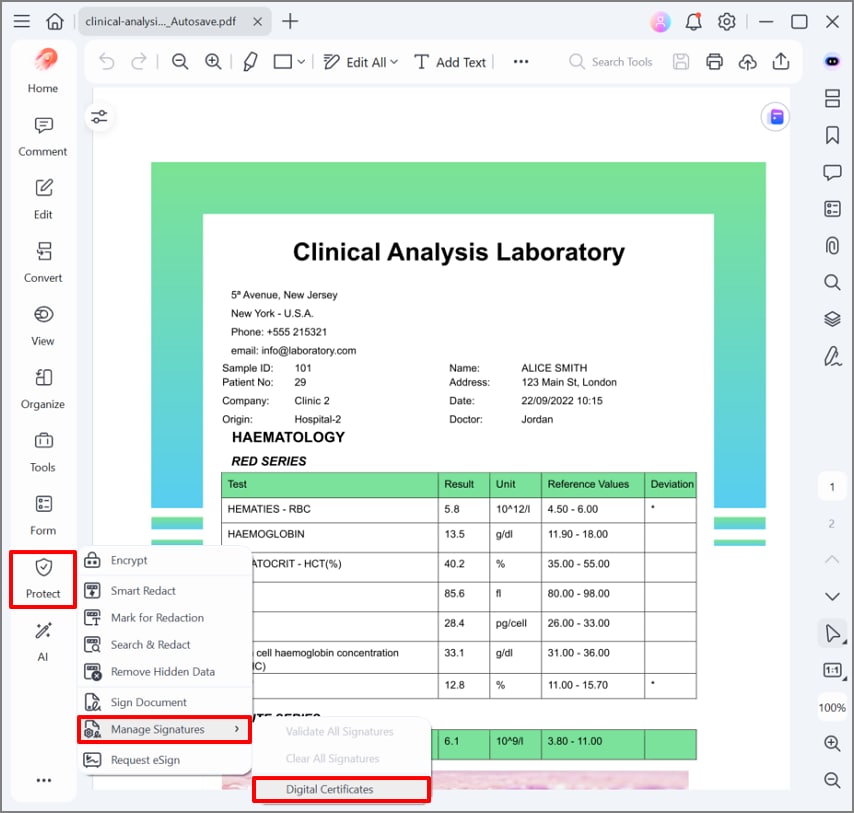
Step 1Access the Protect Feature to Find Digital Certificates
After opening the contact file, click on the "Protect" menu, choose "Manage Signatures" and hit the "Digital Signatures" option.
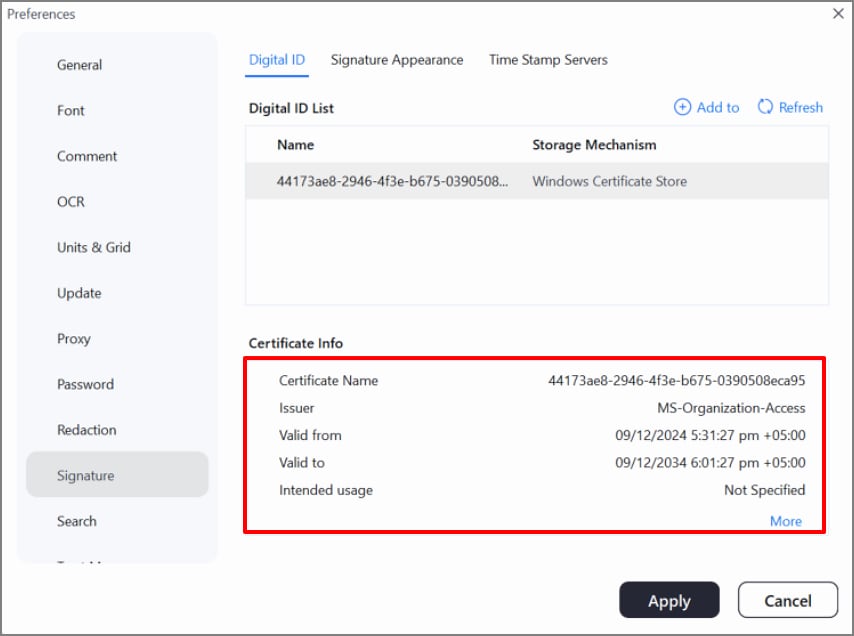
Step 2Verify the Certificate Information for the Signature
Here, examine all the details of the signature to ensure its complete accuracy.
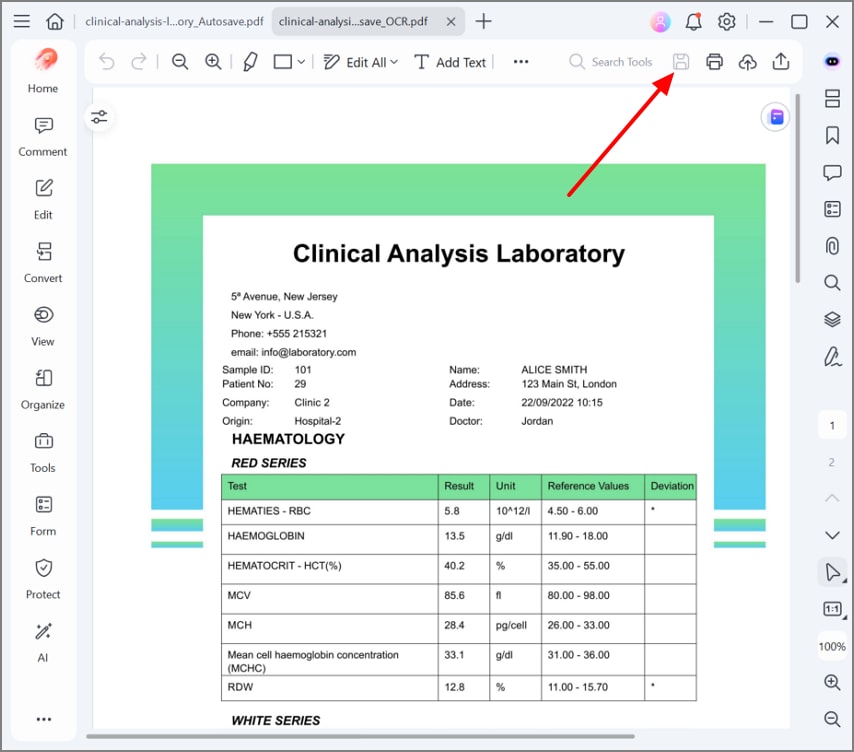
Step 3Save the File to Generate a Duplicate Version
Now, click the "Save" icon to save an additional copy for safely applying the redacting procedure.
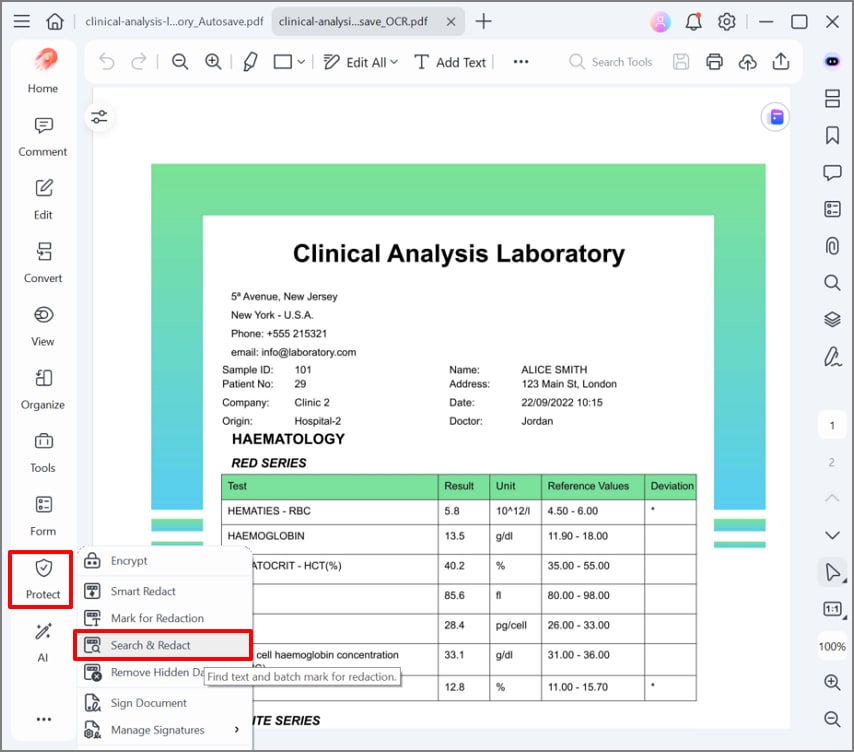
Step 4Apply the Redaction to the Copied File
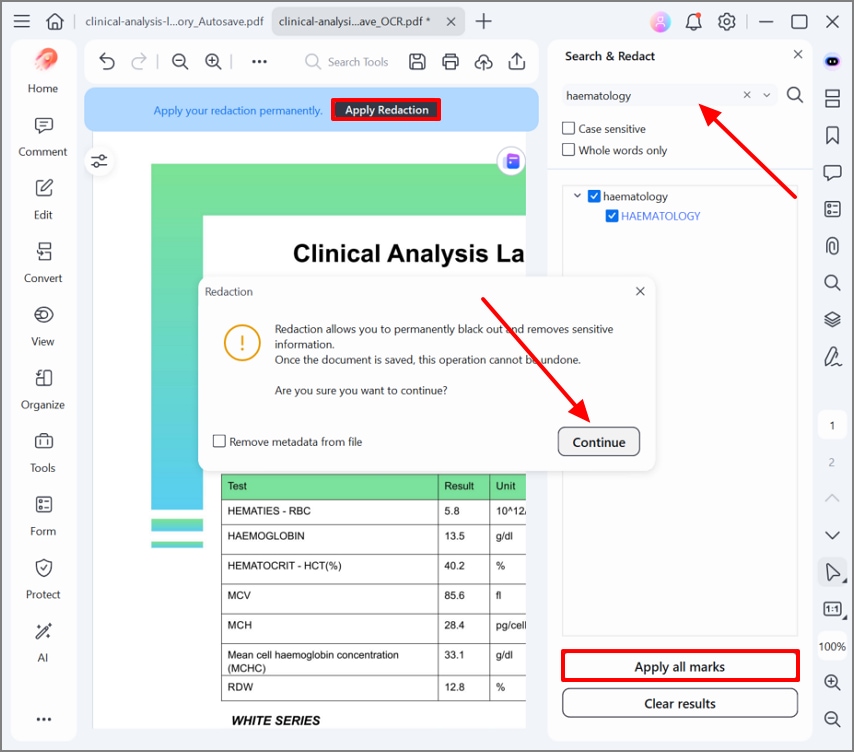
At this point, reopen the copied file, select the "Protect" menu on the left side tab, and choose the "Search and Redact" option.
Step 5Search for the Desired Text to Hide Data
Following this, add the desired target text in the search bar and hit the "Apply for Marks" button. Afterwards, hit the "Apply Redaction" button and hit the "Continue" button to apply the changes.
Step 6Save the Redacted File to the Device Folder
Finally, your desired text has been redacted now, click on the "Export" icon to save the redacted file to the device folder.
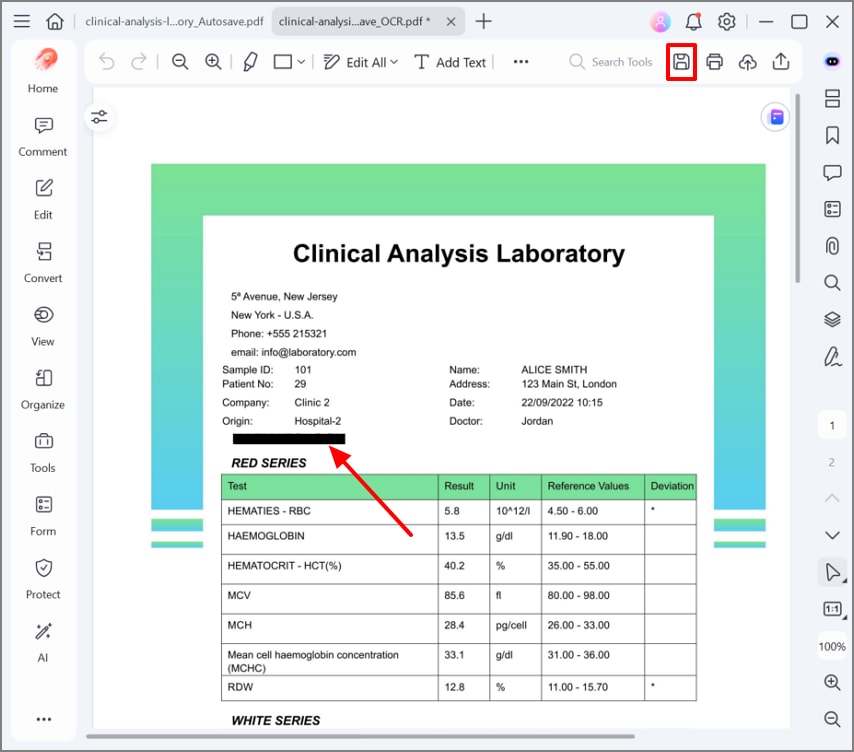
In this workflow, PDFelement has efficiently helped users manage both their original and redacted files. The original files remain intact, and the redaction is being applied to the copied file to ensure safer distribution.
G2 Rating: 4.5/5 |100% Secure
Part 6. Digital Signatures Vs Electronic Signatures When Redacting PDFs
While exploring, can you redact a signed PDF, it is essential to first understand the difference between digital and electronic signatures:
| Features | Digital Signatures | Electronic Signatures |
| Core Purpose | Verify identity and protect document integrity | Capture intent to sign (approval/consent) |
| Technology | Cryptographic certificates and hashing | Typed name, drawn signature, image, or checkbox |
| Tamper Detection | Strong: changes trigger "signature invalid / modified." | Weak/none: visual mark usually not integrity‑bound |
| Full Document Content | Yes, covers the entire PDF structure | Often limited to a field or page appearance |
| Viewer Validation | Formal status (valid/invalid, signer details, time) | Typically, there is no built‑in validation status |
| Redaction Effects | Redaction almost always invalidates the signature | Redaction may not trigger any technical warning |
| Typical Use Cases | Contracts, regulated records, high‑trust workflows | Internal approvals, low‑risk agreements, workflows |
Digital signatures are primarily designed to verify a document's integrity, so they automatically become invalid upon alteration. Whereas, e-signatures are often just hand-drawn signatures, which don't provide any warning of iteration of text.
If you are working with digital signatures, redacting the file will not compromise the document's integrity. On the other hand, if you redact signed PDF with true digital signatures, expect redaction to break signature validity. So, always redact your files while examining the signature type for a more accurate and smoother workflow.
G2 Rating: 4.5/5 |100% Secure
Part 7. Common Mistakes When Redacting Signed PDFs
In the process of redacting a signed PDF, most people miss the errors that invalidate the signatures. So, this section will cover some common mistakes that you can avoid during the procedure:
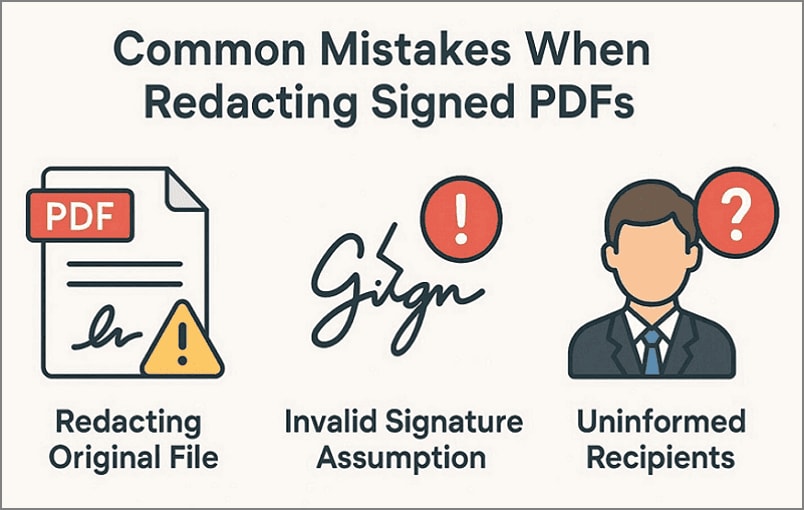
Redacting Original Signed Files: Editing or redacting the original signed PDF destroys your only authoritative record of what was agreed. Furthermore, if you don't have the original version, you may struggle to prove the exact terms in audits or disputes.
Assuming File Validation: Many users assume that redacting the file will not affect the signatures, which is wrong. It can become an issue if the client requires signatures to ensure your legal validity.
Uninformed Recipients: Sending a redacted PDF without clearly stating will create confusion and suspicion. As the pages will look altered and the signatures are invalid, this will be an issue for the contractor.
Using Highlighted Boxes: Users simply draw black boxes on the target, which only hides the data temporarily. Anyone can convert the hidden data into an editable format by using other editable PDF tools, making it risky.
Sharing Source Files: Another major issue is that users save the edits in the original version of the redacted file. If the file is not flattened, anyone can make changes and can even reveal the previous versions.
Frequently Asked Questions About Redacting Signed PDFs
-
Can you redact a signed PDF without breaking the signature?
In most cases, proper redaction alters the document's content, thereby breaking the integrity check of a digital signature. While exploring, can you redact a signed PDF, ensure you re-sign the file if required by the contract. -
Why does my signature become invalid after redaction?
Digital signatures create a cryptographic "fingerprint" of the entire PDF at the moment of signing. When the viewer redacts the file or compresses the new file, it starts showing "invalid" or "document has been changed since signing" warning. -
Is it legal to redact a signed document?
Yes, it is generally legal to create a redacted version of a signed document, especially to protect confidential information. Many legal workflows expect redacted copies to be used for disclosure while keeping the original file safe. -
Should I re-sign a redacted PDF?
It depends on the requirements, as you can re-sign the document of the redacted contract that has specific requirements. You simply redact the file, again add a signature to the file, and save it for further sharing with clients. -
What's the best way to show both signed and redacted versions?
The best way is to first save an extra copy of the original document for the redaction procedure. However, ensure that you save the files by specifying the original and redacted files in their names for a smoother workflow.
Wrap-Up: Redacting Signed PDFs Without Creating Compliance Issues
Summing up, users should be aware that re-creating a PDF file always affects the signature. So, if you want to preserve the document, always apply redaction on its copied version. To know how to redact a signed PDF, this article covers all essential information. Furthermore, we recommend using PDFelement, which supports the redaction workflow by providing multiple redaction options.


