

Receipts are piling up in your wallet after a busy week of meetings, client lunches, and store visits. At tax time, you're scrolling through your phone gallery, trying to match blurry photos with bank statements while deadlines get closer. Tracking expenses feels overwhelming, especially when paper slips fade or go missing. This is where the best apps for receipt scanning step in.
With a quick snap, your expenses are digitized, organized, and stored securely in one place. Choosing from the best apps for receipt scanning ensures smoother expense management and better financial organization without the usual paperwork chaos. Read this article till the end to know about the best options available for receipt scanning.
In this article
- Why Do People Use Receipt Scanning Apps
- What a Receipt Scanning App is Expected To Do
- Different Types of Receipt Scanning Apps
- Free Receipt Scanning Apps: What They Do Well
- Best Way to Scan Receipts With an App
- When Receipt Scanning Apps Stop Being Enough
- Scanning and Managing Receipts with PDFelement
- Receipt Scanning Apps vs. Receipt Scanner Software
- How to Choose the Best Receipt Scanning App for You
- Common Mistakes When Using Receipt Scanning Apps
Part 1. Why Do People Use Receipt Scanning Apps
As paperwork shifts to digital tools, app scanning receipts solutions have become a practical part of daily financial management. Instead of storing piles of paper slips, users rely on mobile apps to capture, categorize, and retrieve receipts instantly. Mentioned below are some of the reasons why people prefer this approach:
- Expense Tracking: Daily purchases such as groceries, fuel, subscriptions, and dining are quickly recorded through receipt scans. The app automatically organizes expenses into categories, making budgeting and monthly reviews far more efficient.
- Reimbursements: Employees traveling for work can scan receipts immediately after a transaction. This ensures accurate submission of claims, reduces lost paperwork, and speeds up reimbursement processing.
- Tax Preparation: Throughout the year, receipts are stored digitally and tagged for tax purposes. When filing season arrives, categorized records are readily available, simplifying documentation and reporting.
- Warranty and Returns: Digital copies of purchase receipts are safely stored within the app. This makes it easier to access proof of purchase when claiming warranties or processing product returns.
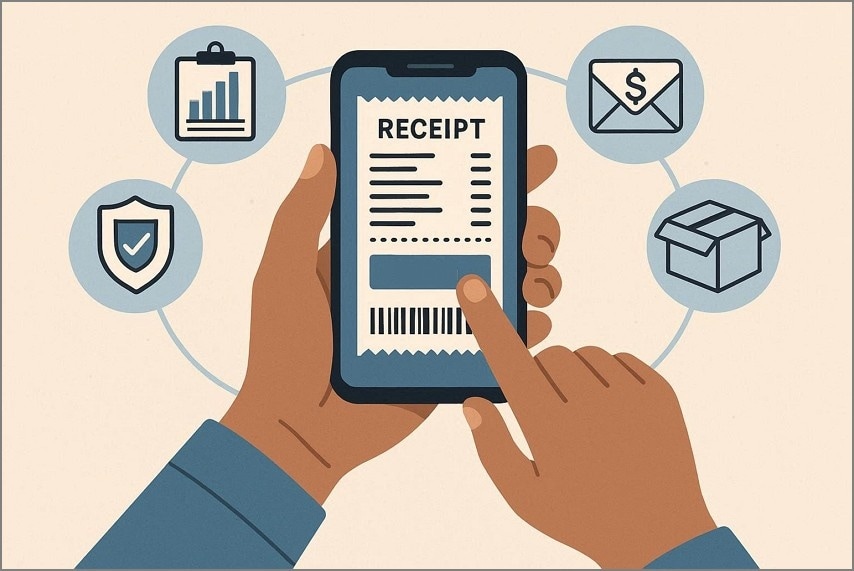
Why Paper Receipts No Longer Work
As financial management becomes increasingly digital, traditional paper receipts no longer meet modern record-keeping demands. Businesses and individuals now prefer storing transactions electronically with receipt applications rather than relying on fragile printed slips. Here are the reasons why paper receipts no longer work in practical scenarios:
- Easily Lost or Damaged: Paper receipts fade over time, tear easily, and can be misplaced. Thermal ink often becomes unreadable within months, making long-term record retention unreliable.
- Difficult to Organize: Sorting physical receipts by date, category, or purpose requires manual effort. In contrast, a receipt application automatically categorizes indexes transactions for quick retrieval.
- Limited Accessibility: Paper records are only available where they're physically stored. Digital copies can be accessed anytime across devices, improving convenience and flexibility.
- Inefficient for Reporting: Manually entering data from paper receipts increases errors and consumes time. Digital scanning reduces input mistakes and accelerates financial reporting processes.


 G2 Rating: 4.5/5 |
 100% Secure
Part 2. What a Receipt Scanning App is Expected To Do
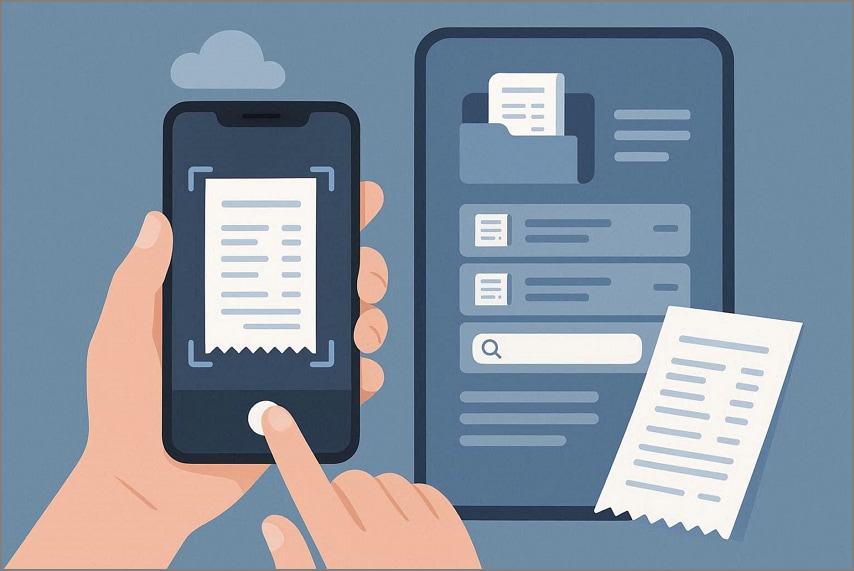
When choosing a reliable receipt scanning app, users expect more than just a basic photo storage tool. Modern apps are designed to automate documentation, improve accuracy, and simplify financial tracking. Here are some of the things that a smart receipt app is expected to do:
- Receipt Capture: Uses the phone camera to scan paper receipts clearly. Advanced apps enhance image quality and detect edges automatically for accurate recording.
- Digital Storage: Saves receipts securely in the cloud or local storage. This ensures documents remain accessible without the risk of fading or physical damage.
- Smart Organization: Automatically sorts receipts by date, merchant, amount, or custom categories. This structured system reduces manual filing effort.
- Quick Search & Retrieval: Enables instant search using keywords, vendor names, or transaction amounts. Optical Character Recognition (OCR) allows fast text-based searches.
- Automatic Data Extraction: Extracts key details such as date, total amount, tax, and merchant name. This reduces manual entry and improves reporting accuracy.
G2 Rating: 4.5/5 |100% Secure
Part 3. Different Types of Receipt Scanning Apps
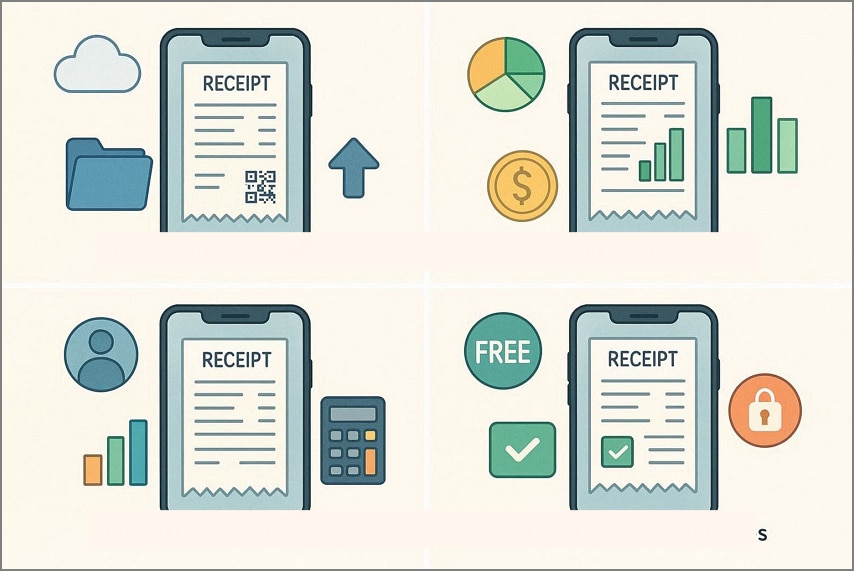
As digital expense tracking becomes standard, choosing the right receipt organizer app depends largely on how you plan to use it. Not all receipt scanning apps serve the same purpose. Mentioned below are some of the types of receipt apps to discuss that you can try:
Simple Receipt Storage Apps
These apps focus primarily on capturing and storing receipt images digitally. They allow users to snap photos, save them securely, and access them later when needed. Features are usually basic, including date tagging and minimal categorization.
Expense-Focused Receipt Apps
Designed for budgeting and expense tracking, these apps go beyond storage. They automatically extract transaction details, categorize spending, and generate summaries or reports. Many include analytics tools to help users monitor monthly spending patterns.
Business Receipt Apps
Business-oriented apps offer advanced functionality such as multi-user access, approval workflows, tax categorization, and integration with accounting software. They support reimbursement processing and compliance documentation.
Free vs. Paid Receipt Scanning Apps
Free apps typically offer limited storage, fewer integrations, and basic scanning features. Paid versions provide enhanced OCR accuracy, unlimited cloud storage, data export options, security features, and automation tools. The choice depends on usage frequency, reporting needs, and required functionality.
G2 Rating: 4.5/5 |100% Secure
Part 4. Free Receipt Scanning Apps: What They Do Well
For users exploring budget-friendly options, a free receipt app can provide surprisingly practical functionality. While premium tools offer advanced automation and integrations, many free receipt scanning apps still handle essential tasks efficiently.
Benefits of Free Receipt Apps
- Basic Receipt Capture: Users can scan receipts quickly using their smartphone camera. Most free apps include automatic edge detection and image enhancement for clearer digital copies.
- Digital Storage: Scanned receipts are stored electronically within the app or cloud storage. This reduces physical clutter and keeps purchase records accessible anytime.
- Simple Categorization: Receipts can be manually sorted by date, store name, or spending category. This helps users maintain organized records without a complex setup.
- Cloud Backup Access: Many free versions offer limited cloud syncing across devices. This ensures receipts remain safe even if a phone is lost or replaced.
- Basic Export Features: Users can export receipts in PDF or CSV format for sharing. This supports simple reporting or documentation needs.
Common Limitations of Free Receipt Scanning Tools
Even the best free receipt scanning apps come with trade-offs compared to paid versions. Here are some of the limitations that people usually face while using these apps:
- Storage Caps: Free plans often restrict the number of receipts you can save or the amount of cloud storage available. Once you hit the limit, you must delete old receipts or upgrade to a paid tier.
- OCR Accuracy: Optical Character Recognition (OCR) may be less precise in free versions. This can result in errors when extracting text from receipts, especially for small fonts or crumpled paper.
- Limited Export Options: Export features may be basic or disabled entirely on free plans, restricting users to screenshots or manual copying. Advanced formats like CSV or direct integration with accounting software are often reserved for paid tiers.
- Fewer Integrations: Free apps may not connect with tools like Excel, Google Sheets, or accounting platforms. Businesses and frequent travelers might find this limiting for reporting and reconciliation.
- Basic Security Features: While free apps secure digital receipts, they might lack advanced encryption or multi-factor authentication. This could be a concern for users storing sensitive financial data.
G2 Rating: 4.5/5 |100% Secure
When Free Apps Are Enough
For many individuals and small-scale users, a free receipt app can deliver exactly what's needed without spending money. These scenarios highlight when basic tools are perfectly suitable:
- Casual Personal Use: If you only scan receipts occasionally (like monthly groceries, utility bills, or one-off purchases), basic free apps handle storage and digital backup easily. You don't need advanced reporting or integration features for light use.
- Simple Return or Warranty Tracking: Free apps are great when your goal is just to keep a digital copy for product returns or warranty claims. They let you capture and retrieve images quickly without subscription barriers.
- Temporary Travel Expense Logging: When traveling for a short trip, free plans can store hotel, fuel, and meal receipts. Basic categorization and date organization often suffice for returning and settling expenses.
- Budget-Aware Students or Individuals: Users who want to track personal spending patterns without premium features can rely on free apps. They cover receipt capture and basic categorization without financial commitment.
Part 5. Best Way to Scan Receipts With an App
Once you've selected the right tool, understanding the best way to scan receipts ensures you get clear images. By following a structured approach inside your receipt scanning app, you can improve OCR accuracy and reduce manual correction.
Lighting and Image Quality Tips for Receipt Scanning
- Use Natural or Bright White Light: Scan receipts in well-lit areas, preferably near natural daylight or under bright white lighting. Adequate illumination prevents shadows and improves text clarity for better recognition.
- Avoid Glare and Reflections: Keep the receipt flat and tilt your phone slightly if glare appears on glossy paper. Reflections can obscure important details like totals and dates.
- Stabilize Your Camera: Hold your phone steady or place it on a stable surface while capturing the image. Motion blur can reduce sharpness and affect text detection accuracy.
- Capture the Entire Receipt: Ensure all edges of the receipt are visible within the frame. Missing sections may lead to incomplete data extraction or storage errors.
- Enhance Image Within the App: Use built-in crop and contrast adjustment tools before saving. These features sharpen text and improve readability for digital archiving.
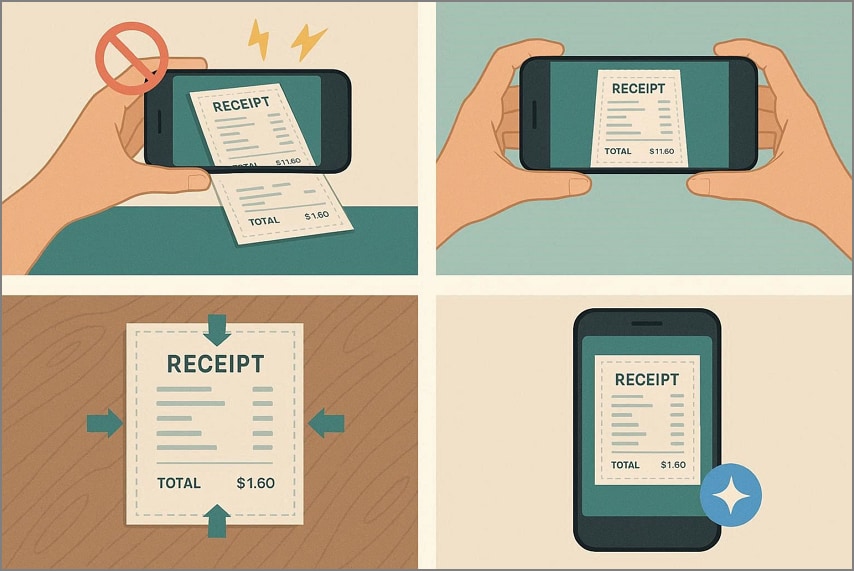
Flat vs. Curved Receipts: Why Positioning Matters
Receipt positioning directly impacts scan clarity and OCR accuracy in a receipt capture app. A flat receipt allows the camera to capture uniform text alignment, while a curved or folded receipt can distort characters and create shadows. Before scanning, it's important to understand the difference between the two:
| Factor | Flat Receipts | Curved Receipts |
| Text Clarity | Text appears straight and evenly aligned, improving readability. | Text may look warped or stretched, reducing OCR accuracy. |
| OCR Performance | Higher recognition accuracy due to consistent spacing and alignment. | Lower recognition rates are caused by distorted characters. |
| Shadow Formation | Minimal shadows when placed on a flat surface. | Curves create uneven lighting and shadow lines. |
| Edge Detection | The app detects borders more accurately for automatic cropping. | Edge detection may fail or crop important sections. |
| Data Extraction Accuracy | Totals, dates, and merchant names are captured more reliably. | Important details may be misread or skipped. |
Why Scanning Quality Affects Recognition
Scanning quality directly influences how accurately Optical Character Recognition (OCR) extracts receipt data. Blurry images, shadows, low contrast, or distorted text reduce the receipt software's ability to identify characters correctly. When the scan is clear and properly aligned, the system can detect totals, dates, and merchant names with higher precision. Poor image quality often results in misread numbers.
Part 6. When Receipt Scanning Apps Stop Being Enough
As financial activity expands, basic receipt scanning apps may no longer meet operational demands. What works well for occasional personal tracking can become inefficient when receipts increase in volume and reporting requirements grow. At this stage, users often need stronger automation, deeper analytics, and tighter financial controls.
- Growing Receipt Volume: Manually reviewing and organizing a large number of receipts becomes time-consuming. Free or basic apps may slow down performance or reach storage limits.
- Need for Accurate Data Extraction: Higher transaction frequency requires precise OCR and minimal errors. Inaccurate data entry can affect bookkeeping and financial calculations.
- Preparing Reports or Summaries: Advanced reporting tools become necessary for monthly, quarterly, or annual reviews. Basic apps often lack customizable summaries and analytics dashboards.
- Verifying Totals and Taxes: Businesses need reliable tax breakdowns and automatic total verification. Limited apps may not separate tax amounts or detect calculation discrepancies.
Part 7. Scanning and Managing Receipts with PDFelement
After a week full of business trips, client lunches, and shopping, your wallet is overflowing with receipts, making organization a headache. PDFelement offers a natural upgrade for anyone needing more than a basic receipt organizer app. It bridges mobile convenience with professional accuracy, combining intuitive scanning with powerful data management.
Designed for users who value efficiency, PDFelement's Receipt Assistant automatically extracts key details from receipts, reduces manual entry, and keeps records secure and searchable. Whether for personal budgeting, reimbursements, or tax purposes, it transforms scattered receipts into reliable, well-organized digital documents that are easy to access and manage.
G2 Rating: 4.5/5 |100% Secure
How PDFelement Helps in Scanning and Managing Receipts
Step 1Scan Receipts Using Mobile or Desktop
Capture receipts using your phone camera or directly on a desktop. PDFelement maintains high-quality scans for accurate data recognition across devices.
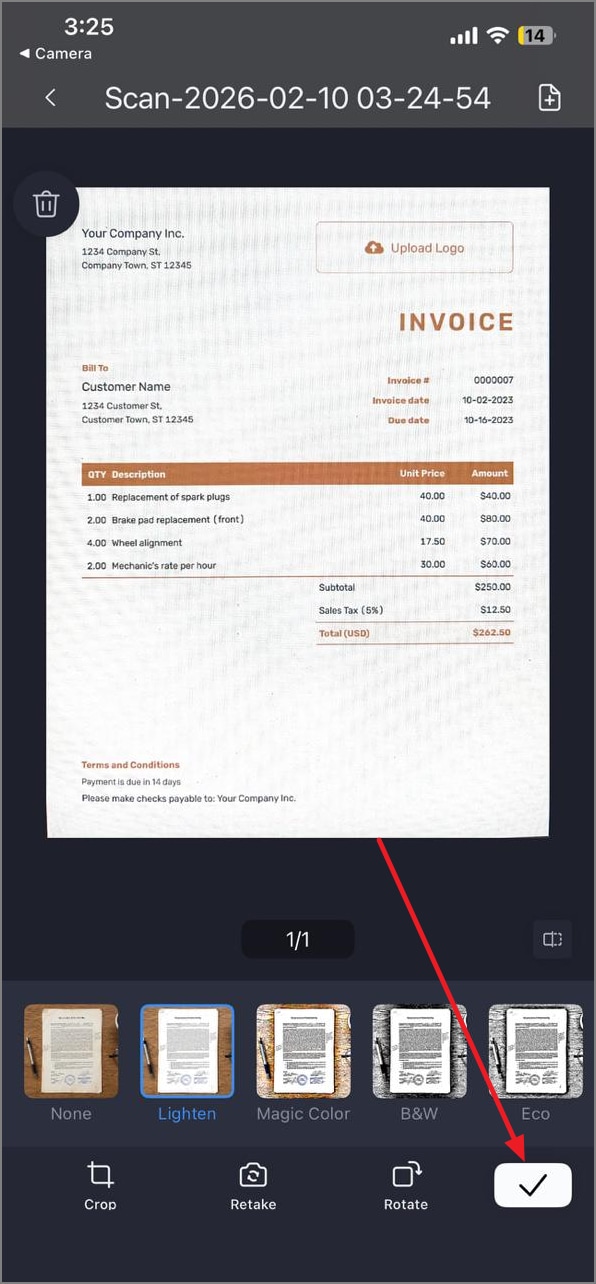
Step 2Cross-Device Scanning and Instant Desktop Access
Mobile scans sync immediately to the desktop, allowing instant review and editing. Users avoid manual transfers while keeping all receipts organized in one place.
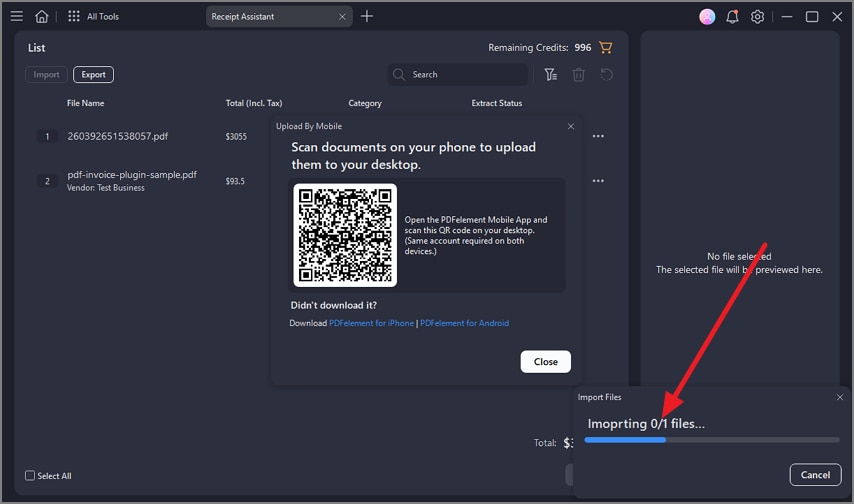
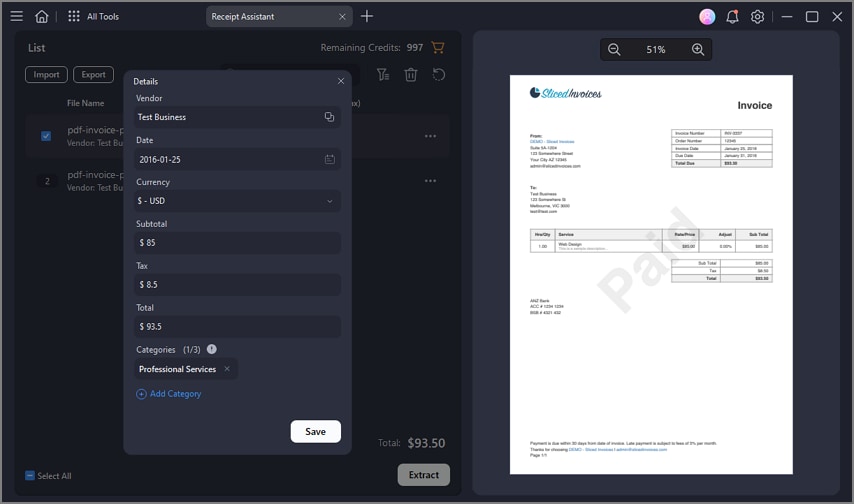
Step 3Automatic Extraction of Key Receipt Fields
The Receipt Assistant identifies totals, dates, vendors, and taxes automatically. This reduces manual entry and ensures accurate, structured records for reporting or reimbursement.
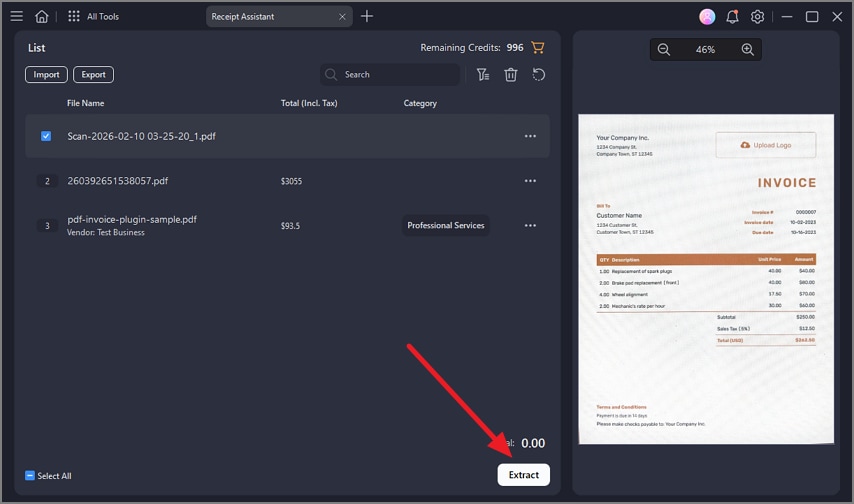
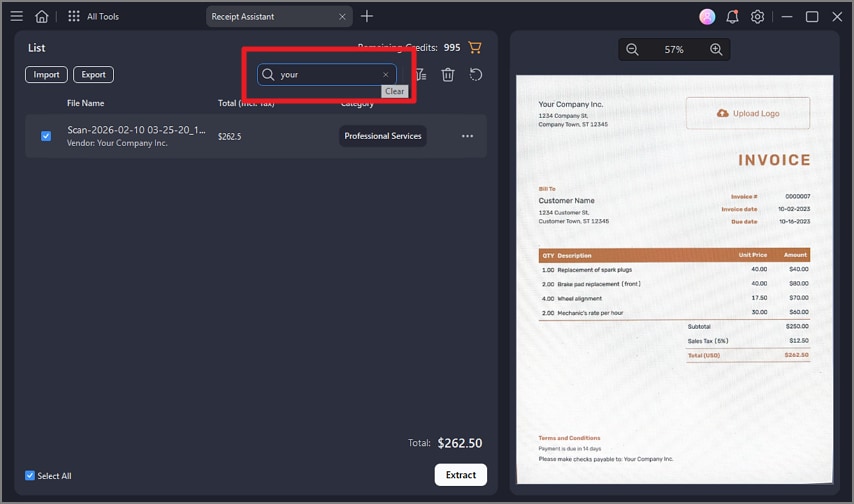
Step 4Jump-to-Field Positioning for Verification
Quickly navigate to extracted fields to verify details efficiently. This ensures data accuracy and saves time when reviewing multiple receipts.
Step 5Cloud Storage for Long-Term Receipt Management
Secure cloud storage keeps receipts accessible anytime, from any device. Long-term archives simplify expense tracking, reporting, and retrieval for personal or business use.
Part 8. Receipt Scanning Apps vs. Receipt Scanner Software
Choosing between a mobile app and dedicated receipt software depends on usage needs and desired functionality. While receipt scanning software often offers advanced features for businesses. Understanding the differences helps users select the right tool for casual tracking or professional expense management.
G2 Rating: 4.5/5 |100% Secure
App-Only Solutions vs. Cross-Device Software
Receipt scanning apps are designed primarily for smartphones and tablets, offering on-the-go convenience. In contrast, receipt scanner software often supports multiple devices and desktop integration, allowing seamless syncing across platforms.
Storage vs. Structured Data
Apps typically focus on storing digital images of receipts with basic categorization. Receipt scanning software goes further, extracting structured data like totals, dates, and vendor names for reporting or accounting purposes.
Casual Use vs. Business Use
Mobile apps suit personal budgeting, travel expenses, and occasional record-keeping. Businesses and finance teams benefit more from receipt scanning software that offers automation, analytics, multi-user access, and compliance-ready documentation.
Integration Capabilities
Apps may have limited or no integration with accounting systems. Receipt scanning software often connects directly with tools like QuickBooks, Xero, or ERP systems for streamlined bookkeeping.
Part 9. How to Choose the Best Receipt Scanning App for You
Selecting the right receipt scanning app depends on how you plan to use it and what features matter most to your workflow. Mentioned below are some of the factors you must consider while choosing the receipt app:
- Assess Your Receipt Volume: Light users with occasional receipts may find free or basic apps sufficient. If you handle large batches frequently, look for apps with bulk scanning and strong organizational tools.
- Determine Accuracy Needs: For reliable tracking, reimbursement claims, or detailed records, prioritize apps with high OCR precision. Higher accuracy reduces manual corrections and ensures totals, dates, and vendor details are captured correctly.
- Free vs Paid Tolerance: Decide whether you're comfortable with storage limits, ads, or basic features in free versions. If you want unlimited scans, cloud storage, and advanced automation, a paid plan may be worth the investment.
- Understand Reporting and Tax Requirements: If you need structured reports, expense summaries, or tax-ready export formats, choose apps that support these capabilities. Some provide customizable reporting and easy extraction for accountants or tax filing.
Part 10.Common Mistakes When Using Receipt Scanning Apps
Even the best receipt scanning apps can't prevent errors if users adopt poor practices. Mismanagement or overreliance on app features can lead to lost data. Mentioned below are some of the common mistakes that people make when using a receipt scanning app:
- Treating Scanned Images as Final Records: Some users assume that a captured image is enough for accounting or tax purposes. Without proper verification or backup, errors in the scan may go unnoticed and cause problems later.
- Skipping Verification: Failing to check extracted data like totals, dates, or merchant names can lead to inaccuracies. Regular review ensures that the app's OCR output matches the original receipt.
- Relying on Free Apps for Business-Critical Data: Free apps often lack advanced security, unlimited storage, or integration with accounting software. Using them for essential business records can risk data loss or incomplete reporting.
- Losing Receipts Due to Storage Limits: Many free or basic apps cap the number of receipts or cloud space. Once the limit is reached, old receipts may be deleted automatically, resulting in lost financial records.
- Ignoring App Updates: Not updating the app may prevent access to improved OCR, bug fixes, or security patches. Keeping the app current ensures optimal performance and reliability.
People Also Ask
-
What is the best receipt scanning app?
The best receipt scanning app depends on your needs: for simple everyday scanning, look for apps with strong OCR and easy organization. PDFelement also offers reliable receipt scanning with searchable PDFs and solid data extraction capabilities. -
Are free receipt apps reliable?
Free receipt apps are generally reliable for basic scanning and digital storage, especially for occasional use or simple record‑keeping. However, they may lack advanced features like bulk scanning, accurate OCR, and integrations. -
How long should receipts be stored digitally?
Digital receipts should be kept as long as they are relevant for tax, reimbursement, or warranty purposes, typically at least 3–7 years, depending on local regulations. -
Do receipt scanning apps extract data automatically?
Many modern receipt scanning apps use OCR to automatically extract key details like date, total, merchant name, and taxes from captured images. Accuracy varies by app, so always verify extracted information for important records. -
When should I move beyond a basic receipt app?
You'll likely need more advanced software when your receipt volume increases, accuracy becomes critical, or you require detailed reports and accounting exports. Upgrading receipt scanning software with enhanced features or integrating tools like PDFelement can make large‑scale management far more efficient.
Conclusion
All in all, this article provided all the details you need to know about the best app for receipt scanning. Receipt scanning apps are a great starting point for digitizing everyday purchases, but as volume grows, accuracy and organization become crucial. Professional tools help reduce errors and minimize manual work, making expense management more efficient. PDFelement, in particular, turns scanned receipts into reliable, searchable, and well-organized records for long-term tracking.

![[2026] Top 5 Great Alternatives to Preview for Mac](https://images.wondershare.com/pdfelement/images2026/pdf-like-article-2.png)


