

Imagine you need to edit a large batch of PDFs for work, but want to save money on software. PDFelement offers powerful PDF editing features, and finding real, verified coupons can help you get the best deal. In this article, we explore the latest PDFelement coupon codes and discounts for 2026.
You'll learn how to spot genuine deals, verify codes to avoid scams, and apply the best savings strategies. Whether you're a student, professional, or business user, this guide helps you maximize your savings on PDFelement software.
In this article
- Quick Precap for PDFelement Coupons and Discounts
- What to Know Before You Hunt for a Code
- How to Get a Valid PDFelement Discount - Method A
- Maximize Savings - Method B
- Real-World Mini Scenarios
- Safe Coupon Hunting: Do's & Don'ts
- Mini Troubleshooting for PDFelement Coupons
- Quick Value Check vs Others
Part 1. Quick Precap for PDFelement Coupons and Discounts
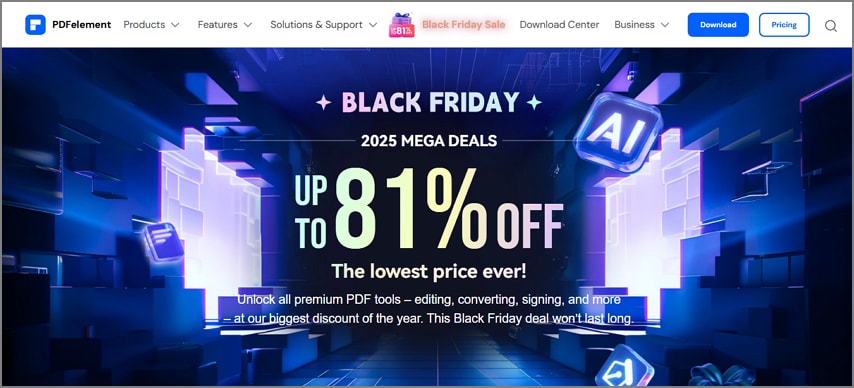
When looking for reliable discounts on PDFelement, it's important to focus on trusted sources that ensure genuine savings without risking scams. Here is where you can get authentic and genuine coupons and codes for this PDF management tool:
- Official Wondershare Promotions: Discounts directly offered on the Wondershare website are the safest and most current deals available.
- Wondershare Newsletters: Signing up for Wondershare's email newsletters gives access to exclusive Wondershare PDFelement coupon codes, early-bird offers, and special promotions only available to subscribers.
- Seasonal Events: Major shopping events like Black Friday, Cyber Monday, and back-to-school sales often feature significant discounts on PDFelement licenses.
- Bundle Offers: Wondershare occasionally provides bundle sales that include PDFelement and other software at a reduced overall price.
Things to Consider For the Coupons and Deals
- Expired or Invalid Codes: Third-party coupon sites often list promo codes that have already expired or do not match the specific product SKU. Always verify the code in your shopping cart before finalizing payment.
- Plan Selection Matters: Before applying a discount, choose the correct PDFelement coupon plan that fits your needs. Perpetual license or subscription, individual or team, desktop only or desktop plus mobile.
- Confirm Final Price: After applying a promo code, review the final total carefully. It should reflect the discount and include any taxes or additional add-ons.
- Official Promo Links: If a code doesn't work, try using official Wondershare promo links often found on their website or newsletters.
- Different SKU Options: Some promo codes apply only to specific versions of the software. For example, a code might only work for the Pro edition and not the standard.


 G2 Rating: 4.5/5 |
 100% Secure
Part 2. What to Know Before You Hunt for a Code
When hunting for a PDFelement discount code, it's important to understand the different pricing plans available so you can choose the best fit and apply coupons correctly. Here are some of the things you must consider before choosing the discount plan for your PDF management:
Plan Types
PDFelement offers both perpetual licenses and subscription plans, each with its own advantages. Mentioned below is the breakdown of the pricing plan this efficient tool offers:
| Plan | Pricing |
| Yearly | US$129.99/yr |
| Perpetual | US$139.99/one-time-purchase |
Platforms
Before hunting for a Wondershare PDFelement coupon code, it's important to know which platforms the tool supports to ensure compatibility with your devices. PDFelement supports multiple platforms, including:
- Windows: Full-featured desktop application for PC users.
- Mac: Native software optimized for macOS devices.
- Android: Mobile app allowing on-the-go PDF editing on Android smartphones and tablets.
- iOS: Mobile support for iPhone and iPad users for seamless editing wherever you are.

Variation in Included Features
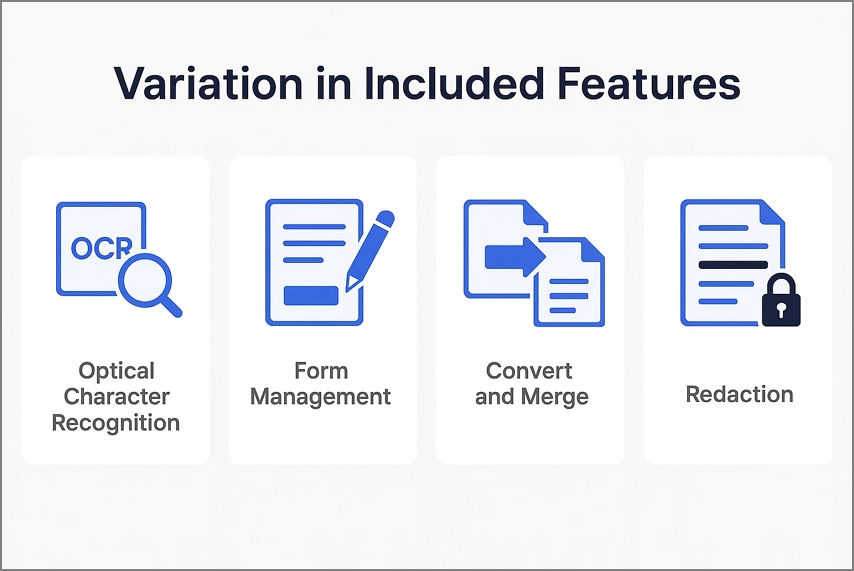
Knowing which features are included in the coupon for PDFelement helps users pick the right plan and understand the full value:
- Optical Character Recognition (OCR): Converts scanned or image-based PDFs into editable and searchable text.
- Form Management (Fill/Create): Allows users to fill out existing PDF forms or create new interactive forms with buttons.
- Convert and Merge: Convert PDFs to and from Word, Excel, ePub, images, and more, and easily merge multiple files into one organized document.
- Page Tools: Edit, reorder, split, rotate, extract, or delete pages within a PDF to customize your document layout precisely.
- Redaction: Securely hide sensitive information by permanently removing text or images before sharing documents.
Why Do Codes Fail?
Discount codes can sometimes be tricky to use, and many users wonder why their PDFelement coupon code does not apply at checkout.
- Promo codes may be limited to certain countries or specific product versions (SKU). Using a code outside these limits causes failure.
- Some discounts apply only to first-time buyers or new accounts, blocking returning customers from redeeming them.
- If an automatic discount is already applied, manually entering another promo code usually won't work, as two codes cannot be combined.
- Promo codes have expiration dates, and using old or outdated coupons will result in rejection at checkout.
G2 Rating: 4.5/5 |100% Secure
Part 3. How to Get a Valid PDFelement Discount - Method A
As discussed, PDFelement offers amazing discounts and deals catering to the different needs of users. Here's a step-by-step guide to help you find and apply valid PDFelement discount codes efficiently:
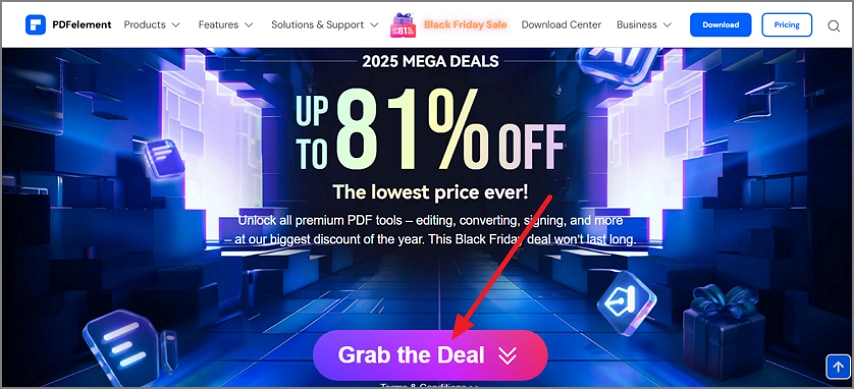
Step 1Access the Discount Page
To begin, access the PDFelement website and head to its discount page by clicking on the designated option on the homepage. Scroll down a bit and click on the "Grab the Deal" option located within the interface.
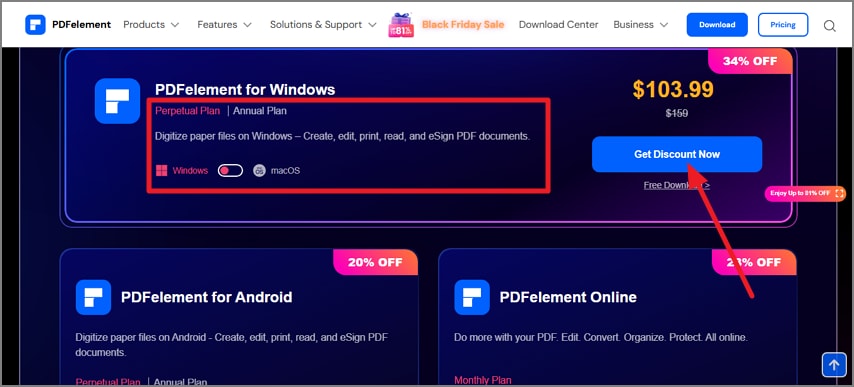
Step 2Select Your Discount Plan
In the following interface, select the discount plan from the options provided. Next, choose your platform, whether you want Windows or Mac. Now, click the "Get Discount Now" button located on the right side.
Step 3Enter Coupon Code, If Any
Moving forward, review the receipt and click on the "I Have a Coupon" option to enter the coupon code in the provided section.

Step 4Enter Email and Buy
Next, enter your email address and password in the designated fields on the right and hit the "Continue to Payment" button to pay for the discount and buy it successfully.

G2 Rating: 4.5/5 |100% Secure
Tips To Make Your Discount Buying Experience Extraordinary
When searching for PDFelement discounts, certain tips can help you maximize savings and ensure a smooth purchase. Mentioned below are some of the tips that will make your experience worthwhile:
- On major event days like Black Friday or Cyber Monday, discounts often auto-apply at checkout.
- If you need multiple licenses, requesting a team or volume quote usually offers better pricing than public discount codes.
- Before buying, install the free trial and test it with your largest PDFs to check the software's speed and accuracy firsthand.
- Keep an eye on official channels and newsletters for exclusive deals not always shared on third-party sites.
- Always verify the final price after applying any discounts to ensure taxes and add-ons are included properly.
Part 4. Maximize Savings - Method B
When aiming to maximize savings on PDFelement legally and effectively, it's important to understand key factors about licensing. Here's how you can make the most of your PDFelement discount code purchase:
- Match SKU to Code: Ensure the promo code you have matches the specific product edition, such as PDFelement Pro or standard, and the operating system (Windows, Mac).
- Bundle Logic: Compare prices between desktop-only licenses and desktop+mobile bundles. Sometimes buying the bundle up front is cheaper than purchasing mobile access later.
- Perpetual vs Subscription Math: Estimate your likely usage length (2–3 years) to decide if a one-time perpetual license or a recurring subscription is more cost-effective.
- Upgrade/Maintenance Path: If you choose a perpetual license, check if upgrade plans are discounted during promotions, which helps keep your software current affordably.
Part 5. Real-World Mini Scenarios
When choosing a PDFelement coupon plan tailored to your needs, it's key to understand which features and discounts apply best to your use case. Mentioned below are some of the real-world scenarios that will help you decide which discount suits you the best:
Student with Scanning & Forms
A university student who scans lecture notes and converts them to editable text using OCR can select the discounted PDFelement plan. The plan includes both OCR and form creation features. If the promo code is restricted to specific SKUs, the student could consider upgrading to the Pro version. This way, they save time editing notes and preparing digital assignments efficiently.

Freelancer on Mac, Windows, and Phones
A freelance graphic designer who works across a Mac desktop, Windows laptop, and smartphone can choose a PDFelement cross-device plan. This ensures smooth PDF editing on all their devices. They verify that the license supports activations on both desktop and mobile platforms, avoiding the need to buy separate tools for each device and simplifying their workflow.

Small Teams
A marketing team of five can benefit from PDFelement's team licensing options designed for collaborative PDF editing. During promotional sales, the team manager can request a customized quote that covers the total number of seats and maintenance fees. Additionally, the manager should verify if the PDFelement coupon licenses support device transfers and deactivations to accommodate remote or shifting team members.

Heavy e-Sign and Compliance
For a legal firm with heavy e-signature and compliance needs, choosing a PDFelement SKU that includes ample e-signature credits is crucial. The firm can utilize bundled redaction tools to hide sensitive information securely. This helps in consistent document tracking and audit trails, ensuring full regulatory compliance.

Part 6. Safe Coupon Hunting: Do's & Don'ts
Navigating the world of PDFelement coupon codes can be rewarding but also tricky if you're not cautious. To help you save safely, here's a quick guide on the dos and don'ts of coupon hunting to maximize your chances of success:
Dos
- Always test the discount code in your shopping cart before completing the purchase to confirm it applies correctly.
- Screenshot the offer and the final total price, including all taxes and add-ons, before paying for your records.
- Read the fine print carefully, especially region restrictions, new-user limitations, renewal prices, and included feature scopes.
- Look out for seasonal sales and newsletter-exclusive offers, which often provide better discounts than random coupon sites.
- Confirm the plan details match your device platforms and feature needs before buying.
Don'ts
- Don't trust "100% success" claims from generic coupon farms; many list expired, invalid, or SKU-mismatched codes.
- Avoid buying from unknown key marketplaces to prevent license validity issues and a lack of customer support.
- Don't skip verifying the final price after applying the code; some sites apply hidden fees or exclude taxes.
- Avoid using multiple discount codes simultaneously if the system doesn't allow stacking; this can invalidate your order.
Part 7. Mini Troubleshooting for PDFelement Coupons
Before completing your Wondershare PDFelement coupon code purchase, here are some mini troubleshooting tips to ensure everything goes smoothly:
- Code "Invalid/Expired": If your promo code doesn't work, try using the official promo link that often auto-applies discounts. Also, check if the code is limited to a certain edition or region.
- Discount Smaller than Banner Advertised: This usually happens due to taxes, regional pricing differences, or having a different SKU in your cart. Double-check and reselect the exact plan the promo covers to get the advertised discount.
- Can't Stack Codes: Most stores only allow one promotion per order. Choose the code that gives you the highest net savings, whether it's manual or an automatic discount.
- Wrong Email/Account: Verify the email and account you use to purchase; this will be the account that manages your licenses to avoid access issues later.
- Moving Devices Later: Review the license activation and deactivation policies to ensure you can transfer PDFelement to a new device without extra fees.
- Need VAT Invoice: Make sure to verify tax handling at checkout, as some coupons display savings before taxes, and get a VAT invoice if required for your records.
Part 8. Quick Value Check vs Others
Choosing the right PDF editor depends largely on your platform preference. Comparing PDFelement's discount offers and features with competitor tools can help ensure you select the best value for your specific requirements.
- If you primarily use Apple devices and focus on annotation features, compare the final PDFelement promo price and features with PDF Expert. The tool is specifically tailored for Mac and iOS users.
- For users who want powerful Windows-based controls and do not require cross-platform functionality, consider PDF-XChange Editor as a viable alternative.
- Organizations needing comprehensive enterprise workflows should evaluate Acrobat Pro deals, but carefully confirm the total cost of ownership (TCO), including renewals, which can be high over time.
- Stick with PDFelement if you desire the broadest feature set editing, OCR, form handling, and page tools, at a consistent price across multiple platforms, ensuring flexibility and value.
People Also Ask
-
Where can I get a real PDFelement coupon code?
Start by checking official Wondershare promo pages or subscribing to their newsletter. Then verify the discount in your shopping cart before checkout. -
Is there a PDFelement Pro-only coupon?
Yes, some promo codes are exclusive to PDFelement Pro or specific editions. So always match your intended plan with the code's SKU requirements. -
Perpetual or subscription—which is cheaper?
Run a cost comparison over 2–3 years, including upgrade and renewal fees. Perpetual can be cheaper long-term, but subscription offers lower upfront costs and continuous updates. -
Why won't third-party codes work?
Many third-party codes are expired, restricted by user region, or invalid for your specific SKU, making them fail during checkout. -
Can I use one license on multiple devices?
Check the number of seats and activations allowed in your plan. Team licenses are usually better suited for managing multiple users across devices. -
Do promos include OCR/AI/e-sign?
Always confirm feature inclusions like OCR, AI, or e-sign credits in the deal description before purchasing to avoid surprises.
Conclusion
To wrap it up, this article provided essential tips for successfully using PDFelement coupon codes and promos. By understanding how to verify codes, match plans to your needs, and compare offerings, you can confidently find the best deals. With these insights, securing a worthwhile PDFelement discount is both achievable and straightforward.




