Memorial Day Flyer Template: What to Include and How to Customize It
In this article
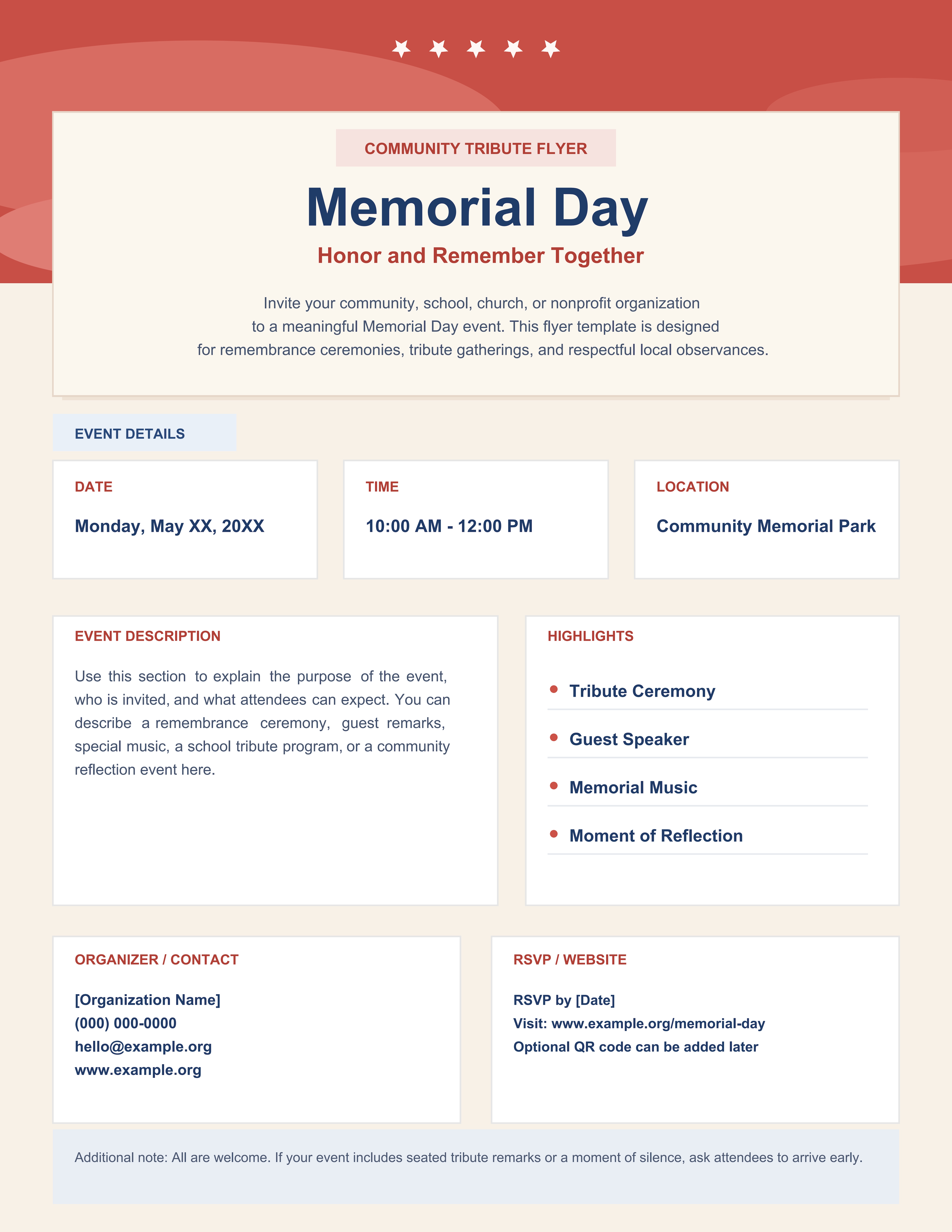
What is a Memorial Day flyer template? A Memorial Day flyer template is a one-page announcement layout used to promote a Memorial Day event in a public, shareable format. This page reflects the actual structure of the template, including a bold Memorial Day title, a short honor and remember subtitle, a centered introduction, an event details block for date, time, and location, an event description area, a list of highlights, an organizer / contact panel, an RSVP / website panel, and a closing note for attendees.
The search intent behind a Memorial Day flyer template is different from a formal invitation or a ceremony program. People looking for a Memorial Day event flyer, Memorial Day poster template, or Memorial Day announcement flyer usually want something that can be posted online, printed for bulletin boards, or shared quickly by email and community groups. That is why the layout focuses on visibility, fast scanning, and public-facing event information instead of long ceremonial wording.
Who should use this Memorial Day flyer template
This page is for organizers who need a public announcement asset rather than a private invitation card or internal planning form. It fits events where the goal is to spread awareness, improve turnout, and make the event details easy to understand at a glance.
- Community groups promoting a Memorial Day tribute, ceremony, or remembrance event
- Schools preparing a Memorial Day assembly flyer or campus announcement
- Churches sharing a Memorial Day service flyer with members and local families
- Veterans organizations and nonprofits that need a printable Memorial Day event flyer template
- Local organizers who want a clean Memorial Day poster template for physical boards, social posting, or PDF sharing
What to include in a Memorial Day flyer template
This flyer template already follows the content pattern most people expect from a public event announcement. The sections below map directly to the real fields shown in the design, so the page is about this template itself rather than a generic holiday flyer.
| Flyer Section | What to Fill In | Why It Matters |
| Main title and subtitle | The Memorial Day heading and a short supporting line such as a tribute or remembrance phrase | Sets the tone and tells viewers what the page is about immediately |
| Introduction | A brief overview of the event audience, purpose, and type of observance | Helps the flyer work as more than just a date block |
| Date / Time / Location | The event schedule and venue details | Supports the core intent behind a Memorial Day announcement flyer |
| Event Description | A short paragraph explaining what attendees can expect | Clarifies whether the event is a ceremony, school tribute, church service, or community gathering |
| Highlights | Key moments such as a guest speaker, music, reflection, wreath laying, or tribute ceremony | Adds specifics without making the flyer feel crowded |
| Organizer / Contact | The host name, phone number, email, or website | Makes the flyer functional in real use |
| RSVP / Website | A reply deadline, landing page, or optional event URL | Gives the announcement a direct next step |
| Attendee Note | Arrival guidance, seating reminders, or general attendance instructions | Improves usability when the flyer is printed or shared as a PDF |
How to write a Memorial Day flyer that matches this template
Start with the public-facing information first. Because this is a Memorial Day flyer template, the most important items are the title, the date, the time, the location, and a concise event description. If someone cannot understand those in a few seconds, the flyer is not doing its job well.
Next, use the introduction and description areas for brief context. This specific template has space for a short centered introduction and a larger description card, so it works best when you write two different layers of copy: a quick overview above and a more informative explanation below. That structure is more effective than repeating the same sentence in both areas.
The Highlights list should stay short and concrete. On this template, items like Tribute Ceremony, Guest Speaker, Memorial Music, and Moment of Reflection fit naturally because the visual design clearly expects short feature-style bullets instead of long narrative text.
Why do people search for a Memorial Day flyer template?
Most users searching for a Memorial Day flyer template want a practical promotional layout they can customize fast. They are usually not looking for a formal invitation message or a detailed ceremony outline. They need a one-page asset that announces the event, explains the basics, and looks appropriate for a remembrance theme.
Note: This template is best for public outreach. If your main goal is to send a formal event message to invited guests, a Memorial Day invitation template is a better fit. If your goal is to show the order of service during the event, a Memorial Day program template is the better format.
Memorial Day flyer template vs Memorial Day invitation template
A flyer is built for broad visibility. An invitation is built for direct guest communication. That difference matters because the same Memorial Day event may need both assets, but they should not be written the same way.
| Format | Best For | Main Content Focus |
| Memorial Day Flyer Template | Public event promotion, posting, and awareness | Headline, date, time, location, event summary, highlights, and contact details |
| Memorial Day Invitation Template | Formal guest messaging for a remembrance event | Host line, invitation wording, RSVP language, and ceremonial tone |
How to edit the flyer template in PDFelement
PDFelement is useful for a Memorial Day flyer template PDF because public event details often change close to publishing time. A venue may be updated, RSVP instructions may shift, or organizer contact details may need correction. An editable PDF makes those changes easier without forcing you to rebuild the layout.
It also includes AI, Edit, OCR, Convert, Sign, Protect, and Batch Tools, which can help when the flyer is part of a larger event set that also includes invitations, programs, checklists, sign-up sheets, and thank-you letters.
Step 1 Open the Memorial Day flyer template in PDFelement
Check the public-facing fields first, including the title, introduction, event details, and organizer blocks.
Step 2 Replace the placeholder flyer content
Fill in the date, time, location, event description, highlights, and contact / RSVP sections so the page matches your actual Memorial Day event.
Step 3 Save a final sharing version
Export the updated file as a clean PDF for printing, posting online, email sharing, or local distribution.
FAQ
-
What should a Memorial Day flyer template include?
A good Memorial Day flyer template should include the event title, date, time, location, a short description, a few key highlights, and clear organizer or RSVP details.
-
Is this the same as a Memorial Day invitation template?
No. A flyer is for public promotion, while an invitation is for direct guest communication with more formal event wording.
-
Can this flyer template work for school, church, or community events?
Yes. This layout is flexible enough for school assemblies, church services, civic ceremonies, nonprofit remembrance events, and local public tributes.
-
Why is a flyer useful for Memorial Day events?
Because it gives organizers a quick, readable format for sharing event basics and increasing awareness without overwhelming viewers with too much ceremony detail.