In the fast-paced world of healthcare, accurate documentation is important. However, one of the most common issues faced within this system relates to time. This is where medical speech-to-text software comes in to offer a practical and fast solution to doctors to dictate patient records, diagnoses, and reports.
In 2026, AI-driven medical tools, including Dragon Medical and AWS Transcribe Medical have become essential for improving workflow efficiency to follow healthcare data regulations. This article will look into the leading medical transcription solutions, their features, and how they integrate seamlessly into clinical practices.
Part 1. Top 3 Medical Speech-to-Text Picks
Medical dictation software is categorized into front-end dictation, which transfers notes directly into Electronic Health Records, and backend transcription services, which convert audio to structured text capture. The quality of accuracy of specialty vocabulary, model customization, and audio quality matters. Therefore, you need to select tools that support medical language and workflow integration.

Top 3 Picks By Scenario
- Deep EHR Drag Type Commands: Dragon Medical or similar tuned systems are good at rich EHR integrations and complicated voice commands. They offer very tailored medical vocabularies and macros that allow clinicians to operate hands-free, navigate records, and generate formatted notes.
- Scalable Team API: Cloud transcription API, like AWS Transcribe Medical, can be scaled with ease when dealing with a large clinic, and supports batch workflows. They are optimal in cases where IT can handle secure integration and need flexible updates to pricing and language models.
- Mobile Capture of Quick Administrative: Mobile apps help record visit notes or field data on the go, offering fast capture, offline support, and secure exports. PDFelement Mobile lets you edit, annotate, and sign medical PDFs directly on your smartphone after you perform the medical speech-to-text steps.
Compliance Caveat
- Ensure that the software meets HIPAA requirements and that the vendor offers Business Associate Agreements (BAA).
- Review your organization's policies for Protected Health Information (PHI) storage, access, and auditing before deployment.
- Perform security tests to determine encryption in transit and at rest, data residency, and privacy levels.
- Make sure you have role-based access controls, including logging and continuous monitoring.
- Educate and train personnel on safe dictation practices and reduce PHI when aligning audio records.
Part 2. Characteristics of a Medical Dictation Software in 2026
In this section of the guide, we will be looking into the Medical speech recognition software characteristics required in 2026:
- Front-end Dictation: Dragon Medical One or nVoq.Voice is a recent technology that enable clinicians to dictate directly in the EHR in real-time. They assist in higher voice instructions and macros, which allow one to navigate fast, add templates, and organize documentation without typing.
- Back-end Transcription: AWS Transcribe Medical and Google Cloud Speech Medical are platforms that break down audio from recorded calls and translate it into exact text after consultation. In many cases, these services provide optional human quality assurance layers to ensure transcription accuracy of critical reports, with over 99% accuracy.
- Ambient Scribing: AI-based systems such as Nuance DAX Copilot can automatically hear patient-doctor conversations and write notes about the encounter. They also aid in minimizing clerical work since they convert conversations into a format that clinicians can review.
- APIs and Embedded Services: Cloud services for Healthcare offer APIs that can be built directly into hospital apps or telehealth systems. They enable real-time transcription, translation, and analytics while maintaining enterprise-grade security and compliance standards.
Part 3. Non-Negotiables for Healthcare Related to Compliance & IT
When it comes to following compliance regulations and using state-of-the-art IT, users need the best. Here we are looking into the major factors that are a must-have within your best medical dictation software:
- Regulatory Safeguards: Healthcare organizations need to ensure the use of software that supports core privacy regulations, such as HIPAA and BAA contracts, and PHI encryption.
- Flexible Deployments: The institutions can deploy on-premises, via virtual desktop infrastructure (VDI), in a private cloud, or in vendor-managed clouds, based on their IT strategy and data governance requirements.
- EHR Integrations: Quality medical dictation software must work with EHR templates, SmartPhrases, macros, and command sets that simplify documentation, including adding review-of-systems or coding suggestions, without clinical advice.
- Accuracy Factors: Seek solutions that feature specialty-trained models, noise avoidance, microphone-quality optimization, and accent flexibility, ensuring high accuracy and consistent transcription in the clinical setting.
- Administrative Control: The IT teams should have strong user provisioning and device compliance policies and data retention or deletion to control access lifecycles, sensitive information, and internal audit needs.
Part 4. The Top Medical Dictation Solutions in 2026
Now that you know how the medical dictation tools work, you must also be aware of the top options that you can depend on. In this section, we are looking into the top 5 medical voice recognition software you can choose while working in a hospital or a clinic:
PDFelement Mobile [iOS/Android]
Best For: Administrative notes, patient intake summaries, or de-identified recordings that can be processed on-device in compliance with organizational policies.
Step-by-Step Guide on How to Use PDFelement AI Record Function
Below is a complete guide on how to use AI Record in a hospital or clinic to record patient records in text formats within a PDF:


 G2 Rating: 4.5/5 |
 100% Secure
Step 1Access PDFelement AI Record Function
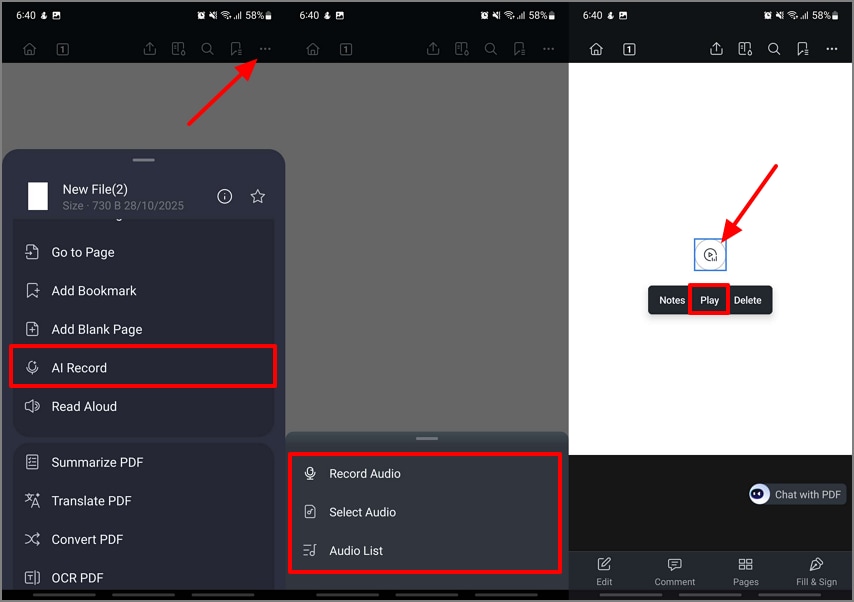
Initiate the process by accessing PDFelement on your mobile and opening up a new blank PDF. Then, tap on the "Horizontal Three Dots" to pick the "AI Record" button. Then choose how you want to upload the medical audio file. Once the audio is on the PDF, tap on it to hit the "Play" button.
Step 2Transcribe the Medical Recording in Your Language Preference
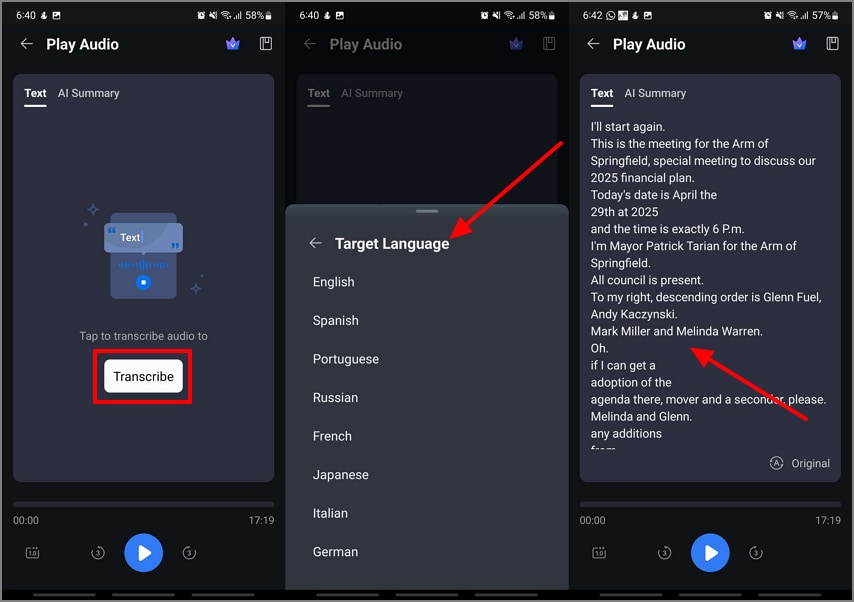
At the Play Audio screen, hit the "Transcribe" button and pick a "Target Language" of your choice. Allow PDFelement' AI to transcribe the audio file.
Step 3Summarize the Transcribed Text For Better Understanding
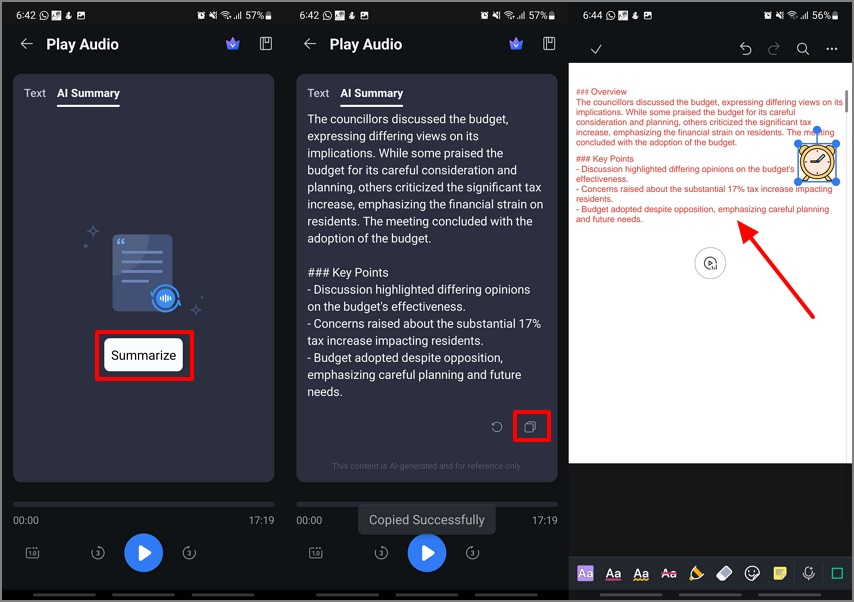
Jump to the AI Summary section in the Play Audio screen to hit the "Summarize" button. Once you get the key points and summary of the audio, tap on the "Copy" icon. Then, move back to the editing interface and edit the patient's medical summary record or annotate it with complete flexibility.
Step 4Save a Copy of the Medical Record PDF into the Scanned Documents
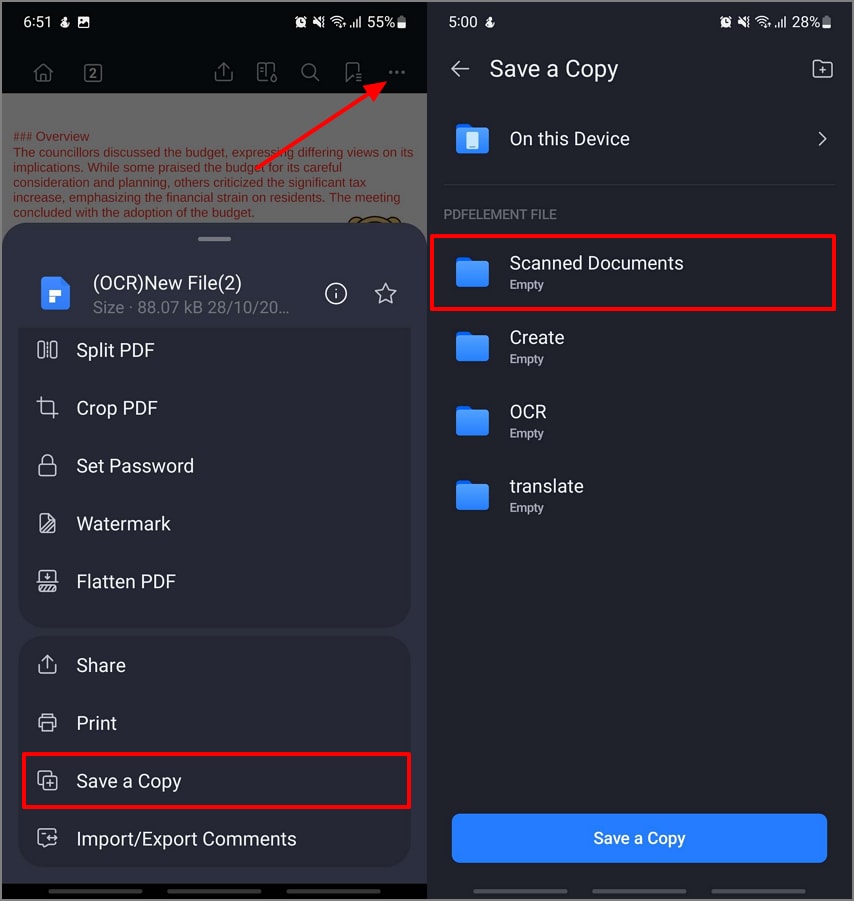
Finally, tap on the "Three Horizontal Dots" to pick the "Save a Copy" option and choose the "Scanned Documents" section.
G2 Rating: 4.5/5 |100% Secure
Additional Functions of PDFelement Mobile
- AI-Generate Mind Map: This feature can instantly create structured mind maps from case summaries or patient notes. It helps clinicians visualize differential diagnoses, treatment plans, or symptom progressions for quick reference.
- AI Translate: AI-powered translation helps convert medical forms and patient education materials into multiple languages. It supports clear communication with non-English-speaking patients and reduces misunderstandings in multilingual healthcare settings.
- Switch AI Models: Users can switch between AI models (DeepSeek-V3 / GPT-4o / GPT-4o-mini / Gemini 1.5 Pro) based on complexity and speed needs. For instance, clinicians can use advanced models for detailed summaries or lighter models for quick note reviews.
- Convert HTMLs to PDFs: This function lets users save online patient education pages or clinical resources as PDFs. It ensures easy offline access and secure archiving of verified medical information for patient counseling or record-keeping.
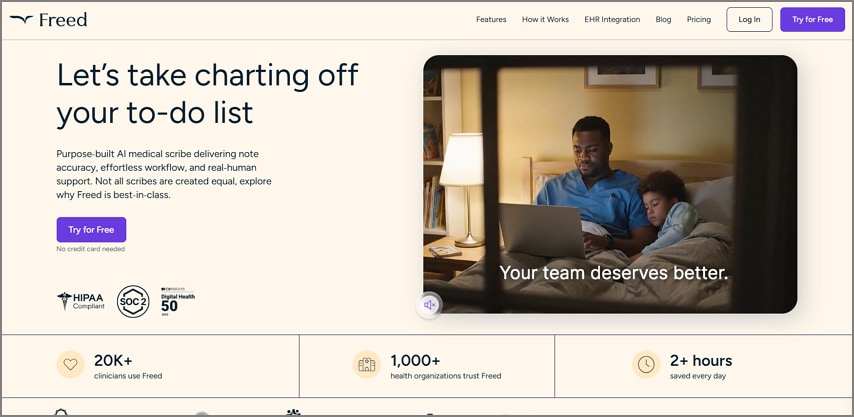
Freed
Best For: Clinicians who want to find a balance between face-to-face time with patients and after-hours work-life balance.
Key Features
- It performs real-time AI transcription during virtual or in-person health checkups.
- Even while using challenging terminology, the tool still transcribes the medical records or prescriptions accurately.
- Freed has the ability to support over 14 languages and helps doctors dealing with diverse patients.
Pros
- This tool helps medical practitioners maintain a work-life balance by spending time managing medical records.
- Doctors get the ability to generate unlimited notes for heavy documentation loads or teams.
Cons
- It is limited to cloud-based workflows, which can restrict doctors from storing limited records.
- Practitioners will need to cross-check and make manual adjustments before submitting to the EHR.
Who Should Pick it: Practitioners who are in constant contact with the patient and do not want to spend hours typing.
AWS Transcribe Medical
Best For: Companies that require scalable, developer-friendly, cloud-based transcription APIs to power automated transcriptions.
Key Features
- It processes multi-speaker clinical conversations to help you get optimized notes for the EHR systems and healthcare systems.
- AWS Transcribe Medical supports over 1000 global compliance standards and other data set controls to ensure patient privacy.
- This software can be embedded into any telehealth, EHR, or clinical workflow system through an open API.
Pros
- It ensures high scalability for organizations that have different transcription demands.
- This software is a cost-effective option for clinics that have to perform bulk transcriptions with pay-as-you-go options.
Cons
- Clinics that have practitioners with limited technical knowledge might not be able to use this tool effectively.
- The AWS software requires high-end IT resources in order for it to get integrated into your system.
Who Should Pick it: IT-supported health systems, telehealth systems, or research institutions in need of scalable medical speech processing.
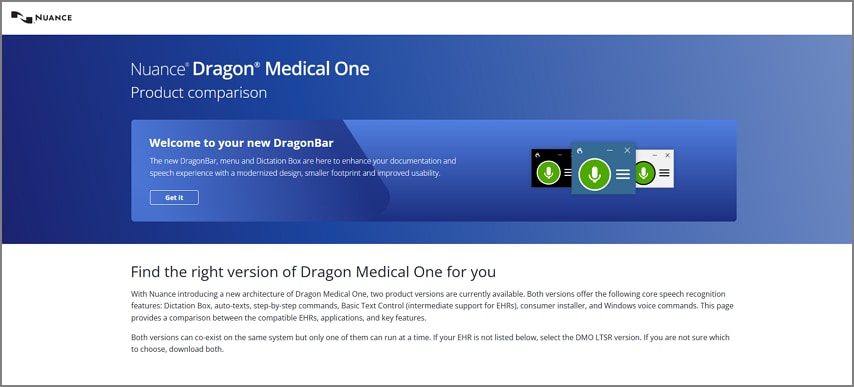
Nuance Dragon Medical One
Best For: Practitioners who require highly specialized and clinically specific vocabularies and command macros on the front-end dictation, heavily integrated with EHR-linked systems.
Key Features
- The advanced speech recognition function in this tool is built for medical vocabulary and challenging jargon.
- To allow doctors to create multiple documents, the tool supports EHR navigation, templates, Smart Phrases, and custom macros.
- It has multiple deployment options, while making sure it is compatible with the latest LTSR broader system.
Pros
- The high accuracy of generated medical records allows doctors and healthcare systems to highly depend on this tool.
- It improves EHR navigation and speeds up the entire process to avoid wasting time in manually submitting documents.
Cons
- To store the documents and operate smoothly, it requires a cloud-based integration.
- When compared to the other medical speech recognition software Dragon Medical One can seem expensive.
Who Should Pick it: Doctors, nurse practitioners, and experts focused on the most accurate and EHR-linked dictation and clinical note generation.
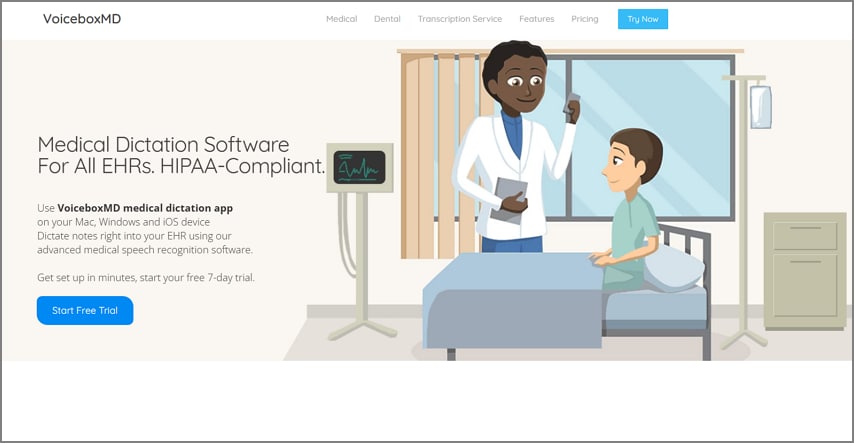
VoiceboxMD
Best For: Practices desiring a simplified, tailorable dictation that is connected with EHRs.
Key Features
- It provides accurate recognition of complex medical and drug terms for different specialists as well.
- You get the ability to get real-time dictation along with the flexibility to edit the text and customize it.
- The tool is applicable to both lengthy consult notes and quick follow-up notes.
Pros
- It helps users improve their workflow and reduces the doctors' putting in extra efforts.
- The clinicians can easily use the tool and get accurate information.
Cons
- Users might need to adapt to maximize the custom note structure as a whole.
- The EHR integrations in this tool are reported by users to not be robust.
Who Should Pick it: Individual physicians and groups of physicians that require a high level of flexibility to tailor documentation and still achieve accuracy and fit of EHR workflow.
Comparative Table to Help You Pick the Best Medical Dictation Software 2026
Jump into the comparative table below to get a better understanding of which medical speech recognition tool you need to choose:
| Aspects | PDFelement Mobile | Freed | AWS Transcribe Medical | Dragon Medical One | VoiceboxMD |
| Front-End Dictation | ✓ | ✓ | ✗ | ✓ | ✓ |
| Back-End Transcription | Manual import and editing | ✓ | ✓ | ✗ | ✓ |
| EHR Shortcuts/Macros | Limited | Limited | ✗ | ✓ | ✗ |
| Deployment Options | Mobile app (iOS / Android) | Cloud-based | Cloud (API via AWS) | Cloud or VDI | Cloud-based |
| BAA/HIPAA Path | Basic security only, not HIPAA | Organization-wide BAA, HIPAA | BAA available, HIPAA eligible | BAA, HIPAA compliant | BAA, HIPAA compliant |
| Specialty Vocab | Limited medical annotation tools | ✓ | ✓ | ✓ | ✓ |
| Admin Controls | App-level and device settings | Team and license management | API access, dataset controls | User and device management | Workflow and account management |
| Best For | Mobile admin/document mark-up | Live clinician scribing | Large org API/batch needs | Complex EHR doc/navigators | Practices needing flexible notes |
Part 5. Dictation Devices, Mics & Mobile Capture Required For Keeping Medical Records
In this section, we will have a look at the hardware devices and mobile setup you will require to perform the speech-to-text medical process:
Dictation Devices and Headsets
Choose microphones or headsets with noise cancellation to reduce background sounds and maintain clear recordings during patient consultations. USB devices provide stable wired connections for desktop use, while Bluetooth options allow mobility for busy clinical environments. Always use hygiene covers or disposable mic shields to maintain infection control and protect sensitive equipment.
Clinic Mobile Use
In outpatient or community settings, clinicians may need to record hallway summaries, home health visits, or intake notes. Mobile capture tools can work offline and sync later to a secure EHR or repository once connectivity is restored, depending on organizational policy. Always follow internal rules regarding PHI recording permissions to ensure compliance and support efficient documentation.
Part 6. How to Ensure a Smooth Workflow While Recording Medical Data
Here are the steps you need to take in order to understand the workflow you need to carry out for optimized clarity and best practices in medical documentation:
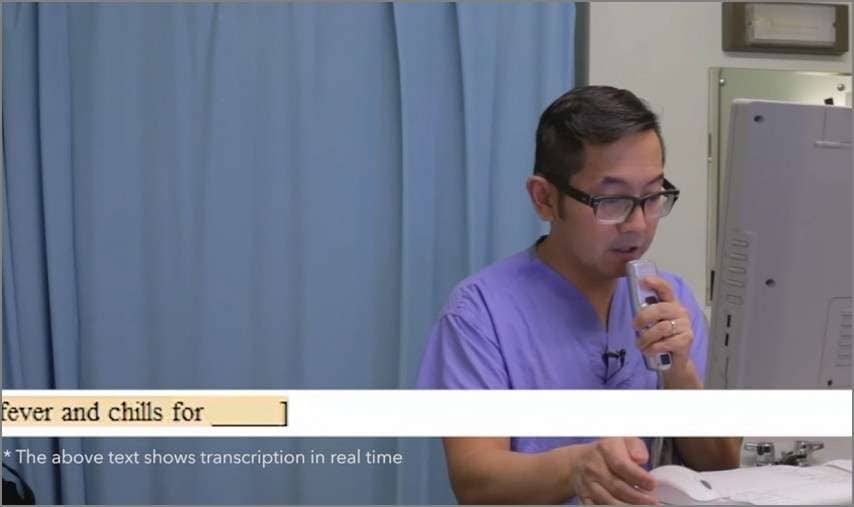
Front-End Dictation into EHR (Real-Time)
Step 1. Start by selecting the appropriate medical profile of your patient within your medical dictation software.
Step 2. Next, position your microphone at the proper distance and ensure that you are seated in a sound-free environment.
Step 3. Once you are ready, start dictating the patient's medical history into the microphone. You will need to dictate the History of Present Illness, Physical Exam Results, and the Medical Decision Making by using the macros and command shortcuts.
Step 4. Finally, review the transcribed results in the EHR to ensure accuracy and sign off.
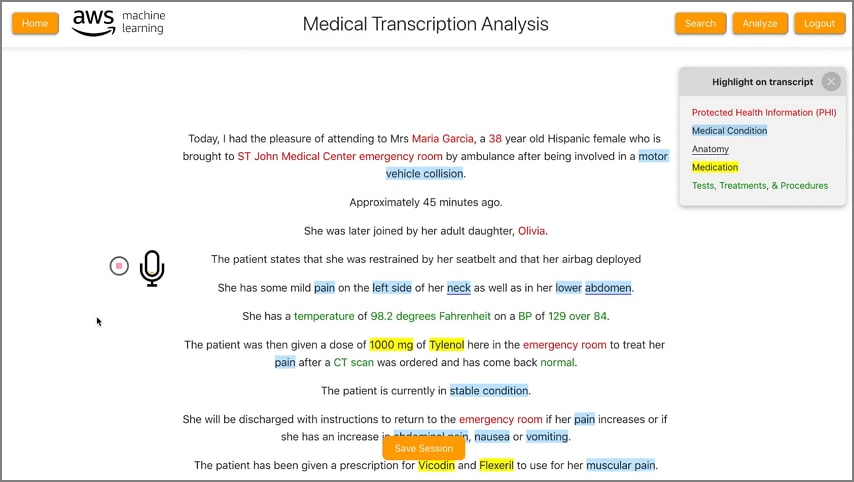
Back-End Transcription (Batch Audio → Text)
Step 1. Initiate the process by exporting the recording of your medical records from your recording device.
Step 2. Upload the recording to your transcription software and allow the tool to transcribe the audio into text format.
Step 3. Then review and edit the medical notes, performing a quality assurance check to ensure accuracy.
Step 4. Once the file is ready, attach the medical record notes to the patient's chart in your EHR system.
On-Device Admin Notes
In such situations, you can choose PDFelement, which can act as a speech-to-text medical app to live record patient details and edit the notes:
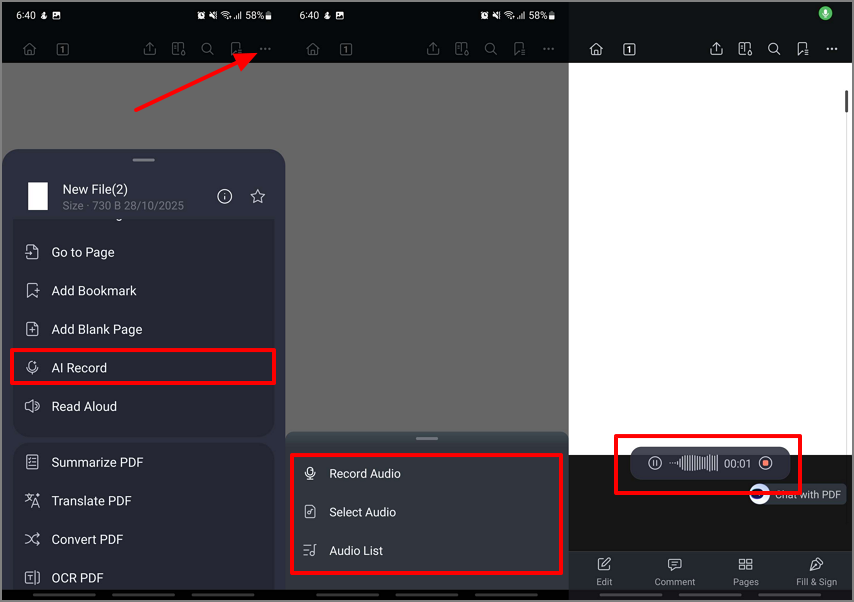
Step 1Access PDFelement AI Record Function
Initiate the procedure by launching PDFelement and then tap on the "Horizontal Three Dots" icon to pick the "AI Record" option. Next, select the method you want to import your medical audio. You can perform a live recording and then "Play" it to move to the next step.
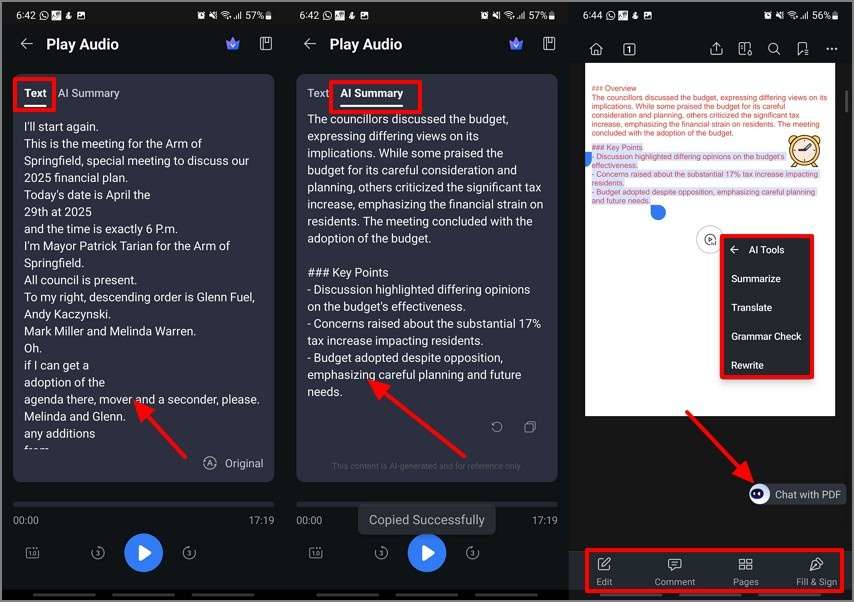
Step 2Transcribe the Audio and Summarize it to Perform Further Edits
Moving on, at the Play Audio screen, pick the "Text" section to transcribe the audio file and then to the "AI Summary" section to summarize it. Tap on the "Chat with PDF" floating button to access the "AI Tools" and further enhance the audio text. Finally, use the "Edit," "Comment," "Organize Pages," and "Fill and Sign" options to organize the document.
Note: PDFelement Mobile is solely to aid in supplementary, administrative, or non-clinical note-taking within a healthcare facility under strict policy and security regulations. It cannot be considered an alternative to certified and HIPAA-compliant medical dictation software.
Part 7. Tips to Ensure Accuracy and Workflow Tips
This section will look into the tips when collecting patient data for the record by using a healthcare speech recognition tool:
- Microphone Placement: Maintain a constant distance between the microphone and your mouth (six to eight inches). Adequate positioning reduces distortion and maintains the speech being clear in the software.
- Silent Conditions: Speak loudly in a closed room or minimize the amount of noise to the greatest extent possible. The quiet environment will aid the system to differentiate your voice from others in the environment, so as to be more accurate.
- Structured Prompts: Use consistent phrasing and section headers such as "History of Present Illness" or "Assessment and Plan." This structure will help the software to create a proper formatting of the notes in a precise way for quick reviews.
- Medication and Allergy Checking: Never rely on a generated medication list or allergy information without a manual verification. Automated transcription may misinterpret drug names, and final verification helps prevent potential clinical errors.
- Custom Vocabulary: Additional specific terms, abbreviations, and procedural phrases are also added to your custom dictionary. This makes the system identify niche terminologies that are applicable to your field.
- Assess and Revise Workflow: Take time to proofread briefly after each shift or at the end of the clinic day. The immediate review of transcripts enables quicker corrections and the maintenance of the accuracy of the context.
Part 8. Security & Compliance Checklist
With the help of this checklist, you can keep track of the factors to ensure patient security and compliance during the medical speech-to-text process:
- Business Associate Agreement (BAA): Make sure that there is an effective BAA with all vendors who deal with Protected Health Information (PHI). This agreement identifies data protection duties and provides accountability for compliance.
- Data Location and Retention: Ensure patient data is stored and processed, and that storage duration is appropriate. Before deployment, ensure that storage regions are configured using legal and privacy requirements in your organization.
- Encryption Standards: verify that all data is encrypted during transmission (TLS) and at rest. Strong encryption will ensure that only authorized access is possible for transfers, including server and device storage.
- Access Control and Auditing: Use role-based access controls (RBAC) to restrict PHI access to authorized personnel. Keep track of the audit logs to track the activity and identify unauthorized use.
- Device and Endpoint Security: Impose mobile device management (MDM) policies in order to impose security settings, application permissions, and remote wipe. This protects PHI on portable and shared clinical devices.
- Training and Consent Practices: Regularly provide staff training on securely handling information and dictation. Post patient consent signage and also implement de-identification procedures when using data to train AI or models.
Frequently Asked Questions
1. What's the difference between medical speech recognition and general dictation?
Medical speech recognition is trained on healthcare terminology, ensuring accurate capture of clinical terms and abbreviations. General dictation tools often misinterpret medical jargon and lack specialty-specific context. For patient safety and efficiency, healthcare providers should always choose medical-grade dictation solutions.
2. Do I need an EHR integration for voice commands?
EHR integration enables full use of voice commands and macros for structured documentation. Without it, you can still dictate text, but navigation and automation features are limited. Integration ensures your dictation flows directly into the right EHR fields with minimal manual editing.
3. Can cloud services be HIPAA-eligible?
Yes, some cloud vendors offer HIPAA-eligible environments when they sign a Business Associate Agreement (BAA). Always verify this before storing or processing Protected Health Information (PHI). Confirm your organization's policy to ensure all data-handling practices align with compliance requirements.
4. Is ambient scribing reliable for all specialties?
Ambient scribing accuracy varies depending on specialty, patient interaction style, and background noise. Most solutions perform well for primary care but may need review for complex fields like oncology or surgery. Always verify, edit, and sign the AI-generated summaries before adding them to records.
5. What mic works best in a busy clinic?
Use a noise-canceling, unidirectional microphone or a certified medical-grade headset. These reduce background chatter and ensure clear speech capture during patient interactions. Investing in quality audio hardware directly improves transcription accuracy and reduces editing time.
6. Can I use a mobile app for quick notes?
Yes, you can use mobile apps for quick admin or non-diagnostic notes if your organization permits it. Always avoid recording PHI if the app is not covered by compliance agreements. Apps like PDFelement Mobile can help manage and annotate forms securely within policy limits.
Conclusion
In conclusion, selecting the right medical speech-to-text software requires balancing accuracy, compliance, and workflow efficiency. Front-end dictation is ideal for real-time EHR updates, while back-end transcription supports larger volumes and delayed documentation.
Cloud APIs enhance the flexibility of custom healthcare apps, provided they meet HIPAA and BAA standards. Alongside these dictation tools, PDFelement Mobile can be used to securely review, annotate, and sign medical PDFs on the go, helping clinicians manage documentation efficiently while remaining compliant.