Teacher Weekly Planner Template: Free Download
In this article
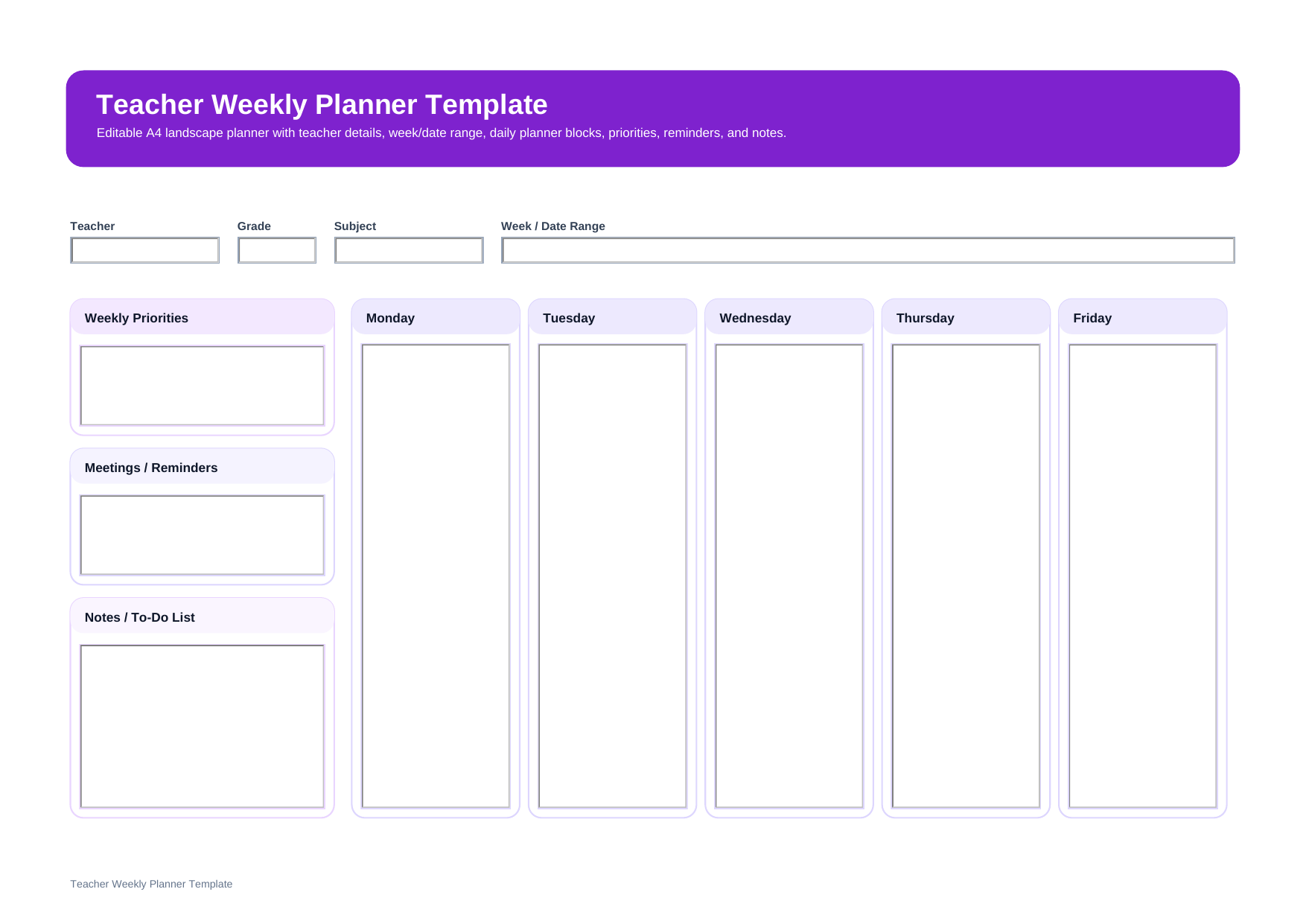
What is a teacher weekly planner template? A teacher weekly planner template is a practical planning page that helps teachers organize weekly priorities, meetings, reminders, notes, and Monday-to-Friday plans in one clear layout. It is useful when you want to manage the full school week in one place instead of working from separate notes.
This template matches a landscape weekly planner with top fields for Teacher, Grade, Subject, and Week / Date Range, a left column for Weekly Priorities, Meetings / Reminders, and Notes / To-Do List, plus five weekday planning boxes from Monday to Friday.
Who should use this teacher weekly planner template?
This template is a good fit for teachers who need more than a lesson page. It helps you manage weekly teaching plans, school tasks, important reminders, and ongoing responsibilities in one view, so the week stays structured and easier to follow.
- Teachers planning classroom work and non-teaching tasks in the same weekly layout
- Teachers who want one page for weekday plans, meetings, and reminders
- Teachers balancing several responsibilities across one school week
What is included in this teacher weekly planner template?
This planner is built for weekly organization. The template includes fields for Teacher, Grade, Subject, and Week / Date Range, followed by weekday sections for Monday, Tuesday, Wednesday, Thursday, and Friday. It also includes side sections for Weekly Priorities, Meetings / Reminders, and Notes / To-Do List.
| Field | What to Fill In | Why It Helps |
| Teacher / Grade / Subject | Your main teaching details | Keeps the planner easy to identify and sort |
| Week / Date Range | The exact school week you are planning | Makes weekly records easier to review later |
| Monday to Friday Sections | Main plans, tasks, or lesson notes for each weekday | Gives you a full weekly overview at a glance |
| Weekly Priorities | The most important goals or tasks for the week | Helps you keep the week focused |
| Meetings / Reminders | Staff meetings, deadlines, events, or follow-ups | Helps you avoid missed school responsibilities |
| Notes / To-Do List | Extra tasks, preparation items, or quick reminders | Keeps planning practical and flexible |
How do you organize a school week with this teacher weekly planner?
Start by entering the Teacher, Grade, Subject, and Week / Date Range. Then use the weekday boxes from Monday to Friday for the main plans you want to see each day.
After that, complete the side sections for Weekly Priorities, Meetings / Reminders, and Notes / To-Do List. This layout works best when you keep entries short and easy to scan, so the page stays useful as a weekly command center.
Why do teachers use a weekly planner instead of separate notes?
Teachers often use a weekly planner because it puts the full week in one view. That makes it easier to balance classroom instruction, preparation work, meetings, and school obligations without switching between multiple pages or notebooks.
Note: This template is best for overall weekly organization. If you need detailed teaching procedures for every class period, a lesson-plan template may still be useful alongside it.
What is the difference between a teacher weekly planner and a weekly lesson plan?
A teacher weekly planner covers the broader school week, including weekday plans, priorities, reminders, meetings, and notes. A weekly lesson plan focuses more directly on lesson content, activities, and teaching flow across the week. Many teachers use both, but for different purposes.
| Format | Best For | Main Difference |
| Teacher Weekly Planner | Managing weekly teaching work and priorities | Combines weekday plans with priorities, reminders, and notes |
| Weekly Lesson Plan | Planning what will be taught across the week | Focuses more on lessons, activities, and instruction flow |
Why download this teacher weekly planner template?
This template gives you a clean weekly layout for organizing class work, school tasks, and reminders in one printable page. It is helpful when you want a planner that feels structured but still leaves enough space for weekly adjustments.
How can you edit and reuse this teacher weekly planner template with PDFelement?
PDFelement makes it easy to turn this planner into a reusable digital file. You can type into the PDF, revise plans during the week, and save a fresh copy for the next teaching cycle without rebuilding the same layout every time.
In addition to basic form filling, PDFelement also includes useful tools such as AI, Convert, OCR, Edit, Sign, Protect, and Batch Tools. That means you can summarize documents with AI, convert files to or from PDF, recognize text in scanned pages, update content quickly, add signatures, secure files, and handle multiple documents more efficiently.
Step 1 Open the teacher weekly planner template in PDFelement
Review the top fields, side sections, and Monday-to-Friday layout before you begin filling it in.
Step 2 Fill in the weekly details and weekday plans
Type the teacher information, week range, weekday plans, priorities, reminders, and to-do notes directly into the PDF.
Step 3 Save, print, or duplicate it for the next week
Keep one copy for current use and save another version to reuse as your weekly planning routine continues.
Why is PDFelement useful for teacher planning?
PDFelement is useful for teacher planning because it helps you edit PDFs, fill forms, convert documents, use OCR on scanned files, protect planning records, and simplify repeated work with batch tools. It is a practical option for teachers who want planning files to stay organized and reusable.
FAQ
-
Is this teacher weekly planner template editable?
Yes. This is designed as an editable PDF template, so you can type into the planner before saving or printing it.
-
What should a teacher weekly planner include?
A teacher weekly planner usually includes teacher, grade, subject, a week or date range, Monday-to-Friday planning sections, weekly priorities, meetings or reminders, and notes or to-do items.
-
Who should use a teacher weekly planner?
It is useful for teachers who want to manage lessons, school tasks, and weekly responsibilities in one organized view.
-
Can I print this planner for classroom use?
Yes. It works well as a printable weekly planning page for teachers who prefer a paper copy during the school week.