DepEd Detailed Lesson Plan Template: Free Download
In this article
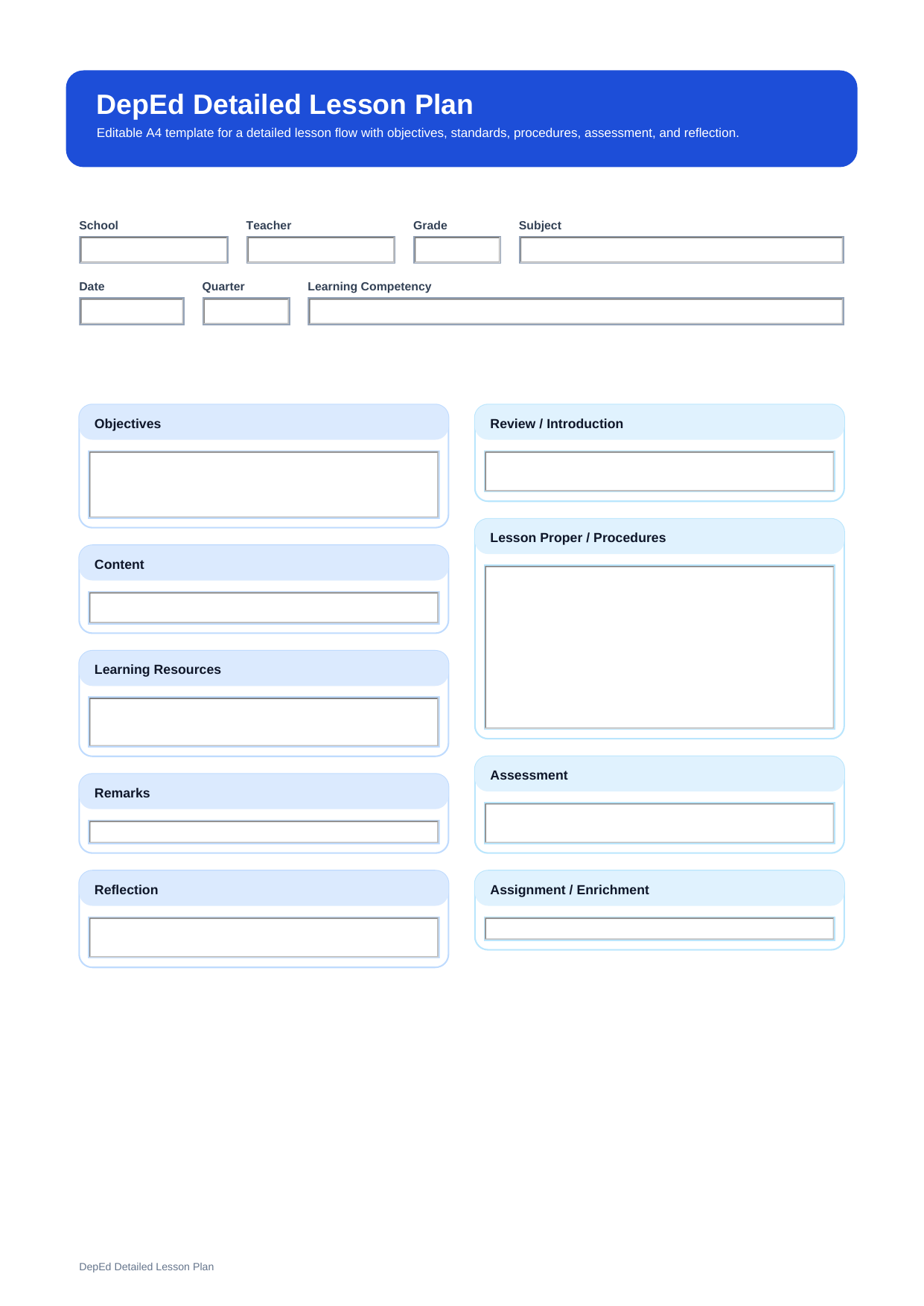
What is a DepEd detailed lesson plan template? A DepEd detailed lesson plan template is a more complete lesson planning format that helps teachers write objectives, content, learning resources, procedures, remarks, and reflection in greater detail.
This free editable PDF template is useful for teachers who need more space for teaching flow, classroom activities, assessment, and lesson notes. It is a practical choice when you want a fuller teaching guide before class starts.
Who should use this detailed lesson plan template?
This format is helpful for teachers who want a fuller lesson guide instead of a short lesson log. It is especially useful for new teachers, demo teaching, observed lessons, and lessons that need a more careful teaching sequence.
- Teachers preparing demonstration lessons
- Teachers who need a step-by-step teaching guide
- Teachers planning lessons with several activities or transitions
What sections are included in a detailed lesson plan?
A detailed lesson plan uses the same main lesson preparation elements found in DepEd guidance, but it expands them with more detail in the lesson flow.
| Section | What to Fill In | Why It Helps |
| Objectives | Learning goals, standards, or competencies | Defines what students should learn |
| Content | Topic and lesson scope | Keeps the lesson aligned |
| Learning Resources | Materials, references, and tools | Prepares what you need before class |
| Procedures | Step-by-step lesson sequence | Supports smooth lesson delivery |
| Remarks | Changes, delays, or unfinished parts | Records important teaching notes |
| Reflection | Review of outcomes and classroom response | Helps improve future lessons |
How do you write a detailed lesson plan step by step?
Start with clear objectives so the lesson has a strong target. Then define the lesson content and prepare all learning resources before class. After that, write the procedures in order, from introduction to lesson development, guided practice, assessment, and closure.
When the class is finished, add remarks and reflection to record what worked well and what should be improved.
Why is a detailed lesson plan useful?
A detailed lesson plan helps teachers teach with more confidence because the lesson flow is already organized in advance. It is also useful when teaching a new topic, preparing for class observation, or managing a lesson that needs careful timing.
What is the difference between a detailed lesson plan and a daily lesson log?
A detailed lesson plan gives more space and more detail for the teaching process. It is designed for fuller planning and step-by-step classroom instruction. A daily lesson log is more concise and is better for recording the key elements of the lesson in a shorter format.
| Format | Best For | Main Difference |
| Detailed Lesson Plan | Full lesson development and instruction flow | Full step-by-step lesson flow |
| Daily Lesson Log | Shorter daily teaching record | Shorter daily lesson record |
Note: Choose a detailed lesson plan when you need a clearer classroom script, more detailed procedures, or stronger preparation for observation and demo teaching.
Why download this DepEd detailed lesson plan template?
This template saves time because the main lesson sections are already arranged for you. Instead of starting from a blank page, you can focus on writing your lesson goals, teaching steps, and assessment clearly.
How can you edit this detailed lesson plan with PDFelement?
A detailed lesson plan usually needs more writing and more revision than a simple lesson log. If you want to update your teaching steps, assessment, or classroom notes before printing, PDFelement can help you edit and fill the PDF more smoothly.
Once your lesson plan is ready, you can save it as a reusable file or print a classroom copy. This is useful for demo teaching, observation, or regular class preparation.
Step 1 Open the lesson plan PDF in PDFelement
Load the file and review each lesson section before adding your content.
Step 2 Fill in the lesson sections
Type your objectives, teaching steps, resources, assessment details, remarks, and reflection into the PDF.
Step 3 Save and print the final version
Keep a digital copy for reuse or print the lesson plan for classroom and observation use.
Why is PDFelement a good fit for detailed lesson planning?
Because detailed lesson plans often include longer procedures and more structured notes, it helps to use a tool like PDFelement that lets you type clearly into the PDF and keep the format organized.
FAQ
-
Does a detailed lesson plan take more time to prepare?
Yes. A detailed lesson plan usually takes more time because it includes a fuller teaching sequence and more written detail.
-
What should be included in the procedures section?
The procedures section should explain the main teaching steps in order, including how the lesson begins, develops, checks understanding, and closes.
-
Can I use this template for demo teaching?
Yes. A detailed lesson plan format is a strong choice for demo teaching because it gives a clearer step-by-step structure.
-
Is this detailed lesson plan based on DepEd guidance?
Yes. The structure follows the core lesson preparation elements commonly associated with DepEd lesson preparation guidance.