Sub Plan Examples Free PDF Samples
In this article
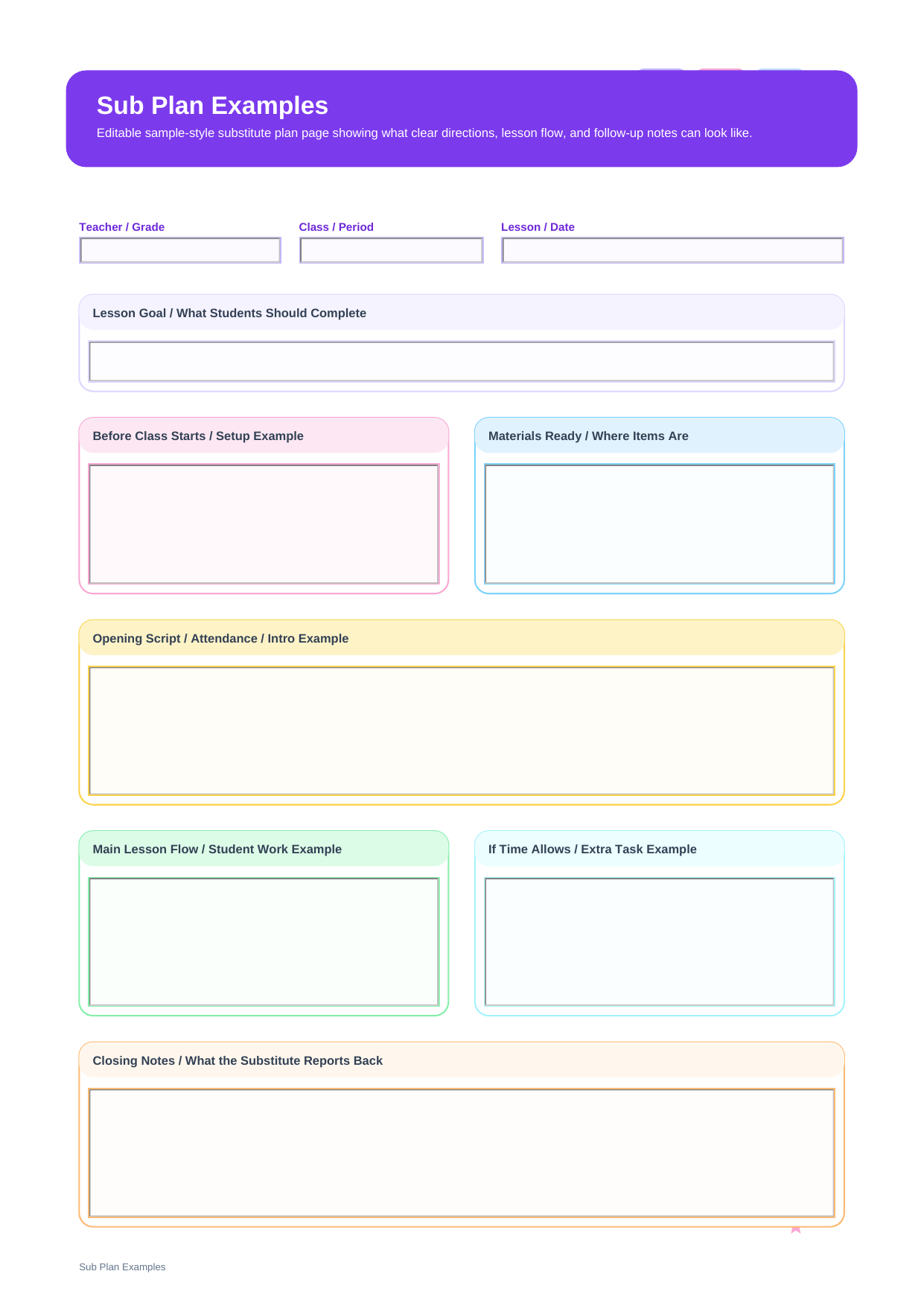
What are sub plan examples? Sub plan examples are model pages that show how substitute directions can be written in a realistic classroom voice. This PDF mirrors the sample-style structure with fields for Teacher / Grade, Class / Period, Lesson / Date, Lesson Goal / What Students Should Complete, Before Class Starts / Setup Example, Materials Ready / Where Items Are, Opening Script / Attendance / Intro Example, Main Lesson Flow / Student Work Example, If Time Allows / Extra Task Example, and Closing Notes / What the Substitute Reports Back.
This is why example pages feel different from blank templates. They are less about giving empty boxes and more about demonstrating tone, order, and the level of detail a substitute can actually use when stepping into an unfamiliar room.
Who should study these substitute examples
These pages are most useful for teachers who already know they need sub plans but are unsure how detailed the instructions should be or how sample wording should sound.
- Teachers looking for a sample sub plan before writing their own
- New educators who want to see substitute directions in a realistic format
- Teams creating a shared standard for how substitute notes should read
What appears on the sample page
This PDF is organized around the real field structure of the template, so each section below corresponds directly to what appears on the page.
| Field | What to Fill In | Why It Helps |
| Teacher / Grade | The teacher name and grade context of the sample | Grounds the example in a believable classroom setting |
| Class / Period | The sample teaching block or class period | Shows how the example can be tied to a specific class |
| Lesson / Date | The lesson title and date context | Makes the example read like an actual classroom handoff |
| Lesson Goal / What Students Should Complete | A concrete sample outcome | Shows how goal wording can stay practical and measurable |
| Before Class Starts / Setup Example | Sample prep instructions before students begin | Demonstrates what substitutes need before the class opens |
| Materials Ready / Where Items Are | Modeled material-location language | Shows how to write resource directions clearly |
| Opening Script / Attendance / Intro Example | A sample opening sequence | Gives structure to the first few minutes of class |
| Main Lesson Flow / Student Work Example | The sample sequence of teaching and work time | Illustrates how much detail is enough without becoming a script |
| If Time Allows / Extra Task Example | A modeled extension task | Shows how to plan for timing shifts gracefully |
| Closing Notes / What the Substitute Reports Back | A sample wrap-up and reporting section | Demonstrates how to close the loop with the regular teacher |
How to use examples without copying them blindly
The best way to use examples is to study the level of detail, not to copy every phrase. Notice how the sample explains setup, materials, opening language, and student work in a way that is specific enough to be useful but not so long that the substitute stops reading.
Example pages are also useful because they reveal rhythm. They show where a sub plan should slow down, where it can stay brief, and how to write instructions that sound human instead of stiff or over-engineered.
Why do teachers download this sub plan examples?
Teachers often search for sample sub plans because seeing one complete model is faster than trying to infer the right tone from a blank form alone.
Note: This file is example-oriented. It is meant to model substitute-facing language and structure, not simply provide a blank packet to fill from scratch.
What is the difference between sub plan examples and sub plan templates?
Examples teach by showing. Templates teach by organizing. If you need a starting structure, choose the template. If you need help with tone, detail, or sample sequencing, the examples page gives more guidance.
| Format | Best For | Main Difference |
| Sub Plan Examples | Learning how substitute instructions can be written | Sample-driven page with modeled wording and flow |
| Sub Plans Template | Building a new substitute packet from scratch | Blank reusable structure with no sample content built in |
How to adapt them with PDFelement
PDFelement is helpful here because example pages often turn into working drafts. You can keep the sample logic, replace the details with your own class information, and save a custom version quickly.
It also includes AI, Edit, OCR, Convert, Sign, Protect, and Batch Tools, which makes it easier to compare versions, attach example materials, and maintain a small bank of substitute references.
Step 1 Open the sub plan examples page in PDFelement
Read the modeled structure first so you can see how the lesson and reporting sequence works.
Step 2 Replace the sample details with your own classroom information
Adapt the opening, materials, main flow, and closing notes instead of rewriting the whole format.
Step 3 Save the edited page as your classroom version
Keep the original example available as a reference for future substitute planning.
Why is PDFelement practical for substitute planning?
PDFelement is practical because examples are most useful when they can be annotated, adjusted, and turned into personalized templates over time.
FAQ
-
Why use sub plan examples?
They help teachers see how much detail to include, what order to use, and how substitute instructions can sound natural and clear.
-
Should I copy sample wording exactly?
Not usually. It is better to borrow the structure and level of detail while adjusting the content for your own classroom.
-
Are examples better than templates?
They serve different purposes. Examples are better for guidance, while templates are better for repeated day-to-day use.
-
Is the PDF editable?
Yes. You can revise the example, save your own version, and print it for actual substitute use.