Sub Binder Template Free PDF for Substitute Teachers
In this article
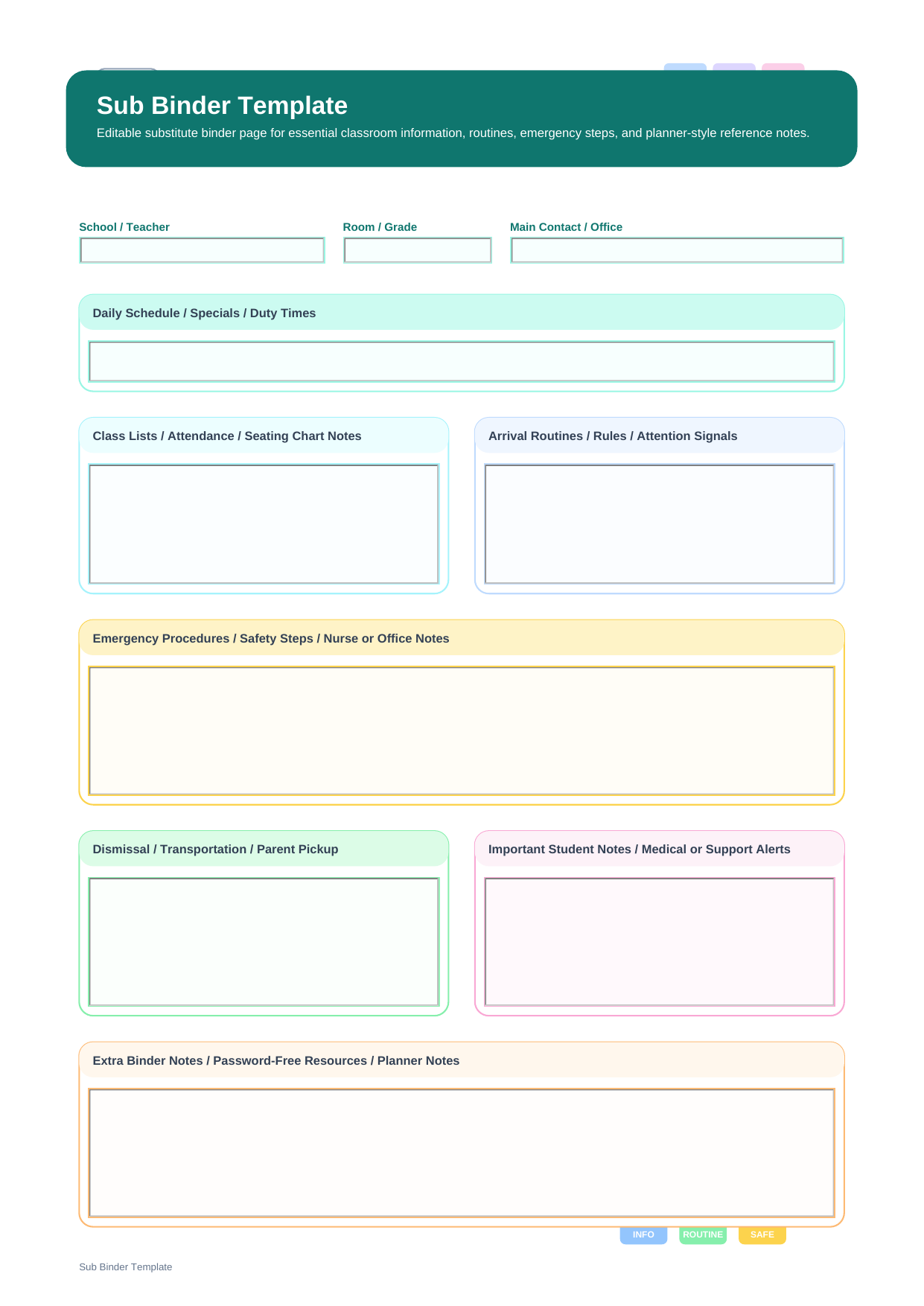
What is a sub binder template? A sub binder template is a substitute-teacher reference page meant for ongoing classroom organization rather than one specific lesson or one specific day. This PDF follows the exact binder-style layout with fields for School / Teacher, Room / Grade, Main Contact / Office, Daily Schedule / Specials / Duty Times, Class Lists / Attendance / Seating Chart Notes, Arrival Routines / Rules / Attention Signals, Emergency Procedures / Safety Steps / Nurse or Office Notes, Dismissal / Transportation / Parent Pickup, Important Student Notes / Medical or Support Alerts, and Extra Binder Notes / Password-Free Resources / Planner Notes.
In other words, this page behaves more like a substitute teacher planner than a lesson sheet. It gathers the information a substitute may need before teaching even begins: where to go, who to contact, how the room functions, and what routines matter most for safety and order.
Who needs a substitute binder page
This layout is ideal for teachers who want a standing substitute binder ready at all times, especially when last-minute absences make it hard to prepare daily notes from scratch.
- Teachers maintaining a permanent substitute binder in the classroom
- Schools that want planner-style substitute reference pages in every room
- Educators who need emergency routines and student support information in one place
What information belongs in this binder layout
This PDF is organized around the real field structure of the template, so each section below corresponds directly to what appears on the page.
| Field | What to Fill In | Why It Helps |
| School / Teacher | The school and teacher identity information | Tells the substitute where the binder belongs and whose room it supports |
| Room / Grade | The room number and grade or class context | Helps orient the substitute immediately on arrival |
| Main Contact / Office | Office number, front desk, nearby teammate, or contact point | Makes urgent communication faster and safer |
| Daily Schedule / Specials / Duty Times | A standing daily overview of the room timetable | Provides a dependable operational map for the day |
| Class Lists / Attendance / Seating Chart Notes | Attendance references and seating details | Supports accurate record keeping and classroom recognition |
| Arrival Routines / Rules / Attention Signals | What students do when they arrive and how the room is managed | Gives the substitute a usable management framework |
| Emergency Procedures / Safety Steps / Nurse or Office Notes | What to do during emergencies or health-related issues | Keeps the most critical information easy to find |
| Dismissal / Transportation / Parent Pickup | How students leave and any transportation details | Prevents end-of-day confusion and mistakes |
| Important Student Notes / Medical or Support Alerts | Essential student-specific support reminders | Helps substitutes respond appropriately to known needs |
| Extra Binder Notes / Password-Free Resources / Planner Notes | Additional references, backup materials, or low-friction resources | Turns the binder into a real working tool instead of a static document |
How to build a binder that really helps a substitute
A useful sub binder is built around permanence. Start with information that rarely changes, such as contacts, room identity, safety procedures, and core routines. Then add the Daily Schedule / Specials / Duty Times and attendance-related references that substitutes need every time they enter the room.
The strongest binder pages also respect urgency. That is why Emergency Procedures / Safety Steps / Nurse or Office Notes and Dismissal / Transportation / Parent Pickup deserve clear, direct wording. Save the final section for low-risk resources and planner notes that help without overwhelming the substitute.
Why do teachers download this sub binder template?
Teachers choose this file when they want a substitute binder that functions as a dependable operational reference, not just a temporary lesson attachment.
Note: This page is binder-oriented and long-use by design. It supports substitute readiness over time, whereas day-specific sub plans are better for temporary lesson instructions and scheduling changes.
How is a sub binder template different from a sub plans template?
A sub binder template is a standing reference tool. A sub plans template is usually updated for a particular absence or date. The binder page stores stable classroom information, while the sub plans page handles the day-specific handoff.
| Format | Best For | Main Difference |
| Sub Binder Template | Building a long-term substitute reference binder | Emphasizes contacts, routines, safety, attendance, dismissal, and standing notes |
| Sub Plans Template | Preparing substitute instructions for a specific day | Emphasizes schedule changes, lesson work, and end-of-day reporting |
How to maintain it with PDFelement
PDFelement is a good fit for binder maintenance because binder pages need occasional updates, not constant rewriting. You can revise contact details, schedule changes, or safety notes without disturbing the overall layout.
Its AI, Edit, OCR, Convert, Sign, Protect, and Batch Tools features are also useful if the binder includes scanned seating charts, class lists, or additional printable reference pages.
Step 1 Open the sub binder template in PDFelement
Review the contact, safety, and routine areas before making updates.
Step 2 Update the standing classroom information
Fill in room details, schedules, attendance notes, emergency steps, and dismissal information directly in the PDF.
Step 3 Save a current binder copy for the classroom
Replace outdated versions as routines or contacts change during the school year.
Why is PDFelement practical for substitute planning?
PDFelement helps because a substitute binder is only useful when it stays current, readable, and easy to revise over time.
FAQ
-
What should go in a sub binder?
A strong sub binder should include room information, contacts, schedule, attendance references, routines, emergency procedures, dismissal notes, and important student support details.
-
Is a sub binder the same as sub plans?
No. A binder is a standing classroom reference, while sub plans are usually date-specific instructions for a particular absence.
-
Why include dismissal and transportation notes?
Because end-of-day transitions are high-risk moments, and substitutes need those instructions to be obvious and easy to trust.
-
Is the PDF editable?
Yes. You can type into the binder fields, save updated versions, and keep the file current throughout the school year.