DepEd Daily Lesson Log Template: Free Download
In this article
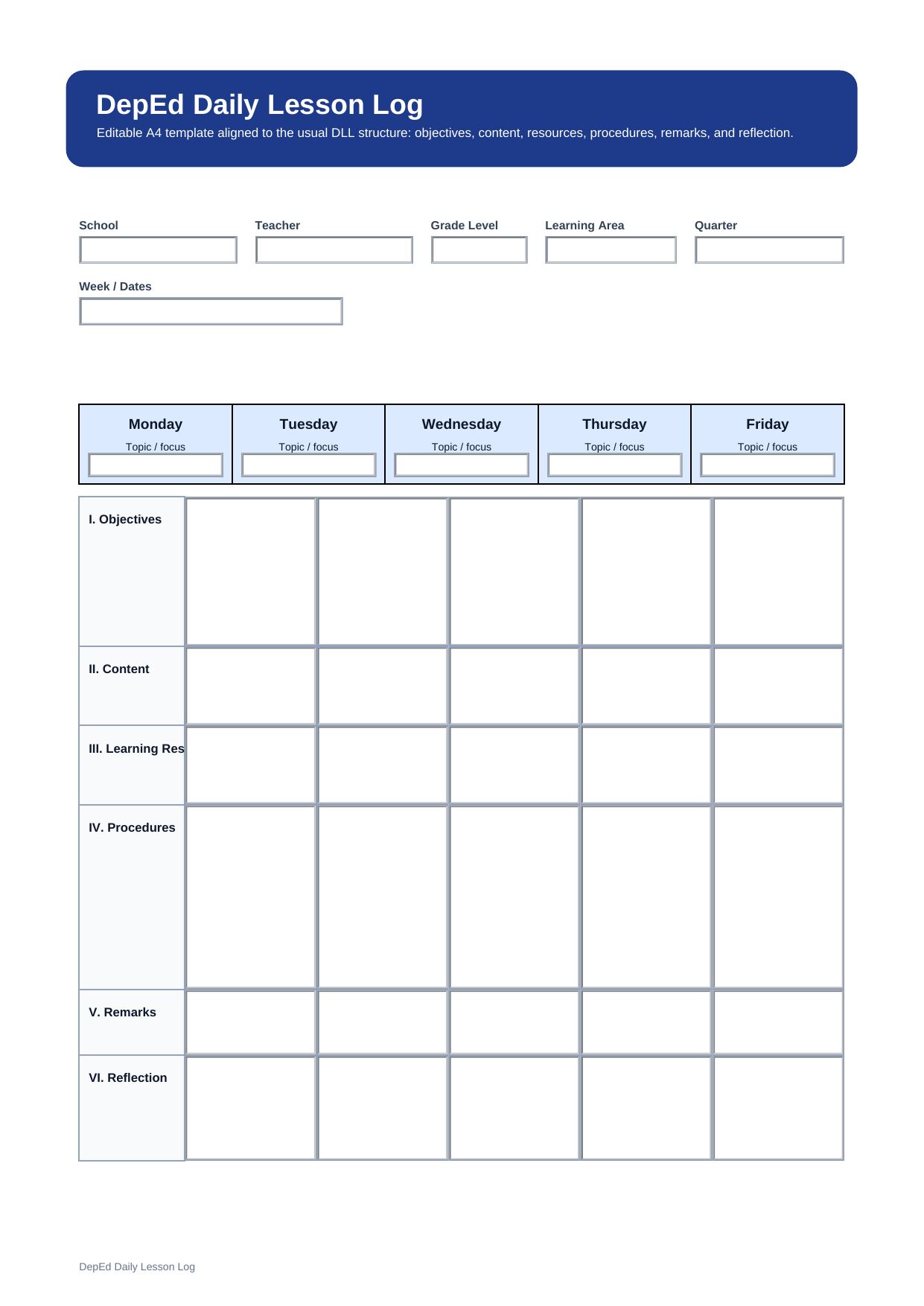
What is a DepEd daily lesson log template? A DepEd daily lesson log template is a classroom planning form that helps teachers organize daily teaching in a simple and structured way. It usually includes objectives, content, learning resources, procedures, remarks, and reflection.
This free editable PDF template is designed for teachers who want a clear format for lesson preparation, classroom delivery, and post-class reflection. It gives you a ready-made structure so you can focus on teaching instead of building a lesson log from scratch.
Who should use this DepEd DLL template?
This template is useful for teachers who want a simple daily or weekly teaching record without writing a full detailed lesson plan every time. It works well for teachers who need to keep lesson goals, resources, remarks, and reflection in one place.
- Teachers who want a structured daily teaching record
- Teachers who prefer a shorter format than a detailed lesson plan
- Teachers who need a printable and reusable lesson log
What is included in this DepEd DLL template?
A DepEd daily lesson log commonly includes the core lesson preparation elements used in daily teaching. These sections help teachers prepare before class and review the lesson after class.
| Section | What to Fill In | Why It Helps |
| Objectives | Learning goals, standards, or competencies | Keeps the lesson focused |
| Content | The topic or lesson subject | Shows what will be taught |
| Learning Resources | Books, files, links, worksheets, or materials | Supports lesson delivery |
| Procedures | Main teaching steps | Gives structure to the class |
| Remarks | Unfinished parts, changes, or special notes | Records lesson delivery issues |
| Reflection | What worked, what did not, and next steps | Improves future teaching |
How do you use a DepEd daily lesson log?
Start by writing the lesson objectives and the content for the day. Then list the learning resources you need, such as references, classroom tools, or handouts. After that, write the main procedures in a simple teaching order so the lesson flow is easy to follow.
When the class is over, use the remarks and reflection sections to record what happened, what students understood well, and what may need improvement next time.
Why do teachers use a daily lesson log?
Teachers use a daily lesson log because it helps them stay organized and consistent. A written log is easier to review than scattered notes, and it gives teachers a clear record of lesson goals, materials, teaching flow, and classroom outcomes.
Note: A daily lesson log is best for concise lesson tracking. If you need a fuller step-by-step classroom script, a detailed lesson plan may be a better fit.
What is the difference between a DLL and a detailed lesson plan?
A DLL is shorter and more concise. It helps teachers record the key parts of a lesson in a structured format. A detailed lesson plan covers the same main lesson elements, but it gives a more complete, step-by-step description of what the teacher and students will do.
| Format | Best For | Main Difference |
| Daily Lesson Log | Clear daily lesson tracking | Short, concise daily record |
| Detailed Lesson Plan | Step-by-step teaching preparation | Fuller step-by-step teaching guide |
Why download this DepEd daily lesson log template?
This template gives you a ready-to-use format that is easy to fill in, save, and print. It is useful if you want a clean lesson planning page with the common DepEd lesson structure already arranged for you.
How can you edit and print this DLL template with PDFelement?
If you want to customize this DepEd daily lesson log before class, PDFelement can help you do it more easily. You can open the PDF, type into fillable fields, update lesson details, and save the file for later use.
It is also useful when you need a clean printed copy for classroom use. You can print the whole document after filling in your lesson details.
Step 1 Open the DLL template in PDFelement
Import the PDF file and review the lesson log sections before you start editing.
Step 2 Fill in the lesson details
Click the fields and type your objectives, content, procedures, remarks, and reflection.
Step 3 Save or print the file
Save the updated lesson log for reuse or print a classroom copy when you are ready.
Why use PDFelement for this template?
PDFelement is helpful if you want to edit the PDF without changing the overall layout. It works well for teachers who want to reuse the same lesson log format many times.
FAQ
-
Is this DepEd DLL template editable?
Yes. This version is designed as an editable PDF template, so you can type into the fields before printing or saving.
-
Can I print this DLL template for weekly use?
Yes. You can print it and use it as part of your weekly teaching routine, especially if you want a clean record of lesson preparation and reflection.
-
What sections are included in a DepEd DLL?
A DepEd DLL commonly includes objectives, content, learning resources, procedures, remarks, and reflection.
-
How is a DLL different from a detailed lesson plan?
A DLL is shorter and more concise, while a detailed lesson plan includes a fuller step-by-step teaching sequence.