
High School Academic Transcript Template PDF
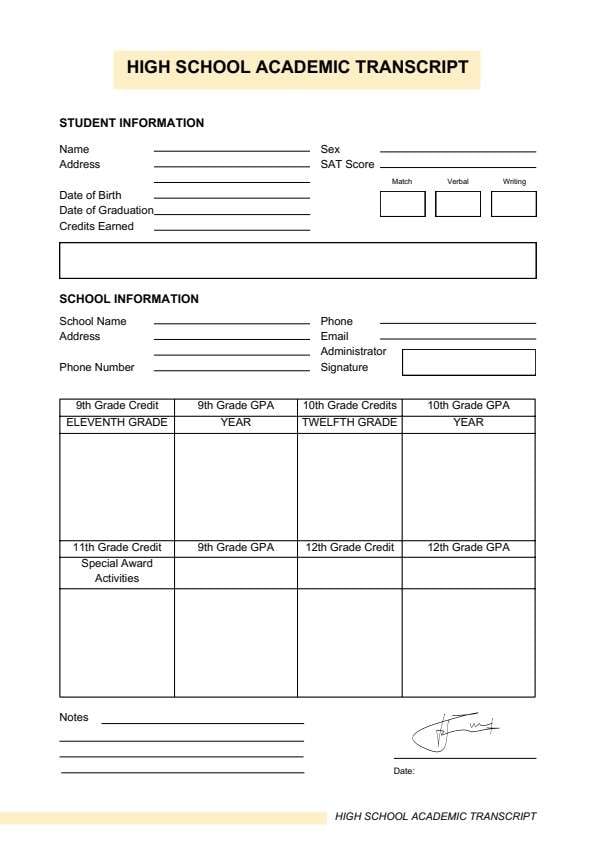
Download a printable high school academic transcript PDF template to organize student information, school details, grades, credits, GPA, test scores, activities, notes, and signature fields. It helps schools, counselors, homeschool parents, students, and administrative staff keep a clear academic record in one simple layout.
What is a high school academic transcript
A high school academic transcript is a structured PDF used to record student academic details such as credits, GPA, grades, and school information. It keeps the record organized, easy to scan, and ready to print or share.
Users download this transcript because it gives them a simple way to present academic information in one clear document without building a layout from scratch.
Student record keeping
Track academic history, credits, and GPA in one printable form.
School administration
Prepare a consistent transcript format for office or registrar use.
Counselor support
Organize grades, graduation details, and school contact information.
Homeschool documentation
Keep a clean academic summary for family school records.
- Replacing official school registrar or student information systems
- Changing grades or academic records without proper authorization
- Serving as a legal proof of enrollment or graduation on its own
How to use and edit the academic transcript
You can print this template for handwritten completion or fill it out digitally as an editable PDF. Digital editing is useful when you want typed entries, reusable records, clean copies, and easy sharing.
How to customize the PDF
Use this workflow to enter student details, complete school information, fill grades and credits, and prepare the transcript for review and printing.
Open the PDF in PDFelement
Open the template, click each fillable field, type the needed details, and save a clean digital copy.
Fill in the student name, address, date of birth, graduation date, credits earned, sex, and SAT score.
Add the school name, school address, phone number, email, administrator name, and signature details.
Complete the grade and GPA table, add special awards, activities, and notes, then save the finished transcript.
PDFelement helps schools and families type clean transcript entries, adjust labels, add notes, save reusable copies, and keep academic records organized for printing and sharing.
| PDFelement Feature | How It Helps |
|---|---|
| Edit PDF | Customize headings, labels, and transcript notes |
| Fill PDF | Type student, school, grade, and credit details into each field |
| Form tools | Use text fields and boxes for structured academic records |
| Annotate | Add reminders, comments, or record notes before printing |
| Convert | Export or archive the finished transcript for records |
| Organize PDFs | Keep transcripts by student, school year, or graduation term |
What to include in an academic transcript
A useful academic transcript PDF should be clear enough for daily record keeping but simple enough to complete quickly. The fields below show what this template is built to capture and why each part matters.
Academic Transcript fields
| Field | What to Fill In | Why It Helps |
|---|---|---|
| Student information | Name, address, date of birth, graduation date, credits earned, sex, and SAT score | Identifies the student and academic status |
| School information | School name, address, phone number, email, administrator name, and signature | Confirms the school issuing the transcript |
| Grade and GPA table | 9th, 10th, 11th, and 12th grade credits and GPA values | Shows academic progress across high school years |
| Academic details | Year, subject categories, or additional coursework notes | Gives context for the listed results |
| Special awards and activities | Awards, clubs, sports, or extracurricular activities | Shows student involvement beyond grades |
| Notes and signature | Comments, verification notes, and date/signature details | Supports review and record authenticity |
Why users download this template
Users download this academic transcript because it gives them a simple way to organize grades, credits, and school details in one printable PDF.
 Record student grades and GPA Track credits earned by grade level Keep school contact and administrator details List awards, activities, and notes Print a clean transcript for review Save a reusable copy for school records
Tips for using this template
- Use the same grading format across all year levels.
- Double-check credits and GPA entries before saving the final copy.
- Keep the transcript wording clean and consistent for easy review.
- Add notes only where they help clarify the academic record.
- Store the final PDF securely with other school or student files.
FAQs
What is a high school academic transcript?
It is a document used to record student grades, credits, GPA, school details, and other academic information.
Who should use this template?
Schools, counselors, homeschool parents, students, and administrative staff can use it.
Is the PDF editable?
Yes. You can type student details, update grade fields, add notes, save copies, and print it.
What should be included in a transcript?
Common fields include student information, school information, grades, credits, GPA, awards, activities, and notes.
Can this replace an official school record system?
No. It is a transcript template for organization and presentation, not a registrar system.
Can I reuse this template for multiple students?
Yes. Keep a blank master copy and duplicate it for each student or school year.
Related templates


This template page includes usage guidance, editing steps, review information, and related tools to avoid thin template-page content.