
Book Notes Tracker Template PDF
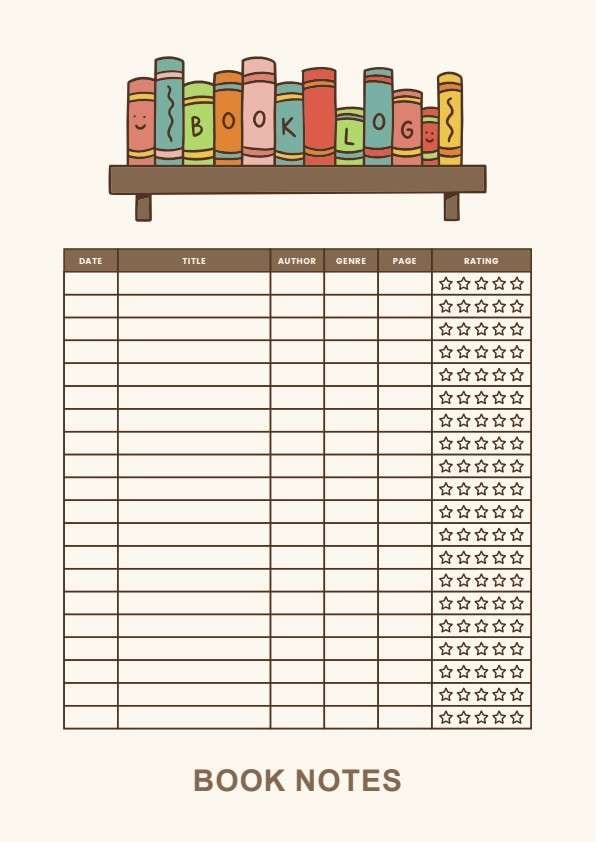
Download a printable book notes tracker PDF template to record reading dates, book titles, authors, genres, page numbers, ratings, and notes. It helps readers, students, teachers, librarians, and book clubs keep reading history organized in one simple layout.
What is a book notes tracker
A book notes tracker is a structured PDF used to record reading details such as book titles, authors, genres, page numbers, ratings, and notes. It keeps the log organized, easy to scan, and ready to print or share.
Users download this book notes tracker because it gives them a simple way to keep a personal reading log without building a tracker from scratch.
Personal reading logs
Track books read, dates, genres, and quick ratings in one place.
Classroom reading records
Keep student reading progress organized for teachers or parents.
Book clubs
Capture titles, author names, and discussion-ready notes.
Reading challenges
Monitor page counts and completed books over time.
- Replacing a full library catalog or digital reading app
- Serving as a formal academic assessment or school record
- Tracking long-form annotations, quotations, or research notes in detail
How to use and edit the book notes tracker
You can print this template for handwritten completion or fill it out digitally as an editable PDF. Digital editing is useful when you want typed entries, reusable records, clean copies, and easy sharing.
How to customize the PDF
Use this workflow to add reading details, fill in the tracker columns, rate each book, and save a clean reading log for later review.
Open the PDF in PDFelement
Open the template, click each fillable field, type the needed details, and save a clean digital copy.
Fill in the date, title, author, genre, page number, and reading progress.
Use the rating row to mark how much you liked the book.
Add short notes or comments, then save or print the completed tracker.
PDFelement helps readers type clean tracker entries, adjust labels, duplicate copies for each reading list, add comments, and keep book logs organized for printing and sharing.
| PDFelement Feature | How It Helps |
|---|---|
| Edit PDF | Customize headings, labels, and notes |
| Fill PDF | Type book titles, authors, and reading details into each row |
| Form tools | Use text fields and boxes for structured reading records |
| Annotate | Add comments or short reading reminders before saving |
| Convert | Export or archive the finished tracker for records |
| Organize PDFs | Keep trackers by month, challenge, class, or reading list |
What to include in a book notes tracker
A useful book notes tracker PDF should be clear enough for daily reading use but simple enough to complete quickly. The fields below show what this template is built to capture and why each part matters.
Book Notes Tracker fields
| Field | What to Fill In | Why It Helps |
|---|---|---|
| Date | Reading date or completion date | Shows when the book was read |
| Title | Book title | Identifies the book being tracked |
| Author | Author name | Helps sort and compare books |
| Genre | Fiction, nonfiction, mystery, fantasy, or other category | Organizes the reading list by type |
| Page | Page number or total pages read | Tracks reading progress and length |
| Rating | Star rating or simple score | Lets users note how much they liked the book |
| Notes | Short thoughts, summary points, or favorite moments | Adds useful context for later review |
Why users download this template
Users download this book notes tracker because it gives them a simple way to organize reading history and quick book notes in one printable PDF.
 Track books read over time Record author and genre details Log page counts and reading progress Mark ratings for each book Keep a clean reading log for school or home Save a reusable copy for every reading list
Tips for using this template
- Write the book title the same way each time for easier sorting.
- Use the rating column consistently so your reading log stays easy to scan.
- Keep notes short so the tracker stays readable.
- Save one copy per month, semester, or reading challenge.
- Duplicate the master file before starting a new book list.
FAQs
What is a book notes tracker?
It is a form used to record reading dates, titles, authors, genres, page numbers, ratings, and notes.
Who should use this template?
Readers, students, teachers, librarians, homeschool parents, and book clubs can use it.
Is the PDF editable?
Yes. You can type book details, update the rows, add notes, save copies, and print it.
What should I include in a reading tracker?
Common fields include date, title, author, genre, page number, rating, and notes.
Can I reuse this template for multiple books?
Yes. Keep a blank master copy and duplicate it for each new reading list or challenge.
Can this replace a digital reading app?
No. It is a simple printable tracker for note-taking and organization, not a full reading management system.
Related templates


This template page includes usage guidance, editing steps, review information, and related tools to avoid thin template-page content.