


Soccer Team Budget Tracker Template PDF
Download a printable soccer team budget tracker PDF template to record income, expenses, player fees, fundraising, sponsorships, equipment costs, referee fees, tournament fees, travel costs, remaining balance, approvals, and notes. It helps coaches, treasurers, team managers, booster groups, clubs, and school programs keep basic team finances organized.
What is a soccer team budget tracker
A soccer team budget tracker is a structured soccer PDF that helps teams capture the information needed for this specific workflow. It keeps important details organized, easy to scan, and ready to print or share.
Users download this soccer team budget tracker because it gives teams a simple way to document income and spending without building a spreadsheet from scratch.
Season budget planning
Estimate player fees, team costs, equipment, tournament fees, and travel needs.
Team treasurer records
Track income and expenses in one printable PDF summary.
Fundraising oversight
Record fundraising, sponsorship, donations, and how funds are used.
Manager reporting
Share a clear budget snapshot with coaches, parents, or club staff.
- Replacing accounting software for complex finances
- Serving as tax, legal, or financial advice
- Storing bank account or payment card details
How to use and edit the budget tracker
You can print this template for paper collection or complete it as a fillable PDF. Digital editing is useful when you want typed entries, reusable records, clean copies, and easy sharing with coaches, staff, parents, organizers, or approved team contacts.
How to customize the PDF
Use this workflow to enter budget categories, record income and expenses, update running balances, and add approval or reimbursement notes.
Open the PDF in PDFelement
Open the template, click each fillable field, type the needed details, tick checkboxes where relevant, and save a clean digital copy.
Fill team name, season, budget owner, date range, starting balance, and review date.
Enter player fees, fundraising, sponsorships, equipment, referee fees, tournament fees, travel, and other costs.
Calculate totals, note remaining balance, add reimbursement status, approvals, and treasurer notes.
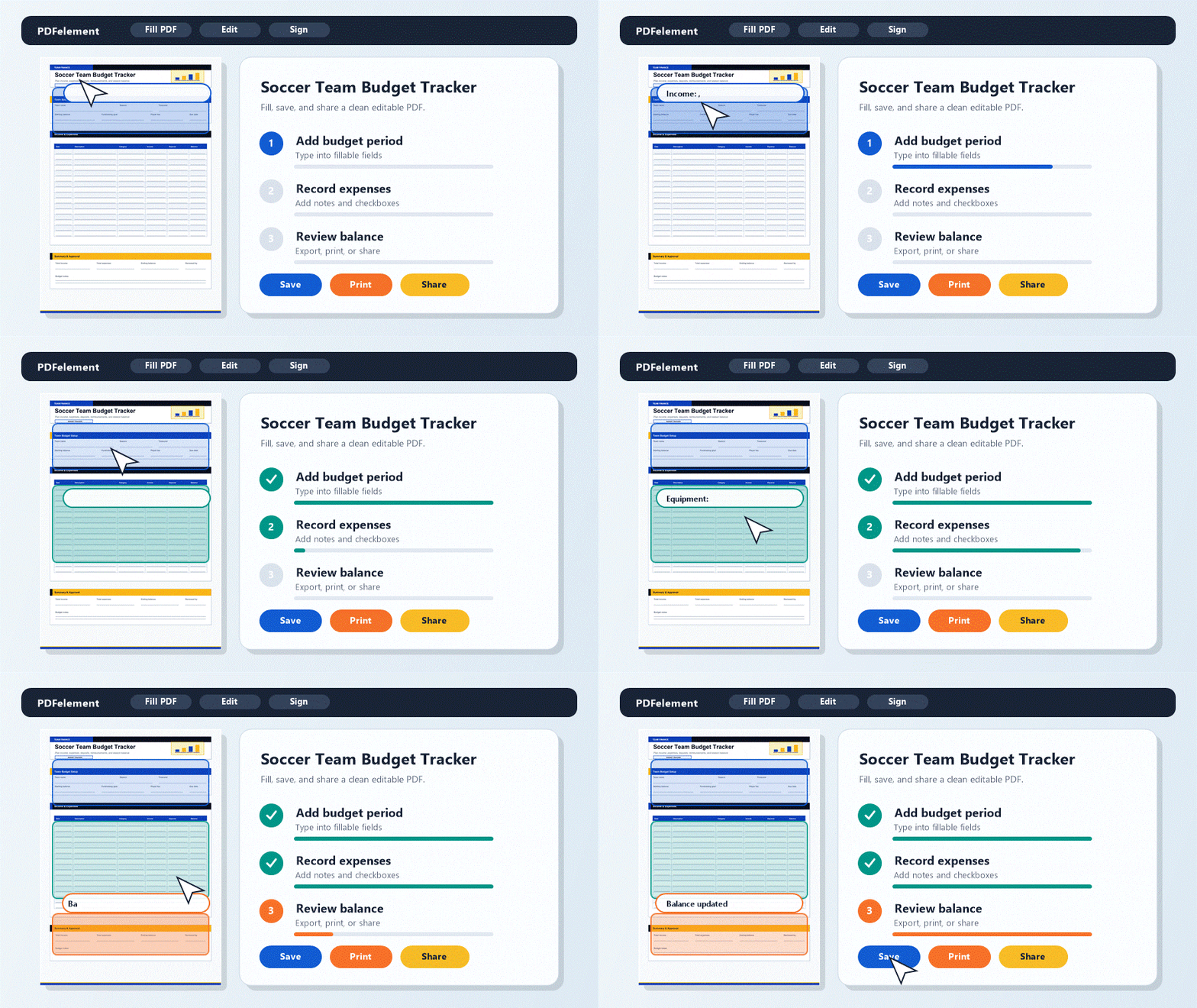


PDFelement helps managers type clean budget entries, adjust labels for local categories, annotate receipts or notes, save dated copies, and print a budget summary for parent or staff review.
| PDFelement Feature | How It Helps |
|---|---|
| Edit PDF | Customize labels, headings, notes, and reusable sections |
| Fill PDF | Type clean information into every fillable field |
| Form tools | Use checkboxes and text fields for structured soccer records |
| Annotate | Add comments or extra reminders before printing or sharing |
| Convert | Export or archive the finished PDF for team records |
| Organize PDFs | Keep templates by team, date, event, player, or season |
What to include in a team budget tracker
A useful soccer PDF should be specific enough for real team workflows but simple enough to complete quickly. The fields below show what this template is built to capture and why each part matters.
Soccer Team Budget Tracker fields
| Field | What to Fill In | Why It Helps |
|---|---|---|
| Budget summary | Team, season, owner, date range, starting balance, and review date | Defines the budget period |
| Income | Player fees, fundraising, sponsorship, donations, and credits | Shows available funds |
| Expenses | Equipment, uniforms, referee fees, tournament entry, field rental, travel, and supplies | Tracks where money is spent |
| Balance | Total income, total expenses, remaining balance, and pending items | Gives a quick financial snapshot |
| Approvals and notes | Reimbursement status, approved by, receipt notes, and treasurer comments | Supports accountability |
Why users download this template
Users download this soccer team budget tracker because it gives teams a simple way to document income and spending without building a spreadsheet from scratch.
 Track team income and expenses in one PDF Record player fees and fundraising totals Monitor equipment, tournament, and travel costs Share a clean budget snapshot with parents Save dated budget versions Avoid storing sensitive payment details in the form
Soccer Team Budget Tracker vs other soccer templates
| Template Type | Best For | Main Difference |
|---|---|---|
| Soccer Team Budget Tracker | Income, expenses, balances, fundraising, and approvals | Focuses on team finances |
| Soccer Equipment Checkout Form | Gear assignments, due dates, condition, and returns | Focuses on equipment tracking |
| Soccer Volunteer Sign-Up Sheet | Roles, shifts, contacts, and assignments | Focuses on staffing |
| Youth Soccer Registration Form | Player intake, guardian details, consent, and fee status | Focuses on registration |
Tips for using this template
- Keep receipts or proof of purchase outside the summary form.
- Use categories consistently across the season.
- Avoid entering bank account or card details.
- Save a dated copy before sharing budget updates.
- Use accounting software for complex club finances.
FAQs
What is a soccer team budget tracker?
It is a form used to record team income, expenses, fundraising, fees, balances, approvals, and budget notes.
Who should use this template?
Team treasurers, coaches, managers, booster groups, school programs, and club administrators can use it.
Is the budget tracker PDF editable?
Yes. You can type entries, update totals, add notes, save copies, and print it.
What expenses should a soccer team budget include?
Common expenses include equipment, uniforms, tournament fees, referee fees, field rental, travel, supplies, and event costs.
Can this replace accounting software?
No. It is a simple PDF tracker for team-level planning and summaries, not a full accounting system.
Should I include bank account details?
No. Keep sensitive financial details out of shared PDF templates.
How often should the budget be updated?
Update it after each major payment, fundraiser, purchase, reimbursement, or parent fee collection.
Related templates


This template page includes usage guidance, editing steps, review information, and related tools to avoid thin template-page content.