
Soccer Player Evaluation Form Template PDF
Download a printable soccer player evaluation form PDF template to assess player profile, position, age group, current team, dominant foot, technical skills, tactical awareness, teamwork, coachability, scout notes, and final recommendation. Coaches, scouts, academies, tryout organizers, and school teams can use it on paper or fill it digitally with PDFelement.
What is a soccer player evaluation form
A soccer player evaluation form is a structured soccer PDF that helps teams capture the information needed for this specific workflow. It keeps important details organized, easy to scan, and ready to print or share.
Users download this soccer player evaluation form because it gives coaches a practical way to judge players consistently instead of relying on scattered notes.
Tryouts and trials
Rate players consistently during open tryouts, academy trials, or preseason selection days.
Youth player development
Track progress in ball control, passing, shooting, defending, speed, decision-making, and teamwork.
Coach and scout reports
Keep written notes, improvement areas, and selection recommendations in one clean PDF.
School and club teams
Compare players fairly when building squads, watch lists, or development groups.
- Recording official match incidents or referee decisions
- Planning full practice sessions with drill timing
- Tracking tournament standings, fixtures, or brackets
How to use and edit the evaluation form
You can print this template for sideline use or complete it as a fillable PDF. Digital editing is useful when you want typed entries, reusable records, clean copies, and easy sharing with coaches, staff, parents, or organizers.
How to customize the PDF
Use this workflow to fill player profile details, rate each skill category, add scout notes, and record a final coach decision.
Open the PDF in PDFelement
Open the template, click each fillable field, type the needed details, tick checkboxes where relevant, and save a clean digital copy.
Fill in the player name, position, age group, team, dominant foot, evaluator, date, and overall grade.
Mark the 1 to 5 rating boxes for technical, physical, tactical, and attitude-related attributes.
Add strengths, improvement needs, coach signature, review date, and the final recommendation.
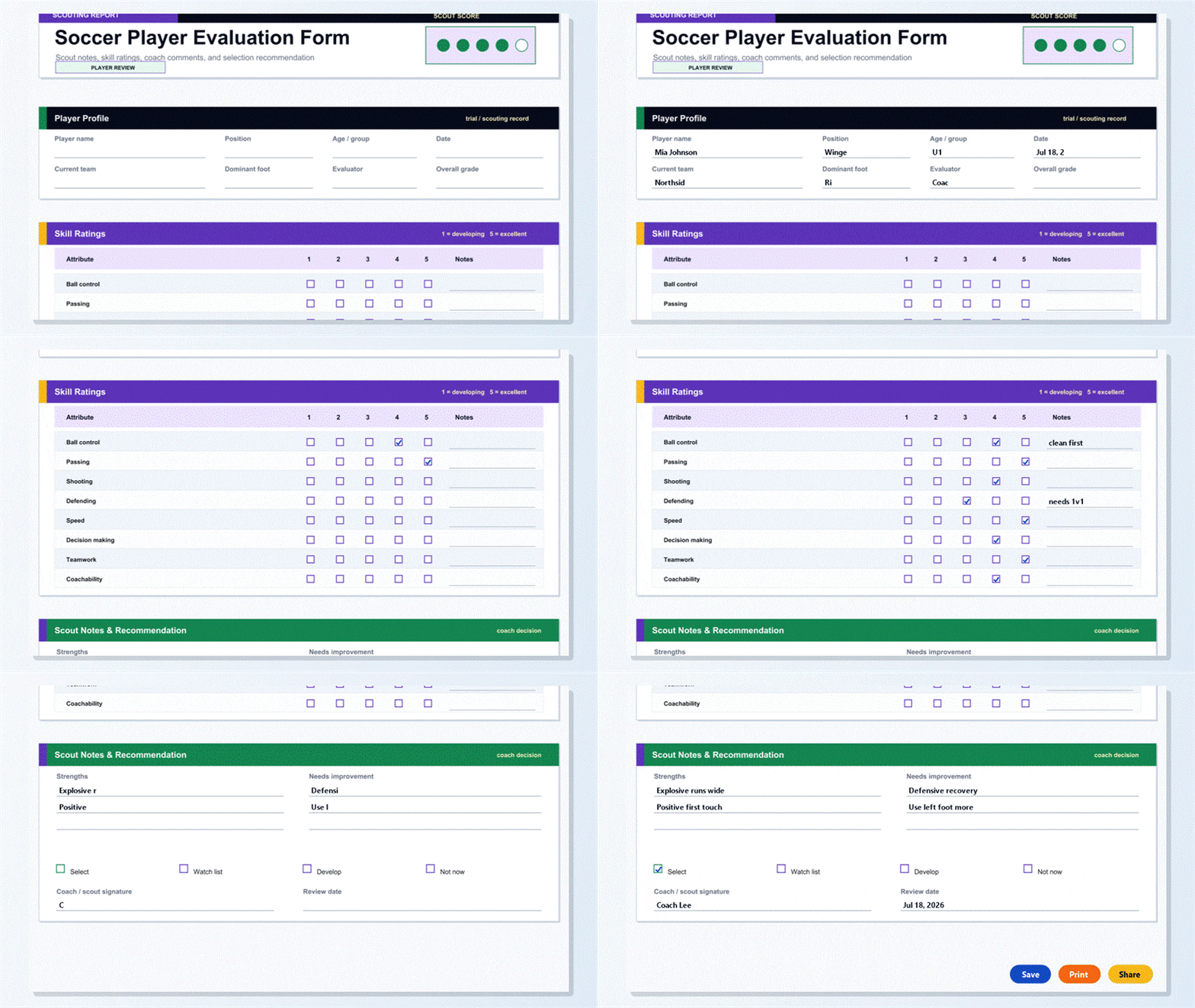


PDFelement helps coaches and scouts complete the evaluation form cleanly, reuse the same form across multiple players, save typed notes, and organize player review PDFs by team, date, age group, or trial event.
| PDFelement Feature | How It Helps |
|---|---|
| Edit PDF | Customize labels, headings, notes, and reusable sections |
| Fill PDF | Type clean information into every fillable field |
| Form tools | Use checkboxes and text fields for structured soccer records |
| Annotate | Add comments or extra reminders before printing or sharing |
| Convert | Export or archive the finished PDF for team records |
| Organize PDFs | Keep templates by team, date, event, player, or season |
What to include in a soccer player review
A useful soccer PDF should be specific enough for real team workflows but simple enough to complete quickly. The fields below show what this template is built to capture and why each part matters.
Soccer Player Evaluation Form fields
| Field | What to Fill In | Why It Helps |
|---|---|---|
| Player profile | Name, position, age group, date, current team, dominant foot, evaluator, and overall grade | Keeps the review tied to the right player and event |
| Skill ratings | Ball control, passing, shooting, defending, speed, decision making, teamwork, and coachability | Makes player comparison easier across the same criteria |
| Rating notes | Short notes for each skill row | Adds context behind the score |
| Strengths | Positive traits and standout moments | Highlights what the player should keep building on |
| Needs improvement | Development priorities and coaching focus | Turns the evaluation into an action plan |
| Recommendation | Select, watch list, develop, or not now | Supports selection and follow-up decisions |
Why users download this template
Users download this soccer player evaluation form because it gives coaches a practical way to judge players consistently instead of relying on scattered notes.
 Use the same rating scale for every player Capture strengths and improvement needs beside skill scores Support fair selection decisions for trials and tryouts Create a player development record over time Print a blank scouting form or fill it digitally Keep evaluations clean enough to share with staff
Soccer Player Evaluation Form vs other soccer templates
| Template Type | Best For | Main Difference |
|---|---|---|
| Soccer Player Evaluation Form | Player ratings, scout notes, strengths, weaknesses, and recommendation | Focuses on individual player assessment |
| Soccer Team Roster | Player names, numbers, positions, contacts, and kit notes | Focuses on team administration |
| Soccer Training Session Plan | Drills, timing, coaching points, equipment, and attendance | Focuses on practice planning |
| Soccer Match Stats Sheet | Shots, goals, cards, saves, corners, and match notes | Focuses on match performance data |
Tips for using this template
- Agree on rating standards before evaluators begin.
- Write short notes immediately while observations are fresh.
- Use the same form for every player in the same trial group.
- Review both scores and notes before making a final decision.
- Keep a copy for future development conversations.
FAQs
What is a soccer player evaluation form?
It is a coach or scout form used to rate player skills, write observation notes, and record a final selection or development recommendation.
Can this evaluation form be used for youth soccer?
Yes. It works well for youth teams, school teams, academies, camps, and tryouts because the rating areas are easy to understand.
Is the PDF fillable?
Yes. The PDF includes fillable text fields and checkboxes, so you can type notes and mark ratings digitally.
What skills should a soccer player evaluation include?
A useful evaluation usually covers ball control, passing, shooting, defending, speed, decision making, teamwork, coachability, and written notes.
Can I use this form for tryouts?
Yes. The form is designed for tryouts, trials, camps, and scouting sessions where several players need to be reviewed consistently.
How should coaches use the rating scale?
Use the same standard for every player in the same group, then add short notes to explain any high or low scores.
Can I save one evaluation for each player?
Yes. Fill the PDF digitally, save a separate copy for each player, and organize the files by team, age group, or trial date.
Related templates


This template page includes usage guidance, editing steps, review information, and related tools to avoid thin template-page content.