Weekly Lesson Plan Template: Free Download
In this article
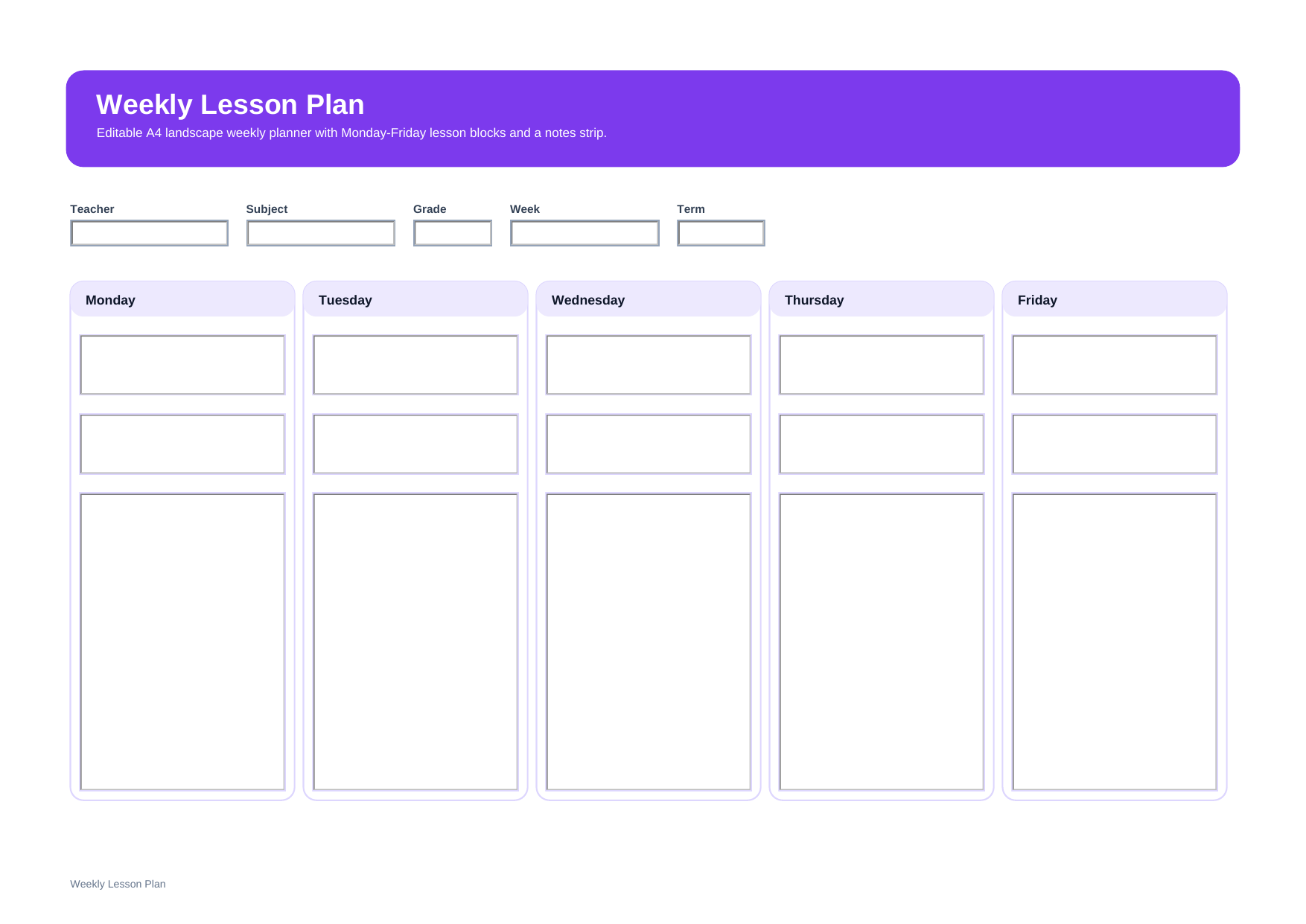
What is a weekly lesson plan template? A weekly lesson plan template is a teacher planning page that helps you organize lessons, activities, assignments, and priorities for several school days in one place. It is useful when you want a week-at-a-glance view instead of planning each day on a separate page.
This free editable PDF template is a practical choice for teachers who want to map out the school week, track the main focus for each day, and stay organized before class starts. It works well for both elementary and secondary planning.
Who should use this weekly lesson plan template?
This template is useful for teachers who want a broader weekly overview instead of writing a full plan for each class period on separate pages. It is especially helpful when you need to see Monday-to-Friday teaching flow, upcoming tasks, and weekly priorities at the same time.
- Teachers planning several school days at once
- Teachers who want a quick weekly overview before writing detailed daily plans
- Teachers managing multiple classes, subjects, or assignments during the week
What is included in this weekly lesson plan template?
This template is designed to keep the whole week readable on one page. It includes core planning details such as teacher name, subject, grade, week, and term, plus a Monday-to-Friday layout for lesson notes and weekly tasks.
| Field | What to Fill In | Why It Helps |
| Teacher / Subject / Grade | Your class details for the week | Keeps the plan easy to identify |
| Week / Term | The time period you are planning for | Helps you track the correct school week |
| Monday to Friday Sections | Main lesson focus for each day | Gives you a week-at-a-glance view |
| Activities / Assignments | Key tasks, practice, or homework | Supports lesson follow-through |
| Weekly Notes | Reminders, changes, or important follow-up items | Helps you stay organized during the week |
How do you plan a school week with this template?
Start by filling in the teacher, subject, grade, and week details. Then write the main lesson focus for each day from Monday to Friday. Keep each day concise so the full week stays easy to scan.
After that, add the main activities, assignments, or reminders for each day. This helps you see how the week will flow before you prepare detailed daily materials.
Why do teachers use a weekly lesson plan?
Teachers use a weekly lesson plan because it gives them a clear overview of the whole week. It is useful for pacing lessons, balancing tasks across several days, and making quick adjustments when the teaching schedule changes.
Note: A weekly lesson plan is best when you want to see the whole week at once. If you need more room for detailed procedures, materials, and assessment, a daily lesson plan may be a better fit.
What is the difference between a weekly lesson plan and a daily lesson plan?
A weekly lesson plan gives a broader view of several school days. A daily lesson plan gives more detail for one lesson or one day. Many teachers use the weekly version first to map out the week, then use a daily template when they need deeper classroom detail.
| Format | Best For | Main Difference |
| Weekly Lesson Plan | Planning several school days | Shows the whole week at a glance |
| Daily Lesson Plan | Planning one lesson or one day | Gives more room for daily detail |
Why download this weekly lesson plan template?
This template gives you a clean weekly layout that is easy to fill in, review, and reuse. It is useful if you want to keep lesson ideas, assignments, and weekly priorities together in one printable page.
How can you edit and reuse this weekly lesson plan template with PDFelement?
PDFelement makes it easier to update your weekly plan before class starts. You can type into the PDF, revise lesson notes, and save a clean digital version for the next school week. This works well if you want a reusable planning file instead of rewriting the same structure again and again.
Beyond basic editing, PDFelement also supports useful document tools such as AI features, Convert, OCR, Edit, Sign, Protect, and Batch Tools. That means you can summarize PDF content with AI, convert files to and from PDF, recognize text in scanned pages, sign documents, protect sensitive files, and handle multiple files more efficiently in one workflow.
Step 1 Open the weekly lesson plan template in PDFelement
Review the weekly layout and prepare the lesson details you want to add.
Step 2 Fill in the week-by-week details
Type your weekly focus, daily lessons, assignments, and reminders into the PDF.
Step 3 Save, print, or reuse the file
Keep a digital copy for future planning or print the completed weekly planner for classroom use.
Why is PDFelement useful for weekly planning?
PDFelement is useful for weekly planning because it helps teachers edit PDFs, fill forms, convert files, use OCR, protect documents, and manage repetitive work with batch tools. It is a practical option when you want to keep planning documents organized across the school term.
FAQ
-
Is this weekly lesson plan template editable?
Yes. This version is designed as an editable PDF template, so you can type in your weekly lesson details before saving or printing.
-
Who should use a weekly lesson plan instead of a daily lesson plan?
A weekly lesson plan is a better choice when you want to see several school days at once and manage pacing, assignments, and lesson flow across the full week.
-
What should a weekly lesson plan include?
A weekly lesson plan usually includes class details, the school week, daily lesson focus, activities, assignments, and reminders or notes.
-
Can I print this weekly lesson plan for classroom use?
Yes. It is designed to work well as a printable planning page for teachers who want a simple week-at-a-glance format.