Substitute Lesson Plan Template Free PDF
In this article
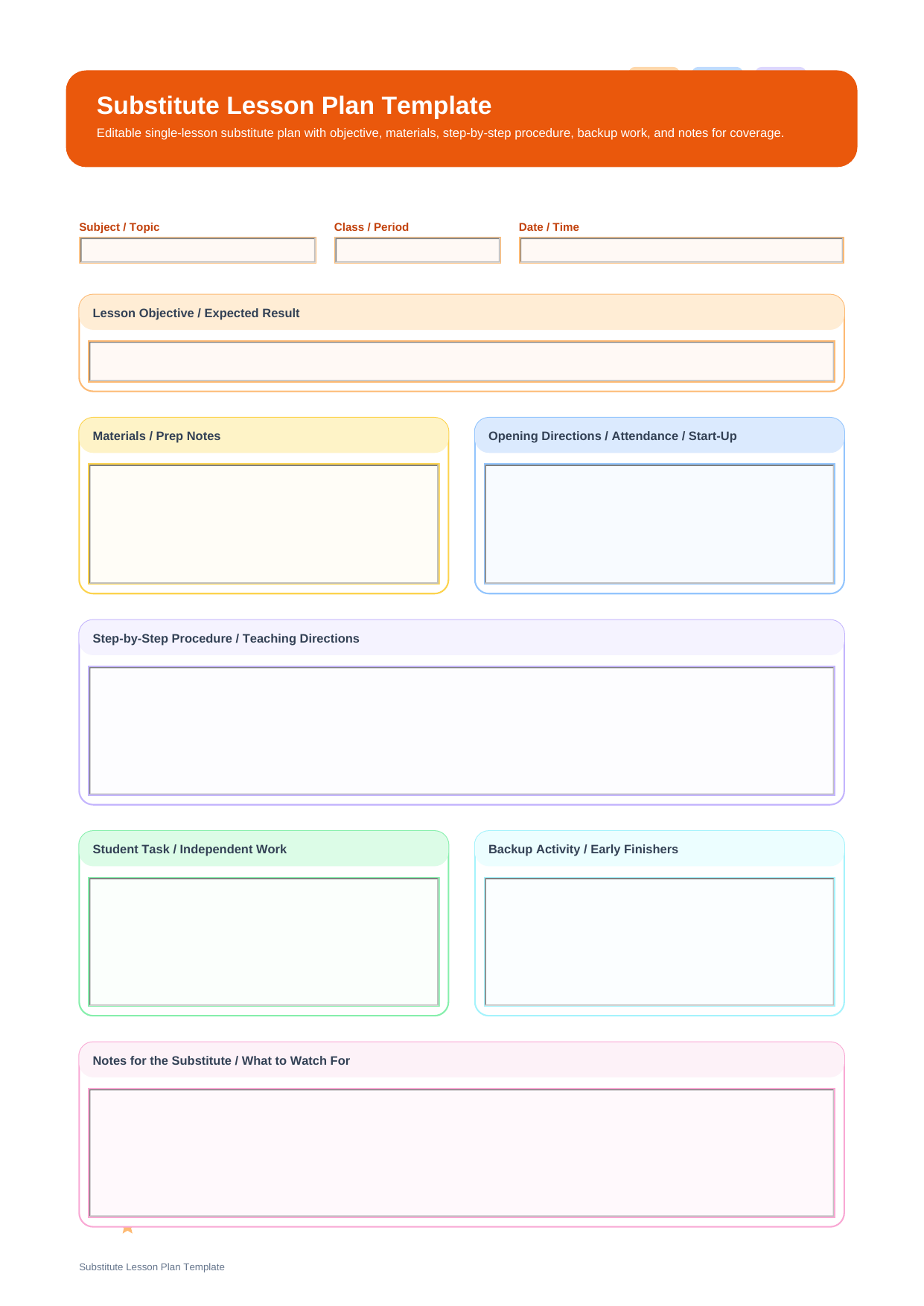
What is a substitute lesson plan template? A substitute lesson plan template is a one-lesson handoff page created for a teacher who needs to leave one class period, one subject block, or one specific activity sequence in a clear format. This PDF follows the exact template fields: Subject / Topic, Class / Period, Date / Time, Lesson Objective / Expected Result, Materials / Prep Notes, Opening Directions / Attendance / Start-Up, Step-by-Step Procedure / Teaching Directions, Student Task / Independent Work, Backup Activity / Early Finishers, and Notes for the Substitute / What to Watch For.
This makes it narrower and more teachable than a general substitute packet. Instead of explaining the entire day, it focuses on one lesson arc: what to start with, how to guide the class, what students should produce, and what the substitute should do if the class moves faster than expected.
Who this single-lesson substitute page is for
This page fits teachers who are comfortable with the daily routine already being known, but need to hand over one specific lesson in a way that is hard to misread.
- Subject teachers leaving one period plan for a substitute
- Elementary teachers who need a class-ready lesson during partial-day coverage
- Teams that want a backup activity included if students finish early
What the lesson template covers
This PDF is organized around the real field structure of the template, so each section below corresponds directly to what appears on the page.
| Field | What to Fill In | Why It Helps |
| Subject / Topic | The subject area and the lesson topic | Frames the lesson immediately for the substitute |
| Class / Period | The group, class section, or period number | Prevents the plan from being used in the wrong block |
| Date / Time | The date and lesson time | Keeps the page tied to one specific teaching window |
| Lesson Objective / Expected Result | What students should complete, understand, or produce | Defines success for the substitute and the class |
| Materials / Prep Notes | What to hand out, open, collect, or prepare | Reduces guesswork before the lesson begins |
| Opening Directions / Attendance / Start-Up | How the substitute should begin the class | Creates a controlled start instead of an improvised one |
| Step-by-Step Procedure / Teaching Directions | The actual teaching sequence and instructions | Serves as the backbone of the lesson |
| Student Task / Independent Work | What students do once the lesson is underway | Separates the core student activity from teacher directions |
| Backup Activity / Early Finishers | What to do if the class finishes sooner than planned | Prevents dead time and off-task behavior |
| Notes for the Substitute / What to Watch For | Special reminders, likely trouble spots, or adjustment notes | Captures what a generic lesson plan often leaves out |
How to leave a teachable lesson for a substitute
When leaving a substitute lesson, the objective should be concrete. Use Lesson Objective / Expected Result to say what students should actually complete by the end of the period, then list Materials / Prep Notes so the substitute can begin without opening cabinets or hunting through folders.
The heart of this page is the sequence from Opening Directions / Attendance / Start-Up into Step-by-Step Procedure / Teaching Directions and then Student Task / Independent Work. End with a backup plan and a few realistic notes so the lesson remains usable even if timing shifts.
Why do teachers download this substitute lesson plan template?
Teachers use this format when they want a substitute to run one lesson cleanly without reading through a full-day packet. It is compact, direct, and centered on teachable steps.
Note: This is a single-lesson substitute form. It is not intended to replace a full-day sub packet with routines, seating guidance, and broader classroom management details.
How is a substitute lesson plan template different from a sub plans template?
A substitute lesson plan template zooms in on one teachable block. A sub plans template covers the broader handoff for the day, including routines, transitions, and reporting. The lesson template is more instructional, while the larger sub plans page is more operational.
| Format | Best For | Main Difference |
| Substitute Lesson Plan Template | Leaving one clear lesson for substitute coverage | Focuses on objective, procedure, student task, and backup work |
| Sub Plans Template | Preparing day-level substitute instructions | Focuses on schedule, routines, support notes, and end-of-day communication |
How to edit it with PDFelement
PDFelement is useful for this page because short lesson plans are often reused with only a few changes. You can keep the structure, swap in a new topic, and update the backup task without rebuilding the layout.
Its AI, Edit, OCR, Convert, Sign, Protect, and Batch Tools features also help if the lesson plan needs to be combined with reading passages, worksheets, or scanned class materials.
Step 1 Open the substitute lesson plan template in PDFelement
Check that the lesson objective and class period fields match the class you are leaving.
Step 2 Complete the procedure and student task sections
Type the exact lesson flow, then add backup work and substitute notes for pacing changes.
Step 3 Save a lesson-specific copy
Keep separate versions for different subjects or periods rather than rewriting the same file each time.
Why is PDFelement practical for substitute planning?
PDFelement helps because a substitute lesson works best when the directions are clean, editable, and quick to revise before printing or sending.
FAQ
-
What should a substitute lesson plan include?
It should include the topic, class, date, objective, materials, opening steps, teaching procedure, student work, backup activity, and notes for the substitute.
-
Why is a backup activity useful?
Because substitute-taught lessons do not always take the same amount of time, and extra work helps avoid downtime.
-
Can I use this for one period only?
Yes. This template is especially useful for a single subject block or one class period.
-
Is the PDF editable?
Yes. You can type into the lesson fields, save new versions, and print the file for substitute coverage.