Sub Plans Template Free PDF for Teachers
In this article
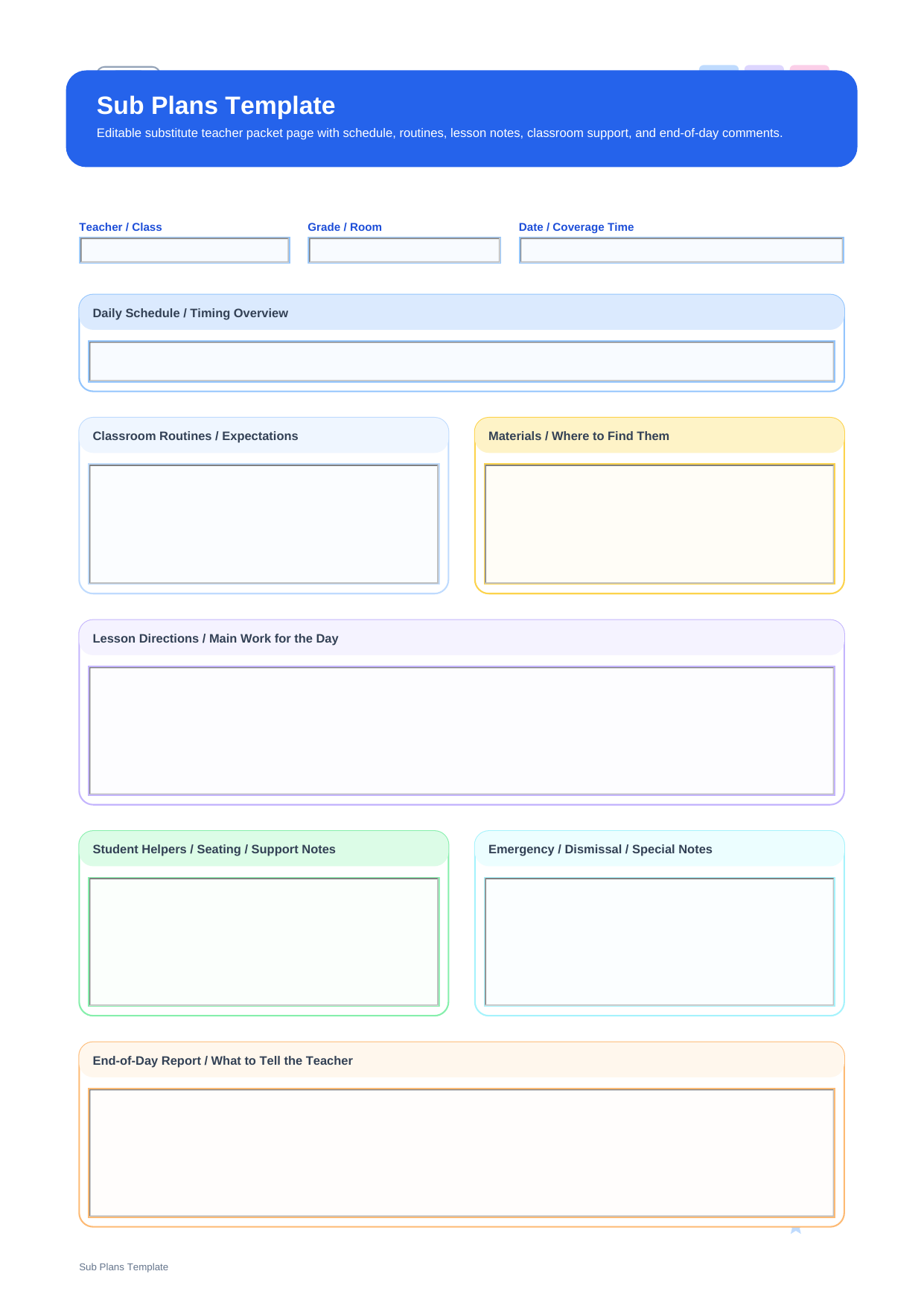
What is a sub plans template? A sub plans template is a substitute-teacher planning sheet designed to hand over the school day clearly when the regular teacher is away. This PDF matches the live template layout with top fields for Teacher / Class, Grade / Room, and Date / Coverage Time, followed by larger sections for Daily Schedule / Timing Overview, Classroom Routines / Expectations, Materials / Where to Find Them, Lesson Directions / Main Work for the Day, Student Helpers / Seating / Support Notes, Emergency / Dismissal / Special Notes, and End-of-Day Report / What to Tell the Teacher.
Unlike a one-lesson form, this page is built for handoff. It helps the substitute understand not only what to teach, but also how the room runs, which students may need support, and what information should come back to the classroom teacher afterward.
Who should use this substitute planning page
This page is best for teachers who want to leave a complete, readable substitute packet without scattering details across sticky notes, emails, and separate lesson pages.
- Classroom teachers preparing a full-day or half-day substitute plan
- Grade-level teachers who need a reliable emergency sub packet
- Schools that want substitute instructions to be consistent and easy to follow
What fields are included
This PDF is organized around the real field structure of the template, so each section below corresponds directly to what appears on the page.
| Field | What to Fill In | Why It Helps |
| Teacher / Class | The teacher name or class name being covered | Gives the substitute immediate orientation |
| Grade / Room | The room number, grade, or group assignment | Helps the substitute move into the correct space quickly |
| Date / Coverage Time | The date and the time block to be covered | Clarifies whether the plan is for a full day or only part of one |
| Daily Schedule / Timing Overview | The order of periods, specials, breaks, and transitions | Shows the shape of the day before details begin |
| Classroom Routines / Expectations | Rules, signals, daily habits, and expected behavior | Prevents avoidable confusion during routine moments |
| Materials / Where to Find Them | Printed work, books, bins, digital instructions, or supply locations | Saves time and reduces searching during the day |
| Lesson Directions / Main Work for the Day | The main academic tasks, instructions, and sequence of work | Acts as the core teaching guide for the substitute |
| Student Helpers / Seating / Support Notes | Helpful students, seating concerns, or support reminders | Makes classroom management easier and more realistic |
| Emergency / Dismissal / Special Notes | Safety instructions, dismissal reminders, or unusual day details | Protects the most important operational information |
| End-of-Day Report / What to Tell the Teacher | What happened, what was finished, and any behavior or follow-up notes | Creates a clean handback after coverage ends |
How to prepare effective sub plans
The most effective substitute plans start with logistics, not lesson detail. Fill in the Daily Schedule / Timing Overview first so the substitute can see the pace of the day, then add Classroom Routines / Expectations and Materials / Where to Find Them before describing academic work.
Once the basic structure is clear, use Lesson Directions / Main Work for the Day to explain what students should do and in what order. Leave the last two sections for what substitutes usually need most in real classrooms: who may need attention, and what the regular teacher will want to know afterward.
Why do teachers download this sub plans template?
Teachers download this file when they need one page that works as a practical substitute packet rather than a narrow lesson-only form. It keeps routines, timing, materials, and reporting in the same place.
Note: This page is a substitute coverage template for the day as a whole. It is broader than a single substitute lesson page and more operational than an example sheet.
What is the difference between a sub plans template and sub plan examples?
A template gives you a clean structure to complete for your own classroom. Examples show what a filled substitute plan might look like. If your goal is to prepare fresh coverage notes, the template is the better tool. If your goal is to see sample wording, the examples page is more helpful.
| Format | Best For | Main Difference |
| Sub Plans Template | Creating your own substitute handoff from scratch | Blank operational format for schedule, routines, lessons, and reporting |
| Sub Plan Examples | Reviewing sample substitute wording and structure | Modeled pages that show how directions may be written |
How to edit and reuse it with PDFelement
PDFelement works well for substitute planning because you can keep one reusable master file and update only the date, schedule, and classroom details each time coverage is needed.
It also offers AI, Edit, OCR, Convert, Sign, Protect, and Batch Tools, which is useful if your substitute packet includes scanned seating charts, extra worksheets, or multiple versions for different classes.
Step 1 Open the sub plans template in PDFelement
Read through the schedule and routine sections first so the day stays coherent.
Step 2 Fill in the substitute-facing details
Type the schedule, lesson directions, student notes, and end-of-day reporting instructions directly into the PDF.
Step 3 Save a reusable emergency copy
Keep one version ready for last-minute absences and duplicate it whenever the date or class changes.
Why is PDFelement practical for substitute planning?
PDFelement is especially practical here because substitute plans are often revised under time pressure, and fast editing matters more than elaborate formatting.
FAQ
-
What should be included in sub plans?
Good sub plans should cover the schedule, class routines, lesson directions, materials, important student notes, dismissal details, and a place for substitute feedback.
-
Is this the same as a substitute lesson plan template?
No. This page is broader and covers the whole handoff, while a substitute lesson plan template usually focuses on one lesson block.
-
Can I use this as an emergency sub plan?
Yes. It works well as a reusable emergency substitute form because the layout includes daily operations as well as academic notes.
-
Is the PDF editable?
Yes. You can type directly into the fields, save updated copies, and print them whenever coverage is needed.