Replace PDF Text
PDFelement makes it easy to find & replace text in PDF files online.
No cost, no ads, no installation—just fast, simple editing.
 Replace PDF Text Online for Free
Automatic Text Detection
No Quality Loss
Replace PDF Text Online for Free
Automatic Text Detection
No Quality Loss
 What is a Text Replacer?
PDFelement is an online PDF editor with a built-in PDF text replace tool, making it easy to replace text in PDF files. You can also manually edit content using the Edit Text feature to change font size, text color, and more—perfect for anyone needing to replace text online.
 Free Download
Replace PDF Text Onlline vs. Offline
3 easy steps to find and replace text online.
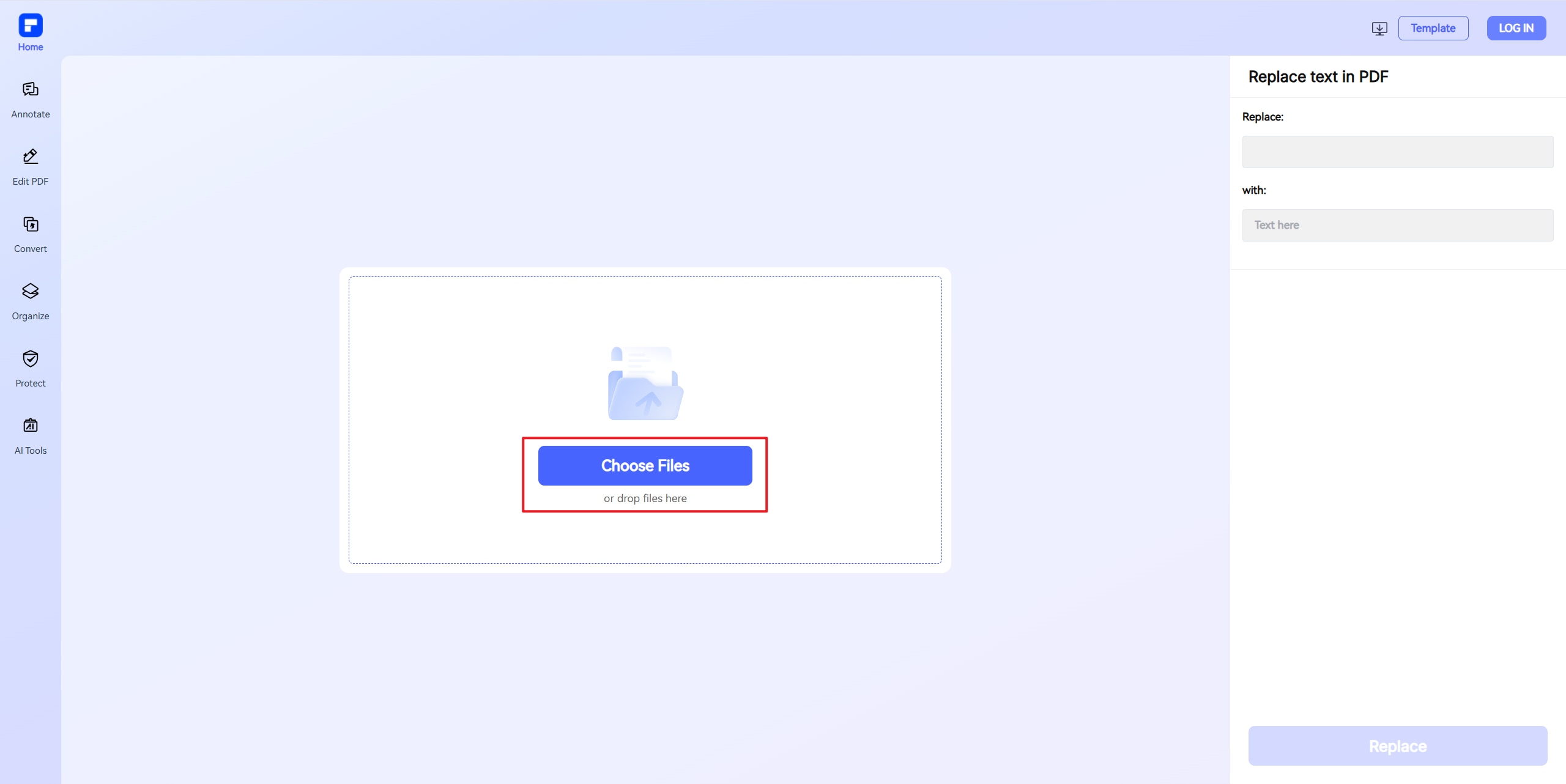
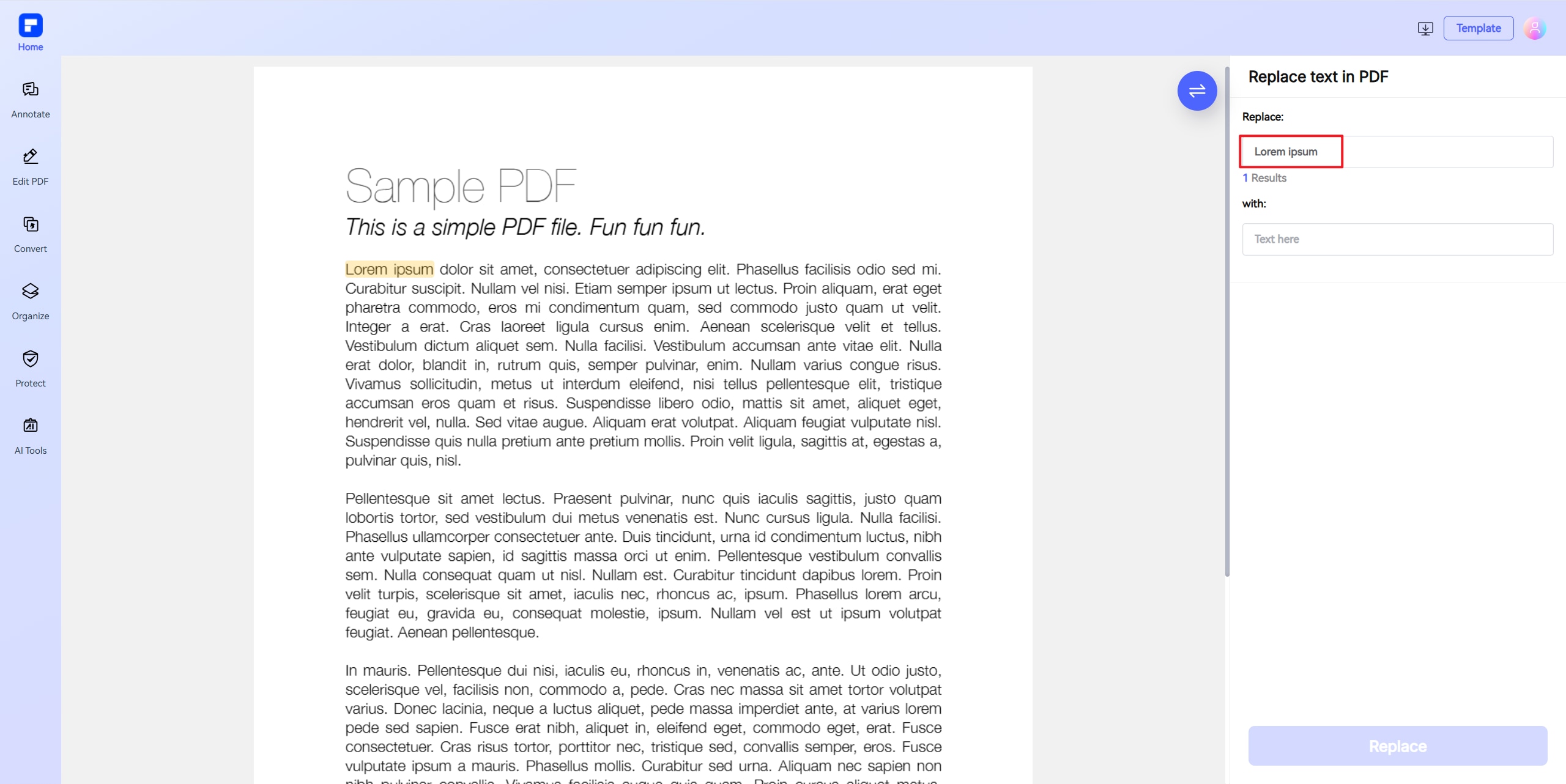
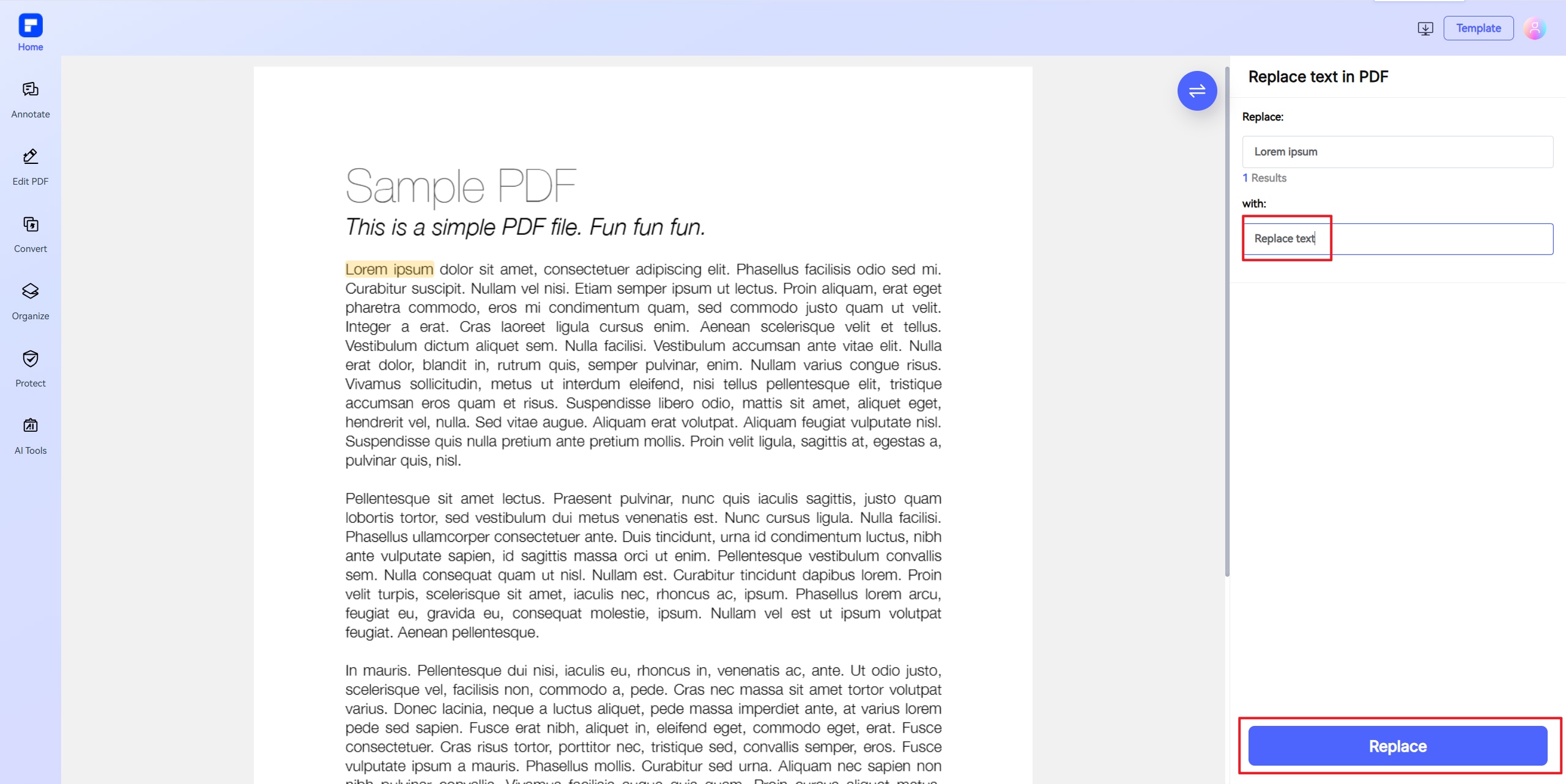
Discover the power of PDFelement PDF text replacer.
Free & Online PDF Text Replacer
Free & Web-Based – No installation needed. Access and edit PDFs anytime, anywhere—perfect for quick on-the-go fixes.
Automatic Text Locating
Effortlessly find and replace text in seconds—just enter the old and new words, and let PDFelement handle the rest.
No Quality Loss
Your edited PDFs retain their original quality, with seamless text replacement and crisp, clear output.
OCR PDF Support
Works on scanned/image-based PDFs with built-in OCR. Automatically detects and extracts text from scanned documents.
Ease of Use
Simplify PDF editing with intuitive features: click-to-edit, drag-and-drop, auto OCR, and one-click export!
Replace, Edit, Merge & More
All your essential PDF tools in one place. Simplify document management with 30+ powerful PDF tools.
Replace text in PDF with the same font for wider use.

Secure, Compliant, and Professional PDF Software - Award - Winning.
PDFelement shines in G2 Winter 2026 as a Leader, Momentum Leader, and High Performer for Enterprise - adding to its 2024 G2 Best Software Award - Top 50 Office Products, ISO 27001 - Information Security Management certification, and PDF Association membership.







FAQs about find and replace in PDF.
-
How do I replace text in a PDF?
To replace text in a PDF, you can utilize online tools that offer functionality similar to the "find and replace" feature in Word. One such tool is the PDFelement online PDF text Replacer which allows you to find and replace words in a PDF document directly within your browser. This online PDF editor enables you to replace text on a PDF without the need for software installation, making it convenient and accessible.
Using the PDFelement online PDF text Replacer, you can perform a find and replace operation by uploading your PDF file, specifying the text you want to find, and entering the replacement text. This process is akin to the find & replace feature in MS Word, providing a familiar experience for users. The tool ensures that the formatting of your PDF remains intact while replacing the specified text.
This online text replace tool is particularly useful for editing documents where you need to replace words or phrases across the entire PDF. Whether you're correcting errors, updating information, or customizing content, the PDF text replace functionality streamlines the process. As a free online PDF editor replace text tool, it offers a straightforward solution for modifying your PDF documents efficiently.
-
How do you replace specific text in a PDF?
To replace specific text in a PDF, you can use various online tools that offer convenient find and replace functionality, similar to what you might use in Word. While the find and replace in Word or find and replace in MS Word features are well-known, many people are unaware that you can also replace text online in PDFs without installing software. Online PDF editors like WorkinTool provide easy-to-use pdf text replace and replace words features. With these tools, you simply upload your PDF, enter the text you want to find, specify the replacement, and the tool will automatically update your document. This pdf editor online free replace text process is secure and preserves your file’s formatting.
A particularly effective option is the PDFelement online PDF text Replacer tool. This platform allows you to replace text in PDF quickly and accurately, making it ideal for updating contracts, reports, or forms. You can perform find and replace online for single words or entire phrases, and even handle multiple replacements at once. Whether you need to replace pdf text, perform a pdf find and replace, or just use a text replacer for minor edits, these online solutions make the process fast and hassle-free.
-
How to replace text in scanned PDF?
To replace text in a scanned PDF, you must first convert the scanned image into an editable format using Optical Character Recognition (OCR) technology. Scanned PDFs are essentially images, so standard text editing tools cannot recognize or modify the text until OCR has been applied. Most advanced PDF editors, including Adobe Acrobat and PDFelement, provide built-in OCR features for this purpose.
With Adobe Acrobat, open your scanned PDF and select the "Edit" option. Acrobat will automatically run OCR to recognize the text in your document, making it editable. After OCR is complete, you can select any text element, type your replacement, and the software will match the original font and formatting as closely as possible. Always review the OCR output for accuracy, as scanned documents-especially those with low image quality-may have recognition errors. Save a backup copy before making major changes.
Online tools like PDFelement also support replacing text in scanned PDFs. First, use PDFelement’s OCR feature to convert the scanned PDF into an editable file. Once the OCR process finishes, you can use their "Replace Text" tool to search for specific words or phrases and replace them as needed. The PDFelement online PDF text Replacer tool offers a similar workflow, allowing you to perform find and replace operations on scanned PDFs after OCR processing.
In summary, to replace text in a scanned PDF, apply OCR to make the document editable, then use a PDF text replacer tool, such as PDFelement, to efficiently search for and replace the desired text online.
-
Which PDF editor can replace text?
Several PDF editors can replace text directly within PDF documents, making them as easy to edit as Word files. PDFgear stands out as a free PDF editor that allows users to modify existing text, replace images, and maintain the original layout and formatting. It also includes OCR support for editing scanned PDFs, ensuring you can search for and replace words or phrases efficiently.
PDFelement is an all-in-one online PDF editor that enables users to quickly find and replace text in PDF files. You simply upload your document, enter the text to find and its replacement, and PDFelement processes the change instantly. It also offers a wide range of additional PDF management features, such as adding images, combining or splitting pages, and file conversion.
WorkinTool provides a free online PDF editor that lets you replace multiple pieces of text at once, preserving all other elements and formatting in your file. The process is fast, secure, and does not compromise document quality.
-
How do you replace text in a PDF online for free?
To replace text in a PDF online for free, you can use several user-friendly PDF editors that offer robust find and replace or replace text features. Tools like pdfFiller, PDFelement, WorkinTool, PDFgear, Sejda, and Xodo allow you to upload your PDF, search for the text you want to change, and enter the replacement-all directly in your browser without installing software.
For example, with pdfFiller, you simply register or log in, upload your PDF, and select the "Replace Text PDF" tool. You can then highlight the text you want to change, enter the new content, and save or download your updated file. This process preserves your document’s formatting and ensures a professional appearance. Similarly, WorkinTool lets you upload your PDF, specify the text to find and what to replace it with, and then download the edited PDF-all for free and with support for multiple replacements at once.
PDFgear is another standout free editor, making it easy to modify existing text, replace images, and annotate your PDFs, much like editing in Word. Sejda and Xodo also provide simple online interfaces for editing and replacing text in PDFs without watermarks or registration.
Among these, the PDFelement online PDF text Replacer tool is highly recommended for its intuitive workflow and reliable results, making online PDF text replacement fast and accessible for everyone.
-
Are there any limitations to PDFelement's online PDF editor?
Yes, there are certain limitations for free users:
Daily Usage Limits:
· Most editing and conversion tools allow 1 free use per day (e.g., Edit PDF, Merge, Split, Compress, Convert, Protect).
AI PDF Tool Limits:
· Chat with PDF, AI Read, AI Proofreader:
①Limited to 10 uses
②Supports PDFs up to 100MB and 260 pages
AI Translator & AI Detector:
· Limited to 10 uses (every 10 pages = 1 use; under 10 pages still counts as 1 use)
· Max file size: 100MB (AI Translator), 10MB (AI Detector)
Note:
· To enjoy unlimited usage, you can upgrade to premium access.
Page/File Size Restrictions:
· PDF files must be under 100MB (except for AI Detector)
· Max file size for OCR: 50MB
· Max 260 pages for AI tools
More tips for replace words.
Rate PDFelement Online PDF tools:

4.8
(188,357 Votes)You have to upload and download at least 1 file to rate! We've already perfectly processed 307,292,373 files with a total size of 10,124 TB
Try more PDFelement online PDF tools.



Simplified by AI.
Fast, easy, and affordable PDF editor. Convert, edit, sign PDFs, and more.


