Compress Image Online for Free
Free online image compressor to compress JPG, PNG, GIF, or BMP in seconds.
Pick compression levels and reduce image size without losing quality instantly.
 Compress Images Online for Free Anytime
Batch Compress JPG, PNG, and GIF Files
Reduce Image Size With Low, Medium, or High Compression Levels
Compress Images Online for Free Anytime
Batch Compress JPG, PNG, and GIF Files
Reduce Image Size With Low, Medium, or High Compression Levels
 Lossy vs. Lossless Compression: What’s the Difference?
- Lossy compression shrinks image size by removing some data, slightly reducing quality. It’s ideal for web use where faster loading and smaller files matter most.
- Lossless compression retains all original data while reducing image size, making it perfect for editing, printing, or archiving high-quality visuals.
Use lossy compression to reduce image size for quick sharing, and lossless compression when preserving detail is essential.
How to compress an image online for free?
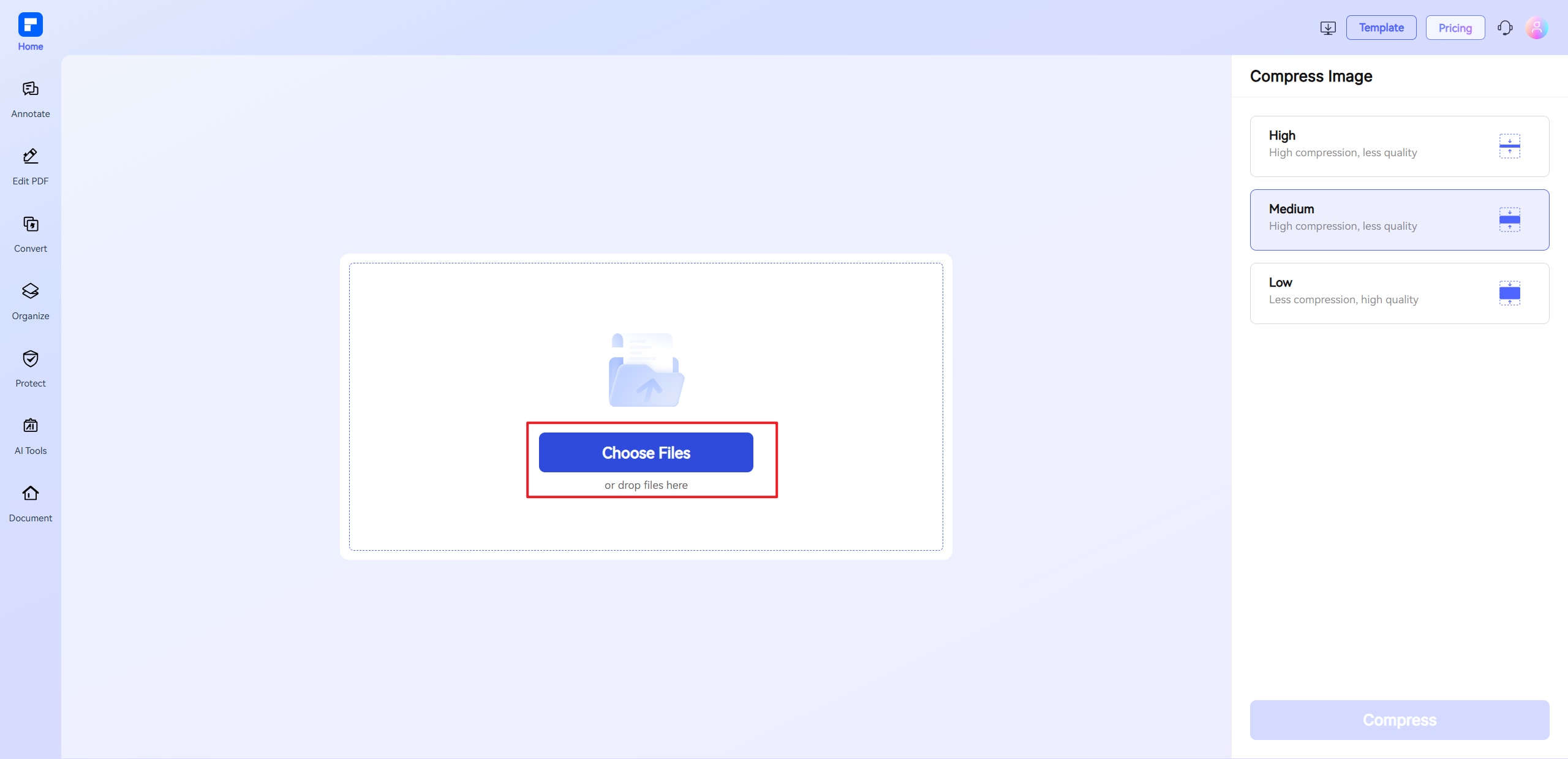
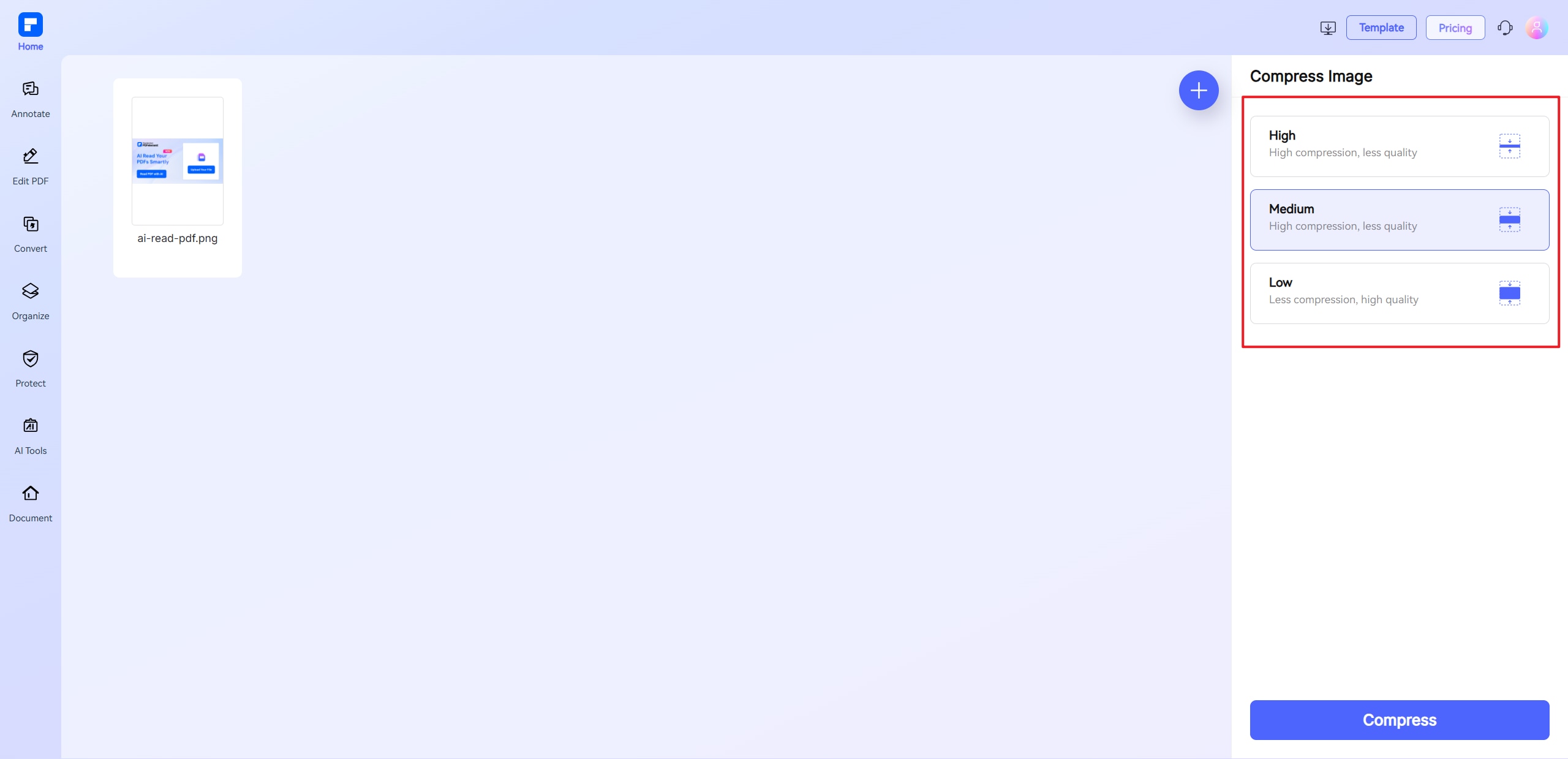
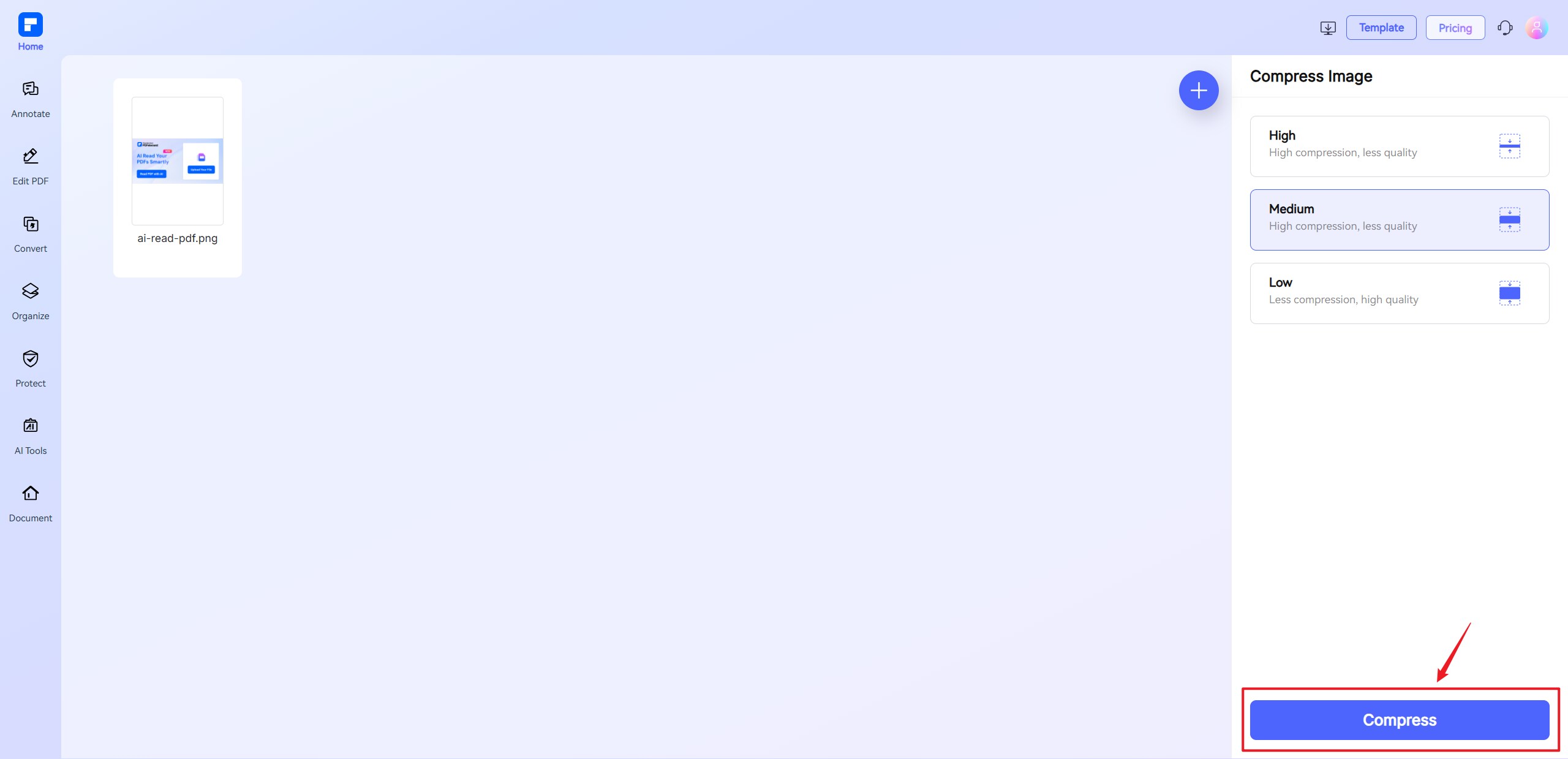
Experience the difference with our Online Image Compressor.
Compress Images Online for
Free in Seconds
Use this free online image compressor to shrink file size instantly. Upload your photo, choose settings, and reduce image size in one click.
Reduce Image Size With Low, Medium, or High Compression
Select from three compression levels to lower image size without losing quality. Balance clarity and file weight with a customizable image size compressor.
Shrink JPG, PNG, GIF, BMP, TIF,
and TIFF Easily
Compress JPGs, PNGs, and GIFs without hassle. Reduce image dimensions while keeping detail. Ideal for sharing, saving, or optimizing performance.
Bulk Image Compressor Without Quality Loss
Compress multiple images at once using our batch photo compressor. Reduce image size online fast. No downloads, no quality drop.
Access Online Image Reducer Anytime, Anywhere
This online photo compressor runs on any device—Windows, Mac, mobile, or tablet. Resize image in KB anytime, anywhere.
Secure and Private Image
Compress Tool
Images are encrypted and auto-deleted after processing. Use this online image optimizer with confidence. Your data stays safe and private.
Free Online Image Compression for wider use.

Secure, Compliant, and Professional PDF Software - Award - Winning.
PDFelement shines in G2 Winter 2026 as a Leader, Momentum Leader, and High Performer for Enterprise - adding to its 2024 G2 Best Software Award - Top 50 Office Products, ISO 27001 - Information Security Management certification, and PDF Association membership.







FAQs about decreasing image size online.
-
How can I compress a photo online for free?
To reduce the size of your photo without paying or installing software, you can use a free online image compressor. Here's a step-by-step guide:
- Use a Trusted Online Tool
One reliable option is the PDFelement Online Compress Image Tool. It works directly in your browser and supports common formats like JPG, PNG, GIF, and BMP. - Upload Your Photo
Go to the tool's webpage and upload your image. You can drag and drop or click to select a file from your computer or mobile device. - Choose Compression Level
Select a compression level—Low, Medium, or High—based on your needs. Higher compression means a smaller file size but may slightly reduce image quality. - Compress and Download
Click the “Compress” button. The tool will process your image in seconds. Once done, download your compressed photo directly. - Same and Private
PDFelement ensures your photos are encrypted during upload and automatically deleted after processing, keeping your files secure.
This method is fast, free, and works on any device—no downloads needed.
- Use a Trusted Online Tool
-
What is the best way to reduce image size without losing quality?
To reduce image size without noticeably affecting quality, follow these steps:
- Use a Lossless Compression Tool
Choose an image compressor that supports lossless compression, which reduces file size while keeping all visual data intact.
PDFelement Online Compress Image Tool is a reliable option—it lets you compress JPG, PNG, GIF, and more without losing clarity.
- Adjust Compression Level Carefully
Select a low or medium compression level. These settings shrink the file while preserving image sharpness, making them ideal for resumes, portfolios, and official forms. - Compress and Save
Use the PDFelement tool to compress and download your optimized image quickly and securely.
- Use a Lossless Compression Tool
-
Can I compress JPG images to under 100KB or 50KB?
Yes, you can compress JPG images to under 100KB—or even 50KB—using an online image compressor.
- Here’s how to do it with PDFelement Online Compress Image Tool:
- Upload Your JPG File:
Go to the tool and drag in your JPG image. - Select a Compression Level
Choose Medium or High compression to significantly reduce file size. The tool displays the estimated size before download. - Download the Compressed Image
Once compressed, download the image. You’ll often get results under 100KB, and with High compression, under 50KB—perfect for forms, portals, and online uploads. - Preserve Visual Quality
Even at smaller sizes, the tool keeps your JPG clear enough for documents like visas, resumes, or school forms.
This method is free, browser-based, and works fast—ideal for users needing a quick JPG size reducer without installing software.
- Upload Your JPG File:
-
Can I bulk compress photos?
Yes, you can bulk compress photos using the PDFelement Online Compress Image Tool, which supports multiple image uploads at once.
- Go to the Tool Online
Open the PDFelement Online Compress Image Tool in your browser—no installation needed. - Upload Multiple Images
Select or drag and drop multiple JPG, PNG, or GIF files. The tool supports batch uploads for fast processing. - Choose Compression Level
Apply Low, Medium, or High compression to all images at once, depending on your size and quality needs. - Download All at Once
Once processed, download all your compressed images in a single zip file—efficient and time-saving.
- Go to the Tool Online
-
How to compress GIFs without losing quality?
To reduce the file size of a GIF while preserving its animation and visual quality, follow these steps:
- Use a Lossless GIF Compressor
Choose a tool that supports GIF compression without degrading frames. The PDFelement Online Compress Image Tool is a reliable option that compresses GIFs while keeping their motion and clarity intact. - Upload Your GIF
Visit the tool online and drag in your GIF file. No installation is needed. - Select Compression Level
Choose Low or Medium compression to minimize file size while preserving frame rate and color detail. - Download the Compressed GIF
After processing, download your optimized GIF. It will be smaller in size but retain original animation and quality.
This method is perfect for web use, chats, or presentations where you need to compress GIFs without losing quality or animation smoothness.
- Use a Lossless GIF Compressor
-
Are there any limitations to the PDFelement online PDF editor?
Yes, there are certain limitations for free users:
- Daily Usage Limits:
- Most editing and conversion tools allow 1 free use per day (e.g., Edit PDF, Merge, Split, Compress, Convert, Protect).
- AI PDF Tool Limits:
- Chat with PDF, AI Read, AI Proofreader:
- Limited to 10 uses per day
- Supports PDFs up to 100MB and 260 pages
- AI PDF Translator & AI Detector:
- Limited to 10 uses (every 10 pages = 1 use; under 10 pages still counts as 1 use)
- Max file size: 100MB (AI Translator), 10MB (AI Detector)
- Note:
- To enjoy unlimited usage, you can upgrade to premium access.
- Page/File Size Restrictions:
- PDF files must be under 100MB (except for AI Detector)
- Max file size for OCR: 50MB
- Max 260 pages for AI tools
Tips and tricks for image compression.
Rate PDFelement Online PDF tools:

4.8
(188,357 Votes)You have to upload and download at least 1 file to rate! We've already perfectly processed 307,292,373 files with a total size of 10,124 TB
Try more PDFelement online PDF tools.



Simplified by AI.
Fast, easy, and affordable PDF editor. Convert, edit, sign PDFs, and more.
 Free Download


