Chat With PDF for Free
Chat with any PDF instantly. Upload your document—textbook, report, or research paper, and our free AI PDF chat
will answer questions, summarize content, and deliver insights fast.
 Best Free Chat PDF Alternative - Ask Your PDF Anything in Seconds
Get Instant, Accurate Answers
Best Free Chat PDF Alternative - Ask Your PDF Anything in Seconds
Get Instant, Accurate Answers from PDF with AI
Chat With Any PDF—Secure, Anytime, Anywhere
 Free Download
Chat With PDF Online vs Offline
How to chat with your PDF for free?
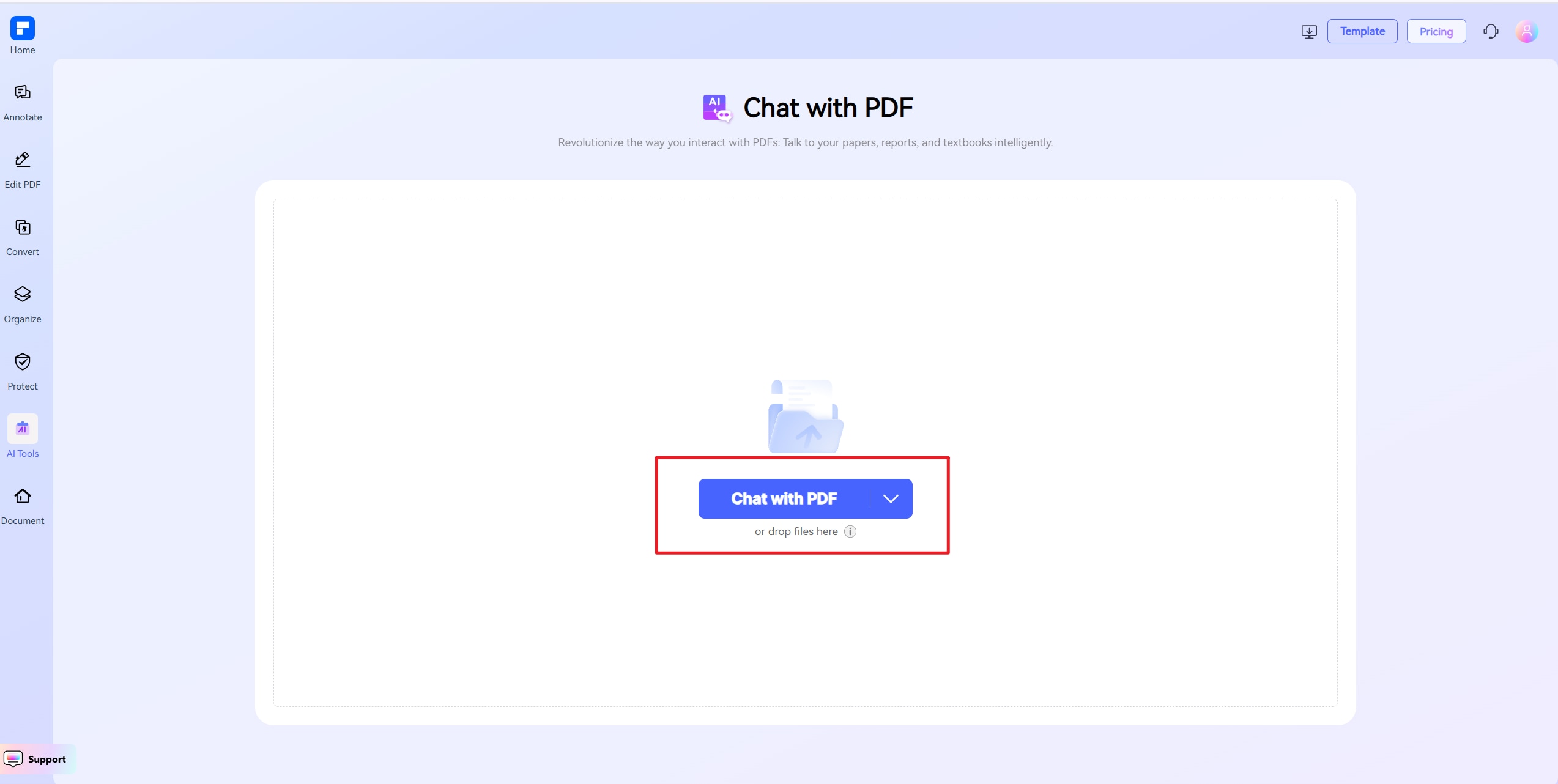
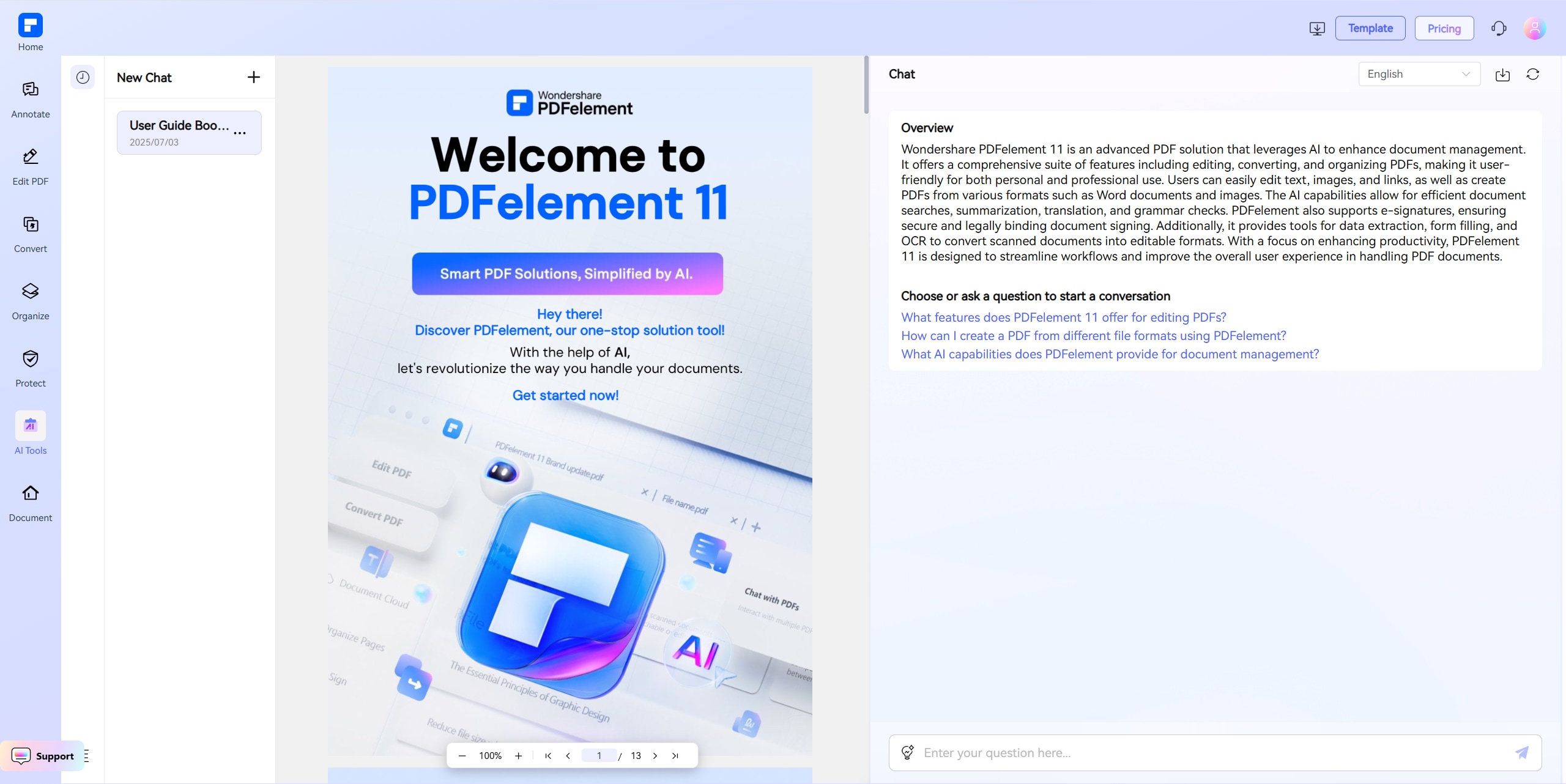
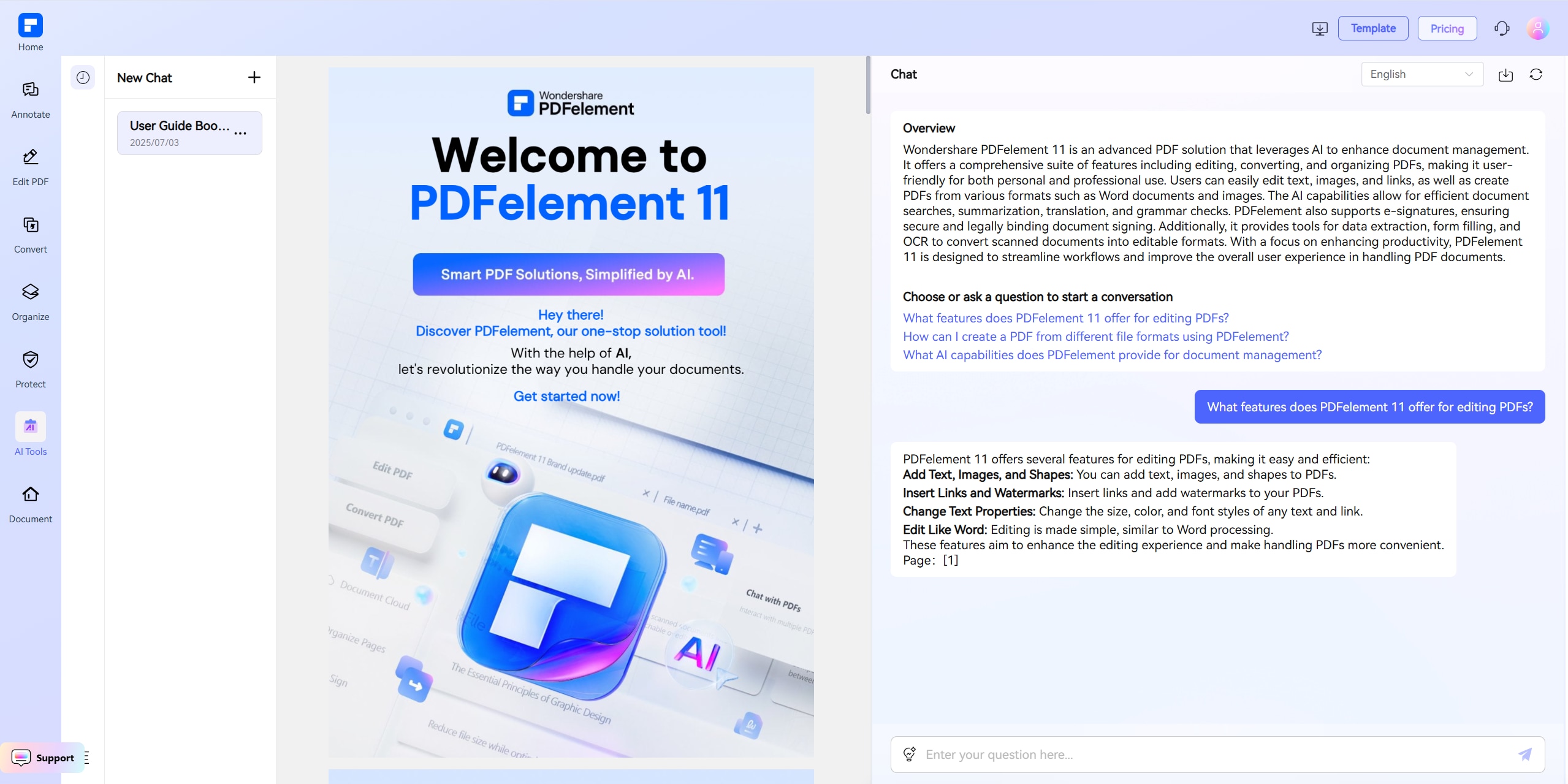
Discover what sets our PDF Chat AI apart.
Chat With PDFs in Multiple
Languages Free
Upload your PDF and chat in your preferred language. Whether it’s a Spanish CV, German contract, or English research paper, our multilingual AI delivers instant answers.
Smarter ChatPDF Alternative –
Instant Q&A from Any PDF
Get fast, accurate answers from textbooks, reports, manuals, and more. A better, faster ChatPDF alternative, free to use.
Secure, Cloud-Based Access
on Any Device
Chat with PDFs anytime, anywhere—on desktop, tablet, or mobile. Files are encrypted and auto-deleted after 60 minutes to protect your privacy.
Free Download
Upload several PDFs and chat with them side by side. Perfect for comparing documents or studying from multiple sources—save time and stay organized.
Chat With Scanned PDFs
Using Built-In OCR
Working with scanned or image-based PDFs? Our OCR technology makes them readable so you can ask questions and get AI-powered answers with ease.
All-in-One AI PDF Assistant
More than chat—translate, rewrite, summarize, convert to Mind Maps or PowerPoint, check grammar, and even detect AI-generated text.
Free AI Chat PDF for wider use.

Secure, Compliant, and Professional PDF Software - Award - Winning.
PDFelement shines in G2 Winter 2026 as a Leader, Momentum Leader, and High Performer for Enterprise - adding to its 2024 G2 Best Software Award - Top 50 Office Products, ISO 27001 - Information Security Management certification, and PDF Association membership.







FAQs about Chat With PDF AI Tools.
-
Can I use ChatGPT to talk to my PDF documents?
Yes, you can use ChatGPT to interact with your PDF documents. Here's how:>
In ChatGPT (Plus or Pro plan):- Upload a PDF: Click the paperclip icon in the chat box to upload your PDF file.
- Ask questions or give commands: After uploading, you can ask ChatGPT to:
- Summarize the document
- Extract key points
- Answer questions based on the content
- Find specific sections or terms
- Translate or rephrase parts This is useful for reviewing reports, research papers, contracts, eBooks, and more.
Tip:If you frequently work with PDFs, tools like Wondershare PDFelement (which provides both online and desktop services) may be more appropriate and tailored for PDF analysis or Q&A.
-
Is Adobe AI Assistant free?
Adobe Acrobat AI Assistant is not free; it requires a paid subscription as an add-on to Adobe Acrobat.
- Pricing Overview
- Standard Pricing: The AI Assistant is available as an add-on for $4.99 per month when added to your existing Acrobat plan.
- Student Discount: Eligible students can subscribe to the AI Assistant at a discounted rate of $1.99 per month.
- Future Pricing: After June 30, 2025, the standard pricing is expected to increase to $9.99 per user per month.
- Alternative: PDFelement Online Chat with PDF Tool
- Price: Free after registration, limited to 10 uses
- Platform: Web-based (no installation required)
- What It Does:
- Allows you to upload a PDF
- Interact with it via an AI chatbot
- Get summaries, insights, and answer questions
- Pricing Overview
-
What’s the best free alternative to ChatPDF AI?
You can use Wondershare PDFelement Online Chat with PDF tool. Here is how it stands out.
- Price: Free (requires sign-up), limited to 10 uses
- Features:
- Chat with your PDF via AI
- Summarize, explain, and answer questions
- Easy-to-use interface, browser-based
-
Can AI help me with literature reviews?
Yes, AI can significantly help you with literature reviews, saving time and improving the quality of your work. Here's how:
-
How AI Can Help with Literature Reviews
- Finding Relevant Papers
- AI tools like Semantic Scholar, Research Rabbit, and Connected Papers can recommend related research based on your topic.
- You can also ask ChatGPT for keyword suggestions or search strategies to use in databases like PubMed, JSTOR, or Google Scholar.
- Summarizing Articles
- Upload PDFs (e.g., research papers) here or use tools like Wondershare PDFelement Online or ChatPDF AI.
- AI will extract key findings, methods, and conclusions.
- Helpful for quickly understanding a paper's relevance.
- Comparing and Contrasting Studies
You can paste abstracts or summaries into AI tools and ask for:
- Methodological differences
- Conflicting results
- Gaps in the literature
- Finding Relevant Papers
-
Can AI generate quiz questions from a PDF?
Yes, AI can definitely generate quiz questions from a PDF, and it's a great way to create study tools, training materials, or test prep content.
-
How to Do It in PDFelement Online:
- Upload your PDF.
- Say something like: "Generate 10 multiple-choice quiz questions based on this PDF.” or "Create a quiz that covers key concepts from chapter 2."
- You can also ask for:
- Questions on specific sections
- Answer keys and explanations
- Difficulty levels (easy, medium, hard)
-
Is there an AI that reads a PDF and answers questions for free?
Yes, there are free AI tools that can read a PDF and answer your questions based on its content. Here are the best ones available without requiring payment:
- Wondershare PDFelement Online Chat with PDF
- Free (after registration), limited to 10 uses
- Upload your PDF and chat with it
- Get summaries, explanations, and answers to custom questions
- PDFgear Chat with PDF
- Free and no sign-up required
- Drag-and-drop interface for instant Q&A
- Simple and fast for short documents
- ChatDOC
- Free plan available
- AI answers your questions based on uploaded PDFs (with citations)
- Good for academic, business, and legal documents
- Wondershare PDFelement Online Chat with PDF
-
Can ChatGPT read scanned documents or image-based PDFs?
Yes, ChatGPT can read scanned documents or image-based PDFs, but with important considerations:
-
How ChatGPT Handles Scanned PDFs
If You’re Using ChatGPT Plus or Pro:
- ChatGPT has vision capabilities and can extract text from images inside PDFs using OCR (Optical Character Recognition).
- You can upload a scanned or image-based PDF, and I’ll try to read and analyze the content.
- Accuracy depends on the quality of the scan: Clear, typed documents = high accuracy/ Handwritten or blurry text = lower accuracy
Tips to Improve Results:
- Ensure Good Image Quality - Clean scans with high contrast work best.
- Limit File Size/Length - For long or complex documents, consider breaking them up.
- You can also choose an alternative PDFelement Online tool, which can read scanned PDFs better with built-in OCR.
-
Can I use AI to chat with academic papers or research PDFs?
Yes, you can use AI to chat with academic papers or research PDFs, and it’s one of the most powerful and time-saving use cases for students, researchers, and professionals. PDFelement Online is highly recommended.
What AI Can Do with Research PDFs:
- Summarize sections (abstract, methods, conclusions)
- Explain technical terms or jargon
- Highlight key results and data
- Answer questions like: "What was the main research question?", "What methodology was used?", "What are the limitations mentioned?"
-
Are there any limitations to PDFelement's online PDF editor?
Yes, there are certain limitations for free users:
- Daily Usage Limits:
- Most editing and conversion tools allow 1 free use per day (e.g., Edit PDF, Merge, Split, Compress, Convert, Protect).
- AI PDF Tool Limits:
- Chat with PDF, AI Read, AI Proofreader:
- Limited to 10 uses
- Supports PDFs up to 100MB and 260 pages
- AI Translator:
- Limited to 10 uses (every 10 pages = 1 use; under 10 pages still counts as 1 use)
- Max file size: 100MB (AI Translator), 10MB (AI Detector)
- Chat with PDF, AI Read, AI Proofreader:
- Note:
- To enjoy unlimited usage, you can upgrade to premium access.
- Page/File Size Restrictions:
- PDF files must be under 100MB (except for AI Detector)
- Max file size for OCR: 50MB
- Max 260 pages for AI tools
- Daily Usage Limits:
Tips and tricks for Chat With PDFs.
Rate PDFelement Online PDF tools:

4.8
(188,357 Votes)You have to upload and download at least 1 file to rate! We've already perfectly processed 307,292,373 files with a total size of 10,124 TB
Try more PDFelement online PDF tools.



Simplified by AI.
Fast, easy, and affordable PDF editor. Convert, edit, sign PDFs, and more.


