AI PDF Summarizer for Free
Experience fast, free AI summarizer PDF tools. Summarize PDFs, articles, and books in seconds.
Perfect for research papers, essays, and AI document summarization needs.
 Free AI PDF Summarizer Online
Summarize Large PDFs With AI
Free AI PDF Summarizer Online
Summarize Large PDFs With AI
in Seconds
AI Document Summarization Supports
Scanned PDFs
 Free Download
Summarize PDF Online vs Offline
How to summarize a PDF with AI for free?
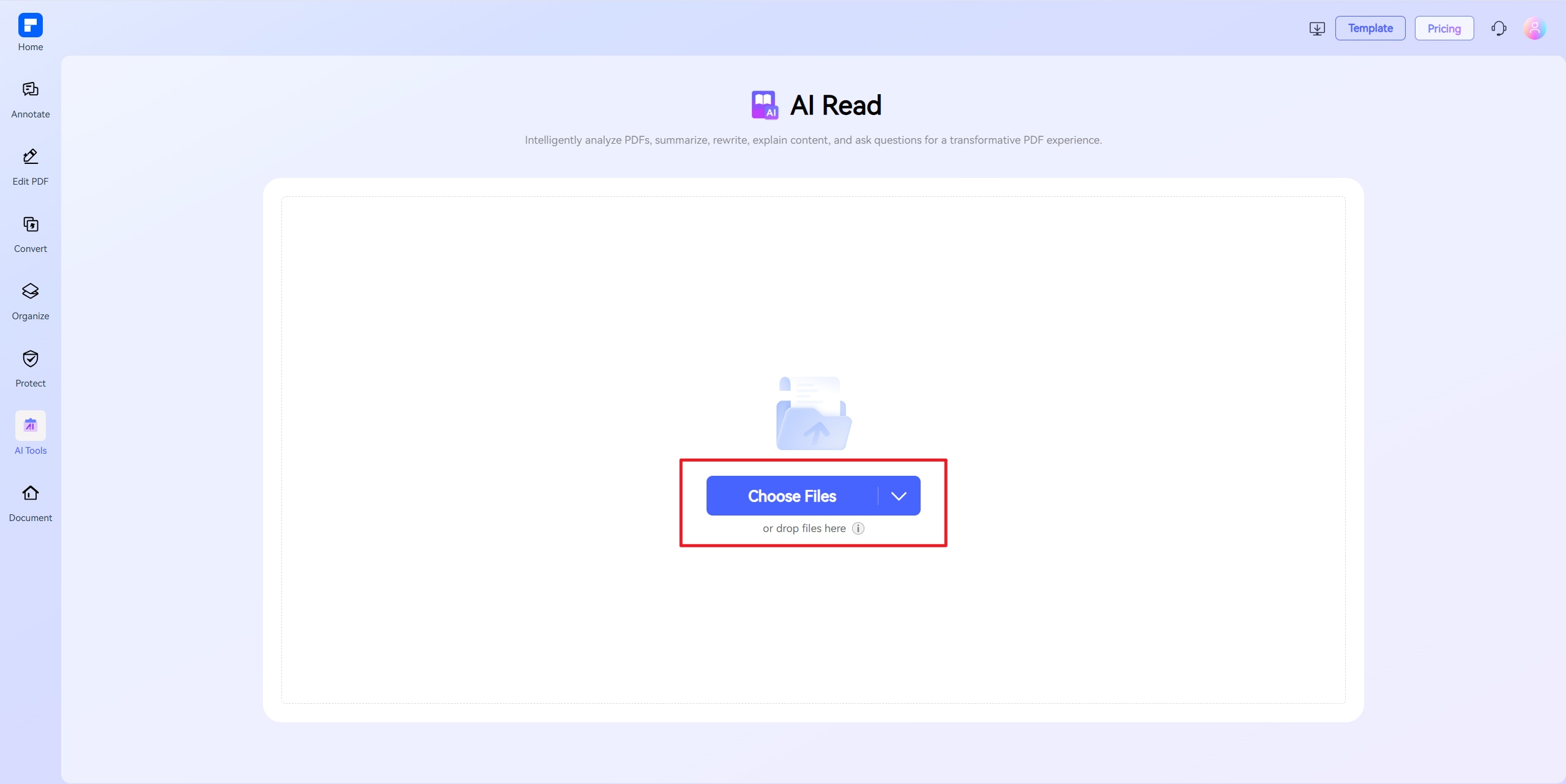
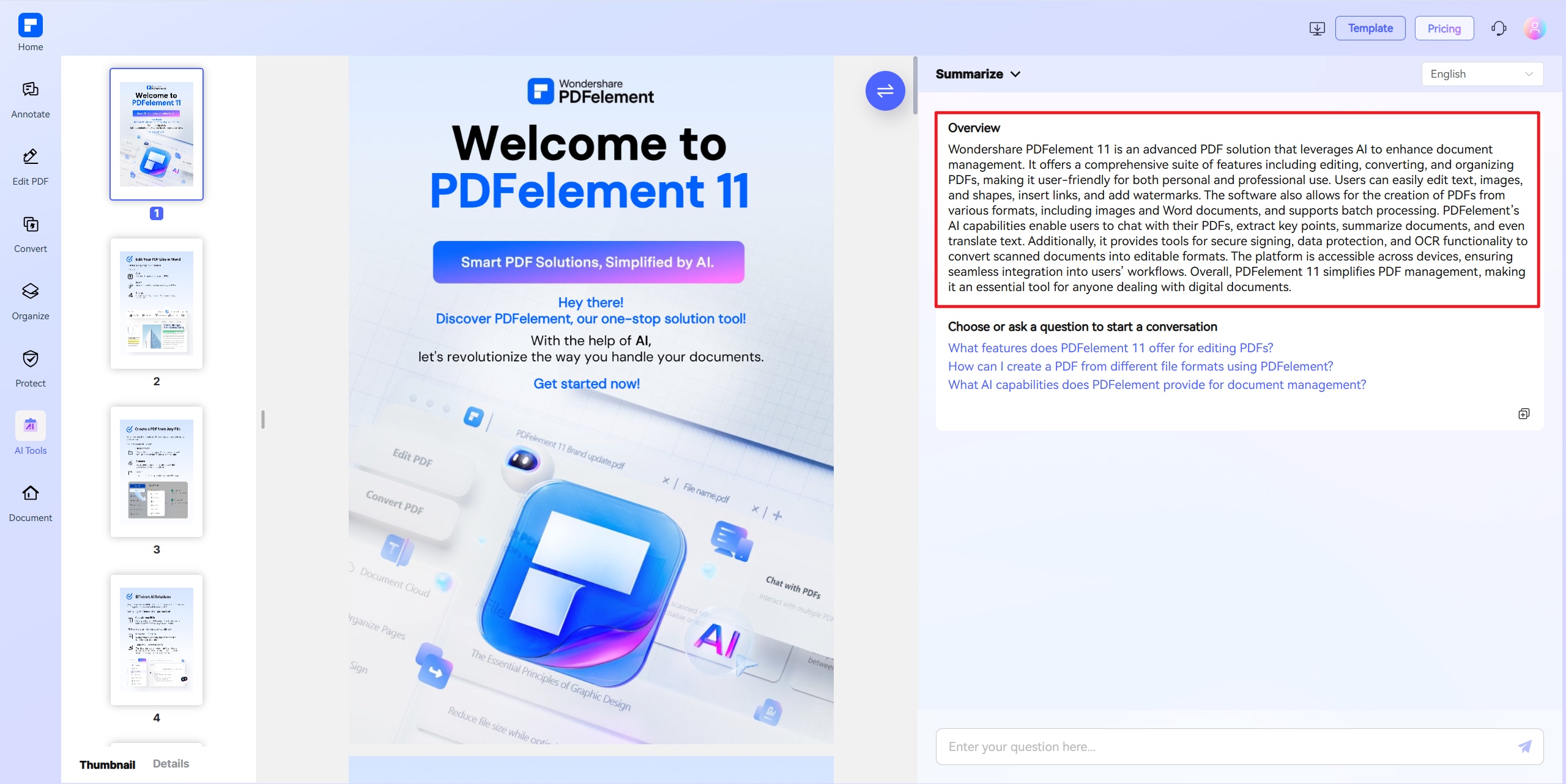
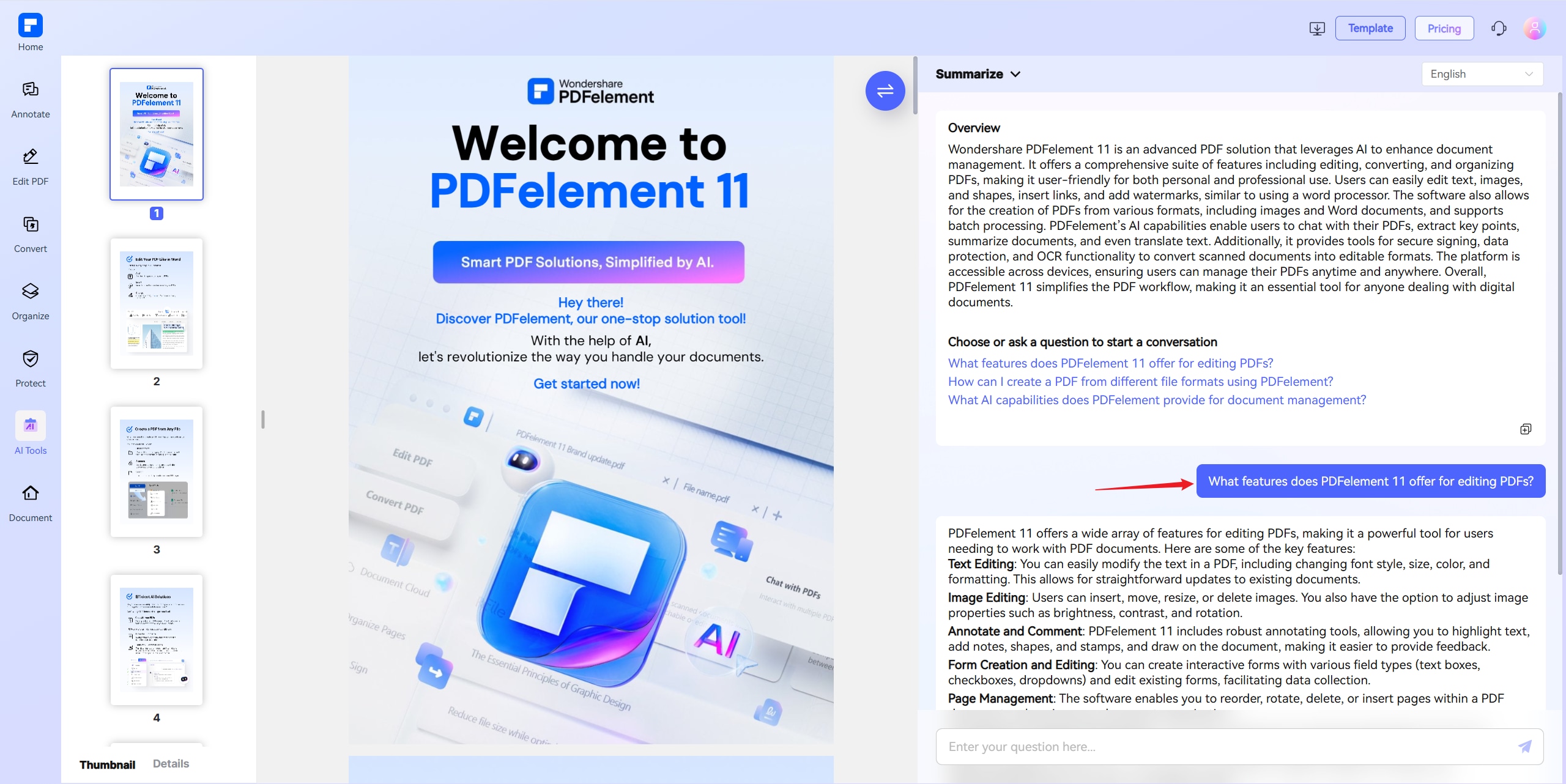
Experience the difference with the Free AI PDF Summarizer.
PDF Summarizer Online for Free
Instantly summarize PDFs with our free AI-powered summarizer. Simply upload your document and get clear summaries in just a few clicks.
Summarize Large PDFs With
AI in Seconds
Quickly extract key insights from lengthy PDFs like research papers, articles, or reports. Fast, accurate, and AI-powered for your convenience.
AI Reads and Summarizes Scanned
PDFs With Ease
Thanks to built-in OCR technology, our AI effortlessly summarizes scanned documents and image-based PDFs.
Summarize Multiple PDF
Documents at Once
Upload and summarize multiple documents in one go. Ideal for batch processing research papers, reports, or training materials.
AI Convert PDFs Into Notes
or Mind Maps
Transform PDFs into concise notes or visually organized mind maps using flexible AI summarization.
More Than Just an AI PDF Summarizer
Go beyond summaries—chat with your PDF to explain concepts, rephrase text, or explore content interactively. Your intelligent PDF assistant.
Free Online PDF Summarizer for wider use.

Secure, Compliant, and Professional PDF Software - Award - Winning.
PDFelement shines in G2 Winter 2026 as a Leader, Momentum Leader, and High Performer for Enterprise - adding to its 2024 G2 Best Software Award - Top 50 Office Products, ISO 27001 - Information Security Management certification, and PDF Association membership.







FAQs about AI that summarize PDFs.
-
What is the best AI to summarize PDF documents?
PDFelement Online AI PDF Summarizer is a reliable, free option for quick PDF summarization directly in your browser. It instantly summarizes articles, books, research papers, or reports without installation.
For advanced needs, PDFelement for desktop provides professional AI document summarization , support for multiple PDFs, scanned document summarization, and the ability to convert PDFs into notes or mind maps.
Both tools are designed for clear, structured PDF summarization powered by AI, whether you're a student, researcher, or working professional.
-
Can ChatGPT summarize PDFs?
Yes, ChatGPT can summarize PDFs, but with some limitations and requirements.
- Requires GPT-4 or higher – Free users may not have access to this feature.
- Manual Upload Needed – You must convert the PDF to text or upload it directly if using a paid version.
- Limitations on Length & Accuracy
- Struggles with long documents (e.g., >10 pages).
- May produce generic summaries or factual errors ("hallucinations").
- No Built-in OCR – Cannot extract text from scanned/image-based PDFs.
A Better Alternative: PDFelement AI Summarizer
For a more reliable, OCR-supported, and user-friendly solution, consider PDFelement Online AI PDF Summarizer.
- Why Choose PDFelement Online?
- One-Click Summaries – Instantly condenses long PDFs into key points.
- Built-in OCR – Extracts text from scanned/image PDFs.
- AI-Powered Analysis – Uses AI for interactive Q&A and summaries.
- No Length Restrictions – It efficiently handles documents up to 100MB & 260 pages.
-
Can AI convert a PDF to notes automatically?
Yes, AI can automatically convert a PDF into notes.
- How AI Converts PDFs to Notes:
- Content Extraction: AI reads and extracts key text from PDFs, including lectures, articles, or books.
- Summarization: It identifies main ideas, important points, and relevant details to create concise notes.
- Formatting: The output is organized into easy-to-read summaries or bullet points for quick study.
- Recommended Tools:
- PDFelement Online AI PDF Summarizer: This online tool uses advanced AI to instantly summarize PDFs into clear notes. Simply upload your document, and it will generate concise, readable study notes quickly and accurately.
- PDFelement Desktop: The desktop version offers powerful AI features including PDF summarization, note extraction, and editing, making it ideal for regular use on Windows or Mac.
-
Can I summarize multiple PDFs at once with AI?
Yes, AI can summarize multiple PDFs at once, saving time and effort. With PDFelement for Desktop, you can easily accomplish your tasks. Here's how you do it.
- Step 1: Open PDFelement Desktop
- Launch PDFelement on your Windows or Mac device.
- Step 2: Import Multiple PDFs
- Click Summarize PDF from the homepage.
- Open the first PDF. The AI will begin summarizing the file.
- Click AI Assistant > AI Summarize > Summarize Multiple PDFs, or simply click the clip icon to upload other PDF files.
- Step 3: Start AI Summarization
- Click the little book icon to let the AI extract key points and create concise summaries for each document.
- Step 4: View and Save Summaries
- Once completed, summaries will be generated.
- Review, edit if needed, and export your summaries in your preferred format.
Tip: PDFelement Desktop supports summarizing large files and multiple PDFs simultaneously, ideal for study materials, research papers, or work reports.
Need a quick, free online tool to summarize a single PDF? Try the PDFelement Online AI PDF Summarizer to get summaries without installing anything.
- Step 1: Open PDFelement Desktop
-
Does AI summarizer support non-English PDFs?
Yes, many AI summarizers support non-English PDFs, but capabilities depend on the tool.
- AI Summarizer Language Support:
- Multilingual Support: Advanced AI summarizers can process PDFs in various languages like Spanish, French, German, Chinese, and more.
- Accuracy Varies: Summary quality depends on the language and complexity of the document. AI performs best on widely used languages.
- Limitations: Some tools may not support certain symbols, complex scripts, or niche languages.
Recommended Solution: PDFelement Online AI PDF Summarizer, supports summarizing PDFs in multiple languages. You can upload non-English PDFs, and the AI will generate clear, structured summaries, ideal for academic, business, or personal use.
For best results, ensure your PDF text is selectable (not scanned images) to enable accurate AI extraction.
-
Can I use an AI PDF summarizer on mobile?
Yes, you can use an AI PDF summarizer on mobile devices.
Recommended Solution:
- PDFelement AI PDF Summarizer is available on both mobile and desktop:
- PDFelement Mobile App: Summarize PDFs directly on your phone. Open your document, and the AI extracts key points into a concise summary.
- PDFelement Online AI PDF Summarizer: Access the summarizer via your mobile browser. No installation needed—just upload your PDF and get instant, readable summaries on the go.
-
Can AI summarize an article?
Yes, AI can summarize an article quickly and accurately.
- Option 1: PDFelement Online AI PDF Summarizer (No download required)
- Visit the PDFelement Online AI PDF Summarizer.
- Open your browser and go to the online summarizer page.
- Upload Your PDF
- Click Upload or drag and drop your PDF file.
- Generate Summary
- The AI will automatically analyze your document and extract key points.
- View & Download
- Review the generated summary.
- Copy the text or download it for later use.
- Option 2: PDFelement Desktop AI PDF Summarizer
- Open PDFelement on Your Computer
- Available for Windows and Mac.
- Import Your PDF
- Open and select your PDF.
- Select AI Summarizer
- Choose the AI Summarize option under AI Assistant.
- Get Your Summary
- The AI will quickly extract the main points.
- You can edit, copy, or export the summary.
- Visit the PDFelement Online AI PDF Summarizer.
-
Is there an AI that summarizes documents?
Yes, there are several AI tools that can summarize documents quickly and accurately. Popular AI summarizers include:
- PDFelement Online AI PDF Summarizer
- Summarizes PDF documents into clear, concise key points.
- Works online or via the PDFelement desktop.
- Ideal for summarizing articles, essays, reports, or study materials.
- ChatGPT (with PDF upload)
- Can summarize documents if you upload them.
- Works well for PDFs, Word docs, or plain text files.
- Provides summaries, key takeaways, or custom formats.
- QuillBot AI Summarizer
- Summarizes text, paragraphs, or entire documents.
- Offers short or detailed summary modes.
- PDFelement Online AI PDF Summarizer
-
Are there any limitations to PDFelement’s online PDF editor?
Yes, there are certain limitations for free users:
- Daily Usage Limits:
- Most editing and conversion tools allow 1 free use per day (e.g., Edit PDF, Merge, Split, Compress, Convert, Protect).
- AI PDF Tool Limits:
- Chat with PDF, AI Read, AI Proofreader:
- Limited to 10 uses
- Supports PDFs up to 100MB and 260 pages
- AI Translator & AI Detector:
- Limited to 10 uses
- Max file size: 100MB (AI Translator), 10MB (AI Detector)
- Note:
- To enjoy unlimited usage, you can upgrade to premium access.
- Page/File Size Restrictions:
- PDF files must be under 100MB (except for AI Detector)
- Max file size for OCR: 50MB
- Max 260 pages for AI tools
Tips and tricks for AI PDF Summarizer.
Rate PDFelement Online PDF tools:

4.8
(188,357 Votes)You have to upload and download at least 1 file to rate! We've already perfectly processed 307,292,373 files with a total size of 10,124 TB
Try more PDFelement online PDF tools.



Simplified by AI.
Fast, easy, and affordable PDF editor. Convert, edit, sign PDFs, and more.


