Convert Image to Document Online for Free
Convert JPG/JPEG, PNG, or GIF images to editable Word documents or text online.
Our free image-to-document converter uses OCR for fast, accurate conversion—no installation required.
 Convert JPG/JPEG, PNG, BMP, GIF, TIF Images to Word, Excel, PPT, RTF, and TXT
OCR-Enabled Conversion for Scanned Images in Multiple Languages
Free Images to Document Converter With
Convert JPG/JPEG, PNG, BMP, GIF, TIF Images to Word, Excel, PPT, RTF, and TXT
OCR-Enabled Conversion for Scanned Images in Multiple Languages
Free Images to Document Converter With
Privacy and Data Protection
How to convert Image to Word or Document Online for Free?
Experience the difference with our Image to Document Converter Online.
Free JPG and Image to Word Converter Online
Convert JPG/JPEG, PNG, or GIF images into editable Word (.docx) documents directly in your browser.
Convert to More Than Just Word
Turn images into Word, Excel, PowerPoint, or plain text files with flexible output options.
Support All Major Image Formats
Convert JPG, JPEG, PNG, BMP, GIF, and TIF files without compatibility issues.
Accurate OCR for Scanned Photos and Documents
Extract text from scans with built-in OCR. Support English, French, Spanish, Chinese, and more.
Seamlessly Convert Pictures
on Any Device
Use the image to doc converter on Mac, Windows, iOS, or Android. No installation needed.
Private, Secure Image to Document Conversion
All processing happens in-browser, and files are deleted shortly after to protect your privacy.
Image to Document Converter Online for wider use.

Secure, Compliant, and Professional PDF Software - Award - Winning.
PDFelement shines in G2 Winter 2026 as a Leader, Momentum Leader, and High Performer for Enterprise - adding to its 2024 G2 Best Software Award - Top 50 Office Products, ISO 27001 - Information Security Management certification, and PDF Association membership.







FAQs about converting Image to Document online.
-
How do I convert a JPG to a Word document for free?
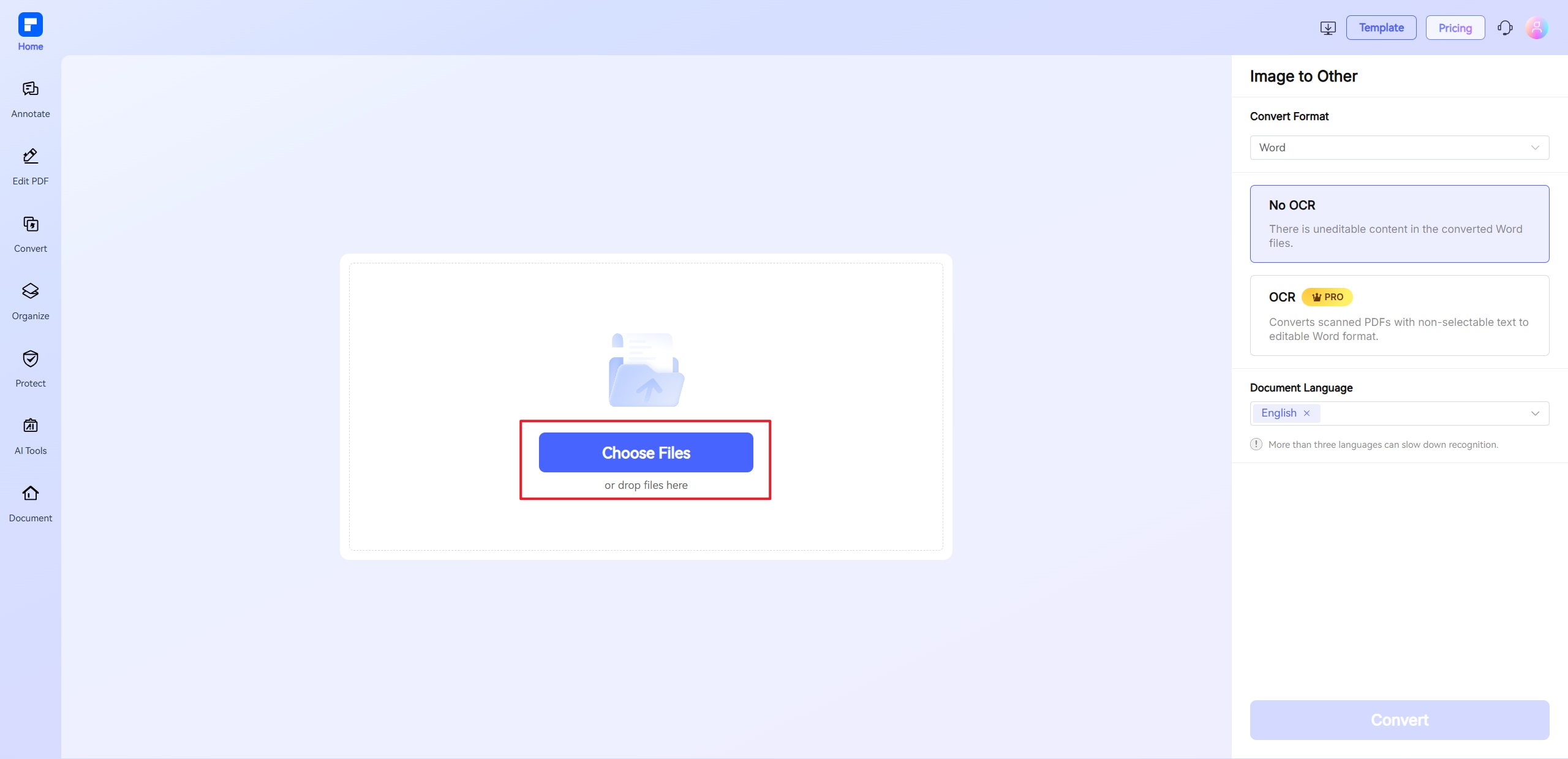
You can easily convert JPG images to editable Word documents using PDFelement Online's Convert From Images tool. Here's a simple step-by-step guide:
- Go to PDFelement Online
Visit the PDFelement Online website and select the Convert From Images tool. - Upload your JPG file
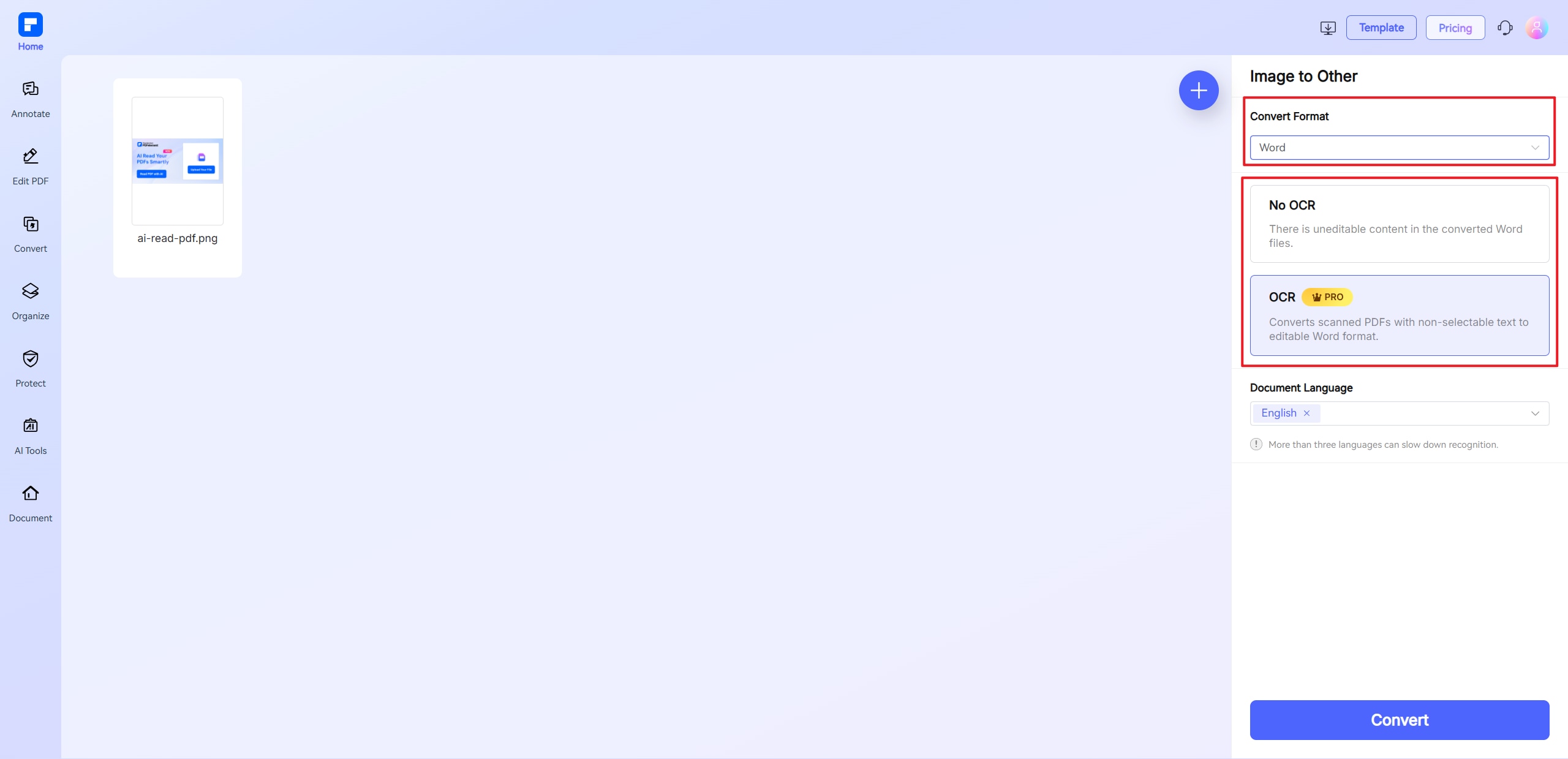
Drag and drop your JPG image file into the upload area or click to browse your files. - Select output format
Choose "Word" as your output format. - Complete OCR and language option
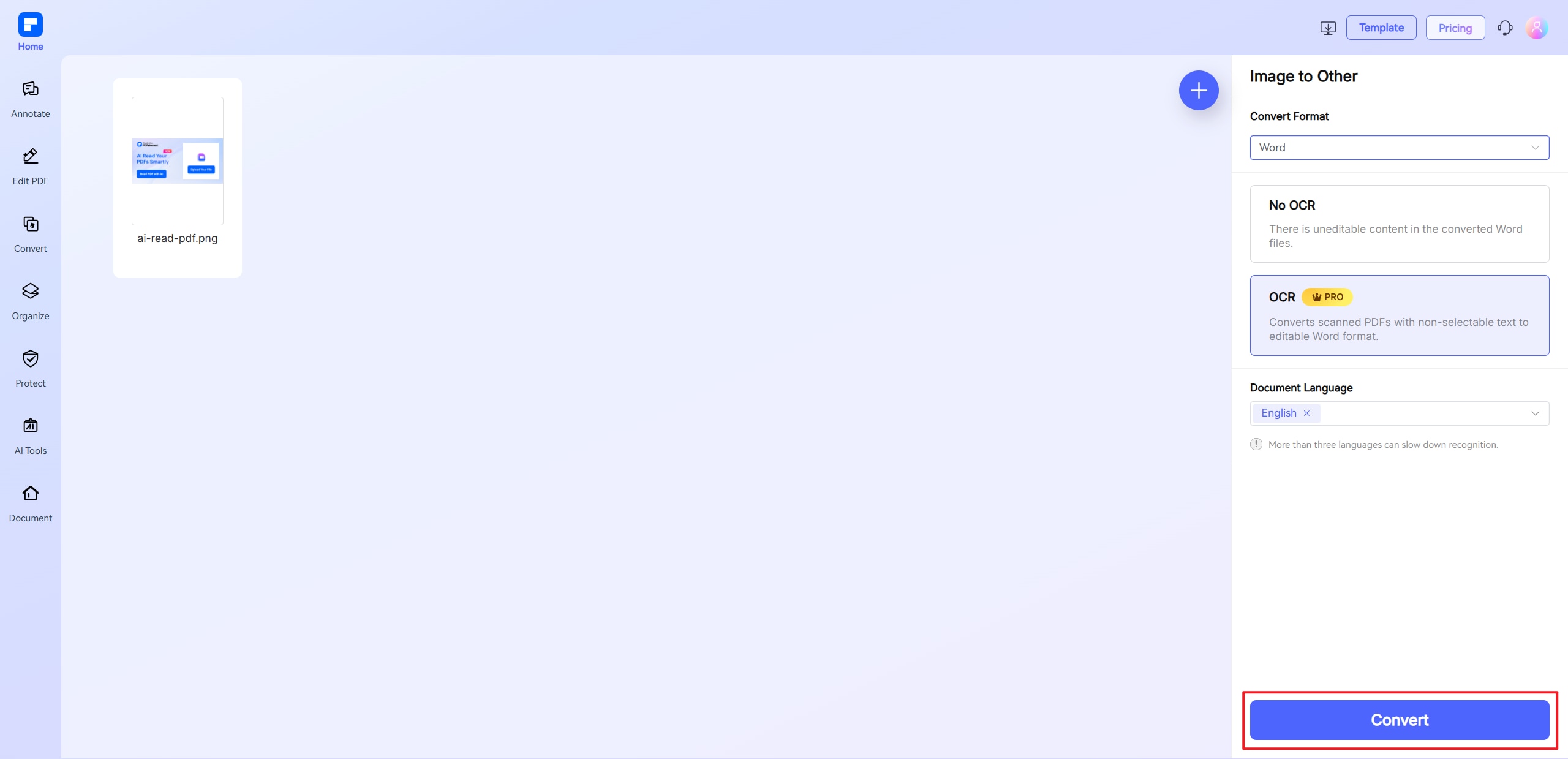
Enable OCR if needed. Select a suitable language. - Start the conversion
Click the "Convert" button to begin the process. - Download your Word file
Once conversion is complete, download your new editable Word document.
- Go to PDFelement Online
-
What formats can I convert images into?
With PDFelement Online Convert From Images tool, you can convert image files into several editable formats, depending on your needs.
- Supported Output Formats:
- Word (.docx) – For editable text documents such as resumes or reports
- Excel (.xlsx) – For structured data from invoices, tables, or forms
- PowerPoint (.pptx) – For turning visuals like slides or training materials into editable presentations
- Text (.txt) – For plain text extraction without formatting
- Rich Text Format (.rtf) – For editable text with basic formatting options
You can upload image formats like JPG, JPEG, PNG, BMP, GIF, and TIF, and convert them into the format that best fits your task—all for free, right in your browser.
-
Can I convert multiple images at once?
Yes, PDFelement Online Convert From Images tool supports batch conversion of images to editable formats. Here's how you do it.
- Open the PDFelement Online Convert From Images tool in your browser.
- Upload multiple images (JPG, PNG, BMP, GIF, or TIF).
- Select the output format—Word, Excel, PowerPoint, Text, or RTF.
- Enable OCR if your images contain scanned or handwritten text.
- Select the appropriate language for your document.
- Click Convert to process all files at once and download the results.
-
Can I convert a photo to a document on iPhone?
Yes, you can easily convert a photo to a document on your iPhone using the PDFelement Online Convert From Images tool—no app download required.
- Steps:
- Open Safari or any browser on your iPhone.
- Go to the PDFelement Online Convert From Images tool.
- Tap to upload a photo from your Camera Roll (JPG, PNG, etc.).
- Select the output format—Word, Excel, PPT, Text, or RTF.
- Enable OCR if the photo contains scanned or handwritten text.
- Choose the correct document language to improve text recognition accuracy.
- Tap Convert and download your editable document directly.
The tool works fully in-browser, making it a quick and secure way to convert photos to documents on iPhone—anytime, anywhere.
-
Can I ocr JPG to Doc files?
Yes, you can easily OCR JPG to DOC using the PDFelement Online Convert From Images tool. Here's how:
- Visit the PDFelement Online Convert From Images tool in your browser.
- Upload your JPG image.
- Select Word (.docx) as the output format.
- Enable OCR to extract text from the image.
- Choose the correct document language for better accuracy.
- Click Convert and download your editable Word document.
-
Are there any limitations to the PDFelement online PDF editor?
Yes, there are certain limitations for free users:
- Daily Usage Limits:
- Most editing and conversion tools allow 1 free use per day (e.g., Edit PDF, Merge, Split, Compress, Convert, Protect).
- AI PDF Tool Limits:
- Chat with PDF, AI Read, AI Proofreader:
- Limited to 10 uses per day
- Supports PDFs up to 100MB and 260 pages
- AI PDF Translator & AI Detector:
- Limited to 10 uses (every 10 pages = 1 use; under 10 pages still counts as 1 use)
- Max file size: 100MB (AI Translator), 10MB (AI Detector)
- Note:
- To enjoy unlimited usage, you can upgrade to premium access.
- Page/File Size Restrictions:
- PDF files must be under 100MB (except for AI Detector)
- Max file size for OCR: 50MB
- Max 260 pages for AI tools
Tips and tricks for free Image to Document Converter.
Rate PDFelement Online PDF tools:

4.8
(188,357 Votes)You have to upload and download at least 1 file to rate! We've already perfectly processed 307,292,373 files with a total size of 10,124 TB
Try more PDFelement online PDF tools.



Simplified by AI.
Fast, easy, and affordable PDF editor. Convert, edit, sign PDFs, and more.


