Smart & Simple PDF to 500KB Online Free Converter
Need to cut your file size? Use our free online tool to reduce your PDF to 500KB in just moments. It’s quick, straightforward, and doesn’t require any downloads or sign-ups. Keep your document looking great while making it easy to share, upload, or store.
 100% Free PDF Reduction
Maintain Clear Formatting and Readability
Custom Size for Precise Control
100% Free PDF Reduction
Maintain Clear Formatting and Readability
Custom Size for Precise Control
 Why use a 500KB PDF Compressor?
A 500KB file strikes the perfect balance—it’s compact enough for emails, job portals, and online forms, but still detailed enough for professional content.
Using our PDF compress 500KB tool helps you:
- Avoid email attachment limits
- Speed up uploads on platforms
- Ensure files pass strict online submission checks
 Free Download
Compress PDF Online Free vs. Offline
How to reduce PDF file size to 500KB?
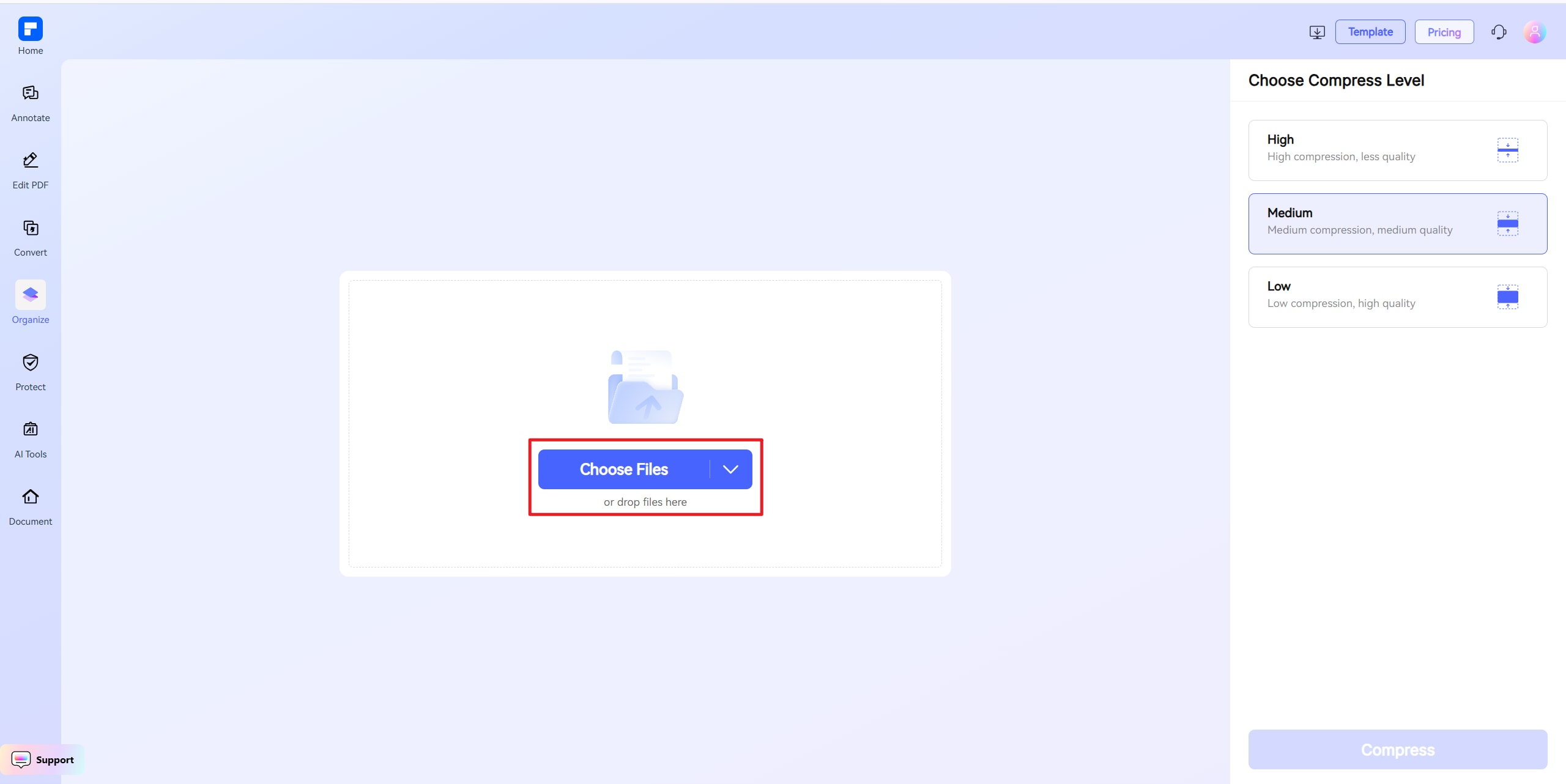
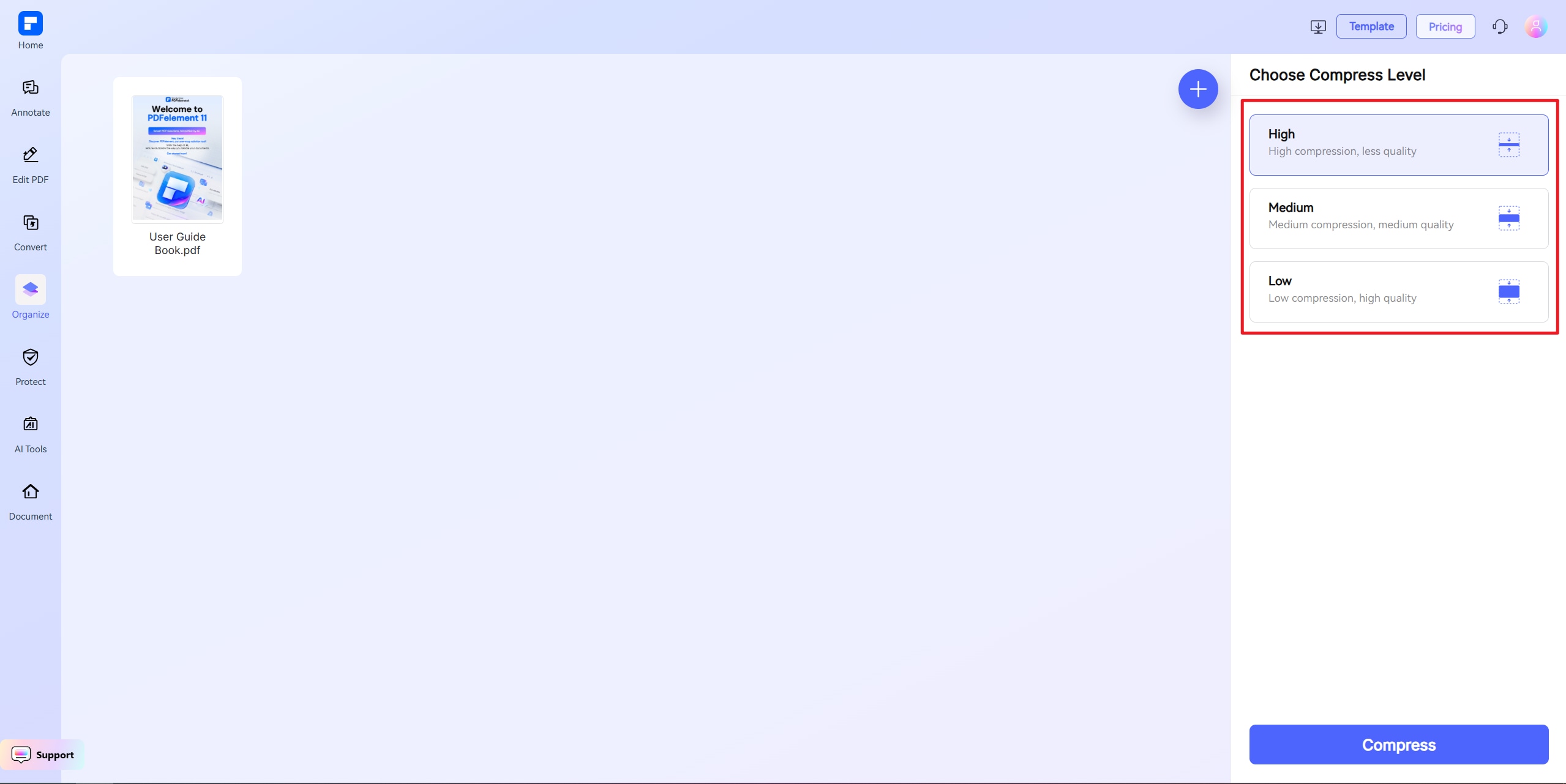
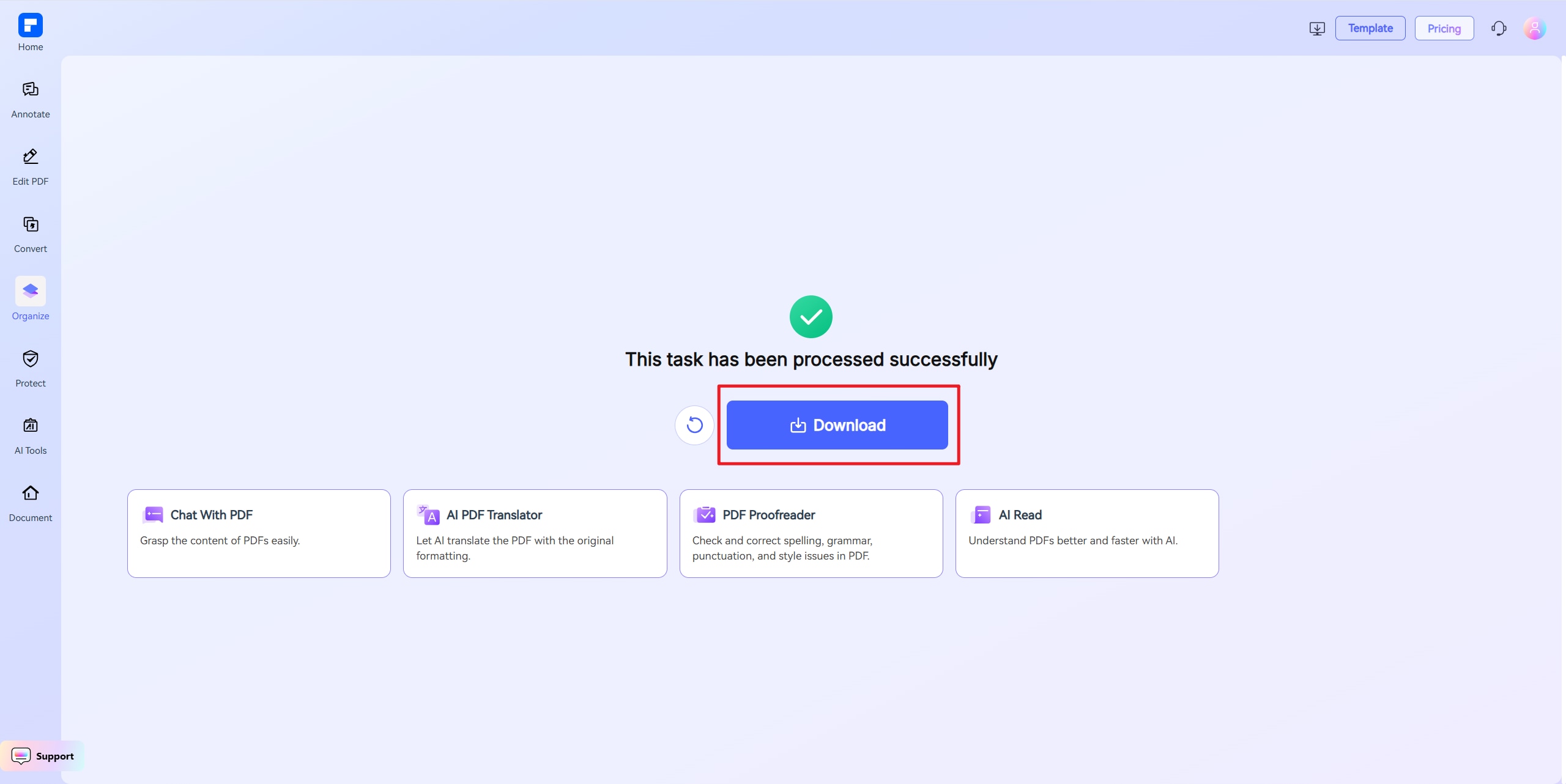
Discover the difference with PDFelement PDF Compressor.
Free and Available Anywhere
Our online 500KB PDF converter is completely free. No downloads, no registration. Compress your PDF to 500KB from any browser.
High-Quality Results Every Time
Shrink your document to under 500KB while keeping fonts crisp, visuals vivid, and your content looking its best.
Custom Compression Controls
Set a target file size like 500KB or adjust quality settings to compress your PDF exactly the way you need.
Fast Sharing, No Errors
Smaller PDFs upload faster and avoid file size errors. A 500KB PDF is perfect for email, web forms, and job sites.
One-Click PDF Compression
With one tap, reduce PDF file size to 500KB. Choose presets or set a specific file for full control.
Compress Files on Any Device
Shrink PDF size anywhere—compatible with Windows, Mac, iOS, Android, and tablets. No app installation required to compress PDF files to 500KB.
Your go-to online PDF resizer.

Secure, Compliant, and Professional PDF Software - Award - Winning.
PDFelement shines in G2 Winter 2026 as a Leader, Momentum Leader, and High Performer for Enterprise - adding to its 2024 G2 Best Software Award - Top 50 Office Products, ISO 27001 - Information Security Management certification, and PDF Association membership.







FAQs about online PDF file resizer.
-
How can I compress a PDF to 500KB for free?
Yes, you can compress a PDF to exactly 500KB for free using a specialized online tool. The PDFelement Online PDF Compressor is an excellent choice because it allows you to set a precise target size, ensuring your file meets specific requirements without guesswork.
Here are the steps to follow:
- Go to the PDFelement Online PDF Compressor website.
- Upload your PDF file from your computer.
- Set the target size. Instead of choosing a general compression level, you can directly set "500KB" as your desired output size.
- Start the compression. Click Compress, and the tool will automatically adjust its settings to reduce the file to as close to 500KB as possible.
- Download the compressed file once the process is complete.
This feature is perfect for meeting strict submission guidelines for online portals, email attachments, or official forms.
-
Will compressing a PDF to 500KB reduce its quality?
Yes, some quality reduction is necessary to shrink a file to 500KB, but a smart tool can manage this effectively. The PDFelement Online PDF Compressor minimizes quality loss by intelligently optimizing your document's content to meet the specific target size you set.
When you set the target to 500KB, here's how PDFelement preserves quality:
- Intelligent Optimization: It analyzes the entire document—including images, fonts, and metadata—and determines the most efficient way to reduce its size without significant visual degradation.
- Balanced Compression: It prioritizes keeping text sharp and legible while applying necessary compression to images and removing non-essential data.
- Precision: By targeting exactly 500KB, it avoids over-compressing your file, which prevents the unnecessary quality loss that can occur with generic "high compression" settings.
For most documents, especially those that are text-heavy or have simple graphics, the final result will be a high-quality file that is perfectly readable and professional.
-
What is the best way to compress a PDF to under 500KB without losing quality?
The best and most precise method is to use a tool that allows you to set a specific file size target. The PDFelement Online PDF Compressor is ideal for this, as it is designed to compress a file to exactly 500KB while automatically preserving as much quality as possible.
Here's why this approach is superior:
- Set a Precise Target: Simply upload your PDF and specify 500KB as the desired size. The tool's algorithm handles the complex task of balancing size and quality for you.
- Avoid Manual Adjustments: You don't need to experiment with different compression levels or pre-edit images. The tool calculates the optimal adjustments needed to hit the target size.
- Optimized for Quality: PDFelement is engineered to protect the most important parts of your document, like text and essential graphics, ensuring the final file remains clear and usable.
By directly setting the target size, you get the smallest possible file that meets your requirement without sacrificing more quality than is absolutely necessary.
-
Can I compress a PDF to 500KB on my Mac or Windows computer?
Yes, but for precise results, an online tool is far more effective. While both Mac and Windows have basic features, neither allows you to target a specific file size like 500KB.
On a Mac:
- The built-in Preview app can "Reduce File Size," but you have no control over the outcome. The final size could be much larger or smaller than 500KB, and quality loss can be unpredictable.
On Windows:
- Windows does not have a native tool for this. Methods like "Microsoft Print to PDF" are not designed for compression and won't help you achieve a specific file size.
For a reliable and accurate solution on any platform, the PDFelement Online PDF Compressor is the best choice. Because it's a web-based tool, it works identically on Mac and Windows. You can simply open your browser, upload your file, set the target size to 500KB, and get a precisely compressed PDF in seconds.
-
What if my PDF is still larger than 500KB after compression?
This can happen if the original PDF is very large or contains complex, high-resolution content that cannot be compressed further without making the file unusable. However, with a tool like the PDFelement Online PDF Compressor that specifically targets 500KB, it will get as close as technically possible.
If the resulting file is still too large, here are your next steps:
- Check the Content: The file may contain elements that resist compression, such as extremely high-resolution scanned images or complex vector graphics.
- Split the PDF: If the document is long, consider splitting it into two or more smaller parts. This is often the best solution for large reports, portfolios, or multi-chapter documents. You can use a free online PDF splitter tool for this.
- Re-upload and Compress Again: After making these manual changes, save a new version of the PDF and try compressing it to the 500KB target size with the PDFelement Online PDF Compressor again. The tool will now have a much better chance of successfully hitting the target.
-
Are there any limitations when I am using this tool to compress PDF?
Just a quick heads-up when using PDFelement Free Online Compressor: the file you upload should be under 100MB. If you're using "Custom Size" mode, the file must be under 10MB. For larger files, choose High, Medium, or Low compression instead. That's it! Feel free to compress as many PDFs as you'd like — all for free. No sign-up needed, and there are no limits to how many you can process.
More tips on shrink PDF file size.
Rate PDFelement Online PDF tools:

4.8
(188,357 Votes)You have to upload and download at least 1 file to rate! We've already perfectly processed 307,292,373 files with a total size of 10,124 TB
Try more PDFelement online PDF tools.



Simplified by AI.
Fast, easy, and affordable PDF editor. Convert, edit, sign PDFs, and more.


