Fast, Free, and Easy PDF Compressor to 2MB
Want to compress a PDF to 2MB without losing readability? Our free online 2 MB PDF converter shrinks your files to fit under strict upload limits—no installs, logins, or tech skills needed.
 Totally Free to Use
High-Quality Output
Exact 2MB Size Targeting
Totally Free to Use
High-Quality Output
Exact 2MB Size Targeting
 Why Compress PDF to 2MB?
Getting a PDF compressed to 2MB is essential for uploading documents to job portals, visa applications, or academic platforms. It's ideal for mid-sized PDFs—like reports, certificates, or portfolios—that must meet specific upload restrictions.
Use this tool to:
- Submit digital applications smoothly
- Stay under upload limits without editing your document
- Save space on your device or cloud storage
- Share documents faster by email or web forms
 Free Download
Compress PDF Online Free vs. Offline
How to reduce PDF file size to 2MB?
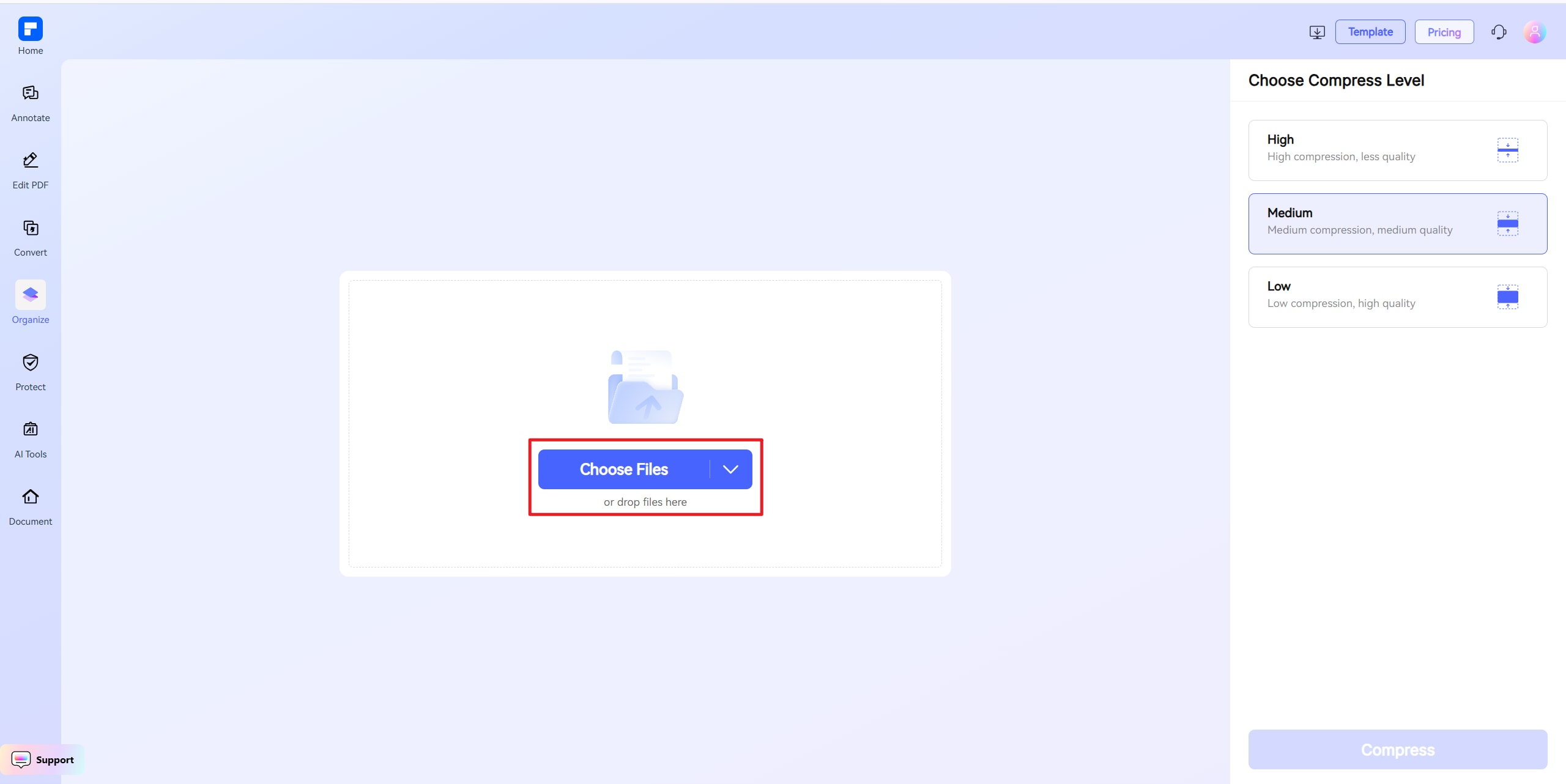
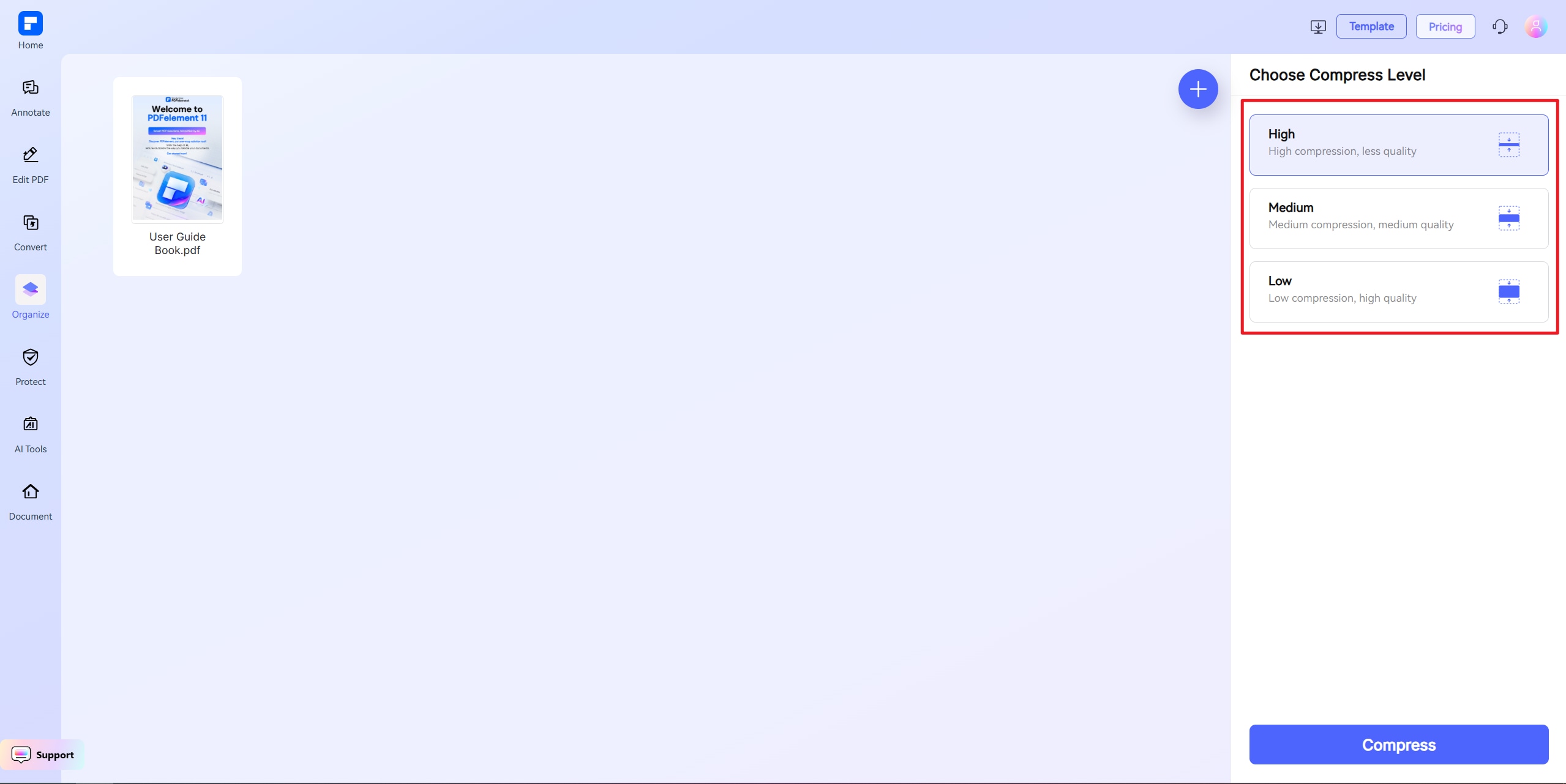
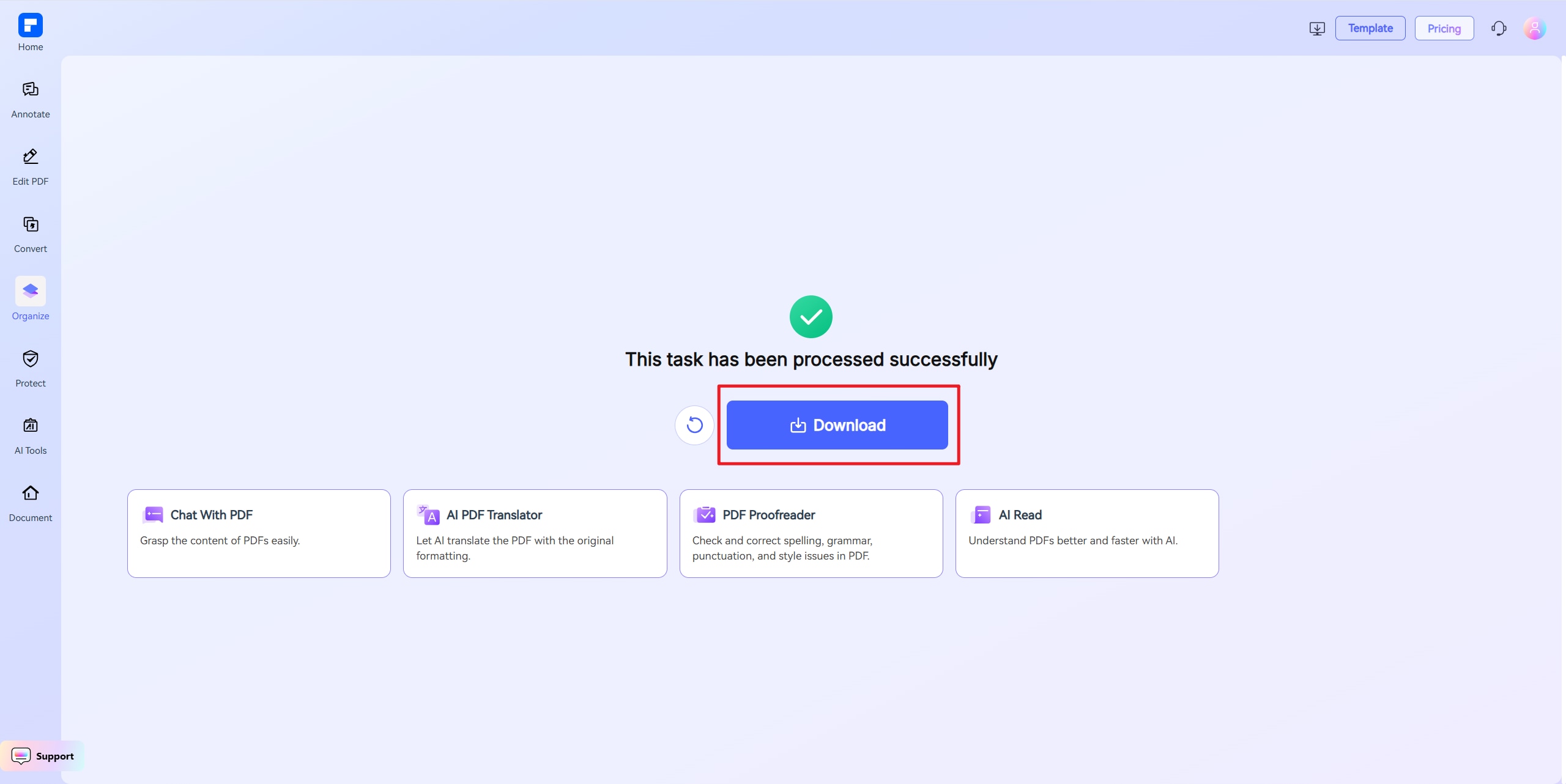
Discover the difference with PDFelement PDF Compressor.
100% Free & Always Available
Our 2 MB PDF converter is fully free and works directly in your browser—no downloads, no registrations. Just upload and compress your PDF to 2MB or less instantly, from any device, anywhere.
Fast, High-Quality File Reduction
Need to compress PDF to 2MB fast? Our online tool gets the job done in seconds while preserving crisp text, clear visuals, and professional formatting. Your document stays polished even after compression.
Precision Control Over File Size
Whether you need your PDF compressed to 2MB exactly or want to adjust quality settings for optimal clarity, our tool gives you full customization. Target your file size with accuracy—no guesswork required.
Hassle-Free Uploads and Fewer Rejections
A PDF under 2MB uploads faster and avoids size-limit issues on job applications, school portals, or government forms. Compressing ensures smooth submissions with no more upload errors or bounce-backs.
One-Click File Compression
Enter your size target—like 2MB—and let the tool do the rest. No software, no learning curve. Just drag, compress, and download in one simple step.
Works on All Devices
Whether you're using Windows, macOS, Android, or iOS, our online PDF compressor 2MB tool runs flawlessly in any browser. No installation needed, no compatibility issues—just results.
Your go-to online PDF resizer.

Secure, Compliant, and Professional PDF Software - Award - Winning.
PDFelement shines in G2 Winter 2026 as a Leader, Momentum Leader, and High Performer for Enterprise - adding to its 2024 G2 Best Software Award - Top 50 Office Products, ISO 27001 - Information Security Management certification, and PDF Association membership.







FAQs about online PDF file resizer.
-
How do I compress a PDF to 2MB without losing quality?
Use a tool that allows precision size control. The PDFelement PDF compressor 2MB tool shrinks files while keeping formatting and readability.
Steps:
- Visit PDFelement's online PDF compressor
- Upload your file
- Choose "Custom Size" and set to 2MB
- Click to compress and download
Best for mid-length PDFs with limited graphics.
-
Can I compress scanned PDFs to 2MB?
Yes, depending on resolution and length. Scanned PDFs are image-heavy, so compressing to 2MB can be tricky—but PDFelement uses smart downscaling to help.
Tips:
- Scan in grayscale, not color
- Use 100 DPI for uploads
- Use 2MB PDF converter presets for best results
-
Is 2MB a realistic size for PDFs?
Yes—for documents like:
- Application forms
- Short presentations
- Text-based reports
- Invoices or receipts
For larger or graphic-heavy files, compressing to 2MB may require simplification (e.g., image removal or splitting).
-
What's the best free tool to compress PDF to 2MB?
PDFelement's online PDF compressor is trusted for setting exact size targets like 2MB—no sign-up, no watermark, and totally browser-based.
Why it's better:
- Supports exact 2MB compression
- No hidden restrictions
- Cross-device support
- Keeps layout, fonts, and structure intact
-
What if my PDF can't be compressed to 2MB?
If the file is still over 2MB after compression, try:
- Removing high-res images or extra pages
- Converting images to grayscale
- Splitting the PDF into smaller files
- Re-uploading for another try
Our 2MB PDF converter pushes compression to its limit while preserving content.
-
Are there any limitations when I am using this tool to compress PDF?
Just a quick heads-up when using PDFelement Free Online Compressor: the file you upload should be under 100MB. If you're using "Custom Size" mode, the file must be under 10MB. For larger files, choose High, Medium, or Low compression instead. That's it! Feel free to compress as many PDFs as you'd like — all for free. No sign-up needed, and there are no limits to how many you can process.
More tips on shrink PDF file size.
Rate PDFelement Online PDF tools:

4.8
(188,357 Votes)You have to upload and download at least 1 file to rate! We've already perfectly processed 307,292,373 files with a total size of 10,124 TB
Try more PDFelement online PDF tools.



Simplified by AI.
Fast, easy, and affordable PDF editor. Convert, edit, sign PDFs, and more.


