Shrink PDFs to 200KB: Your Go-To Free Online Compressor
Say goodbye to oversized files! PDFelement’s online tool lets you effortlessly compress your PDFs to 200KB or even smaller, absolutely free.
Make sharing a breeze, save valuable storage, and keep your documents looking sharp and clear.
 Free & Fast Online PDF Compression
Instant Compression in Just One Click
Customizable Compression for Perfect Size Control
Free & Fast Online PDF Compression
Instant Compression in Just One Click
Customizable Compression for Perfect Size Control
 Hit the 200KB sweet spot: perfect for every document.
Instantly compress PDFs and conquer common file size headaches. Whether it’s bypassing email limits, speeding up downloads, freeing phone space, or ensuring smooth uploads, we make getting your PDFs under 200KB simple.
This 200KB level is ideal for:
- Detailed resumes with experience, skills, and images
- Complex registration forms
- Government forms like ID or license applications
One-click compression, no more errors—just easy sharing.
 Free Download
Compress PDF Online Free vs. Offline
How to get your PDF under 200KB?
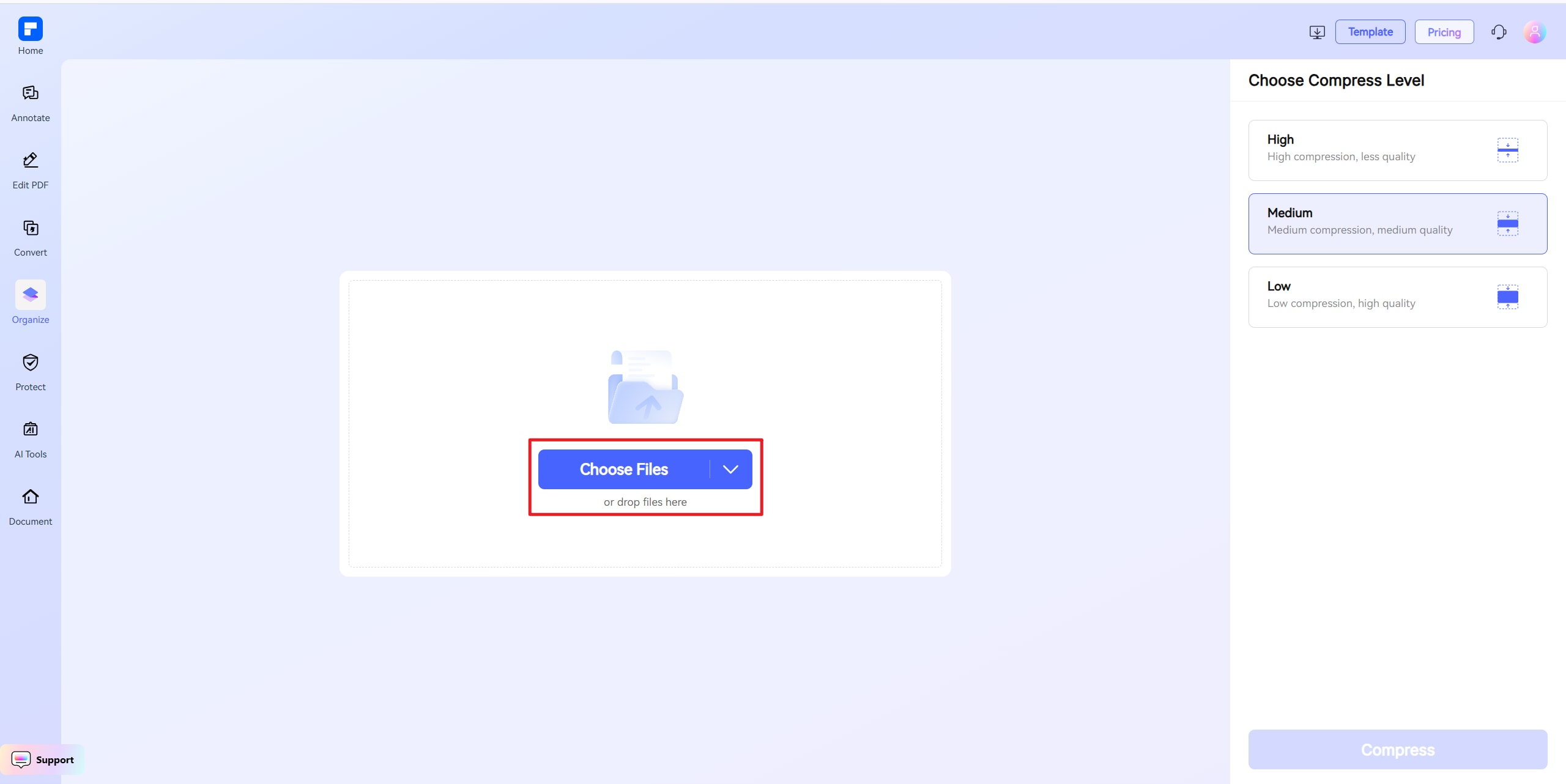
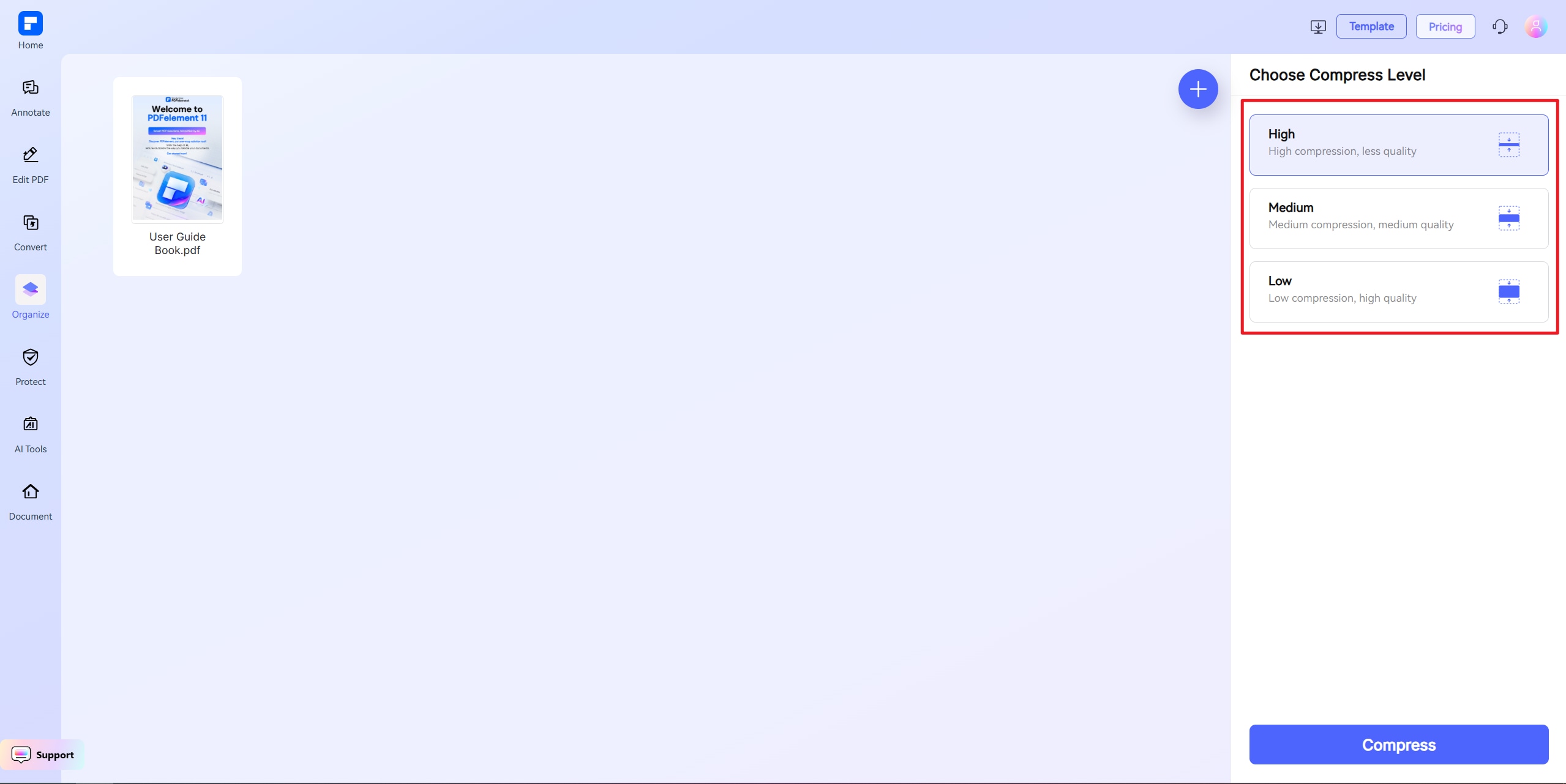
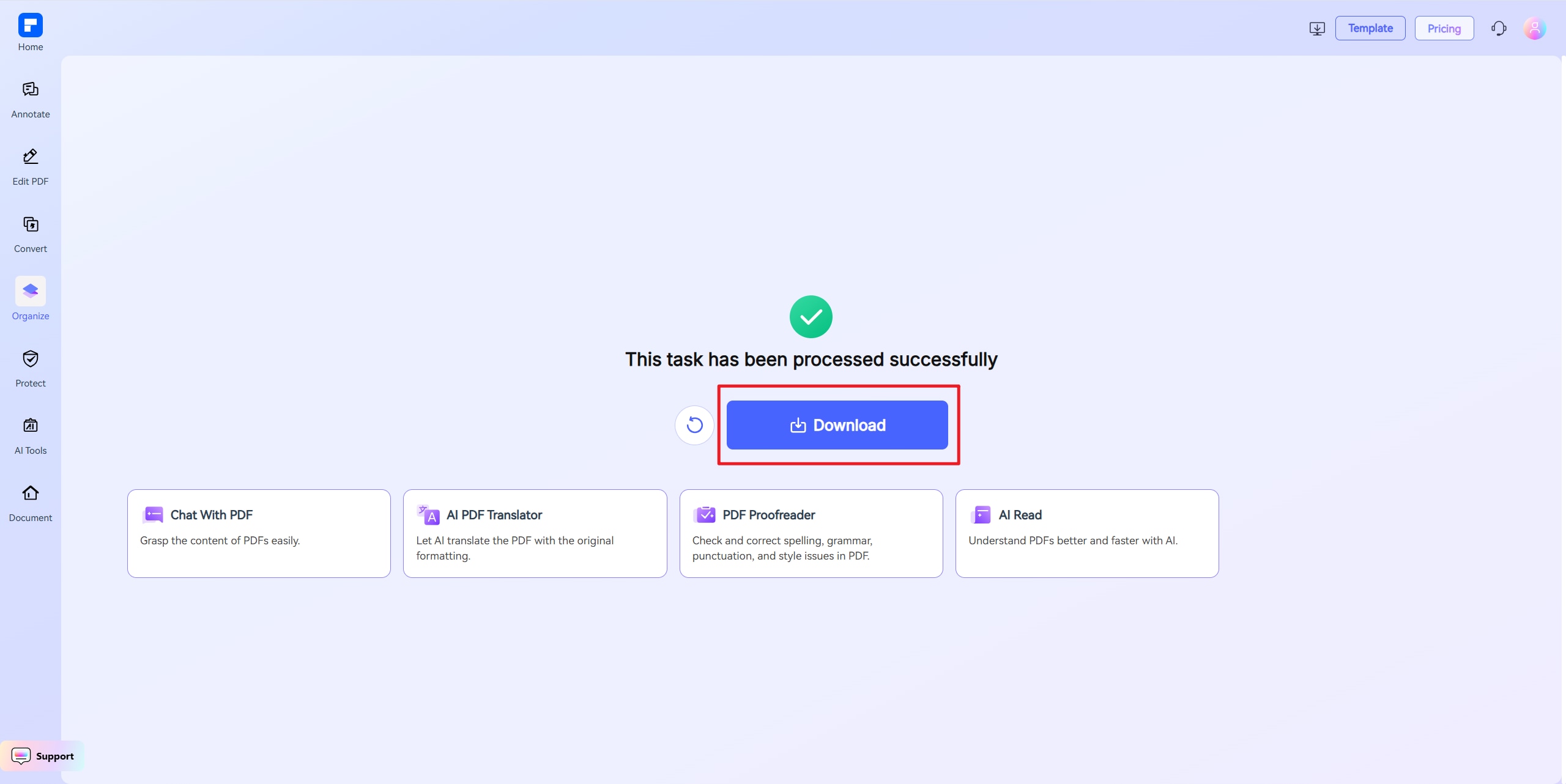
Discover the difference with PDFelement PDF Compressor.
Free Online PDF Compressor
Compress PDFs for free—no strings attached. Our tool is accessible worldwide, anytime, on any device, making 200KB compression a reality for everyone.
Precision PDF Compression
Reduce your file to under 200KB while maintaining professional clarity—ideal for emails, forms, and online submissions.
Customize Your PDF Compression Quality
Set your target size to 200KB and compress your PDF effortlessly. You can also specify any size to shrink your PDF without having to repeat the process.
One-Click PDF Compression
Instantly reduce PDF file size with one click. Choose High, Medium, or Low compression, or set a target size like 200KB for precise control.
Easy Sharing and Collaboration
Minimize PDF file sizes to simplify sharing, speed up uploads, and streamline digital workflows—all without compromising usability, making your PDF files easily under 200KB.
Compress Files on Any Device
Shrink PDF size anywhere—compatible with Windows, Mac, iOS, Android, and tablets. No app installation required to compress PDF files to 200KB.
Your go-to online PDF resizer.

Secure, Compliant, and Professional PDF Software - Award - Winning.
PDFelement shines in G2 Winter 2026 as a Leader, Momentum Leader, and High Performer for Enterprise - adding to its 2024 G2 Best Software Award - Top 50 Office Products, ISO 27001 - Information Security Management certification, and PDF Association membership.







FAQs about online PDF file resizer.
-
How can I compress a PDF to exactly 200KB?
To compress a PDF to exactly 200KB, follow these clear steps:
- Choose a reliable compression tool
Use PDFelement Online Compress PDF to 200KB tool. It's a free, web-based tool designed to reduce PDF file size with precision—no installation needed.
- Upload your PDF file
Go to the tool's page and click “Upload PDF”. Select the file you want to compress.
- Set the target size
Choose “200KB” as the output size. PDFelement automatically adjusts compression settings (images, fonts, and metadata) to achieve the desired result without significantly lowering quality.
- Download your compressed PDF
Once the process completes, click “Download” to save the optimized PDF—now sized close to or exactly at 200KB.
This is ideal for:
- Online job applications
- Government form submissions
- Email attachments with strict file limits
PDFelement Online makes it quick, accurate, and hassle-free.
- Choose a reliable compression tool
-
Will compressing my PDF to 200KB affect its quality?
Yes, compressing a PDF to 200KB can affect its quality—especially if the original file contains high-resolution images, complex formatting, or embedded fonts. However, the impact depends on how the compression is handled.
Smart Compression with PDFelement Online
The PDFelement Online Compress PDF to 200KB tool uses intelligent optimization techniques to reduce file size while maintaining a balance between size and quality. Here's how it works:
- Images Automatically downscales image resolution and compresses them without major visual loss.
- Fonts and Metadata Removes unused fonts and metadata that add unnecessary file weight.
- Redundant Elements Strips out duplicated or non-visible content.
When to Review Output
- If your original file is image-heavy, check the visual clarity after compression.
- If the PDF contains scanned documents or signatures, ensure they remain legible.
- If the file is mostly text, quality loss is minimal or unnoticeable.
In most cases, PDFelement’s compression delivers a well-balanced result—keeping your file under 200KB while preserving readability and structure.
-
Can I reduce a large PDF file (e.g., 10MB) to under 200KB?
It’s possible—but not always practical—to reduce a large PDF (like 10MB) to under 200KB, depending on what’s inside the file.
With PDFelement Online Compress PDF to 200KB tool, you can upload large files and it will attempt to shrink them using advanced compression methods. If your content allows, it will get as close to 200KB as technically possible.
What if it can’t reach 200KB?
If the tool can't reduce your file without unacceptable quality loss, consider:
- Splitting the file into smaller sections
- Removing unnecessary images or pages
- Saving images in lower resolution before adding to your PDF
-
Is it free to compress PDF files to 200KB online?
Yes — you can compress PDF files to 200KB online for free, and that includes using PDFelement Online Compress PDF to 200KB.
PDFelement Online Compress PDF to 200KB
- Offers a free browser-based tool to compress PDFs to around or under 200KB.
- No sign-in, no credit card, no installation required.
- Provides high compression while balancing quality.
-
What types of documents are best suited for compression to 200KB?
Documents with simple layouts and moderate content are ideal for compression to 200KB. These files balance clarity and compactness, making them perfect for uploads, emails, and online forms. Here are the best-suited document types:
Text-Heavy Documents
- Resumes and CVs with basic formatting and few or no images
- Cover letters and application forms that are mostly text
- Business reports without large charts or embedded images
Light Forms and Templates
- Government forms and school forms with editable fields
- Legal templates like NDAs or contracts with minimal branding
E-documents with Light Graphics
- Certificates, diplomas, or ID forms with simple logos
- Event invitations or notices with small icons or headers
- Official notices or memos with minimal color elements
Less suitable documents:
- PDFs with high-resolution images, scans, or graphics-heavy layouts
- Portfolios, magazines, or eBooks with multiple pages and design elements
- Presentation slides with animations or embedded media
Tip: If you're unsure, try uploading your file to PDFelement Online, which is especially effective for these kinds of documents. It reduces file size while keeping formatting and readability intact.
-
Are there any limitations when I am using this tool to compress PDF?
Just a quick heads-up when using PDFelement Free Online Compressor: the file you upload should be under 100MB. If you're using "Custom Size" mode, the file must be under 10MB. For larger files, choose High, Medium, or Low compression instead. That's it! Feel free to compress as many PDFs as you'd like — all for free. No sign-up needed, and there are no limits to how many you can process.
More tips on shrink PDF file size.
Rate PDFelement Online PDF tools:

4.8
(188,357 Votes)You have to upload and download at least 1 file to rate! We've already perfectly processed 307,292,373 files with a total size of 10,124 TB
Try more PDFelement online PDF tools.
Edit PDFConvert to PDFConvert from PDFOrganize PDFProtect PDF Smart PDF Solution,
Simplified by AI.Fast, easy, and affordable PDF editor. Convert, edit, sign PDFs, and more.


